Which kernel version is best for real time?

More
1 year 5 months ago #328162 by DarkPhoinix

If your CNC setup works, then don't worry and just move on.

If you are paranoid, just set your max jitter to some really high value in your config.

Don't worry about stuff unless you need to.
I did it and the situation gets worse! if I only move the linucnc window the steppers make absurd noises and change the speed of movement, they are not yet on the machine they are free.. I don't dare to think what they could do at work!
do you mean this SERVO_PERIOD = 1000000 ?
I set it to 35000000. in the video with glxgear it is again at 1000000.

Please Log in or Create an account to join the conversation.

More
1 year 5 months ago #328171 by tommylight
Do you get latency warnings when you run LinuxCNC?
Are you still using the same PC discussed here on several topics?
Why do you keep doing the same things and expect different results? Stressing the system beyond it's limits will always fail.
Change the graphic card, get a used one for AMD, or get a used PC.
You had good latency at one point in time, so what happened?
LinuxCNC, one youtube video, no whatever stress test you run, nothing, if that works OK, move on to making chips.
The following user(s) said Thank You: DarkPhoinix

Please Log in or Create an account to join the conversation.

More
1 year 5 months ago #328175 by PCW
Do you have a Ethernet connected motion device?

If so, the latency test is relatively useless for determining the actual
LinuxCNC latency.

A simple ping test is much more informative:

sudo chrt 99 ping -i .001 -q -c 60000 [Device_IP]

(will run 1 minute and print out timing statistics)

Where device _IP is the IP address of your Ethernet motion control interface.
 
The following user(s) said Thank You: rodw, DarkPhoinix

Please Log in or Create an account to join the conversation.

More
1 year 5 months ago #328282 by DarkPhoinix

Do you get latency warnings when you run LinuxCNC?
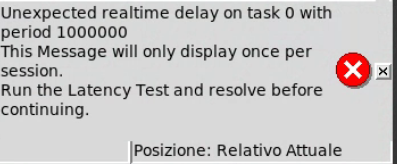
Yes, at start

Are you still using the same PC discussed here on several topics?

Yes i change NVIDIA with ATI and is better, but error of junction with "Community test youtube video" still occurs.

Why do you keep doing the same things and expect different results? Stressing the system beyond it's limits will always fail.
Change the graphic card, get a used one for AMD, or get a used PC.

www.youtube.com/shorts/mWCeSrF2TUM
Whith stress test and 100 GLXGEARS the work go at end with machine not responsive! But one youtube video give me junction error.

You had good latency at one point in time, so what happened?

Yes is good youtube video junction error still occurs.

#################################################
P.S. the forum have some problem e need fix.
EExamble Edit a quote quote all message and Code.
#################################################

Please Log in or Create an account to join the conversation.

More
1 year 5 months ago #328283 by DarkPhoinix

Do you have a Ethernet connected motion device? 
If so, the latency test is relatively useless for determining the actual
LinuxCNC latency.
A simple ping test is much more informative:
sudo chrt 99 ping -i .001 -q -c 60000 [Device_IP]
(will run 1 minute and print out timing statistics)
Where device _IP is the IP address of your Ethernet motion control interface.

Yes PCW, is the same Realtek with dkms driver for fix latency.
Maybe I'm asking the wrong question: is it really necessary to do the test with YouTube?

Please Log in or Create an account to join the conversation.

More
1 year 5 months ago #328289 by PCW
Yes PCW, is the same Realtek with dkms driver for fix latency.
Maybe I'm asking the wrong question: is it really necessary to do the test with YouTube?


When you get an error, what does:

halcmd show param *.tmax

(typed in a terminal)

show?


Please Log in or Create an account to join the conversation.

Time to create page: 0.074 seconds
Powered by Kunena Forum
