
- Posts: 73
- Thank you received: 8
Work with probe
- jcdammeyer
- Offline
- Senior Member
-

Less
More
3 years 3 months ago #275121
by jcdammeyer
Replied by jcdammeyer on topic Work with probe
I'm afraid I'm going to have to suspend work on this project for a few months.I ran the probe_z_minus_wco.ngc and although I don't know why, this is what happened.

Not repairable. Ordered a new one.
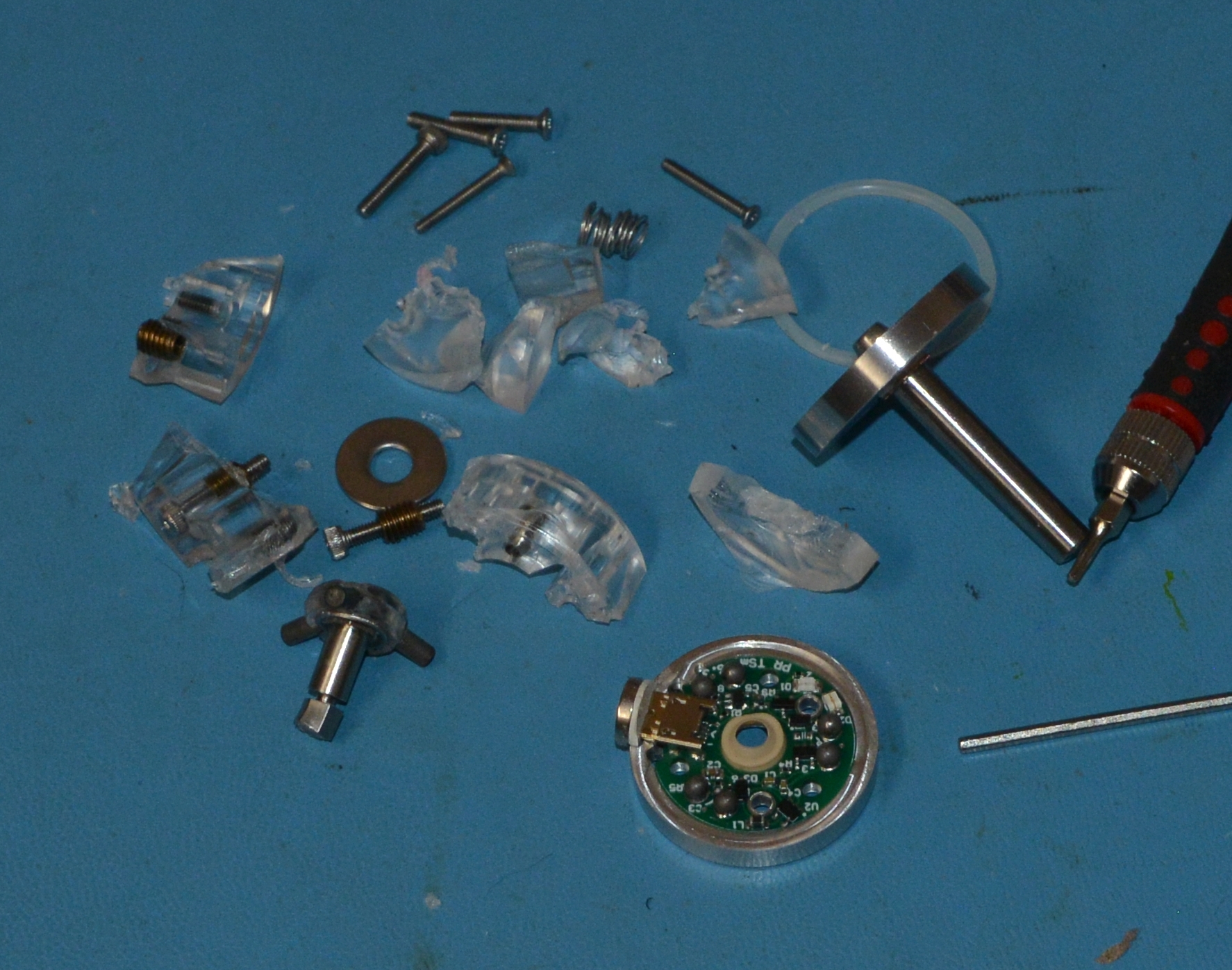
Not repairable. Ordered a new one.
Please Log in or Create an account to join the conversation.
- spumco
- Offline
- Platinum Member
-

Less
More
- Posts: 2180
- Thank you received: 905
3 years 3 months ago #275151
by spumco
Replied by spumco on topic Work with probe
ouch...I feel your pain.
I programmed a tool touch-off at 500ipm recently with similar results.
I programmed a tool touch-off at 500ipm recently with similar results.
Please Log in or Create an account to join the conversation.
- JohnnyCNC
- Offline
- Platinum Member
-
Less
More
- Posts: 572
- Thank you received: 115
3 years 3 months ago #275177
by JohnnyCNC
Replied by JohnnyCNC on topic Work with probe
Ouch is right. I shattered the steel shaft on a small probe once and almost crashed my big probe (Hallmark ITTP Probe).
This is the code I added:
ACTION.CALL_MDI("#[4000 + [#5220]] = [#5063 + #[5203 + [20 * #5220]]]")
What is odd is that when I include the probe length I was getting an odd value in #4001. It seems that this probe code is somehow already accounted for in the probe length. I still need to go back and check the numbers but at least it is updating the parameter.
I made this change in probe_routines.py
This is the code I added:
ACTION.CALL_MDI("#[4000 + [#5220]] = [#5063 + #[5203 + [20 * #5220]]]")
What is odd is that when I include the probe length I was getting an odd value in #4001. It seems that this probe code is somehow already accounted for in the probe length. I still need to go back and check the numbers but at least it is updating the parameter.
I made this change in probe_routines.py
Please Log in or Create an account to join the conversation.
- jcdammeyer
- Offline
- Senior Member
-
Less
More
- Posts: 73
- Thank you received: 8
3 years 3 months ago #275180
by jcdammeyer
Replied by jcdammeyer on topic Work with probe
Thanks. I'll take a look.
Just got back from a social visit to a machine shop with 3 HAAS. He's done commercial work for me before but is now retired and just sits and visits with people.
Showed him the broken probe photos. We all laughed. He said that's why he didn't have a probe because an apprentice would likely toast it and he'd be out $4K for the real one.
Just got back from a social visit to a machine shop with 3 HAAS. He's done commercial work for me before but is now retired and just sits and visits with people.
Showed him the broken probe photos. We all laughed. He said that's why he didn't have a probe because an apprentice would likely toast it and he'd be out $4K for the real one.
Please Log in or Create an account to join the conversation.
- jcdammeyer
- Offline
- Senior Member
-
Less
More
- Posts: 73
- Thank you received: 8
3 years 3 months ago #275181
by jcdammeyer
Replied by jcdammeyer on topic Work with probe
None of the folders for my AXIS linuxCNC has probe_routines.py.
Please Log in or Create an account to join the conversation.
- jcdammeyer
- Offline
- Senior Member
-
Less
More
- Posts: 73
- Thank you received: 8
3 years 3 months ago #275187
by jcdammeyer
Replied by jcdammeyer on topic Work with probe
Really didn't like not having a Z probe and having to wait up to 4 weeks before a new one arrives. I'd like to solve my problem before I forget what I was doing and have to start again.
So first. I made a probe.
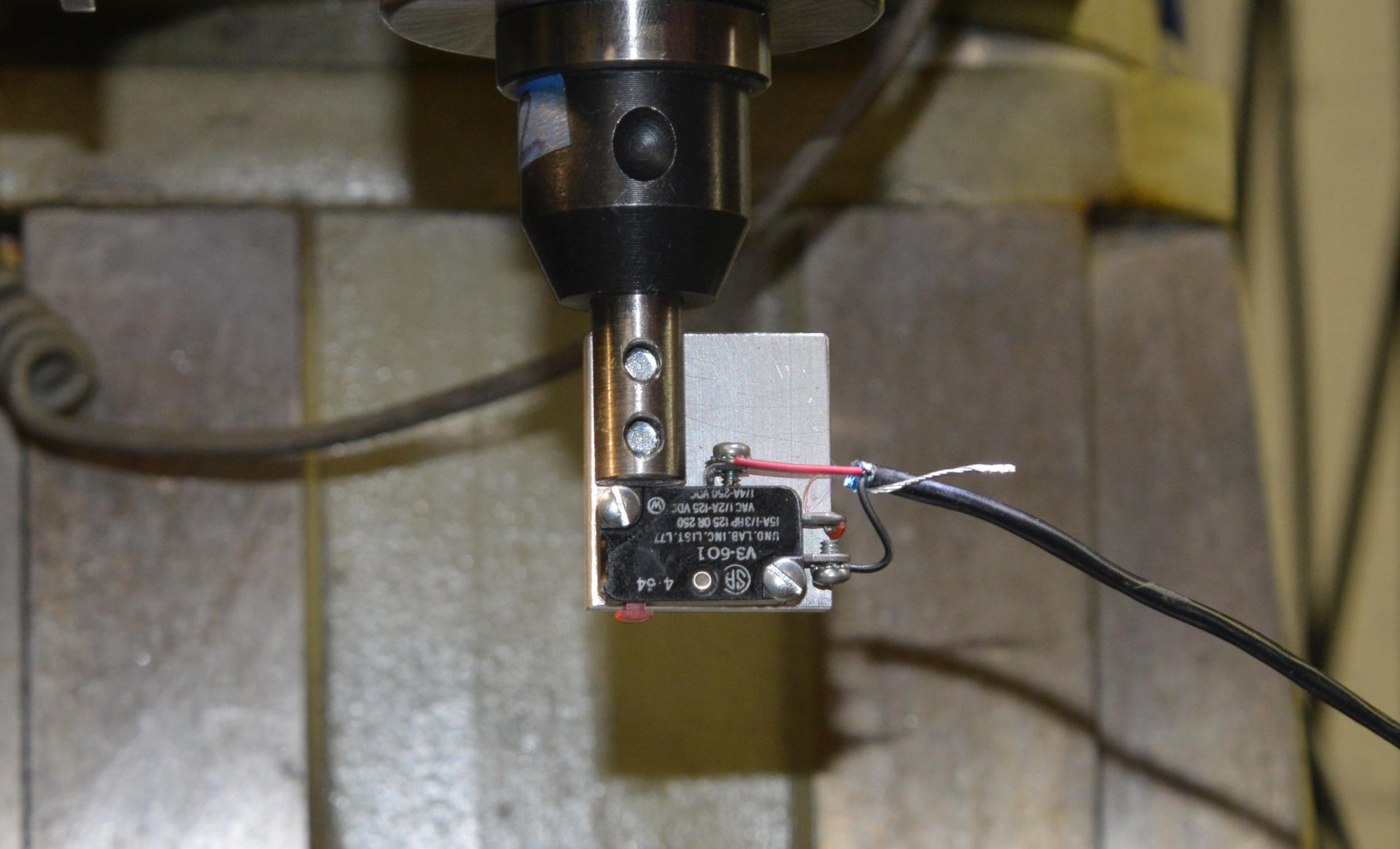
Then I took a look at the "probe_z_minus_wco.ngc" file and started thinking about how the parameters were set up or for that matter if they aren't provided what is used?
So I changed "_psng_probe_z.ngc", which calls "probe_z_minus_wco.ngc", to provide all 15 parameters and added additional diagnostic print statements in "probe_z_minus_wco.ngc".
Now it behaves... almost.
Here's the output.
Current coordinate system is 1.000000 identified as 540.000000
Workspace_Z is -6.326753
Probe Tool Safety Check
Current Z Position 3.158367 -- Fast Probe starting
Probe Position = 2.886978
Probe Error check, 5070 will be 0 if failed
Move to z_clearance height for slow probe
analog aio output to gui DRO "Z PROBED POSITION"
5220=1.000000
z_minus_probed=2.960507
5063=2.960507
workspace_z=-6.326753
_ini[PROBE]LENGTH=4.784000
Executing G10 with Z[2.960507 + -6.326753]
ERROR: index out of range, 7 not in [0..4] (increase num_aio/EMCMOT_MAX_AIO=64)
ERROR: index out of range, 7 not in [0..4] (increase num_aio/EMCMOT_MAX_AIO=64)
('error', 'See notification popup')
I have no idea where the ERROR: index out of range comes from.Any suggestions?
So first. I made a probe.
Then I took a look at the "probe_z_minus_wco.ngc" file and started thinking about how the parameters were set up or for that matter if they aren't provided what is used?
So I changed "_psng_probe_z.ngc", which calls "probe_z_minus_wco.ngc", to provide all 15 parameters and added additional diagnostic print statements in "probe_z_minus_wco.ngc".
Now it behaves... almost.
Here's the output.
Current coordinate system is 1.000000 identified as 540.000000
Workspace_Z is -6.326753
Probe Tool Safety Check
Current Z Position 3.158367 -- Fast Probe starting
Probe Position = 2.886978
Probe Error check, 5070 will be 0 if failed
Move to z_clearance height for slow probe
analog aio output to gui DRO "Z PROBED POSITION"
5220=1.000000
z_minus_probed=2.960507
5063=2.960507
workspace_z=-6.326753
_ini[PROBE]LENGTH=4.784000
Executing G10 with Z[2.960507 + -6.326753]
ERROR: index out of range, 7 not in [0..4] (increase num_aio/EMCMOT_MAX_AIO=64)
ERROR: index out of range, 7 not in [0..4] (increase num_aio/EMCMOT_MAX_AIO=64)
('error', 'See notification popup')
I have no idea where the ERROR: index out of range comes from.Any suggestions?
Please Log in or Create an account to join the conversation.
Time to create page: 3.315 seconds