
- Posts: 38
- Thank you received: 15
Work with probe
- mwidlok
- Offline
- Junior Member
-

Less
More
3 years 3 months ago #276109
by mwidlok
Replied by mwidlok on topic Work with probe
Playing around with probe, I've noticed that DRO on probe screen is empty on my system. It shows X, G54, DTG labels but no numbers. It seems that there is a problem with combi_dro widget from Linuxcnc or with my installation.
Does anybody noticed similar behavior on recent Linuxcnc? Any ideas for me to check?
Thanks in advance, Michal W.
Does anybody noticed similar behavior on recent Linuxcnc? Any ideas for me to check?
Thanks in advance, Michal W.
Please Log in or Create an account to join the conversation.
- lrak
- Offline
- Premium Member
-

Less
More
- Posts: 114
- Thank you received: 22
3 years 3 months ago - 3 years 3 months ago #276200
by lrak
Replied by lrak on topic Work with probe
OK - Trying the code that mwidlok posted..
The instructions are a bit crunchy -
"3 -The following folders from the archive are placed in configuration folder:"
This should read ~/linuxcnc/configs/machine instead of "configuration folder"
,.,.
Seems to be running with 2.9
Only thing I'm not finding is where to connect the probe pin to the probe software - seems there should be a hal line?
The instructions are a bit crunchy -
"3 -The following folders from the archive are placed in configuration folder:"
This should read ~/linuxcnc/configs/machine instead of "configuration folder"
,.,.
Seems to be running with 2.9
Only thing I'm not finding is where to connect the probe pin to the probe software - seems there should be a hal line?
Last edit: 3 years 3 months ago by lrak.
Please Log in or Create an account to join the conversation.
- mwidlok
- Offline
- Junior Member
-
Less
More
- Posts: 38
- Thank you received: 15
3 years 3 months ago #276234
by mwidlok
Replied by mwidlok on topic Work with probe
Irak, I think that You just need to connect probe to "motion.probe-input", check:
[url] linuxcnc.org/docs/html/man/man9/motion.9.html#MOTION%20PINS [/url]
Answering my own question about combi_DRO:
It turns out that the values where in fact displayed, but moved way to the right. It seems that it was glade problem. Here I've updated "probe_screen.glade" to Gtk3, removing/changing most of deprecated widgets. Also radio buttons to select jog increments does not worked (at least in my case), so they are removed for now. Temporary it is also needed to comment jog increments code in "probe_screen.py". These 2 files attached here:
[url] linuxcnc.org/docs/html/man/man9/motion.9.html#MOTION%20PINS [/url]
Answering my own question about combi_DRO:
It turns out that the values where in fact displayed, but moved way to the right. It seems that it was glade problem. Here I've updated "probe_screen.glade" to Gtk3, removing/changing most of deprecated widgets. Also radio buttons to select jog increments does not worked (at least in my case), so they are removed for now. Temporary it is also needed to comment jog increments code in "probe_screen.py". These 2 files attached here:
Please Log in or Create an account to join the conversation.
- lrak
- Offline
- Premium Member
-
Less
More
- Posts: 114
- Thank you received: 22
3 years 3 months ago - 3 years 3 months ago #276422
by lrak
Replied by lrak on topic Work with probe
mwidlok - that fixed what ever was getting cut off --
I see other errors - the invalid number of TAB names - if I load my own panel (not a tab) it creates the same error :
[GladeVCP.QTVCP.QT_ISTAT][WARNING] Embedded tab configuration -invalid number of TAB_NAMES vs TAB_LOCATION - guessing default. (qt_istat.py:430)
**** probe_screen GETINIINFO ****
Preference file path: /home/karl/linuxcnc/configs/wells/probe_screen.pref
**** PROBE SCREEN INFO ****
**** To many increments given in INI File for this screen ****
**** Only the first 5 will be reachable through this screen ****
88080387
I don't think the tab names warning is about probe - I see the same error with my glade pannel..
The line that calls probe is:
EMBED_TAB_COMMAND=gladevcp -c probe -x {XID} -u psng/python/probe_screen.py -H psng/psng.hal psng/probe_screen.glade
,.,.
I'm thinking that a github for your work would make sense - it is possible to put the probe directory in ~/ then just create symbolic links from linuxcnc/configs/machine/ for the python and psng directories.
,.,.
The Black screen area has X three times instead of X, Y and Z..
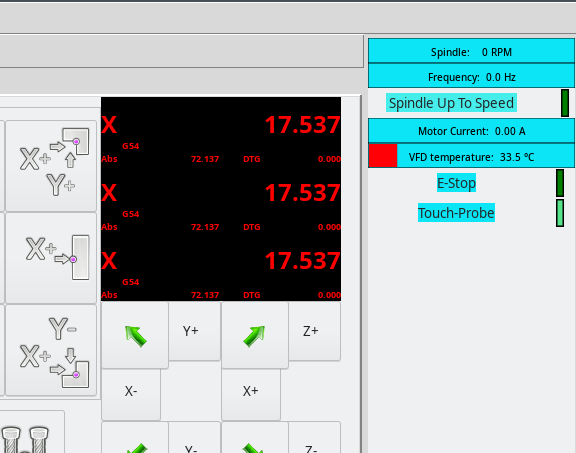
I see other errors - the invalid number of TAB names - if I load my own panel (not a tab) it creates the same error :
[GladeVCP.QTVCP.QT_ISTAT][WARNING] Embedded tab configuration -invalid number of TAB_NAMES vs TAB_LOCATION - guessing default. (qt_istat.py:430)
**** probe_screen GETINIINFO ****
Preference file path: /home/karl/linuxcnc/configs/wells/probe_screen.pref
**** PROBE SCREEN INFO ****
**** To many increments given in INI File for this screen ****
**** Only the first 5 will be reachable through this screen ****
88080387
I don't think the tab names warning is about probe - I see the same error with my glade pannel..
The line that calls probe is:
EMBED_TAB_COMMAND=gladevcp -c probe -x {XID} -u psng/python/probe_screen.py -H psng/psng.hal psng/probe_screen.glade
,.,.
I'm thinking that a github for your work would make sense - it is possible to put the probe directory in ~/ then just create symbolic links from linuxcnc/configs/machine/ for the python and psng directories.
,.,.
The Black screen area has X three times instead of X, Y and Z..
Last edit: 3 years 3 months ago by lrak.
Please Log in or Create an account to join the conversation.
- mwidlok
- Offline
- Junior Member
-
Less
More
- Posts: 38
- Thank you received: 15
3 years 3 months ago - 3 years 3 months ago #276444
by mwidlok
Replied by mwidlok on topic Work with probe
I also have warnings about TAB_NAMES vs TAB_LOCATION and currently I'm not sure how to fix that.
I'm not familiar with git/github (locally I'm using svn), and for now the changes are "too experimental" in my opinion to put them there (my own opinion!! - please argue ). On my pc I have a bigger project with machine schematics, etc and one directory is dedicated to complete linuxcnc configuration. This directory is then linked to ~/linuxcnc - similarly for what You said.
In glade file I missed "joint" property for combi_dro widgets, sorry. I must copy/paste something and glade lost it. I would like to add step buttons, as in original code, but need to learn GTK more for this. Anyway here is the hot-fix version, thanks:
I'm not familiar with git/github (locally I'm using svn), and for now the changes are "too experimental" in my opinion to put them there (my own opinion!! - please argue
). On my pc I have a bigger project with machine schematics, etc and one directory is dedicated to complete linuxcnc configuration. This directory is then linked to ~/linuxcnc - similarly for what You said.In glade file I missed "joint" property for combi_dro widgets, sorry. I must copy/paste something and glade lost it. I would like to add step buttons, as in original code, but need to learn GTK more for this. Anyway here is the hot-fix version, thanks:
Last edit: 3 years 3 months ago by mwidlok.
The following user(s) said Thank You: lrak
Please Log in or Create an account to join the conversation.
- lrak
- Offline
- Premium Member
-
Less
More
- Posts: 114
- Thank you received: 22
3 years 3 months ago #276493
by lrak
Replied by lrak on topic Work with probe
That worked.
As per github - there are LOTS of projects there that don't work at all. Don't worry about it being 'experimental'. The advantage is you can make it available so more people can easily try it - find bugs - help fix bugs - it gets polished. Software is never finished.
As per glade, I used the new glade interface designer (3.40) just yesterday, seems improved, but couldn't find the GtkHBox widget (I must be missing the way to point to a lib or something changed?) - so I copied and pasted. Have you tried opening probe_screen.glade with the new version? Should make it easy?
As per github - there are LOTS of projects there that don't work at all. Don't worry about it being 'experimental'. The advantage is you can make it available so more people can easily try it - find bugs - help fix bugs - it gets polished. Software is never finished.
As per glade, I used the new glade interface designer (3.40) just yesterday, seems improved, but couldn't find the GtkHBox widget (I must be missing the way to point to a lib or something changed?) - so I copied and pasted. Have you tried opening probe_screen.glade with the new version? Should make it easy?
Please Log in or Create an account to join the conversation.
Time to create page: 3.803 seconds