
- Posts: 73
- Thank you received: 8
Work with probe
- jcdammeyer
- Offline
- Senior Member
-

Less
More
3 years 3 months ago #275462
by jcdammeyer
Replied by jcdammeyer on topic Work with probe
I'm using the 2.8 version with the changes from Alkabal and others. Some of the changes are incorrect and resulted in my probe destroying itself at 150ipm into a 1-2-3 block.
Part of the problem is I believe the design philosophy was to place the tool setter on top of the work (perhaps a sheet of MDF on a CNC router) and be able to probe various configuration edges etc. The PSNG screen is an amazing bit of work but it keeps changing appearance on each iteration and likely the code keeps changing too.
So for now I'm staying with 2.8 and I've now got several processes in place.
1. Probe the tool setter to determine the length of the tool tip to the quill and put that into the tool table.
2. For tools like R8 collets that hold various cutters with different shanks the length in the tool table for that tool # is 0.
3. Same with Drill Chucks unless you have several for one project and the drill bits stay in them for the entire project in which case measure them.
4. On a tool change if there is a valid length then use that to set the new work space Z zero position.
5. If there isn't a length go probe the tool setter.
6. Finally , normally, the M06 macro does not perform a tool change if the requested tool is the same as the currently mounted tool. What I've done is forced a re-probe at the tool setter if the length in the tool table is 0. This avoids doing a T00 M06 G9 and then a T5 M06 G43. Instead a T5 M06 G43 will result in a tool measurement after I put a new drill bit in the drill chuck (TTS Tool #5).
I still need to do more testing before I post the modified code.
Part of the problem is I believe the design philosophy was to place the tool setter on top of the work (perhaps a sheet of MDF on a CNC router) and be able to probe various configuration edges etc. The PSNG screen is an amazing bit of work but it keeps changing appearance on each iteration and likely the code keeps changing too.
So for now I'm staying with 2.8 and I've now got several processes in place.
1. Probe the tool setter to determine the length of the tool tip to the quill and put that into the tool table.
2. For tools like R8 collets that hold various cutters with different shanks the length in the tool table for that tool # is 0.
3. Same with Drill Chucks unless you have several for one project and the drill bits stay in them for the entire project in which case measure them.
4. On a tool change if there is a valid length then use that to set the new work space Z zero position.
5. If there isn't a length go probe the tool setter.
6. Finally , normally, the M06 macro does not perform a tool change if the requested tool is the same as the currently mounted tool. What I've done is forced a re-probe at the tool setter if the length in the tool table is 0. This avoids doing a T00 M06 G9 and then a T5 M06 G43. Instead a T5 M06 G43 will result in a tool measurement after I put a new drill bit in the drill chuck (TTS Tool #5).
I still need to do more testing before I post the modified code.
Please Log in or Create an account to join the conversation.
- rodw
- Offline
- Platinum Member
-

Less
More
- Posts: 12170
- Thank you received: 4153
3 years 3 months ago #275465
by rodw
Replied by rodw on topic Work with probe
Then install QTDRAGON_HD on V 2.9 and use it's version inspired by verser.
OK - I just upgraded to 2.9.0
Then NONE of the current verser version will work for you because of python incompatibility.
Please Log in or Create an account to join the conversation.
- verser
- Offline
- Senior Member
-
Less
More
- Posts: 78
- Thank you received: 69
3 years 3 months ago - 3 years 3 months ago #275480
by verser
Replied by verser on topic Work with probe
Serg425, Thanks for the good questions.
Second question. I made edits to the 'ERR pin proccessing' code yesterday ( Probe Screen v2.8.3 ) and am preparing the information for the User Guide. This checkbox will be useful for users of wireless probes, such as Vers WLR v7, in which radio signal delay is critical. The ERR pin is physically connected to the CNC controller and signals an abnormal delay in radio. Probe Screen will repeat the measurement if an ERR signal occurs.
Probe Screen can also handle any delay. Not only from wireless probes. For example, Connection Module Vers CM in anti-vibration mode generates a fixed delay of 5 ms, which must be taken into account.
First question. These buttons only set to 0 the current coordinate system for arm or spindle, but do not physically move the axes.Serg452 wrote:
What is the value of the buttons (1) if the enable measurement is still pressed with an offset?
What does the ERR check mean (2)?
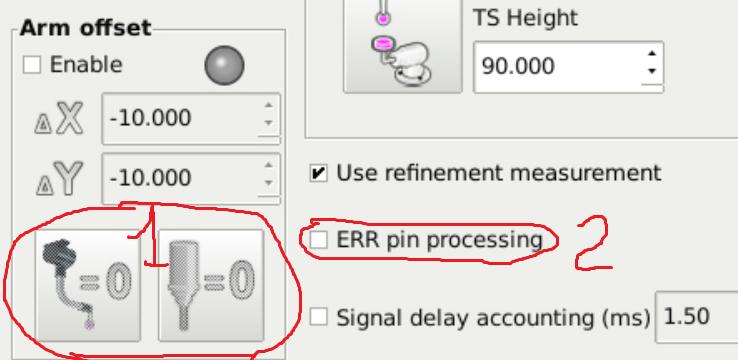
Second question. I made edits to the 'ERR pin proccessing' code yesterday ( Probe Screen v2.8.3 ) and am preparing the information for the User Guide. This checkbox will be useful for users of wireless probes, such as Vers WLR v7, in which radio signal delay is critical. The ERR pin is physically connected to the CNC controller and signals an abnormal delay in radio. Probe Screen will repeat the measurement if an ERR signal occurs.
Probe Screen can also handle any delay. Not only from wireless probes. For example, Connection Module Vers CM in anti-vibration mode generates a fixed delay of 5 ms, which must be taken into account.
This is an important question. And it looks like simple advice is not enough. I'll try to make an appropriate update.Serg452 wrote:
Another question. The remap enable button has disappeared. I use a tool in a cone BT40 and every time there is no need to measure. What should I do?
Last edit: 3 years 3 months ago by verser.
Please Log in or Create an account to join the conversation.
- lrak
- Offline
- Premium Member
-

Less
More
- Posts: 114
- Thank you received: 22
3 years 3 months ago #275707
by lrak
Replied by lrak on topic Work with probe
Ok - so I looked at what changed in python - doesn't look like that much? They changed print into a function and assume float for integer math. There is even code available that will edit the old 2.x print code into 3.x code (I'm sure it will still take a fix or two)..
I've written in a bunch of languages, but not python - (I'm thinking I'm too old to learn yet another language.. )
Perhaps something else changed in the latest version of LinuxCNC?
I've written in a bunch of languages, but not python - (I'm thinking I'm too old to learn yet another language.. )
Perhaps something else changed in the latest version of LinuxCNC?
The following user(s) said Thank You: rodw
Please Log in or Create an account to join the conversation.
- mwidlok
- Offline
- Junior Member
-

Less
More
- Posts: 38
- Thank you received: 15
3 years 3 months ago - 3 years 3 months ago #276003
by mwidlok
Replied by mwidlok on topic Work with probe
Hello,
I've also wanted to run probe_screen on a recent system - here is modified version from:
[url] github.com/verser-git/probe_screen_v2.8 [/url]
that runs on Gtk 3, and Linuxcnc 2.10. In fact only 2 files ("psng/python/probe_screen.py" and "python/stdglue.py") had to be modified. While I've tested it on my system, I can not guarantee that all places are modified correctly - please tell me if there are any troubles.
We have a real meas with all the versions of "probe screen" floating around and I just added one more..... Anybody has any solution for this? My changes will not run on older systems, so I don't think that asking original author to push it to git is an option.
Michael W.
PS. there are only python files in attachment, the rest You need to take from git.
I've also wanted to run probe_screen on a recent system - here is modified version from:
[url] github.com/verser-git/probe_screen_v2.8 [/url]
that runs on Gtk 3, and Linuxcnc 2.10. In fact only 2 files ("psng/python/probe_screen.py" and "python/stdglue.py") had to be modified. While I've tested it on my system, I can not guarantee that all places are modified correctly - please tell me if there are any troubles.
We have a real meas with all the versions of "probe screen" floating around and I just added one more..... Anybody has any solution for this? My changes will not run on older systems, so I don't think that asking original author to push it to git is an option.
Michael W.
PS. there are only python files in attachment, the rest You need to take from git.
Last edit: 3 years 3 months ago by mwidlok.
The following user(s) said Thank You: Roguish, verser, lrak
Please Log in or Create an account to join the conversation.
- jcdammeyer
- Offline
- Senior Member
-
Less
More
- Posts: 73
- Thank you received: 8
3 years 3 months ago #276005
by jcdammeyer
Replied by jcdammeyer on topic Work with probe
GrumbleMode := ON;
There is no solution to this and it's one of the problems with the whole GIT thing. Original author is happy with what he did and updates occasionally and then finally moves on. After all the source is on GIT so support isn't needed.
Various forks show up again, with minimal support since no one 'owns' the the source so each branch peters out and dies as the authors who made the changes also move on to new projects.
Add to that the fact that the milling machine might be 60 years old with updated servos the basic operations that it performs hasn't changed yet LinuxCNC constantly changes to enhance one's user experience. So that old GIT supported stuff isn't updated but doesn't run on the new systems.
As I get older I must admit I'm getting tired of the constant change for hardware that hasn't changed.
I'm still working with the original screen. About 1/3 of the way through a user manual for probing and setting tool lengths. I may modify the original code to select enter probed tool into table or just use probed length. Likely it won't go to the GIT branch since I've not bothered to learn how to use that nor do I really want to.
GrumbleMode := OFF;
There is no solution to this and it's one of the problems with the whole GIT thing. Original author is happy with what he did and updates occasionally and then finally moves on. After all the source is on GIT so support isn't needed.
Various forks show up again, with minimal support since no one 'owns' the the source so each branch peters out and dies as the authors who made the changes also move on to new projects.
Add to that the fact that the milling machine might be 60 years old with updated servos the basic operations that it performs hasn't changed yet LinuxCNC constantly changes to enhance one's user experience. So that old GIT supported stuff isn't updated but doesn't run on the new systems.
As I get older I must admit I'm getting tired of the constant change for hardware that hasn't changed.
I'm still working with the original screen. About 1/3 of the way through a user manual for probing and setting tool lengths. I may modify the original code to select enter probed tool into table or just use probed length. Likely it won't go to the GIT branch since I've not bothered to learn how to use that nor do I really want to.
GrumbleMode := OFF;
The following user(s) said Thank You: Roguish
Please Log in or Create an account to join the conversation.
Time to create page: 0.282 seconds