Advanced Search

Search Results (Searched for: )

  • spumco
  • spumco
17 Jan 2025 18:01
Replied by spumco on topic Carousel with step motor

Carousel with step motor

Category: Advanced Configuration

@spumco
Thanks for the information and the files!
But now i have just 1 sensor - the index (sense-0).
There are no pocket sensor for sense-1.
Need i put one more sensor for pocket?
I thought 1 sensor enough for a stepper type control mode to home the "axis" and the position of each tool is known.


My apologies - I misunderstood your earlier post and thought you had multiple sensors.

With just a home sensor, you can use COUNTS mode.  In COUNTS mode, carousel homes to the sensor at first enable.  From then on all moves are based on the number of steps between pockets.

Which means there is no feedback between the ATC and LCNC.  If you use this mode I strongly recommend using a closed-loop stepper or a servo and connecting the drive fault output to an input on LCNC so LCNC will 'trip' in the case of a drive fault.  Otherwise, if the motor misses steps LCNC does not know it and the tool changer will continue... likely leading to a crash.

Pins/parameters used in COUNTS mode are slightly different than what I posted earlier for INDEX mode.  I will look through my older test configs and see if I can find a copy when I tried COUNTS mode.  Be aware that I couldn't get it working reliably, but there may have been changes in the carousel.comp code calcs which result in reliable operation.
  • richcolvin
  • richcolvin's Avatar
17 Jan 2025 17:56
Problems configuring 7i92TH with pncconf was created by richcolvin

Problems configuring 7i92TH with pncconf

Category: PnCConf Wizard

I am new to LinuxCNC, so please forgive me if this has already been answered.  I searched and could not find it anywhere so am asking here.  (I always hate on other forums when people just jump in with questions before searching.)

I have a 7i92TH connected to a Raspberry Pi 5.  The use case for it is for rose engine lathes, and we need to drive a spindle + 7 axes.

The break-out board we are using for both 26-pin outputs from the 7i92TH was developed using the input from Peter.  Fundamentally, we will have
  • 8 outputs to drivers, all with Step, Direction, & Enable
  • 7+ inputs for limit switches
Peter W. got us setup with the files needed to program the 7i92TH, and that seems to be working as expected.  When I run

         mesaflash --device 7i92t --addr 192.168.1.121 --readhmid

the output matches the .pin file supplied by Peter, telling me that the mesaflash --write command worked to load the .bin file supplied by Peter.

When running pncconf:
  • I've tried with copying the contents of the .pin file into the Input tab on the Help screen, and not doing this.
  • I was able to successfully discover the 7i92TH board, and it populated the Output tab on the Help screen (I didn't check word-for-word, but it seems to be duplicate of the output from mesaflash --readhmid).
When I want to proceed forward, assigning the pins to axes, I encounter the screens I've attached.

ISSUE for which I'm seeking help:  I can't figure out how the Num items (pin numbers?) match up to the .pin file.  What am I missing?
  • hmnijp
  • hmnijp
17 Jan 2025 17:54 - 17 Jan 2025 17:57

Error message "Radius to end of arc differs....etc etc"

Category: General LinuxCNC Questions

hello hmnijp,
could you please elaborate on that? 
I have tryed to comment out this section of the code in interp_arc.cc and then make the build, but I still get error message.
CHKS((abs_err > spiral_abs_tolerance * 100.0) ||
          (rel_err > spiral_rel_tolerance && abs_err > spiral_abs_tolerance),
      _("Radius to end of arc differs from radius to start: "
       "start=(%c%.4f,%c%.4f) center=(%c%.4f,%c%.4f) end=(%c%.4f,%c%.4f) "
       "r1=%.4f r2=%.4f abs_err=%.4g rel_err=%.4f%%"),
       a, current_x, b, current_y, 
       a, *center_x, b, *center_y, 
       a, end_x, b, end_y, radius, radius2,
       abs_err, rel_err*100);


The simplest solution with minimal changes is to fix the upper limit in "interp_internal.hh" file:
#define CENTER_ARC_RADIUS_TOLERANCE_MM (2 * 0.01 * M_SQRT2)
for example
#define CENTER_ARC_RADIUS_TOLERANCE_MM 1.001

after that the setting in the ini file will allow to set a higher value than before 
  • PCW
  • PCW's Avatar
17 Jan 2025 17:46
Replied by PCW on topic Operating computers in the cold

Operating computers in the cold

Category: Computers and Hardware

I can't rule out moisture.

However it's curios that the computer boots up fine but then crashes and once I take it inside it's running just fine.
 

Frost melting when first turned can have this effect, Beware that too long operation with actual
liquid water from melted frost can cause permanent damage due to electrolytic corrosion.
 
  • gekonko
  • gekonko's Avatar
17 Jan 2025 17:17

Error message "Radius to end of arc differs....etc etc"

Category: General LinuxCNC Questions

ok, I got it, there is section for error generating with and without compensation.
thank you.
  • Krulli_Fräser
  • Krulli_Fräser
17 Jan 2025 17:01
Replied by Krulli_Fräser on topic Operating computers in the cold

Operating computers in the cold

Category: Computers and Hardware

I can't rule out moisture.

However it's curios that the computer boots up fine but then crashes and once I take it inside it's running just fine.
  • gene_weber
  • gene_weber's Avatar
17 Jan 2025 17:00
Replied by gene_weber on topic Raspberry Pi OS PREEMPT RT 6.13 Kernel Cookbook

Raspberry Pi OS PREEMPT RT 6.13 Kernel Cookbook

Category: Installing LinuxCNC
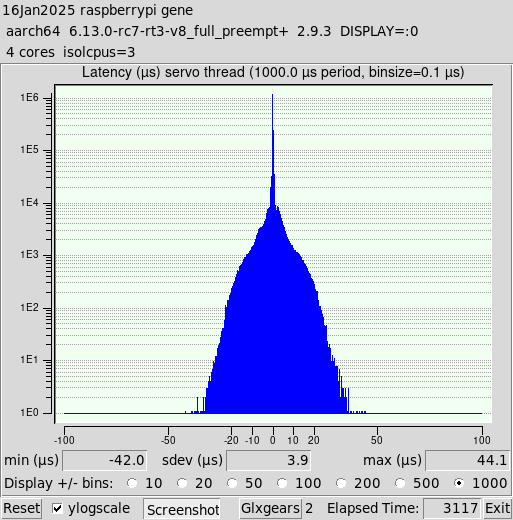
Rather than starting a new thread about jitter mitigation, I'm just going to add it here.

First, I'm keeping in mind that Peter Wallace said " The jitter is basically unimportant with a 7C81 unless its so bad you
get real time errors at the normal servo thread rate
."

I'm also treating the Raspberry Pi + 7C81 as a dedicated controller, not a PC. By that I mean I'm not going to be doing anything on the Pi except LinuxCNC. I may turn on WIFI to update packages, or use email to transfer a file. But I plan to even turn off WIFI before I launch LinuxCNC.


I ran several tests to see which combination of settings offered the most optimized jitter. I ran two Glxgears for all tests as I though that was reasonable, and ran the tests for long periods of time unless they looked bad early on.

I thought that turning off all unused services would decrease Jitter. So I turned off 9 of the 23 services, such as CUPS, Bluetooth, etc. To my surprise this did not decrease jitter.

Screen blank increased jitter a bit, so I turned that off. It doesn't make much sense anyway on a CNC controller.


These are the settings I added to the line already in /boot/firmware/cmdline.txt:
skew_tick=1 kthread_cpus=0-2 irqaffinity=0-2 rcu_nocb_poll rcu_nocbs=3 nohz=on nohz_full=3 isolcpus=3

I tried a few others that some people recommended on various blogs. Nothing else I tried had any noticeable positive impact on jitter, and some noticeably slowed down the responsiveness of the Pi.


Turning off timer_migration did reduce jitter. What I read said that you could make this setting permanent by adding it to the boot command line, or setting it in either of two different system files. Oddly none of that worked. So I setup a cron job to disable it at boot, and that works.
crontab -e
Add the following line:
@reboot sudo sysctl kernel.timer_migration=0


The other thing that helped reduce jitter was changing the scheduling policy to real-time and increasing the priority. I decided to create a shell script to launch latency-histogram, and eventually linuxcnc, which changes these things on the process.
#!/bin/bash
#
# Run with the SCHED_RR real-time policy at the highest priority level (99)
# Uses chrt to switch the process policy and priority immediately after launch.
#
# Gene Weber - January 2025
#
# "The difference between SCHED_FIFO and SCHED_RR is that among tasks with the same priority,
# SCHED_RR performs a round-robin with a certain timeslice; SCHED_FIFO, instead, needs the task
# to explicitly yield the processor." -Claudio

priority=99

# Truncate $1 (the command) to 15 characters starting at 0.
command=${1:0:15}

# Execute the command line provided to rrt as a background task.
`$@` &

# Get the process ID of the command.
PID=`pgrep $command`

# Change the real-time policy to SCHED_FIFO with a priority of $priority.
sudo chrt -r -p $priority $PID

I named it rrt (run real-time). So to launch latency-histogram it's simply:
rrt latency-histogram --nobase --sbins 1000

All spawned sub-processes inherit the policy and priority. So if linuxcnc is launched with rrt:
rrt linuxcnc
all of the processes that are part of LinuxCNC have the policy of SCHED_RR and priority of 99. I used Round Robin scheduling to make sure no LinuxCNC process "starves" another.

I don't know if this will work in the end, but I'm going to give it a try. Nothing ventured, nothing gained.

Implementing all of these, here is the jitter histogram. Good enough.

 
  • gekonko
  • gekonko's Avatar
17 Jan 2025 16:51

Error message "Radius to end of arc differs....etc etc"

Category: General LinuxCNC Questions

hello hmnijp,
could you please elaborate on that? 
I have tryed to comment out this section of the code in interp_arc.cc and then make the build, but I still get error message.
CHKS((abs_err > spiral_abs_tolerance * 100.0) ||
          (rel_err > spiral_rel_tolerance && abs_err > spiral_abs_tolerance),
      _("Radius to end of arc differs from radius to start: "
       "start=(%c%.4f,%c%.4f) center=(%c%.4f,%c%.4f) end=(%c%.4f,%c%.4f) "
       "r1=%.4f r2=%.4f abs_err=%.4g rel_err=%.4f%%"),
       a, current_x, b, current_y, 
       a, *center_x, b, *center_y, 
       a, end_x, b, end_y, radius, radius2,
       abs_err, rel_err*100);
  • Grotius
  • Grotius's Avatar
17 Jan 2025 16:44
Replied by Grotius on topic scurve trajectory planner

scurve trajectory planner

Category: General LinuxCNC Questions

Hi Automata,

I can use the servo's if they are powered 230volts. Then they can be used to finish and test ethercat auto installer. And runtime tests.
My mail : This email address is being protected from spambots. You need JavaScript enabled to view it.

For the planner. If you program a square 100x100mm and use G64 P5
It should show blended corners at runtime.
Works also for G3 to G3.
  • zmrdko
  • zmrdko's Avatar
17 Jan 2025 15:52
Replied by zmrdko on topic Missing link in homing LC10E

Missing link in homing LC10E

Category: EtherCAT

Thank you for sharing findings.
I am trying to achieve the same for Delta B3 drives.
i have questions regarding two points:

1. cia402.comp line 240
      change (statusword >> 10) to (statusword >> 12)
-  did you download this component from github.com/dbraun1981/hal-cia402/ and manually compiled and installed it?

4. cia402.ini
       in [joint_0] be sure:
           HOME_SEQUENCE = 0 (or whatever sequence number is appropriate)
           HOME_USE_INDEX = YES
           HOME_SEARCH_VEL = 0
           HOME_SEARCH_VEL = 1 (or any non-zero value)
- here is HOME_SEARCH_VEL stated two times - maybe one should be HOME_LATCH_VEL?

 
  • tommylight
  • tommylight's Avatar
17 Jan 2025 15:45
Replied by tommylight on topic Operating computers in the cold

Operating computers in the cold

Category: Computers and Hardware

Computers do not care much about temperature on the low side, the used "Enterprise" ones i use are perfectly fine even at -5 C, yesterday all day long, not a single issue.
So if yours is having issues at 0, there is something failing inside, probably power supply as noted by beeps, and it will sooner or later fail even in hot environment.
I have several of those in shops with no heat around here, not just one, i am sure some worked even at -8C.
I am also sure some will fail to start at +5C, and always that is a sign of something failing, and as with everything some will work for many years and some will not.
Computers do care about moisture, and i have several dead from it every year.
TL:DR
CPU's do not care up to -70 or even much more
Capacitors do care a lot
Resistors do care a bit
etc...
  • Krulli_Fräser
  • Krulli_Fräser
17 Jan 2025 15:25
Operating computers in the cold was created by Krulli_Fräser

Operating computers in the cold

Category: Computers and Hardware

Hello all,

I have fun with my converted milling machine and we are preparing to move it to its final place in the shop but now the computer is starting to act up.
The machine is standing in a workshop that is not heated or insulated. So the Computer (hp ProDesk Mini PC) is exposed to really low temperatures. Up until the start of this year it was never an issue but now the computer crashes shortly after booting and starting LCNC. I know this has to do with the cold because I moved the computer inside and after it warmed up I was able to run it just fine. After moving back to the shop it gave me about 20 minutes of work before crashing again. (Likely after cooling down enough) At some point while trying to boot and crashing the computer was beeping in a way that indicated a power supply issue.

The computer was exposed to 0°C (HP datasheet rates it to +10°C). I know the Mesa cards are allowed to handle 0°C but the computer seems to have taken some damage.

It was only a 100€ computer and I was able to save my configs so I'm not to sad if it has taken permament damage.

I have now bought a heating cable used with water pipes which gently heats the computer up with 64W of heating power and a thermostat but after a first test it only ran for 5 minutes.

TL;DR:
I have a computer that was affected by freezing temperatures (0°C)
now it won't run for long
I need a good solution (heating the shop unfortunately not an option)
Does anyone know Computers that handle the cold?
Any other experience?
  • Nserega.90
  • Nserega.90
17 Jan 2025 15:17

ColorCNC Colorlight 5A-75E/5A-75B as FPGA controller board

Category: Driver Boards

Before that I had already assembled CNC machines and 3D printers. But it was much easier with them. There was a board already prepared for a milling machine or 3D printer. I edited the Marlin firmware file and uploaded it. That is, I had work with CNC. I have never dealt with FPGAs. Installing LinuxCNC on real hardware is not a problem. Buying a ColorLight board is also not a problem. I have been working with a soldering iron all my life))) But I have never worked with Linux))) That's why it's a dark forest for me. I read on GitHub how to flash a board and make inputs/outputs by cutting tracks and a resistor, I don't remember exactly))) First, as I understand it, you need real hardware, the ColorLight board itself - flashed. And then its configuration. But I didn't find any information about setting up the board.
  • Cant do this anymore bye all
  • Cant do this anymore bye all's Avatar
17 Jan 2025 15:16
Replied by Cant do this anymore bye all on topic help to compensate for changes in the rack

help to compensate for changes in the rack

Category: Advanced Configuration

Could mapping of the rack be possible as some do for ballscrews\leadscrews ?

Unfortunately I’m not really up on the implementation.
  • Cant do this anymore bye all
  • Cant do this anymore bye all's Avatar
17 Jan 2025 15:12
Replied by Cant do this anymore bye all on topic Arduino IO Expansion

Arduino IO Expansion

Category: Show Your Stuff

I wouldn’t be of the opinion USB = bad. I think it can be let down at the physical layer by less than great cables.
Whilst not the greatest fan of Arduino, it does allow for projects like yours and sharing is quite easy. Developers such as yourself should be thanked, as there is a lot of behind the scenes frustrations, hopefully you didn’t pull too much hair out. Keep up the great work.

Just another thought, Ethernet would add a bit of extra cost, and could mean a 2nd Ethernet card for the pc and such. And complexity for some setting it up. USB\Serial keeps it easy.

All the best from Down Under
Rob
Displaying 19651 - 19665 out of 21715 results.
Time to create page: 0.394 seconds
Powered by Kunena Forum