Advanced Search

Search Results (Searched for: )

  • HansU
  • HansU's Avatar
21 Mar 2025 10:04 - 21 Mar 2025 10:05
Replied by HansU on topic Keyboard Shortcuts in Gmoccapy

Keyboard Shortcuts in Gmoccapy

Category: Gmoccapy

Weird that it works with a small modification in a minimal running example but not in gmoccapy:

import gi
gi.require_version("Gtk", "3.0")
from gi.repository import Gtk, Gdk

class ToggleButtonApp(Gtk.Window):
    def __init__(self):
        super().__init__(title="Toggle Button Example")
        self.set_default_size(200, 100)
        self.tbtn_turtle_jog = Gtk.ToggleButton(label="Button is OFF")
        self.tbtn_turtle_jog.connect("toggled", self.on_chk_turtle_jog_toggled)
        self.add(self.tbtn_turtle_jog)
        self.connect("key-press-event", self.on_key_press)

    def on_chk_turtle_jog_toggled(self, button):
        if button.get_active():
            button.set_label("Button is ON")
        else:
            button.set_label("Button is OFF")

    def on_key_press(self, widget, event):
        keyname = Gdk.keyval_name(event.keyval)
        if keyname == "r" or keyname == "R":
            self.tbtn_turtle_jog.set_active(not self.tbtn_turtle_jog.get_active())
            return True  # Stop further processing of the event

win = ToggleButtonApp()
win.connect("destroy", Gtk.main_quit)
win.show_all()
Gtk.main()


Maybe you have some time to play around and figure it out if it is important for you.
  • jazial
  • jazial
21 Mar 2025 09:57
movable Z limit was created by jazial

movable Z limit

Category: Advanced Configuration

Hello,

I'm working on a mill which make Z+ move to free the tool in spindle.

I need to go to Z++ to disengage locking, but i have to keep under Z25 when machining.

I set up a mux2 component with 2 Z limit values
I normal operation Z limit is 25 and while toolchange Z limit is 180

If i run m6 txx, it works fine, but if I load a program, the plot complain about Z limit, because M6 subroutine mention off limit Z move
If I launch program, linuxcnc complains about Z limit too, but program runs nicely as my limit is moved when it have to

Anyone have an idea to fix this ?

I've tried to add a conditional state before the Z move, but linuxcnc still see the move while plotting

Thanks
  • HansU
  • HansU's Avatar
21 Mar 2025 09:57
Replied by HansU on topic Keyboard Shortcuts in Gmoccapy

Keyboard Shortcuts in Gmoccapy

Category: Gmoccapy

Hi, there,

i am trying to make a keyboard shortcut to toggle between TURTLE and RABBIT jog mode. I think that the code should have look something like this: 

        if keyname == "r":
            "some toggle event goes here"
            return True

It is shown on in the def on_key_event section in the code attached from line 3052. Can you help me which event should I use to toggle jog modes? 


Toggling does not really work without further changes, because it toggles the button twice then.
Adding two buttons is the simplest solution if that works for you.
        if (keyname == "R" or keyname == "r"):
            self.widgets.tbtn_turtle_jog.set_active(False)
        if (keyname == "T" or keyname == "t"):
            self.widgets.tbtn_turtle_jog.set_active(True)
  • jazial
  • jazial
21 Mar 2025 09:43
Replied by jazial on topic halui.spindle.0.override.direct-value

halui.spindle.0.override.direct-value

Category: Advanced Configuration

To Aciera

It's not very well documented, but you have to set the counts value when you use direct value
It takes me some time to figure it out as I made my tests with spindle speed override and it's not working ;-)
  • Hakan
  • Hakan
21 Mar 2025 07:08
Replied by Hakan on topic General Questions about using ethercat

General Questions about using ethercat

Category: EtherCAT

From this here
Note: Using POSIX realtime
Found file(LIB): /usr/share/linuxcnc/hallib/basic_sim.tcl
setup_kins: cmd=loadrt trivkins coordinates=xz
Found file(REL): ./ethercat.hal
trivkins: already exists
./ethercat.hal:11: waitpid failed
It looks like you are including basic_sim.tcl. You got to remove that inclusion.
It's in the .ini file, comment out that line, the line looks something like HALFILE=LIB:basic_sim.tcl
  • RotarySMP
  • RotarySMP's Avatar
21 Mar 2025 05:54
Replied by RotarySMP on topic Blown 7i84

Blown 7i84

Category: Driver Boards

I created confusion there. The 784 is not powered by the 200 rail (which is switched on and off with Machine start / Estop), it is wired to the 204 rail, which is on constantly when the machine main switch is on.
  • gm001
  • gm001
21 Mar 2025 05:21
Hardware advice was created by gm001

Hardware advice

Category: Computers and Hardware

Hi everyone,
I'm hoping that someone can help me get my head wrapped around this, and point me in the right direction.  I've spent over a dozen hours reading through threads on this forum and elsewhere - yet, I can't figure out how to proceed.

My machine is a Bridgeport Series I CNC (Boss 6) mill - and it's sitting in my shop in original condition.  I'm new to CNC (having only dabbled with my Ender 3 3D printer).  However, a close friend of mine who's helping me has a couple of HAAS mills and is a guru with Autodesk Fusion.

I've investigated numerous options for updating this machine.  The more I study this, the more confused I've become!  The simplest answer for a person like me seems to be to install an Acorn board.  I'd rather not.  I don't want to get vendor-locked (more than I have to).  The thought of a company going under and leaving me in the position of having to gut the machine and start over is not appealing.  I don't want to pay a subscription.  I like the openness and configurability of LinuxCNC, and I'm a big fan and daily user of Linux (Red Hat Academy instructor).

My goals:
* Get the old Bridgeport back to making chips again.
* Have the ability to both use this machine as a CNC, and as a glorified manual machine (using LinuxCNC as a DRO).
* Not spend thousands of Dollars on this project (if possible!).

My thoughts:
* Mount a 12" touchsceen monitor in the original control panel housing for interacting with LinuxCNC.
* Hang a pendant on the side of the original control panel housing.
* Pick up a Huanyang VFD for the spindle drive (these seem to be well-supported and well regarded?).
* Replace the ancient original Bridgeport steppers with modern closed-loop NEMA 34's (1100-1200 oz in).

My questions:
* What should I run LinuxCNC on?  I've got a spare RPi 4 sitting in my drawer.  I've got a couple of Supermicro Intel Atom-based ITX server motherboards lying around.  What's the most intelligent way to go?
* It seems that a parallel port interface is the "old-school" way of doing things.  Now, it seems that most prefer an Ethernet interface.  Is there a disadvantage of going one way or another?
* Since I have to replace the steppers anyway, is it foolish to go with a "traditional" setup rather than Ethercat?  It seems like Ethercat will be considerably more expensive (like twice the price or more) - but is it worth the price?
* Everyone seems to agree that Mesa boards are the "gold standard."  How do Pico Systems' boards compare?  Jon Elson lives like 20 miles from my house.  Does anyone have experience with his customer service?  Is it foolish to consider anything other than a Mesa?
* If I go with a Mesa setup, which direction should I go?  If I use the RPi, I could go with the 7C80 or 7C81 - I could also run an Ethernet setup.  If I use the server motherboard, I could go with a parallel port setup or an Ethernet setup.  Is there an advantage of going one way or another, here?
* If I go with a given Mesa board, what else will I need to buy?  It seems that some of the Mesa cards (like the 7C80 and the 7I95T) will hook directly to the stepper drives, while others require a separate daughter card (BoB)?
* What hardware (if any) would I need in order to use the encoders on the steppers as a DRO?  Will any of my hardware selection above affect my ability to have this feature?
* Will a cheap Amazon/Aliexpress stepper motor/drive/power supply set work, or will I need to buy the stepper drives separately?  If I need a particular stepper drive, should I go with a Gecko or something else?
* If I run a touchscreen and a pendant, is there any reason why I will need a keyboard hooked up to this machine (once it is configured)?

Sorry for all of the (possibly stupid) questions.  The DIY CNC and especially the LinuxCNC ecosystem is far more vast than I imagined.  I really did attempt to "do my homework" before asking.  There just seems to be a lot of somewhat conflicting information (possibly, due to changing technologies and best practices over the years?).

Thanks for any advice that you can provide to me!
  • SummerLotus
  • SummerLotus
21 Mar 2025 02:41

Regarding the question of following control on the assembly line

Category: General LinuxCNC Questions
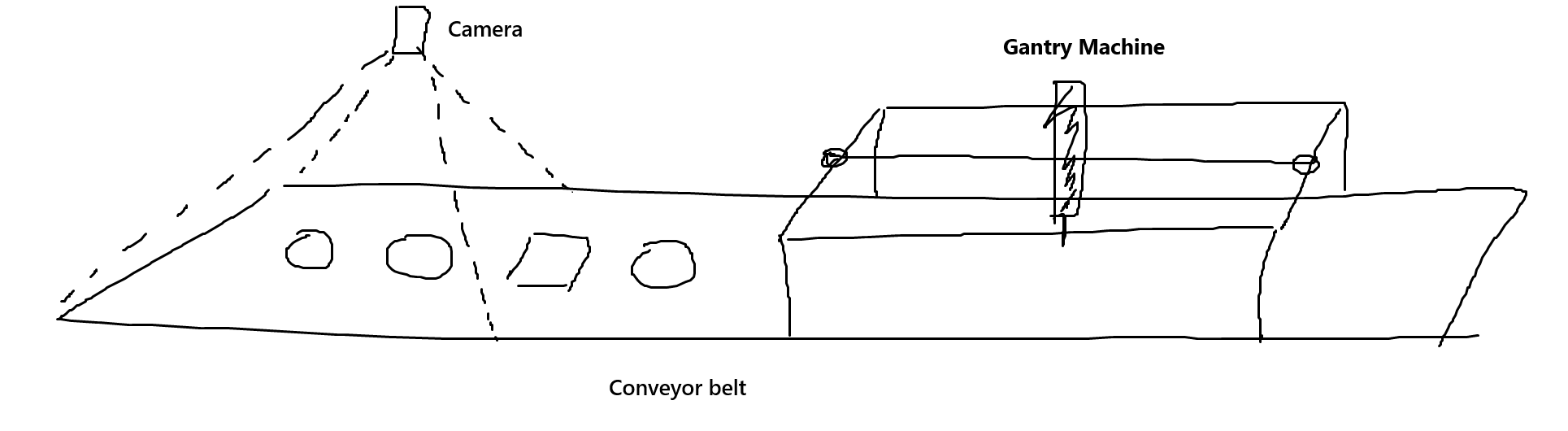
I've solved it
1. Synchronization problem of gantry and conveyor belt, use an external encoder to record the position of the conveyor belt

I want to use vision to determine the location of the item, and I can achieve this too.
When items are placed on the conveyor belt, they will continuously place items on the conveyor belt. My camera and program will also constantly collect images to calculate the location of each item.
I can generate G code to control its running.
But I can't solve multiple G-codes at the moment (the continuous stream of items are placed on the conveyor belt) when will they start running
Ideally, the running signal of each G code is triggered by the encoder position.
But I don't have a good idea to achieve this. Does anyone have a better solution or idea?
 
  • Benb
  • Benb's Avatar
21 Mar 2025 02:20
Replied by Benb on topic Blown 7i84

Blown 7i84

Category: Driver Boards

Right now, the 7k1-131 relay contact is disconnecting the 24VDC supply to mesa 7i84 board which is no, no as indicated by Tommylight. I can suggest you jumper 7k1=131 contact and replace the single pole relay 7k1-131 with a 3-pole relay to disconnect the 3 phase AC side of 6V1 power rectifier. let me know, if this info does not make sense, I can draw a diagiagram.
  • wrhammer
  • wrhammer
21 Mar 2025 01:58
Replied by wrhammer on topic Python commands lag time for remap

Python commands lag time for remap

Category: Advanced Configuration

Self.execute was it! Finally getting back to the python testing. I pretty much got the rest of the machine up and going and it makes more sense to use the python M6 remap for a more automated experience with all the different tools on the Biesse. By the way thanks so much for posting your Biesse upgrade bevins! Mine is up on github also and plan to do a post covering my project. Been a learning experience!
  • tommylight
  • tommylight's Avatar
21 Mar 2025 01:45
Replied by tommylight on topic 2.9.3 - Stuck in wrong state and stops

2.9.3 - Stuck in wrong state and stops

Category: Plasmac

Any news on this?
What exactly happens, if you got more feedback?
-
Last i actually used it for work (not just testing) QTP was over a year ago (when Debian 12.3 was released), it still had a nasty habit of getting stuck doing nothing as follows:
-usually does any number of cuts ok then it hangs on torch going up and does nothing at all, did not try the switch thing so not sure if this is the same issue, but i did notice the Z axis would not go all the way to the top safe travel height, usually 1-3mm lower, only stopping the execution and running from line would work for me.
The same thing happened on PlasmaC and Phill fixed it, so it is strange that it happens on QTP but not on PlasmaC....well it did happen on PlasmaC, about once in 6-9 months of daily use, while on QTP it would happen daily, several times a day sometimes, then it would not happen for months, then happen again.....
Hence i do not use it on production machines.
-
I wrote a rant here and deleted it...
  • tommylight
  • tommylight's Avatar
21 Mar 2025 00:25
Replied by tommylight on topic Closed Loop DC Motor Remora EC500

Closed Loop DC Motor Remora EC500

Category: General LinuxCNC Questions

Oh, i already replied on the Remora topic...
  • tommylight
  • tommylight's Avatar
21 Mar 2025 00:24
Replied by tommylight on topic Remora - ethernet NVEM / EC300 / EC500 cnc board

Remora - ethernet NVEM / EC300 / EC500 cnc board

Category: Computers and Hardware

I need to use a PID loop in speed mode, but I don't have an encoder on the motor; I have it on the load. I'm not an expert in motor control loops, although I understand something, but I'm not sure if I can implement a closed loop with this configuration. Therefore, would it be mandatory to attach an encoder to the motor?

It should work, needs some tuning and as little as possible of backlash between motor and encoder, so the answer to the last part is no, it is not mandatory, LinuxCNC does not care where the encoder is as long as they are physically attached (even with rope), and it can control DC servo motors with just a simple H-bridge.
I have done some simple drives that worked perfectly with LinuxCNC, leme see if i can find them:


-
-Not very useful info bellow, feel free to skip.
And As general info, since audio amplifiers are getting really cheap, especially the D class ones, they can all be used as a servo drive, granted limited current capabilities and the only current limits built in are overload where it shuts completely down or no limiting and burns to a crisp! :)
There are plenty of use cases for them, but complicate things due to +-1V input sensitivity, that can be sometimes misused by bridging them and inverting one input, so only pwm should work. Some are bridged inside, so only inverting one input should do.
  • PCW
  • PCW's Avatar
21 Mar 2025 00:06 - 21 Mar 2025 00:07
Replied by PCW on topic 7I97T joint following error

7I97T joint following error

Category: General LinuxCNC Questions

The scale is generally either left in volts (10) or better
set to the machine units per second at 10V

That is, you have a inch machine, so motion calculations
are in inches per second, if you set the PWM scale to
the velocity (in inches per second) you get at 10V,
then  all the PID numbers are scaled in motion units
(inches per second) and FF1 (the most important
PID tuning parameter for velocity mode servos)
is 1.00
  • tommylight
  • tommylight's Avatar
21 Mar 2025 00:03
Replied by tommylight on topic Blown 7i84

Blown 7i84

Category: Driver Boards

I'm thinking about ether a switch bord between the outputs of the mesa card and the relay board or to just lock it out in the software and to add a new 24v dc power supply. Any thoughts about this?

Yes, plenty:
No switch board,
No lock, whatever that means,
Yes, you can replace the existing power supply for good quality power supply (Delta preferably or Mean Well), just mind the current required.
-additional info just in case:
But, if you want to add another good quality power supply just for the Mesa and also leave the old power supply (makes things easier sometimes, not always), that absolutely requires having the same potential as the rest of the IO, usually means only wiring 0V for this power supply to 0V of the existing power supply, and checking if the machine has the 0V tied to ground/chassis and if not make sure the new power supply does not also, as some do and some do not have GND tied to 0V.
Displaying 17281 - 17295 out of 18505 results.
Time to create page: 0.663 seconds
Powered by Kunena Forum