Advanced Search

Search Results (Searched for: )

  • Blume
  • Blume
13 Dec 2024 17:40
Replied by Blume on topic Probe Basic do not start

Probe Basic do not start

Category: QtPyVCP

ok, thanks, i try it
  • greg23_78
  • greg23_78
13 Dec 2024 17:14

Solution fo "hm2 error finishing read" with no good PC

Category: Computers and Hardware

it's not common to have a 5V power supply, I'm going to order one, too bad it's not 24V because I have lots of power supplies :) .

I replaced the power supply with a laboratory power supply (variable voltage).

It seems to work!

thanks for your advice!
  • StoneB
  • StoneB
13 Dec 2024 17:10
Replied by StoneB on topic Xilinx Setup to edit config for 7i92T

Xilinx Setup to edit config for 7i92T

Category: Driver Boards
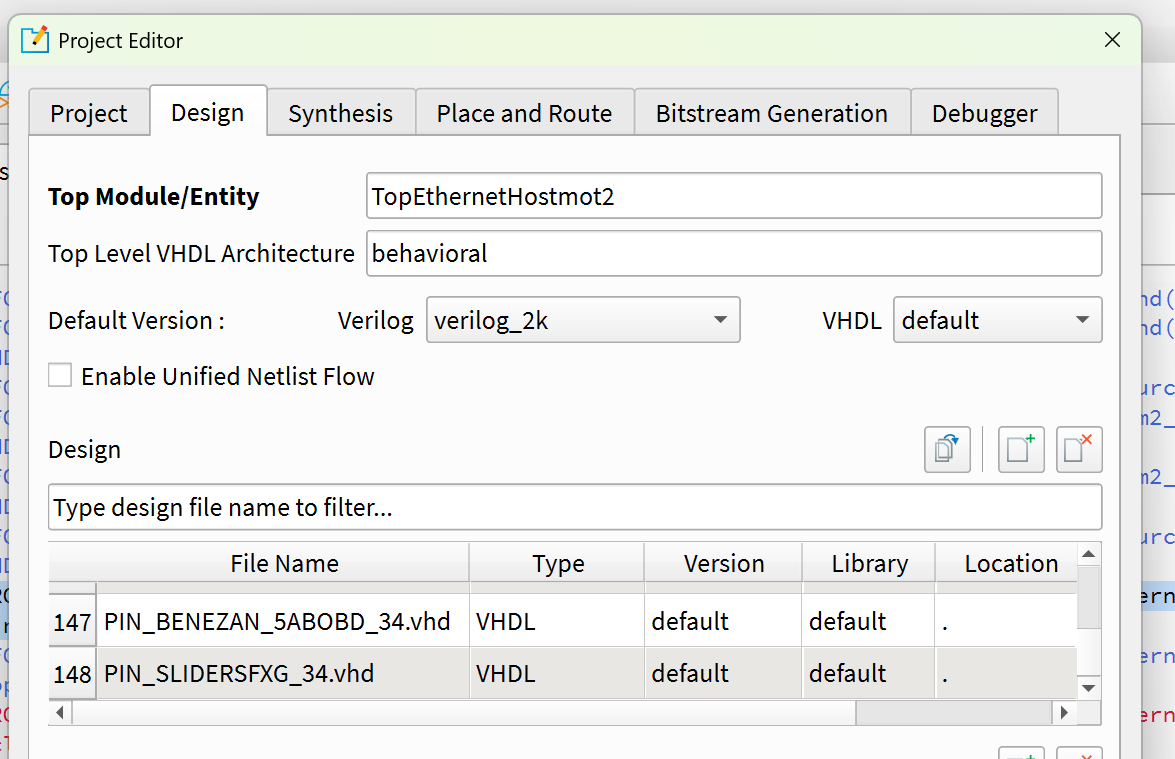
I did - it appears in the design - that's how it should be, right? 

The error that stops Synthesis is:ERROR : ***\7i92t\configs\hostmot2\source\7i92t-hm2\TopEthernet16HostMot2_efx.vhd(135): 'pin_slidersfxg_34' is not compiled in library 'efxlib' [VHDL-1240]

Here are my two edited files:  

File Attachment:

File Name: PIN_SLIDERSFXG_34.zip
File Size:10 KB
  • Lcvette
  • Lcvette's Avatar
13 Dec 2024 16:56 - 13 Dec 2024 16:57
Replied by Lcvette on topic Probe Basic do not start

Probe Basic do not start

Category: QtPyVCP

6 decimal places only for settings in the ini file.. you have too many for max feedrate, better check the rest of the file also
  • tommylight
  • tommylight's Avatar
13 Dec 2024 16:36

Servo tuning for an axis that behaves different in one direction versus the othe

Category: CNC Machines

Two things:
-Y axis is the one with rack/pinion? Check and clean the rack and pinion, they collect a lot of dust that gets pressed between the teeth. Use a wire brush. Also check the spring loading parts, they can be stuck and cause that kind of behavior.
-lower the P value for Y axis/joint a bit.
  • Mitch66
  • Mitch66
13 Dec 2024 16:35
Replied by Mitch66 on topic Improving Base Thread Jitter

Improving Base Thread Jitter

Category: Installing LinuxCNC

Again! Many thanks. I have deselected as many items as possible in the BIOS and selected 'disable multicore technology' so presumably it is now running on just 1 core. I also presume this will have the same effect as disabling core2 with the Isolcpus Parameter and that it will no longer be necessary to use that parameter?

The new stress test reading is 65738 a reduction of around 20000ns. The next stage is to install the Wheezy iso you advised. Just need to find out how I can have both Wheezy and Bookworm available in the GRUB start menu so I can select either OS.

Since Rodw's post I have done a lot of reading - I had not expected the learning curve to be so steep! But very interesting nevertheless, and if I am to get to grips with Linux and stop wasting your time, I will need to overcome my 'Windows induced fear' of changing system files and do much more reading.

If I may, I will report back once I have tried it with Wheezy. If this also makes a difference I will buy the new graphics card and maybe I will get the figure down to something useable. Finger Crossed!

I suspect that the future is hardware based stepping and so I will probably go down the Mesa card route in due course. Bu first, now I have started with this I will do my best to make this computer suitable for software pulse generation - it will be a useful learning tool
thank you again
Mitch
  • Sockheaven
  • Sockheaven's Avatar
13 Dec 2024 16:34

Ethercat installation from repositories - how to step by step

Category: EtherCAT

@Rkatts
I think I have identified the issue you're struggling with.  I have been struggling to get the Kollmorgen AKD servo drives to communicate with LinuxCNC 2.9.X ethercat and been stuck on version 2.8.X for a while now.

I have long suspected that the choice to make EoE default to On is the root cause, and believe I have confirmed this.
It appears you need to compile the IGH master yourself with the --disable-eoe option, once this is successfully installed, the problems go away.

From some additional searches, it sounds like if EoE is turned on you need to have the specific function handlers to handle the EoE packets, otherwise the drive will get bungled up trying to process EoE packets with the CoE handler (this is my hand wavy explanation in my head, not sure its exactly what is happening).

I am using the generic controller and using generic XML configuration for the run up script, so this would make sense.

I am also very green with Linux so this took me quite a while to figure out, but I have put together a install guide for those wishing to do the same, hopefully it is adequate:
  1. Download the LinuxCNC Debian 12 iso (with LinuxCNC 2.9.3 preinstalled)
    image the iso onto a thumb drive using Rufus, install onto PC
    linuxcnc.org/downloads/
  2. Install extra tools:
    $ sudo apt-get install git
    $ sudo apt-get install caja

  3. Manually compile/install the IGH Master
    Following official guide: docs.etherlab.org/ethercat/1.5/pdf/ethercat_doc.pd

    Open a terminal and clone the master repo
    $ sudo git clone gitlab.com/etherlab.org/ethercat.git /etherlab

    Change directory to /etherlab
    $ sudo ./bootstrap
    $ sudo ./configure --sysconfdir=/etc/ --disable-eoe
    $ sudo make
    $ sudo make modules
    $ sudo make install
    $ sudo make modules_installMark the EtherCAT config file editable:
    $ sudo chmod 777 /etherlab/script/ethercat.conf

    Open EtherCAT config and set the adapter Mac ADDR
    Retrieve mac address of adapter you with to use:
    $ ip addr

    In the /etherlab/script/ethercat.conf, update mag addr and devices:
    Enter that mac address on the master0 device lineMASTER0_DEVICE="00:e0:4c:f1:b9:af"   (where the highlighted string is the mac address of your adapter
    Set the DEVICES = “generic” (do not leave blank)

    Enable / Start the EtherCAT service
    $ sudo systemctl enable ethercat.service
    $ sudo systemctl start ethercat.service Verify Master is running/working
    $ ethercat master

    You should get an output (not that no master can be found)

  4. Install EtherCAT support for LinuxCNC
    $ sudo apt update
    $ sudo apt install -y linux-headers-$(uname -r) linuxcnc-ethercatTrying to install without installing the package “ethercat-master” but watching the above build progress it appears to install that anyways.
    At the end of this build process it will notice you have already installed EtherCAT. It appears the user needs to answer “NO” to this prompt to maintain the manually installed version without EoE.
  5. Note Location of LCEC configuration      
    This process installed the lcec object/config file in a new locationNeed to update the LinuxCNC project hal file to use the new location: loadusr -W /usr/bin/lcec_conf ethercat-conf.xml
  6. Update ethercat-conf.xml based on network/device topology and start LinuxCNC

I think that was all the steps, let me know if that helps out or I missed some steps

For anyone that may know the process of updating the official releases, I would make a suggestion that EoE is disabled by default due to the requirements of having compiled driver for your specific EtherCAT device.
If the goal is to make LinuxCNC work out of the box, I'd argue that the configuration released with 2.8.X was easier to use than the default configuration of 2.9.X (so far) since the enabling of EoE appears to require the use of non-generic devices.

I've noticed others having better luck than I had with EtherCAT on LinuxCNC 2.9.X, so maybe I just need to learn how to compile those device drivers, but my lack of experience in linux is holding me back at the moment.

Best Regards,
Paul
  • Blume
  • Blume
13 Dec 2024 16:28 - 13 Dec 2024 16:35
Replied by Blume on topic Probe Basic do not start

Probe Basic do not start

Category: QtPyVCP

sorry, i forgot the report file 
I install the stable Version from PB. I follow the guide. 
Don't know if this is the problem
emcMotionInit: emcTrajInit failed
emc/task/emctaskmain.cc 3054: can't initialize motion
or this part. But the feed override i copied from the guide. 
INIFILE: ERR_CONVERSION, section=DISPLAY, tag=MAX_FEED_OVERRIDE, num=1, lineNo=15
 
  • tommylight
  • tommylight's Avatar
13 Dec 2024 16:24

Solution fo "hm2 error finishing read" with no good PC

Category: Computers and Hardware
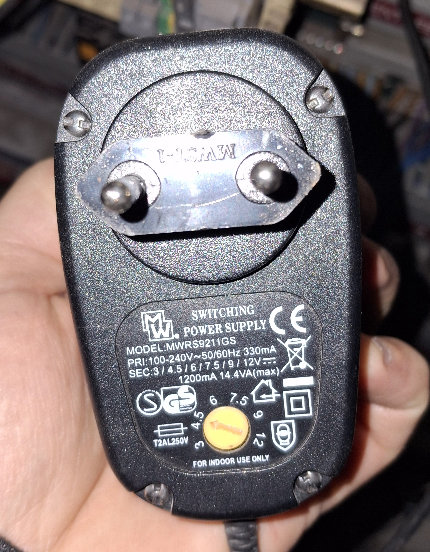
Noooooooooooooooooo!!! :)
Never use those power supplies for anything, ever, except powering LED lights maybe.
That is a non regulated transformer power supply with no output control at all, so voltage varies wildly with load, and is way above 5V at low loads when set to 5V.
Or look at it the other way, never use a 3$ power supply to power 1000$ equipment.
Get a MeanWell or Delta 5V power supply, at 20-30$ they are still cheap and can be found easily online.
In the meantime, if you have an old Samsung 5V charger, they were really good, the original ones, not the counterfeit ones.
  • Lcvette
  • Lcvette's Avatar
13 Dec 2024 16:22 - 13 Dec 2024 16:23
Replied by Lcvette on topic Probe Basic do not start

Probe Basic do not start

Category: QtPyVCP

what error are you getting? need more information from your install also, without it we have no way to know what the issue could be.
  • PCW
  • PCW's Avatar
13 Dec 2024 16:21

Solution fo "hm2 error finishing read" with no good PC

Category: Computers and Hardware

I would say that power supply is marginal

I would get a DIN mounted PS say a MDR20-5

Older encoders may draw considerable current
  • Blume
  • Blume
13 Dec 2024 16:14
Probe Basic do not start was created by Blume

Probe Basic do not start

Category: QtPyVCP

Hi, 
i have some problems to convert my *ini and *hal file from QT-Dragon to Probe basic. Have some errors when i start it. I screenshot my CNC Folder. 

i cant find the error. please help me that i can start it
 
  • greg23_78
  • greg23_78
13 Dec 2024 16:08 - 13 Dec 2024 16:10

Solution fo "hm2 error finishing read" with no good PC

Category: Computers and Hardware

well, I'm trying to locate the trouble, it's with the encoders: when I unplug them, there doesn't seem to be any restarting, and when I plug them back in, the default comes back from time to time.

my encoder is power by 5V

Could it be the power supply or the encoder ground?

below, is the power supply for the 7i97t card too weak?

 
  • kb0thn
  • kb0thn
13 Dec 2024 16:04

Servo tuning for an axis that behaves different in one direction versus the othe

Category: CNC Machines

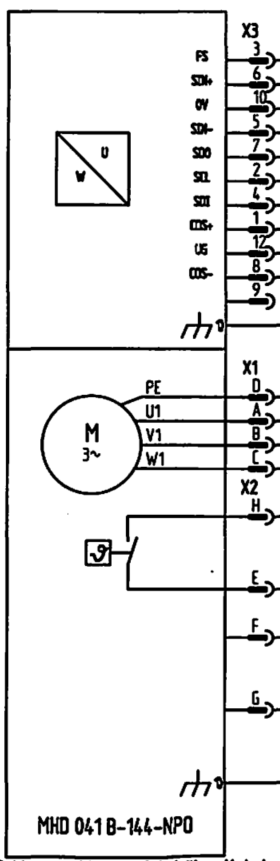
I don't think so. It appears to just be a three phase brushless motor with integral encoder. Here is how the schematic shows the y-axis motor:
 

Looking up the part number, it is described as:
MHD041B-144-NP0-UN by Rexroth, Indramat, Bosch is a Synchronous Motor in the MHD Series. The MHD041B-144-NP0-UN features a Motor Frame Size of 82mm Flange Size, 50mm Centering Diameter and a Motor Frame Length of 2.7 Nm. This Motor has a Motor Encoder of Digital servo feedback and comes with a Output Shaft of Shaft with keyway according to DIN 6885-1 (with shaft sealing ring).

Thanks

 
  • PCW
  • PCW's Avatar
13 Dec 2024 15:43
Displaying 21736 - 21750 out of 22100 results.
Time to create page: 0.874 seconds
Powered by Kunena Forum