Advanced Search

Search Results (Searched for: )

  • JT
  • JT's Avatar
12 May 2025 16:01
Replied by JT on topic keyboard shortcuts

keyboard shortcuts

Category: General LinuxCNC Questions

One thing to note is keyboard shortcuts only work when the Axis window has focus.

JT
  • DarkPhoinix
  • DarkPhoinix
12 May 2025 15:55
Replied by DarkPhoinix on topic Which kernel version is best for real time?

Which kernel version is best for real time?

Category: General LinuxCNC Questions
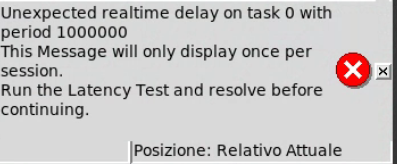
Do you have a Ethernet connected motion device? 
If so, the latency test is relatively useless for determining the actual
LinuxCNC latency.
A simple ping test is much more informative:
sudo chrt 99 ping -i .001 -q -c 60000 [Device_IP]
(will run 1 minute and print out timing statistics)
Where device _IP is the IP address of your Ethernet motion control interface.


Yes PCW, is the same Realtek with dkms driver for fix latency.
Maybe I'm asking the wrong question: is it really necessary to do the test with YouTube?
  • DarkPhoinix
  • DarkPhoinix
12 May 2025 15:50
Replied by DarkPhoinix on topic Which kernel version is best for real time?

Which kernel version is best for real time?

Category: General LinuxCNC Questions

Do you get latency warnings when you run LinuxCNC?


Yes, at start

Are you still using the same PC discussed here on several topics?


Yes i change NVIDIA with ATI and is better, but error of junction with "Community test youtube video" still occurs.

Why do you keep doing the same things and expect different results? Stressing the system beyond it's limits will always fail.
Change the graphic card, get a used one for AMD, or get a used PC.


www.youtube.com/shorts/mWCeSrF2TUM
Whith stress test and 100 GLXGEARS the work go at end with machine not responsive! But one youtube video give me junction error.

You had good latency at one point in time, so what happened?


Yes is good youtube video junction error still occurs.

#################################################
P.S. the forum have some problem e need fix.
EExamble Edit a quote quote all message and Code.
#################################################
  • Murphy
  • Murphy
12 May 2025 15:48 - 12 May 2025 15:50

Remora - ethernet NVEM / EC300 / EC500 cnc board

Category: Computers and Hardware

Try deleting [spindle0]

setp scale-rpm.gain .02
put that in instead
  • Hakan
  • Hakan
12 May 2025 15:46

Off-the-shelf CNC control box with LinuxCNC?

Category: Milling Machines

A link to that PC would be great. I'd love to see those buttons.
  • Spyderbreath
  • Spyderbreath's Avatar
12 May 2025 15:30
Replied by Spyderbreath on topic Remora - ethernet NVEM / EC300 / EC500 cnc board

Remora - ethernet NVEM / EC300 / EC500 cnc board

Category: Computers and Hardware

thanks vp, that will save us a lot of work. we need to archive this shit for the repo or something

darkpheonix - that is good to hear

spyder - this is my WIP remora spindle template (no encoder edition). murphy is also using it. some might be duplicate to what you have now
#########################################################################################
# Remora Spindle hal remora_spindle.hal
#
# this hal file includes the following
# - connecting Remora outputs to LinuxCNC motion spindle.0 enable/direction
# - connecting spindle signals to LinuxCNC motion spindle.0 pins
# - converting the LinuxCNC motion spindle.0.speed-out-abs to signal with scale
# - connecting converted LinuxCNC motion spindle.0.speed-out-abs to Remora PWM
#
#########################################################################################

# conenct LinuxCNC motion spindle.0 on/enable to remora output 01
net spindle-on <= spindle.0.on => remora.output.01
# conenct LinuxCNC motion spindle.0 direction to remora output 02
net spindle-cw <= spindle.0.forward => remora.output.02

# connect spindle signals to LinuxCNC motion spindle.0
net spindle-cmd-rpm <= spindle.0.speed-out
net spindle-cmd-rps <= spindle.0.speed-out-rps
net spindle-cmd-rps-abs <= spindle.0.speed-out-rps-abs
net spindle-at-speed => spindle.0.at-speed

### Connect and configure spindle PWM/0-10v signal ###
###########################################################
# Spindle PWM 0-100 control
# converting the LinuxCNC spindle speed output
# into a useable output signal for our remora pwm component
# - for pwm the math is 100/ [MAX SPINDLE RPM] = gain
# 100/(5000rpm) = .02 , the gain is 0.02
###########################################################

# load a linuxCNC scale module,
loadrt scale names=scale_to_rpm.0,scale-rpm
addf scale-rpm servo-thread
# configure spindle rpm to pwm
# pwm 100 / max rpm = gain number
#setp scale-rpm.gain 0.02 # 100/ rpm (5000) = .02
setp scale-rpm.gain [SPINDLE_0]RPM_GAIN # 100/ rpm (5000) = .02
# connect the LinuxCNC motion spindle.0 speed-out-abs to the pwm scale
net spindle-speed-scale spindle.0.speed-out-abs => scale-rpm.in
# connect pwm scale output to remora spindle pwm SP.0
net spindle-speed-abs scale-rpm.out => remora.SP.0


# Manual toolchange

loadusr -W hal_manualtoolchange
net tool-change iocontrol.0.tool-change => hal_manualtoolchange.change
net tool-changed iocontrol.0.tool-changed <= hal_manualtoolchange.changed
net tool-number iocontrol.0.tool-prep-number => hal_manualtoolchange.number
net tool-prepare-loopback iocontrol.0.tool-prepare => iocontrol.0.tool-prepared
 

I tried this spindle config and I get the following error - ./remora-ec500.hal:79: Ini variable '[SPINDLE_0]RPM_GAIN' not found. Would you or anyone else know what might be wrong and how to fix it?
  • andypugh
  • andypugh's Avatar
12 May 2025 14:51
Replied by andypugh on topic free CADCAM

free CADCAM

Category: CAD CAM

With the castings I am drawing up for my antique motorbike engine project, where everything has draft angles and fillets,  I am definitely hitting the limits of it's filleting engine. I normally end up deleting my extrudes, and fillets multiple times, and changing the order I do things, and sometimes find an order which leads to most of the fillets I need. 

To be fair, this is frequently a problem with Fusion 360 too. 
  • Aciera
  • Aciera's Avatar
12 May 2025 13:45 - 12 May 2025 17:12

Planning to Retrofit a Mazak Integrex200Y Mill-Turn Machine

Category: Advanced Configuration
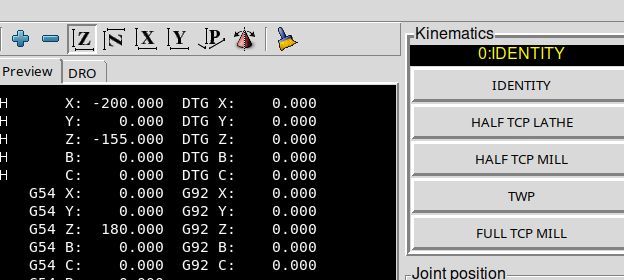
1. I tried to define the real machine limits in the .ini File. i.e. Z axis travel of 1065mm and home at zero. But after starting and homing z is automatically at -180mm.


Changing machine limits in the ini will (and should not) change anything in the DRO at startup. I'm not sure where you see '-180' for Z. This is what I get:
 

2. While running the example part (which makes me happy every time i do it... thank you so much) i realized that the tool change position is defined by G53 in the M6 remap. But in the vismach sim it definitely looks different between T101 und T2.


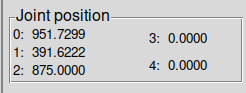
You might get confused about the difference in the tool path backplot (ie the pink line). This is purely a product of the visualization and comes from the different direction of the x and z tool-offsets for milling and turning.  Absolute machine position is reflected by the values in the 'Joint Position' section in the right hand panel:


Note though that 'G53' (and also 'G28', G30') must only be used in 'IDENTITY' mode as the axis directions will follow the directions of the rotated axes in TCP modes or as defined in the TWP plane.

3. Does the kinematic has the prerequisite to work only if home is the position where both spindles are in line with each other? So X and Y between both spindles rotational axis is 0 ? I assume that is not the case.


The kinematic is setup with the pivot point of the spindle rotary to coincide with the machine reference point (ie joint positions all 0). 
On a real machine config we can define the home positions (ie where a joint is 0) using the 'HOME_OFFSET' and 'HOME' values in the ini[JOINT_n] section. This is just not simulated in a simulation config.

1. M19 R180/R0 works fine and is needed for the lathe tools. But I definitely need to write a custom component for this functionality, because the spindle is hydraulically locked and of course alot of logic needs to be implemented for this rotation.
I'm not sure yet how to implement it. My preference would be a custom G-code like i.e. G490 XXX (XXX = Degrees in multiples of 30°) that then calls the custom component. How does the Half TCP Lathe mode know the current tool orientation? As already said it works flawlessly with M19 but would it also work with G490 ?


Currently the kinematic gets the spindle orientation through a hal connection to 'spindle.1.orient-angle'. This pin is set to the angle as requested by 'M19 R.... $1'. Because this value changes instantly it would likely cause a following error in the b-axis drive on the actual machine hence the note in the README about using actual spindle feed back (there are other HAL internal options to make this a gradual change inside hal if there is no real time feedback for the spindle position).  So the kinematic just needs the orientation angle sent to the designated halpin 'mazak-integrex-200y-kins.tool-angle'.

2. I know it sounds a little bit stupid, but it would be nice if the tool rescue function would be limited to pressing the button TWP and then getting asked on how much the tool shall retraced in mm in z (only positive values accepted). Usually in those situations I'm nervous and don't want to wreck the spindle...


This is certainly possible.
  • Wischi
  • Wischi
12 May 2025 12:09
Replied by Wischi on topic Gmoccapy Tool Change Dialog

Gmoccapy Tool Change Dialog

Category: Gmoccapy

Please post your gm.hal and gmoccapy_postgui.hal so we can have a look. The gmoocapy_postgui.hal should include the lines from the documentation.
  • jochen91
  • jochen91
12 May 2025 11:42

Planning to Retrofit a Mazak Integrex200Y Mill-Turn Machine

Category: Advanced Configuration
I played around some more with the sim.

1. I tried to define the real machine limits in the .ini File. i.e. Z axis travel of 1065mm and home at zero. But after starting and homing z is automatically at -180mm.

2. While running the example part (which makes me happy every time i do it... thank you so much) i realized that the tool change position is defined by G53 in the M6 remap. But in the vismach sim it definitely looks different between T101 und T2. See pictures attached. I tried to do a G49 before the tool change call, but that made it worse. For the ATC the position of course need to be the same every time.

3. Does the kinematic has the prerequisite to work only if home is the position where both spindles are in line with each other? So X and Y between both spindles rotational axis is 0 ? I assume that is not the case.

And here are some topics I'm thinking about:

1. M19 R180/R0 works fine and is needed for the lathe tools. But I definitely need to write a custom component for this functionality, because the spindle is hydraulically locked and of course alot of logic needs to be implemented for this rotation.
I'm not sure yet how to implement it. My preference would be a custom G-code like i.e. G490 XXX (XXX = Degrees in multiples of 30°) that then calls the custom component. How does the Half TCP Lathe mode know the current tool orientation? As already said it works flawlessly with M19 but would it also work with G490 ?

2. I know it sounds a little bit stupid, but it would be nice if the tool rescue function would be limited to pressing the button TWP and then getting asked on how much the tool shall retraced in mm in z (only positive values accepted). Usually in those situations I'm nervous and don't want to wreck the spindle...

Kind regards,
Jochen


  • unknown
  • unknown
12 May 2025 11:31
Replied by unknown on topic Off-the-shelf CNC control box with LinuxCNC?

Off-the-shelf CNC control box with LinuxCNC?

Category: Milling Machines

Regarding touchscreens, confirm that they are a USB HID one and don't require any specific\manufacturers drivers.
  • Z3rni3
  • Z3rni3
12 May 2025 10:49
Replied by Z3rni3 on topic hal functions

hal functions

Category: General LinuxCNC Questions

This is perfect! I believe these links cover pretty much everything I was hoping to find.
Thank you very much!
I'll take a closer look at these pages and the related ones.

Hopefully, you'll have some time to answer a few questions if I’m still unclear afterwards.
  • Aciera
  • Aciera's Avatar
12 May 2025 10:43
Replied by Aciera on topic hal functions

hal functions

Category: General LinuxCNC Questions

To get information about the pin functionality you need to look at the man page of the specific component which can be found here:
linuxcnc.org/docs/html/man/man9/


For example the 'motion' component:
linuxcnc.org/docs/html/man/man9/motion.9.html

or the 'pid' component
linuxcnc.org/docs/html/man/man9/pid.9.html
  • my1987toyota
  • my1987toyota's Avatar
12 May 2025 10:41
Replied by my1987toyota on topic What are the chances of getting this setup working?

What are the chances of getting this setup working?

Category: Pick and Place

Where I work right now it's pretty lean ( thanks to the new tariffs ) so I wont be messing with ours unless
we have a really good reason to need it. That said I wish you luck on your project.
  • spincycle
  • spincycle
12 May 2025 10:31
Replied by spincycle on topic Bridgeport VMC760 retrofit

Bridgeport VMC760 retrofit

Category: Milling Machines

The 7i97T has one SS configured on a connector, but with two S devices (7i73 and 7i84) you will probably need to flash a firmware with an additional SS port on the DIL connector.

Thanks for your input Mark.

Excuse my ignorance, but I assume the SS refers to the RS-422 serial connection?

Love your channel by the way. Digging the engine build. The John Britton diy way must run deep, and rightly so.
Displaying 15061 - 15075 out of 17468 results.
Time to create page: 0.679 seconds
Powered by Kunena Forum