Advanced Search

Search Results (Searched for: )

  • robh
  • robh
12 Jan 2025 11:53
Replied by robh on topic Lathe sub spindle m codes

Lathe sub spindle m codes

Category: Turning

iv not really had issue using UVW on my lathe with two turrets
only part i miss is running them together todo parts, as 2nd has to sit around while other is machining then swop over.. but thats a limit of single path controlls.

as for spindle control
i think the issue with sub spindle, or infact more than 1 spindle is there is no standard when it comes to Mcodes for direction or sync codes also

the only part that remains normal on machiens i find is S1, S2 etc , 1 is always main, 2 is sub and 3,4 etc tend to be turret power tooling etc.

one of my machiens for spindle sync has this code
G114.1 H1 D-2 R0
M77 (wait & check for sync to complete)

G114.1 spindle sync active,
H define which is the master spindle
D which spindle is doing the following
R phase offset from spindle axis zero

M77
follow by M77 makes the machine wait for sync to finish before processing more code, if no R is used can skip M77

this can sync to a already running spindle or both can syn from M5 and start together etc.. ovbisly can sync power tooling to a spindle, spindle to power tooling etc.. so gear hobbing , polygon is possible.

there is also a torque code you can issue to limit torque of spindles on pickup or check the part did part off fully before retract etc.

G114.2-Polygon machining command. There are many unique ways to use
polygon machining. Not just for hex or square shapes. Side slots,
Phillips screw driver shapes and whatever else can benefit from the
live tool synchronized with the part while cutting. Use G113 to
cancel.
G114.2 H3 D1 E3 L6 (R15.)
H3 = Master spindle or S3(gang live tool) S4 U121B option
D1= Slave spindle. Could be 1,-1, 2, -1 - is for direction.
E3 = Rotation rate. Number of teeth of the cutter.
L6= Number of flats to be cut on the part.
R15. = Phase shifting amount in degrees.(only on 1:1 ratio
spindles)
G114.3-(option) Gear hobbing command. With a special holder this command
will
time the cutter(S3) and spindle(S1C1) to constantly hold position
so all we do is feed across the part as if we were turning and a
gear shape is cut. A "C" axis is also needed! Use G113 to cancel.
G114.3 H3 D-9 E1 L18 (P0) (Q1.)
H3 = Master spindle or S3(gang live tool)
D-9= Slave spindle or 9= Caxis -9 = reverse
E1 = Rotation rate. Always set to one. Not sure exactly why!
L18= Number of gear teeth to be on the part.
P0 = Helix angle -89.000 to 89.000 for helical gears. Leave off
or set to P0 for spur(straight) gears.
  • rodw
  • rodw's Avatar
12 Jan 2025 11:36
Replied by rodw on topic Computer requirement

Computer requirement

Category: Computers and Hardware

just be aware that later hardware may need a later OS to get driver support.
  • HansU
  • HansU's Avatar
12 Jan 2025 11:34
Replied by HansU on topic Problem with macro in MDI mode

Problem with macro in MDI mode

Category: Gmoccapy

Maybe it helps if you post your macro file.
  • rodw
  • rodw's Avatar
12 Jan 2025 11:33

Real-time kerel not detected on patched 6.12

Category: General LinuxCNC Questions

Sorry, I have not had a chance to look at this over the weekend.
  • HansU
  • HansU's Avatar
12 Jan 2025 11:32 - 12 Jan 2025 11:32

Change color of SpeedControl widget using css

Category: Gmoccapy

As far as I know the SpeedControl cannot be styled by CSS.

You have to change either the glade file or do that in a user command file (linuxcnc.org/docs/stable/html/gui/gmocca...l#_user_command_file)
with that content for example:

self.widgets.spc_spindle.set_property("color", Gdk.RGBA(0, 0, 255, 0))
  • HansU
  • HansU's Avatar
12 Jan 2025 11:18 - 12 Jan 2025 11:19
Replied by HansU on topic gmoccapy

gmoccapy

Category: Gmoccapy

In the glade file only the button sizes can be enlarged. But only those ones that are not being generated.
The icon sizes can only be enlarged in the code. So the easiest is to do that within a user command file. Simply increase the icon sizes in the file attached. But keep in mind that this works only from the start until you change the icon theme in the settings.

AND please write in English. You can't expect that the people you want to get help from are willing to do the extra work and copy your text into a translator.
Also this could be treated as spam and be simply deleted. Other languages are welcome in www.forum.linuxcnc.org/37-international-linuxcnc-users
  • royka
  • royka
12 Jan 2025 11:11 - 12 Jan 2025 11:20

Real-time kerel not detected on patched 6.12

Category: General LinuxCNC Questions

I don't know what you do wrong, but this is without any patch or modification:
 

It seems that this user also didn't need additional patches: forum.linuxcnc.org/38-general-linuxcnc-q...6-12?start=10#318472
  • HansU
  • HansU's Avatar
12 Jan 2025 11:04
Replied by HansU on topic Unwanted actions with a touch screen

Unwanted actions with a touch screen

Category: Gmoccapy

I didn't find a way to reduce the 50px area around the GtK Paned because it's hard coded in the Gtk sources.
So I removed the Gtk Paned again. This is now in the 2.9 branch and so master as well.
  • blazini36
  • blazini36
12 Jan 2025 11:03
Replied by blazini36 on topic Flex GUI Stylesheet Builder

Flex GUI Stylesheet Builder

Category: Flex GUI

"What would the open function do?"

If you use flexqss to make a qss file then close it, your done. You can't edit it after the fact without some File->open type function. There's an awful lot of different selections to make having to make them in 1 sitting.

"Can you elaborate on apply the background colors?"
How do you change the background color without using a theme in the ini? If you specify a qss, the theme doesn't work.....or at least that's what I'm seeing. From my setup, it's either use a flex theme or the background is white.....and my qt theme is dark on my Debian VM. Designer preview shows my ui as dark, launching LinuxCNC with a qss specified it is white....so maybe I'm missing something.
  • HansU
  • HansU's Avatar
12 Jan 2025 11:02
Replied by HansU on topic Duplicate settings in Pref File

Duplicate settings in Pref File

Category: Gmoccapy

FYI: it's now in 2.9 and so master
  • JT
  • JT's Avatar
12 Jan 2025 10:43
Replied by JT on topic Computer requirement

Computer requirement

Category: Computers and Hardware

Is there any requirement for building a Linuxcnc computer.

hd size
ram size

thanks john


Don't get stuck in the trap that you have to use the latest version of LinuxCNC my CHNC Lathe with an older motherboard runs fine with Ubuntu 10 and EMC 2.7 linuxcnc.org/dists/lucid/ I actually prefer the older EMC to LinuxCNC in most older machines as it's much more straight forward and not cluttered up with a dozen GUI's all competing to be the flashiest lol.

JT
  • Cant do this anymore bye all
  • Cant do this anymore bye all's Avatar
12 Jan 2025 10:36
Replied by Cant do this anymore bye all on topic Real-time kerel not detected on patched 6.12

Real-time kerel not detected on patched 6.12

Category: General LinuxCNC Questions
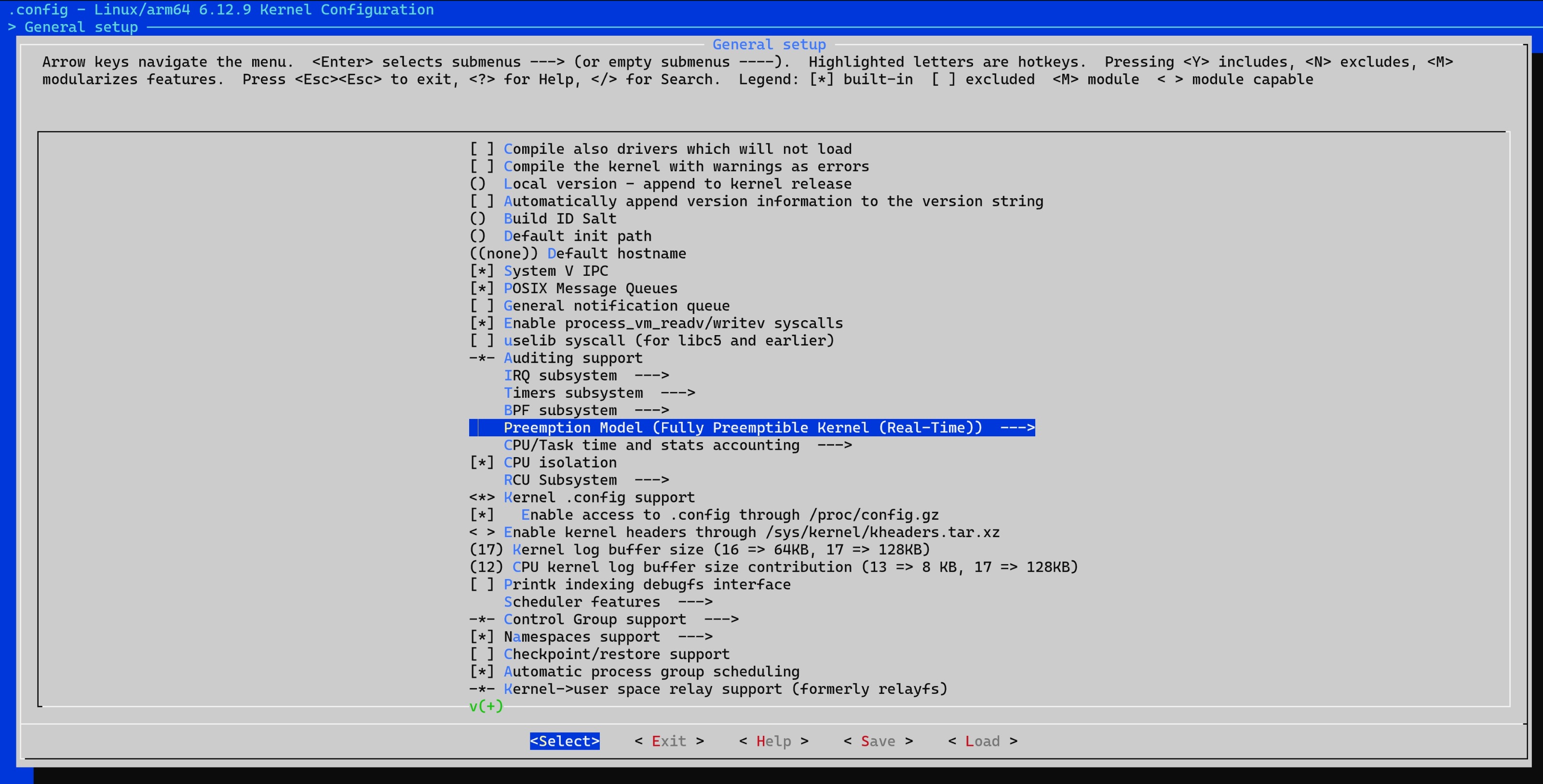
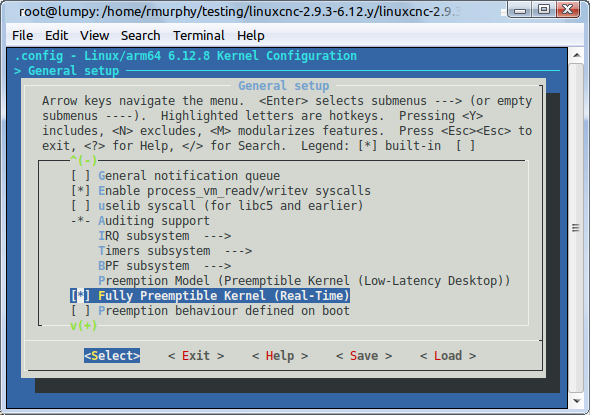
And for 6.12 the patches from kernel.org are still required, other wise you can only select a low-latency desktop, not a fully_preemptible model, which would appear to be "a proper realtime kernel" suitable for a RTOS.

I've work through the image builder for 6.12.y, and I can say from configuring the kernel, that the patches from kernel.org are required. Depending on the commit you chose in the 6.12.y branch there may not be a matching patchset.

So it's not just a case of choosing the 6.12.y branch but also the commit that matches a patchset that is available.

Image below shows a kernel from the 6.12.y branch, commit 236f36133619216a5c8faea1a8c2c93c83efc2f4, which is kernel 6.12.8. This is has been patched with those from kernel.org and a patch, required for the build process to succeed, from Rods repo. As you can see there is an option to select the full preemptible kernel. Without the patch this does not appear. Yes while the sysfs patch does add the ability to report to Linuxcnc the kernel is "realtime" the kernel is only a low-latency-desktop.
As I type I'm running an image build on another machine.
 
 
  • JT
  • JT's Avatar
12 Jan 2025 10:35
Replied by JT on topic Flex GUI Stylesheet Builder

Flex GUI Stylesheet Builder

Category: Flex GUI

A gradient would be good for something like a progressbar unless there's some other way to express zones.

Was messing with the qss builder a bit.....it definately needs an "open" function.

Also doesn't seem to be any way to apply the background colors. I assumed this would be part of "All" but it doesn't seem to work like that.


Gradients can be used to style buttons etc.

What would the open function do?

Can you elaborate on apply the background colors?

JT
  • Cant do this anymore bye all
  • Cant do this anymore bye all's Avatar
12 Jan 2025 10:11
Replied by Cant do this anymore bye all on topic RPi 5 with 6.12 PREEMPT_RT = Using POSIX non-realtime

RPi 5 with 6.12 PREEMPT_RT = Using POSIX non-realtime

Category: Installing LinuxCNC

No not all the realtime code is there (it is a very confusing situation, mainly thanks to tech bloggers, and other sundry types that aren't trying to build a fully preemptive arm kernel), there are still patches up on kernel.org. Without the patches at kernel.org there is no way to select a fully_preemptible kernel (and another one if working on the 6.1.69 kernel). The highest level you can chose is a low-latency desktop, but this is not the model really required for realtime. In another thread I post the differences between the different kernels, forum.linuxcnc.org/38-general-linuxcnc-q...6-12?start=30#318731

This has been a bit of a headache all weekend, I've built a successful image using the 6.1.y branch (unfortunatley first attempt didn't include the Linuxcnc binaries), the commit chosen is 6.1.69, the latest commit on that branch doesn't have a corresponding patch set is available.

I tried with the 6.12.y branch, but there was an issue with the build of the final image.

Finally working with the 6.1.y branch and the 6.1.69 commit it appears that I have a successful image, with the Linuxcnc binaries and spi turned on as default.

I think one reason for "rolling our own image" is to get away from any RPi Foundation branding. Another reason is that we can insert our own modifications in as well.
  • Aciera
  • Aciera's Avatar
12 Jan 2025 10:06

Adding 4th Axis to LinuxCNC with 7i92/7i77/7i76, Use absolute encoder or incr?

Category: Advanced Configuration

Note that some drives (even high quality ones like mitsubishi and yaskawa) have a noticeable lag in the simulated incremental encoder signal when using position loop.
forum.linuxcnc.org/10-advanced-configura...pain?start=30#193073

Absolute encoders should be very accurate but you may struggle to get the encoder data into Linuxcnc (ie to get the multiturn AND motor position ). If it does not offer the multiturn information then you would need a second signal from the rotary to indicate the correct rough orientation for the motor position to be valid. This would be very accurate if you can get a good index signal from the drive.

As an alternative you could also mount a separate incremental encoder directly on the rotary axis and use the encoder index signal for homing.
Displaying 19846 - 19860 out of 21878 results.
Time to create page: 1.963 seconds
Powered by Kunena Forum