
Gmoccapy - A new screen for linuxcnc
- mariusl
- Offline
- Platinum Member
-

Less
More
12 years 11 months ago #40563
by mariusl
Regards
Marius
www.bluearccnc.com
Replied by mariusl on topic Gmoccapy - A new screen for linuxcnc
Norbert I think the plasma.py.txt file that you uploaded is corrupt. This is what is inside.
Please repost that.
Please repost that.
Code:
<!DOCTYPE HTML PUBLIC "-//IETF//DTD HTML 2.0//EN">
<html><head>
<title>500 Internal Server Error</title>
</head><body>
<h1>Internal Server Error</h1>
<p>The server encountered an internal error or
misconfiguration and was unable to complete
your request.</p>
<p>Please contact the server administrator,
webmaster@linuxcnc.org and inform them of the time the error occurred,
and anything you might have done that may have
caused the error.</p>
<p>More information about this error may be available
in the server error log.</p>
<p>Additionally, a 404 Not Found
error was encountered while trying to use an ErrorDocument to handle the request.</p>
</body></html>
Regards
Marius
www.bluearccnc.com
Please Log in or Create an account to join the conversation.
- newbynobi
- Offline
- Moderator
-

Less
More
- Posts: 1931
- Thank you received: 394
12 years 11 months ago #40601
by newbynobi
Replied by newbynobi on topic Gmoccapy - A new screen for linuxcnc
Halo Marius,
you are right, the file is corrupt. I do not know why, may be, because the forum does not allow uploading python files.
I just send you the correct one by separate mail. After adding the file, you should see also the second panal.
Norbert
you are right, the file is corrupt. I do not know why, may be, because the forum does not allow uploading python files.
I just send you the correct one by separate mail. After adding the file, you should see also the second panal.
Norbert
Please Log in or Create an account to join the conversation.
- newbynobi
- Offline
- Moderator
-
Less
More
- Posts: 1931
- Thank you received: 394
12 years 11 months ago #40602
by newbynobi
Replied by newbynobi on topic Gmoccapy - A new screen for linuxcnc
Hallo,
this is the content of plasma.py
Norbert
this is the content of plasma.py
Code:
# This is only to show, that you can implement also your
# own python callbacks.
import linuxcnc
import os
class Plasma:
def __init__(self,halcomp,builder,useropts):
inifile = linuxcnc.ini(os.getenv("INI_FILE_NAME"))
self.builder = builder
self.THC_StepSize = self.builder.get_object("THC_StepSize")
value = inifile.find("PLASMA","THC_StepSize")
self.THC_StepSize.set_value(float(value))
self.TravelHeight = self.builder.get_object("TravelHeight")
value = inifile.find("PLASMA","TravelHeight")
self.TravelHeight.set_value(float(value))
self.TravelGap = self.builder.get_object("TravelGap")
value = inifile.find("PLASMA","TravelGap")
self.TravelGap.set_value(float(value))
self.SwitchTravel = self.builder.get_object("SwitchTravel")
value = inifile.find("PLASMA","SwitchTravel")
self.SwitchTravel.set_value(float(value))
self.PierceDelay = self.builder.get_object("PierceDelay")
value = inifile.find("PLASMA","PierceDelay")
self.PierceDelay.set_value(float(value))
self.PierceGap = self.builder.get_object("PierceGap")
value = inifile.find("PLASMA","PierceGap")
self.PierceGap.set_value(float(value))
self.Piercing_auto = self.builder.get_object("Piercing_auto")
value = inifile.find("PLASMA","Piercing_autostart")
self.Piercing_auto.set_active(int(value))
self.HeightLock = self.builder.get_object("HeightLock")
value = inifile.find("PLASMA","enable_HeightLock")
self.HeightLock.set_active(int(value))
self.CHL_Threshold = self.builder.get_object("CHL_Threshold")
value = inifile.find("PLASMA","CHL_Threshold")
self.CHL_Threshold.set_value(float(value))
self.THC_TargetVoltage = self.builder.get_object("THC_TargetVoltage")
value = inifile.find("PLASMA","THC_TargetVoltage")
self.THC_TargetVoltage.set_value(float(value))
def on_btn_torch_toggled(gtkobj,data=None):
if gtkobj.get_active():
print("active")
else:
print("not active")
def get_handlers(halcomp,builder,useropts):
return(Plasma(halcomp,builder,useropts))
Norbert
Please Log in or Create an account to join the conversation.
- mariusl
- Offline
- Platinum Member
-
12 years 11 months ago #40647
by mariusl
Regards
Marius
www.bluearccnc.com
Replied by mariusl on topic Gmoccapy - A new screen for linuxcnc
Thanks Norbert, all working now. I have started with the component but it is going to take a while as I have to test it very well. I am snowed under with work at this time but lucky it is all plasma machines so I will get enough opportunity to test.
Regards
Marius
www.bluearccnc.com
Please Log in or Create an account to join the conversation.
- sliptonic
- Offline
- Premium Member
-

Less
More
- Posts: 132
- Thank you received: 22
12 years 11 months ago #40652
by sliptonic
Replied by sliptonic on topic Gmoccapy - A new screen for linuxcnc
I've been playing with migrating my mill config from Axis to Gmoccapy and I'm really impressed. With the touchscreen, it's a pleasure to use. Thank you.
The only thing I haven't found is a way to toggle the spindle brake. If I need to customize this myself, I'd like to replace the coolant mist button with the brake toggle since I don't have mist.
Is there a guide to basic customization that I haven't found?
Thanks again!
The only thing I haven't found is a way to toggle the spindle brake. If I need to customize this myself, I'd like to replace the coolant mist button with the brake toggle since I don't have mist.
Is there a guide to basic customization that I haven't found?
Thanks again!
Please Log in or Create an account to join the conversation.
- DaOne
- Offline
- Premium Member
-
Less
More
- Posts: 155
- Thank you received: 6
12 years 11 months ago - 12 years 11 months ago #40657
by DaOne
Replied by DaOne on topic Gmoccapy - A new screen for linuxcnc
I am having a problem with the lathe screen in imperial mode. The diameter is displaying metric while the radius is showing imperial. I also show metric in the "Max Velocity" box when I jog the axis.
In my ini I have it setup for imperial like this...
Here is a screen shot...
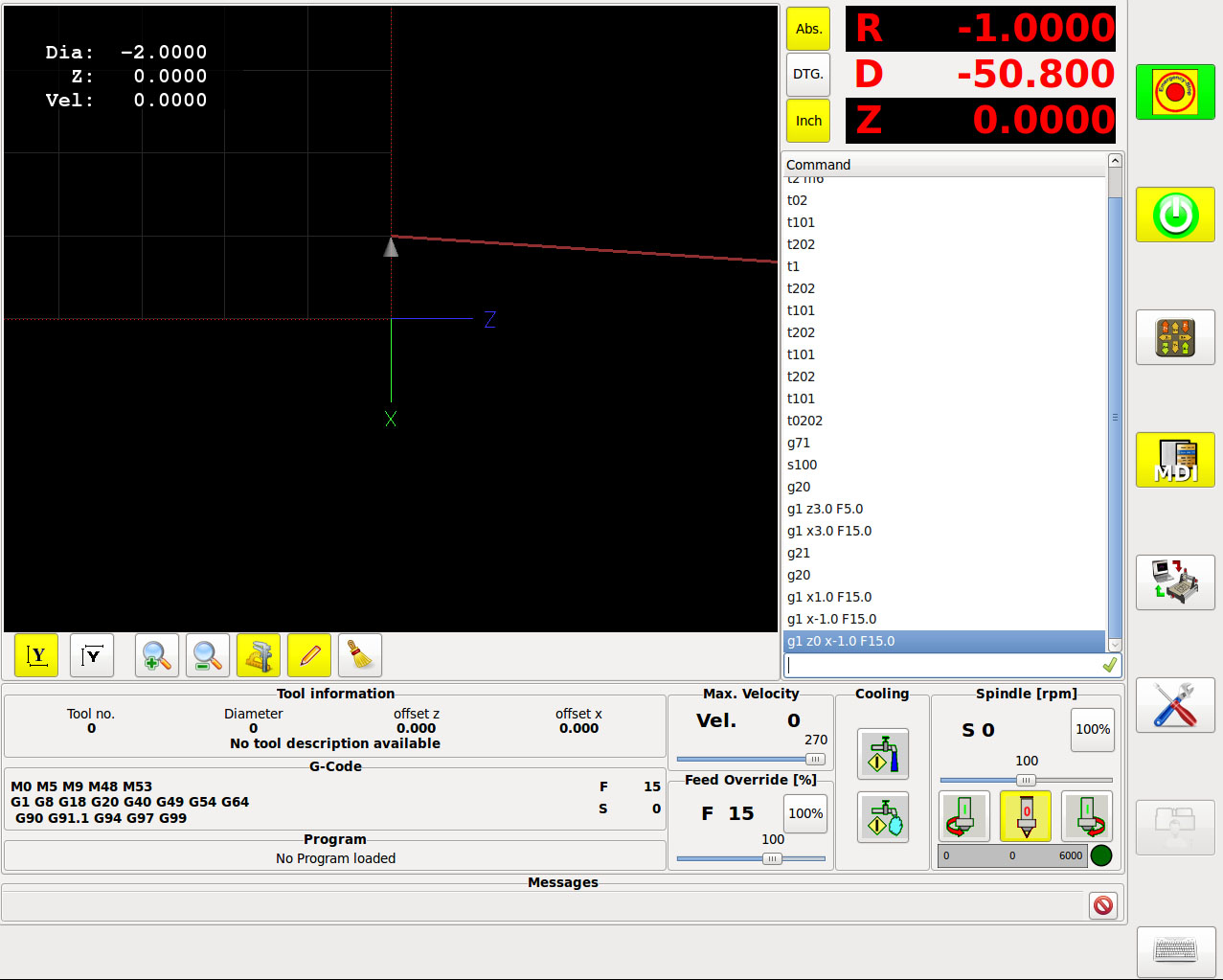
Is there another setting I need to make or is this a bug?
Thanks,
Wes
In my ini I have it setup for imperial like this...
Code:
[TRAJ]
LINEAR_UNITS = inch
[RS274NGC]
RS274NGC_STARTUP_CODE = G18 G20 G40 G49 G54 G80 G90 G94 G8 M9 M5 G64 P0.005
Here is a screen shot...
Is there another setting I need to make or is this a bug?
Thanks,
Wes
Last edit: 12 years 11 months ago by DaOne.
Please Log in or Create an account to join the conversation.
Moderators: newbynobi, HansU
Time to create page: 0.186 seconds