
- Posts: 147
- Thank you received: 12
Gmoccapy - A new screen for linuxcnc
- jtc
- Offline
- Premium Member
-

Less
More
13 years 1 day ago #40415
by jtc
Replied by jtc on topic Gmoccapy - A new screen for linuxcnc
Hi Norbert.
Currently I'm using axis just while we are doing hardware implementation, but the goal is to use Gmoccapy in the end.
From the servo drives we have a "servo ready" signal. The goal is to open the GUI, and after press power on button, it will enable the servo drives, but the home and jog in manual mode should wait to the servo ready signals . In your current version it is any way to do that? preferentially with hal pins...
a "bug" that I find in the Gmoccapy (and axis to), is that in back tool lathe, the inserts shapes disappear. It will be great if they can be showed correctly.
Tnks,
João Tiago
Currently I'm using axis just while we are doing hardware implementation, but the goal is to use Gmoccapy in the end.
From the servo drives we have a "servo ready" signal. The goal is to open the GUI, and after press power on button, it will enable the servo drives, but the home and jog in manual mode should wait to the servo ready signals . In your current version it is any way to do that? preferentially with hal pins...
a "bug" that I find in the Gmoccapy (and axis to), is that in back tool lathe, the inserts shapes disappear. It will be great if they can be showed correctly.
Tnks,
João Tiago
Please Log in or Create an account to join the conversation.
- newbynobi
- Offline
- Moderator
-

Less
More
- Posts: 1931
- Thank you received: 394
13 years 1 day ago - 13 years 1 day ago #40431
by newbynobi
Hallo Marius,
sorry for the late answer. Please take the attached files and replace the existing ones, so you get the missing TravelGap.
(you have to delete the txt extension from plasma.py.txt to be called plasma.py)
I tried to include also the buttons to change the voltage, but I got problems, that the handlers are not found, I will have to look at that closer.
Norbert
Replied by newbynobi on topic Gmoccapy - A new screen for linuxcnc
Norbert,
Sorry I took so long to get back to you. I looked at the pins and it seems ok but for one missing setting. We have a pierce gap but require a cutting gap/height as well. This is not the same as the travel height.
The "step size" setting can change to a percentage (of the feedrate) instead of the 0.0001 . I will use this in the component to adjust the z travel speed.
The lock percentage must be able to go up to 98% for very thick steel.
What happens is as follows. When we get a M03 the torched is moved towards the job at a probe speed (from the INI) until the switch is made. We know the switch offset so we travel back that much and set the z zero. Then we travel up to the pierce gap and start the torch. We wait for an arc good signal and then move the torch down to the cut height/gap. The thc looks at the up/down signals and will adjust the z up or down at a speed percentage of the feed rate. At the end of the cut the torch is retracted to the travel height. Ans the process repeats.
Edit: Oh the one thing that gets changed on the fly while cutting is the target voltage. A large plus and minus button to change the value would be very useful instead of the spinbox.
Hallo Marius,
sorry for the late answer. Please take the attached files and replace the existing ones, so you get the missing TravelGap.
(you have to delete the txt extension from plasma.py.txt to be called plasma.py)
I tried to include also the buttons to change the voltage, but I got problems, that the handlers are not found, I will have to look at that closer.
Norbert
Last edit: 13 years 1 day ago by newbynobi.
Please Log in or Create an account to join the conversation.
- newbynobi
- Offline
- Moderator
-
Less
More
- Posts: 1931
- Thank you received: 394
13 years 1 day ago #40433
by newbynobi
Halo João,
at the moment it is not possible to realize your wish enable jog and home with an external signal out of the box, but...
This is gmoccapy, so there is a solution
Switch on your machine with an external button and connect the servo ready signal to halui.machine.on, that will enable the machine on button of gmoccapy. If you want the signal to switch off the machine you will have to connect also halui.machine.off.
Or you make an own glade button on a custom glade panel.
The mentioned "BUG" is known, but I am not the programmer of gremlin and at the moment not able to fix that. We will have to wait.
But why not using the estop signal to enable the servos and connect the servo ready signal to on?
Norbert
Replied by newbynobi on topic Gmoccapy - A new screen for linuxcnc
From the servo drives we have a "servo ready" signal. The goal is to open the GUI, and after press power on button, it will enable the servo drives, but the home and jog in manual mode should wait to the servo ready signals . In your current version it is any way to do that? preferentially with hal pins...
a "bug" that I find in the Gmoccapy (and axis to), is that in back tool lathe, the inserts shapes disappear. It will be great if they can be showed correctly.
Halo João,
at the moment it is not possible to realize your wish enable jog and home with an external signal out of the box, but...
This is gmoccapy, so there is a solution
Switch on your machine with an external button and connect the servo ready signal to halui.machine.on, that will enable the machine on button of gmoccapy. If you want the signal to switch off the machine you will have to connect also halui.machine.off.
Or you make an own glade button on a custom glade panel.
The mentioned "BUG" is known, but I am not the programmer of gremlin and at the moment not able to fix that. We will have to wait.
But why not using the estop signal to enable the servos and connect the servo ready signal to on?
Norbert
The following user(s) said Thank You: jtc
Please Log in or Create an account to join the conversation.
- jtc
- Offline
- Premium Member
-
Less
More
- Posts: 147
- Thank you received: 12
13 years 1 day ago #40434
by jtc
Replied by jtc on topic Gmoccapy - A new screen for linuxcnc
I'm trying to avoid this solution. for me is more correct only power on the drives when press power on button. if I connect this on that way, the power button will go on automatically when the drives get ready. External power on button is out of question, the control panel was already made.
But, its a solution
But, its a solution
Please Log in or Create an account to join the conversation.
- mariusl
- Offline
- Platinum Member
-

12 years 11 months ago #40550
by mariusl
Regards
Marius
www.bluearccnc.com
Replied by mariusl on topic Gmoccapy - A new screen for linuxcnc
Norbert
Sorry it takes so long but for some reason the notification of your topic replay did not come through. I have been waiting and wondering why you are taking so ling meantime it has been waiting for a week already.
I loaded the files that you attached but now I get now plasma features at all and no error either. It just does not load or show nothing. No glade panel.
While we are at it, I dont know if I asked before but is it possible to store the last selected values in all option, text or spinbox inputs to the preference file or any other file?
For Axis Arceye wrote a component to save the parameters but I believe that in Gscreen it might be done another way.
Sorry it takes so long but for some reason the notification of your topic replay did not come through. I have been waiting and wondering why you are taking so ling meantime it has been waiting for a week already.
I loaded the files that you attached but now I get now plasma features at all and no error either. It just does not load or show nothing. No glade panel.
While we are at it, I dont know if I asked before but is it possible to store the last selected values in all option, text or spinbox inputs to the preference file or any other file?
For Axis Arceye wrote a component to save the parameters but I believe that in Gscreen it might be done another way.
Regards
Marius
www.bluearccnc.com
Please Log in or Create an account to join the conversation.
- mariusl
- Offline
- Platinum Member
-
12 years 11 months ago #40561
by mariusl
Regards
Marius
www.bluearccnc.com
Replied by mariusl on topic Gmoccapy - A new screen for linuxcnc
Norbert
If you do a show pin in the debugger it looks like all the plasma panels loaded but the plasma.glade does not show on screen. The pins are all there.
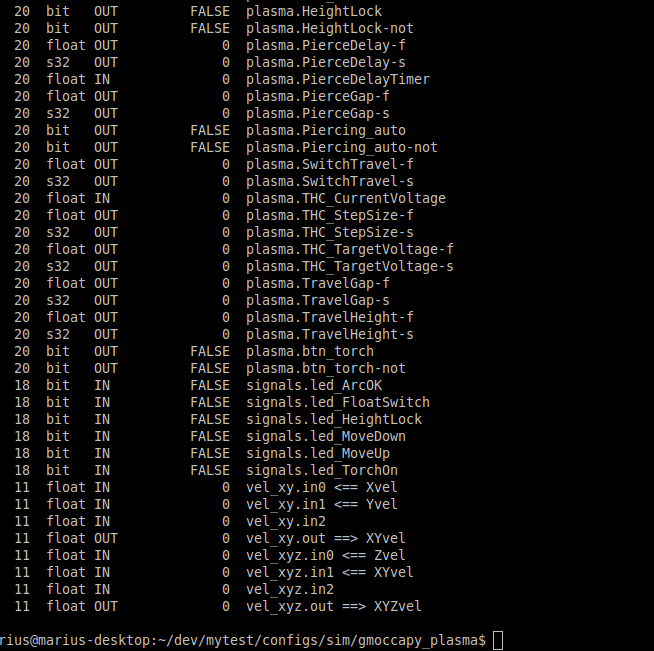
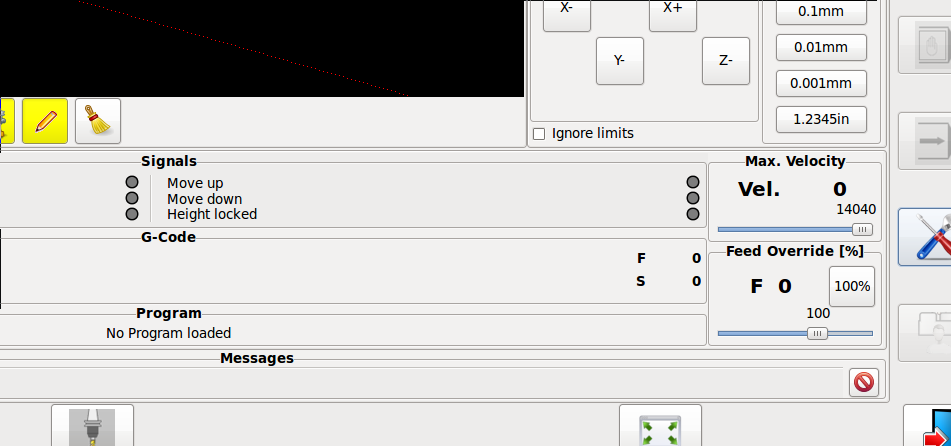
If you do a show pin in the debugger it looks like all the plasma panels loaded but the plasma.glade does not show on screen. The pins are all there.
Regards
Marius
www.bluearccnc.com
Please Log in or Create an account to join the conversation.
Moderators: newbynobi, HansU
Time to create page: 0.192 seconds