
- Posts: 5713
- Thank you received: 2100


Please Log in or Create an account to join the conversation.
Remove the THC Enable checkbox and label from the run tab.
Please Log in or Create an account to join the conversation.
Please Log in or Create an account to join the conversation.
But you can do this from the radiobuttons.Remove the THC Enable checkbox and label from the run tab.
Personally, I think this needs to stay. There will be times when times when you will want to disable this just like you can disable the torch.
That is the case now, if your actual cut feed rate is less then 99.9% of the materials cut feed rate then THC will not be enabled.Then, the need to turn the THC on and off from within gcode would be vastly diminished as the corner lock will do it for us.
What is the intended purpose of using adaptive feed to change the feed rate?Being able to control cutting speed with adaptive feed can be implemented in HAL as I suggested (if it ends up working OK).
Please Log in or Create an account to join the conversation.
phillc54 wrote: Thanks Rod,
But you can do this from the radiobuttons.Remove the THC Enable checkbox and label from the run tab.
Personally, I think this needs to stay. There will be times when times when you will want to disable this just like you can disable the torch.
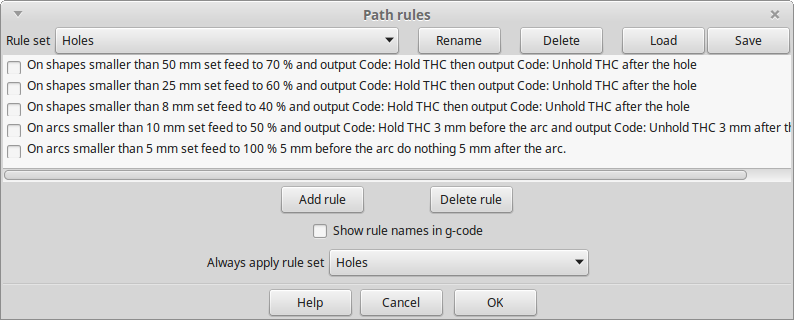
That is the case now, if your actual cut feed rate is less then 99.9% of the materials cut feed rate then THC will not be enabled.Then, the need to turn the THC on and off from within gcode would be vastly diminished as the corner lock will do it for us.
What is the intended purpose of using adaptive feed to change the feed rate?Being able to control cutting speed with adaptive feed can be implemented in HAL as I suggested (if it ends up working OK).
Cheers, Phill.
Please Log in or Create an account to join the conversation.
Please Log in or Create an account to join the conversation.