
- Posts: 2581
- Thank you received: 907
RS485 For Hypertherms
- snowgoer540
- Offline
- Moderator
-

Less
More
6 years 6 months ago #163352
by snowgoer540
1. Phill addressed.
2. I am using a PM65XP. That is a good point though, not sure if marking mode is a different number on PM45XP. I can try to discern from the manual, but without one to test it's hard to say.
3. I dont think it's necessary. I think we should have AMPS and PSI as XX (no decimals). Proper units (Bars) needs to have decimal though.
1B. Good deal.
2B. Agree, see #3 above
3B. Currently it's not how it works, but Phill is addressing it. Also, for my unit a value between the machine's Min and Max will put it in manual mode. A value outside the min and max will cause an error, and a value of 0 will put it in automatic mode. I would imagine at this point he's not far off from having it poll from the machine correctly.
4B. Ok good to know, I just hadnt had any errors from the limited testing I did in the actual GUI. It was dinner time, and the lady was getting impatient .
.
Thanks again for all the help/suggestions. Interested to learn how your RS-232 card is actually communicating with the PM.
Replied by snowgoer540 on topic RS485 For Hypertherms
thefabricator03 wrote:
snowgoer540 wrote: sin_title_o07_s00?ie=UTF8&psc=1]Converter[/url]
Some bugs for Phill to squash:
For the Port tester code:
1. The default values will cause an error since they are out of range for most of the Powermax's. I would suggest making the Default Amps 40 and pressure 75. Something that is in the range for even the 45 amp model.
2. The max pressure for gouge mode is different than the other two. It's 3.0-4.0 Bars, or 43-58 psi. It isn't a huge deal, it just causes a remote controller pressure error. I am not sure if you set this manually in the code, or if you read it from the machine. I think the latter is possible from what I read in the protocol manual, so maybe there is an error in the code there?
3. I dont think the Powermax can handle decimal places for PSI (BAR it can). I also wonder if it can handle decimal for AMPS as well, but I do see that the Serial Manual from Hypertherm does give 55.5A as an example.
For the Plasmac GUI:
1B. When comms are enabled, the tooltip for hovering over Amps should change to say that this controls the amperage for the plasma cutter or something to the sort, currently it says it's just reference, which is true when the comms are off.
2B. I dont think the Powermax can handle decimal places for PSI (BAR it can), I wonder about AMPS too, see #3 above.. I know it cant display it for sure, not sure if that means it's irrelevant when cutting or not.
3B. It might be nice to note with a tooltip over the Pressure that a setting of 0 will set the gas mode to Automatic mode. Likewise, the pressures should mimic the min and max from the different cut modes.. Meaning it wont let you enter a psi of less than 43 for gouging mode, for example. (again I think maybe you can read this from the machine?)
4B. Where do error messages show up in the GUI?
1: Not sure what Phill has set for the default values since I am still using his development versions and have not updated since last year.
2: What Powermax are you using? If it is a PM45XP - it has the ablilty to mark, is that using the gouge mode? My PowerMax 125 does not have that ability.
3: Even if the Powermax could handle decimals for Amps, do you really think its necessary? I cannot see the benefit for a plasma unit to have such resolution. A laser unit maybe. Same with the PSI. Not sure how easy it would be for Phil to add that but really not sure on the value.
1B: I agree with that. Just a little feature that would be handy.
2B: Same as No: 3 above
3B: I agree it would be handy to have a note that 0 would set the machine into Auto mode. But from my testing when you select a mode the interface reads from the unit and only lets you select values that are relevant to the plasma unit. Maybe that is not how it works?
4B: The error messages show up as a pop up in the center of the screen. At least that is my experience with Axis.
I will still map my connector at my machine tomorrow and double check my PCI card part number. I did pay a bit more for the card about 8 years ago, was a bit over $120AUD at the time.
1. Phill addressed.
2. I am using a PM65XP. That is a good point though, not sure if marking mode is a different number on PM45XP. I can try to discern from the manual, but without one to test it's hard to say.
3. I dont think it's necessary. I think we should have AMPS and PSI as XX (no decimals). Proper units (Bars) needs to have decimal though.
1B. Good deal.
2B. Agree, see #3 above
3B. Currently it's not how it works, but Phill is addressing it. Also, for my unit a value between the machine's Min and Max will put it in manual mode. A value outside the min and max will cause an error, and a value of 0 will put it in automatic mode. I would imagine at this point he's not far off from having it poll from the machine correctly.
4B. Ok good to know, I just hadnt had any errors from the limited testing I did in the actual GUI. It was dinner time, and the lady was getting impatient
.Thanks again for all the help/suggestions. Interested to learn how your RS-232 card is actually communicating with the PM.
Please Log in or Create an account to join the conversation.
- rodw
- Offline
- Platinum Member
-

Less
More
- Posts: 12170
- Thank you received: 4153
6 years 6 months ago #163388
by rodw
You also seem to forget the moon goers lost a spaceship because they did not use those proper (SI) units.
Did you know that only three countries in the world don't use SI units? And one of them has made the decision to convert. Here is an interesting map and worth a read.

www.zmescience.com/other/map-of-countrie...g-the-metric-system/
Replied by rodw on topic RS485 For Hypertherms
snowgoer540 wrote: EDIT: Proper units LOL made me chuckle. What was that saying? Two types of countries, those who use the metric system, and those who have been to the moon
You also seem to forget the moon goers lost a spaceship because they did not use those proper (SI) units.
Did you know that only three countries in the world don't use SI units? And one of them has made the decision to convert. Here is an interesting map and worth a read.
www.zmescience.com/other/map-of-countrie...g-the-metric-system/
Please Log in or Create an account to join the conversation.
- phillc54
- Offline
- Platinum Member
-
Less
More
- Posts: 5711
- Thank you received: 2100
6 years 6 months ago #163401
by phillc54
Replied by phillc54 on topic RS485 For Hypertherms
Are we still talking about the port tester here?I did run into some issues. When I start the program, it defaults to Normal Mode and 0 PSI in the Value column, which is good. I can confirm that it is in Automatic mode for pressure control (PM wont let me access the manual settings). This works for Normal and CPA. However when I change to Gouge, it changes the Value column to the MAX pressure. From there, if I go back to Normal or CPA, it changes to the pressure to the MIN value and I cant get back to 0, no matter what mode I put it in. In Normal for example, if I type in 0 and hit enter, it defaults the field to the MIN (63), and wont change the value to 0 I could change it to 64 (for example) though. I can confirm that it is in manual mode from this point forward and wont go back to automatic (since it wont take a 0 in the script.
Please Log in or Create an account to join the conversation.
- phillc54
- Offline
- Platinum Member
-
Less
More
- Posts: 5711
- Thank you received: 2100
6 years 6 months ago #163440
by phillc54
Replied by phillc54 on topic RS485 For Hypertherms
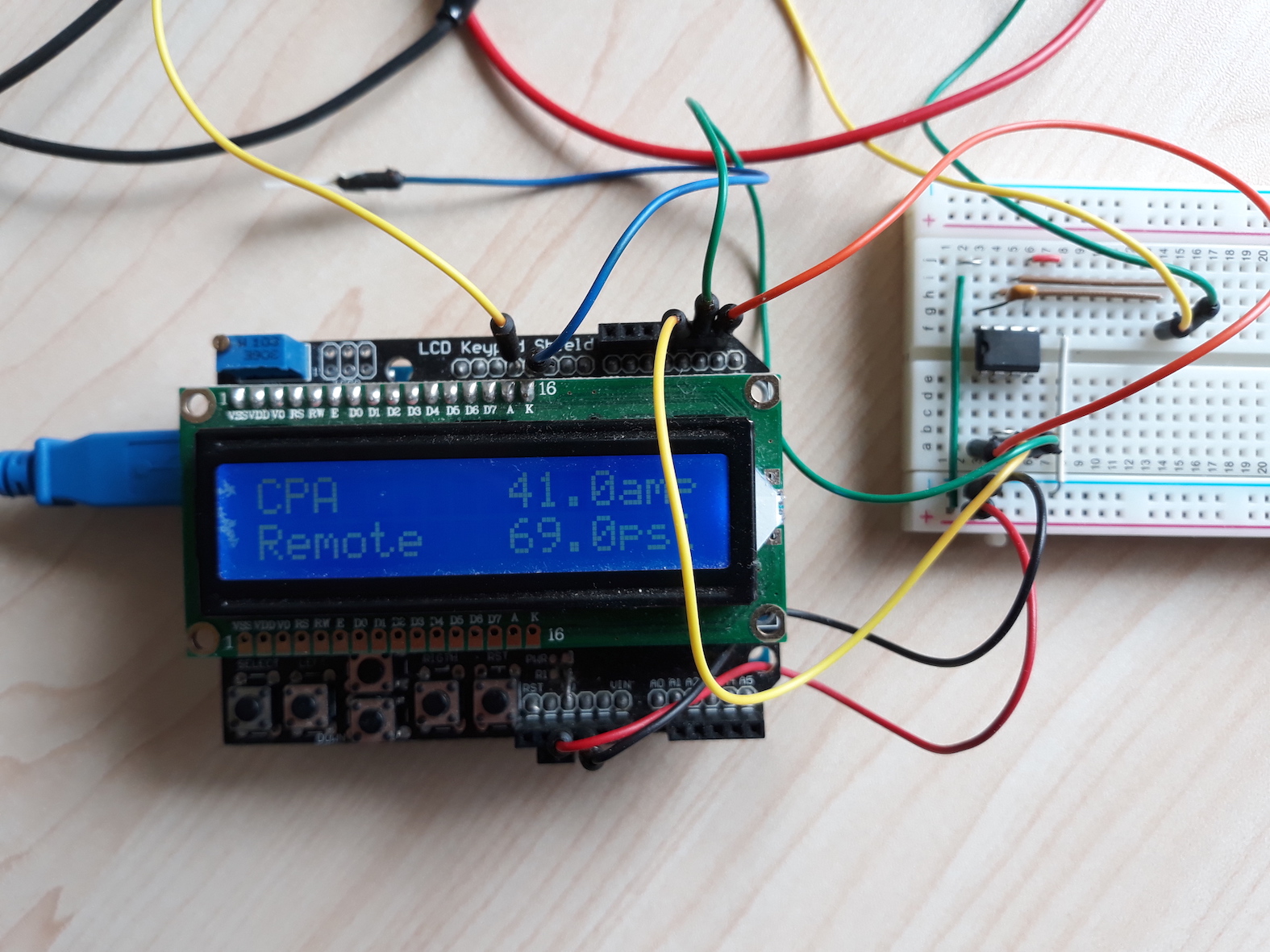
Here is the next try at getting the port tester right.
Would it be possible for you to switch your machine to bar for a test and get me the min and max values to add to the imperial set you posted before.
I think I will spend a bit of time getting the Arduino to spit out the same values as that would make my testing a bit more comprehensive. It would be nice to get all these values for all the Powermax models.
I thought I would throw in a pic of my pmax000...
Would it be possible for you to switch your machine to bar for a test and get me the min and max values to add to the imperial set you posted before.
I think I will spend a bit of time getting the Arduino to spit out the same values as that would make my testing a bit more comprehensive. It would be nice to get all these values for all the Powermax models.
I thought I would throw in a pic of my pmax000...
Please Log in or Create an account to join the conversation.
- snowgoer540
- Offline
- Moderator
-
Less
More
- Posts: 2581
- Thank you received: 907
6 years 6 months ago #163442
by snowgoer540
Yes, sorry. If it helps to make videos, I can do that too?
Replied by snowgoer540 on topic RS485 For Hypertherms
phillc54 wrote:
Are we still talking about the port tester here?I did run into some issues. When I start the program, it defaults to Normal Mode and 0 PSI in the Value column, which is good. I can confirm that it is in Automatic mode for pressure control (PM wont let me access the manual settings). This works for Normal and CPA. However when I change to Gouge, it changes the Value column to the MAX pressure. From there, if I go back to Normal or CPA, it changes to the pressure to the MIN value and I cant get back to 0, no matter what mode I put it in. In Normal for example, if I type in 0 and hit enter, it defaults the field to the MIN (63), and wont change the value to 0 I could change it to 64 (for example) though. I can confirm that it is in manual mode from this point forward and wont go back to automatic (since it wont take a 0 in the script.
Yes, sorry. If it helps to make videos, I can do that too?
Please Log in or Create an account to join the conversation.
- snowgoer540
- Offline
- Moderator
-
Less
More
- Posts: 2581
- Thank you received: 907
6 years 6 months ago #163443
by snowgoer540
I will test it tomorrow morning, and definitely I can get the Bar values as well, sorry I should have thought of that. Wish I could help with all of the values from all models. I looked in my manual and couldn’t find them there for mine... I just got them from the screen prior to your changing the code to read it from the machine. The protocol manual seems a bit outdated as well, but I guess it works.
Haha the pmax000, that’s awesome. Seems like it uses a lot less electricity than mine lol. I have always been intrigued by reverse engineering. I wonder what it would take to reverse engineer the chip/interface on the power max side. Probably a lot of time none of us have for starters hah.
Thanks again.
Replied by snowgoer540 on topic RS485 For Hypertherms
phillc54 wrote: Here is the next try at getting the port tester right.
Would it be possible for you to switch your machine to bar for a test and get me the min and max values to add to the imperial set you posted before.
I think I will spend a bit of time getting the Arduino to spit out the same values as that would make my testing a bit more comprehensive. It would be nice to get all these values for all the Powermax models.
I thought I would throw in a pic of my pmax000...
I will test it tomorrow morning, and definitely I can get the Bar values as well, sorry I should have thought of that. Wish I could help with all of the values from all models. I looked in my manual and couldn’t find them there for mine... I just got them from the screen prior to your changing the code to read it from the machine. The protocol manual seems a bit outdated as well, but I guess it works.
Haha the pmax000, that’s awesome. Seems like it uses a lot less electricity than mine lol. I have always been intrigued by reverse engineering. I wonder what it would take to reverse engineer the chip/interface on the power max side. Probably a lot of time none of us have for starters hah.
Thanks again.
Please Log in or Create an account to join the conversation.
Moderators: snowgoer540
Time to create page: 0.941 seconds