
- Posts: 574
- Thank you received: 96
Сustomization QTvcp
- hottabich
- Offline
- Platinum Member
-

Less
More
6 years 6 months ago #164592
by hottabich
Replied by hottabich on topic Сustomization QTvcp
The macro tab works perfectly. I cannot implement the Macro tab in MDI Touchy.
UTB is not necessary for me. I just check the operation of the widget.
UTB is not necessary for me. I just check the operation of the widget.
Please Log in or Create an account to join the conversation.
- cmorley
- Offline
- Moderator
-

Less
More
- Posts: 7368
- Thank you received: 2181
6 years 6 months ago #164593
by cmorley
Replied by cmorley on topic Сustomization QTvcp
Oh yes i understand now!
I forgot about macros on the touchyMDI and never finished it!
Chris
I forgot about macros on the touchyMDI and never finished it!
Chris
Please Log in or Create an account to join the conversation.
- hottabich
- Offline
- Platinum Member
-
Less
More
- Posts: 574
- Thank you received: 96
6 years 6 months ago - 6 years 6 months ago #164594
by hottabich
Replied by hottabich on topic Сustomization QTvcp
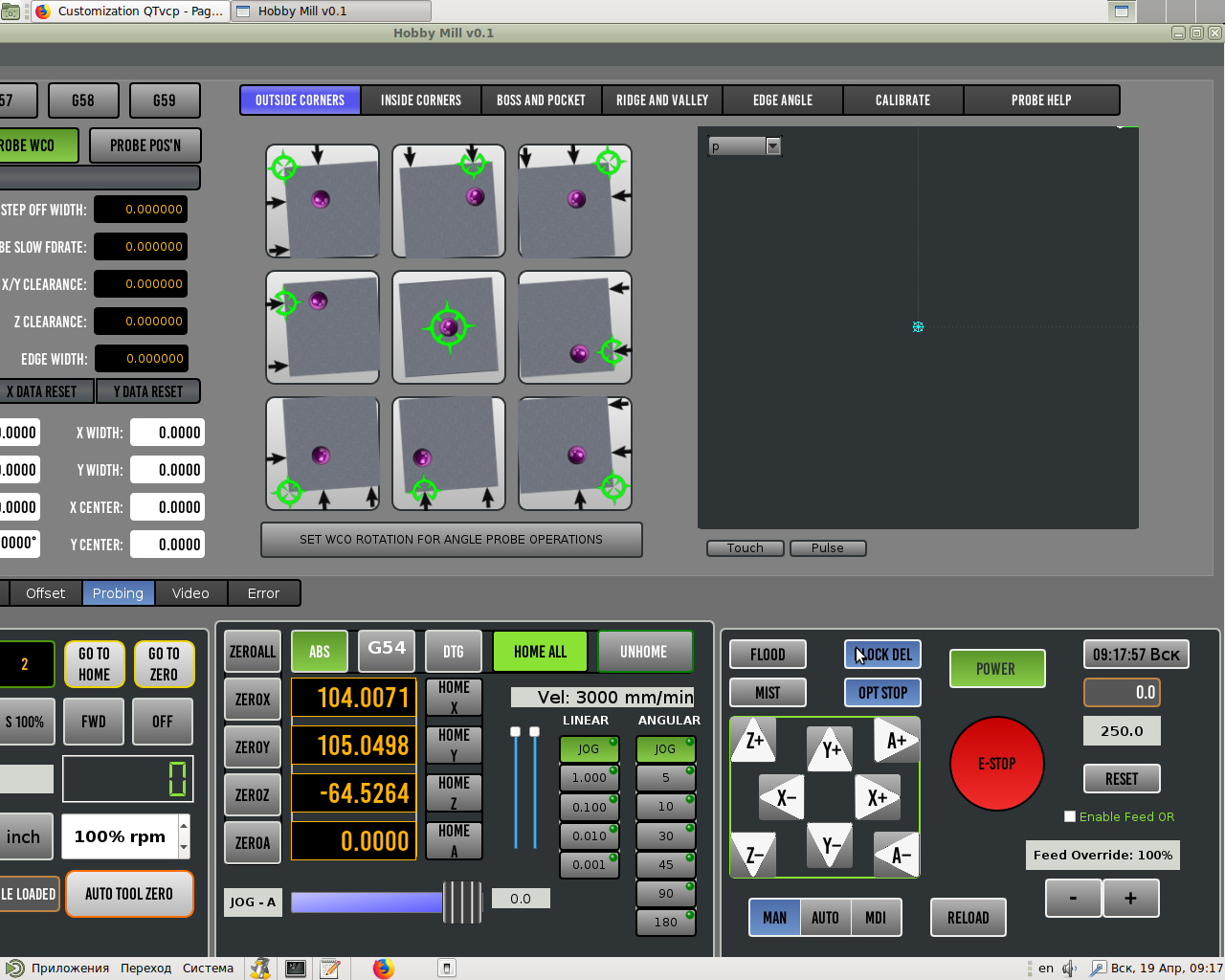
There is an interesting question. I added Plot to the Probe page. Why are two GcodeGraphics conflicting? And is there a possibility to add a button in Qtvcp
ProbeSim?
ProbeSim?
Last edit: 6 years 6 months ago by hottabich.
Please Log in or Create an account to join the conversation.
- cmorley
- Offline
- Moderator
-
Less
More
- Posts: 7368
- Thank you received: 2181
6 years 6 months ago #164595
by cmorley
Replied by cmorley on topic Сustomization QTvcp
plotting uses a fair amount of process power. There is a special widget to move other widgets from place to place. QtDefault demonstrates this with the 'big view' button. it cycles the display by moving widgets around.
This might be better way to do it - its a little complicated. I'll have to refresh my memory on the widget.
I have not tried two plotters so I don't know what the problem is.
add a button for what?
This might be better way to do it - its a little complicated. I'll have to refresh my memory on the widget.
I have not tried two plotters so I don't know what the problem is.
add a button for what?
The following user(s) said Thank You: hottabich
Please Log in or Create an account to join the conversation.
- hottabich
- Offline
- Platinum Member
-
Less
More
- Posts: 574
- Thank you received: 96
6 years 6 months ago - 6 years 6 months ago #164597
by hottabich
Replied by hottabich on topic Сustomization QTvcp
Launch my interface and switch the visualization p, x, y, z and also move
picture in the window. Everything is necessary for checking Probe in simulator. ProbeSim mimics
(probe in). (QtDefault demonstrates this with the 'big view' button. it cycles the display by moving widgets around.)
If so make it super!
picture in the window. Everything is necessary for checking Probe in simulator. ProbeSim mimics
(probe in). (QtDefault demonstrates this with the 'big view' button. it cycles the display by moving widgets around.)
If so make it super!
Last edit: 6 years 6 months ago by hottabich.
Please Log in or Create an account to join the conversation.
- cmorley
- Offline
- Moderator
-
Less
More
- Posts: 7368
- Thank you received: 2181
6 years 6 months ago #164602
by cmorley
Replied by cmorley on topic Сustomization QTvcp
Get a button to call this function when pressed and released.
Code:
def SimProbeButton(self, state):
if state:
hal.set_P('motion.probe-input','1')
else:
hal.set_P('motion.probe-input','o')
The following user(s) said Thank You: hottabich
Please Log in or Create an account to join the conversation.
Moderators: cmorley
Time to create page: 0.645 seconds