
- Posts: 319
- Thank you received: 90
Error in tool_offsetview.py
- MarkoPolo
- Offline
- Elite Member
-

Less
More
1 year 11 months ago #315597
by MarkoPolo
Replied by MarkoPolo on topic Error in tool_offsetview.py
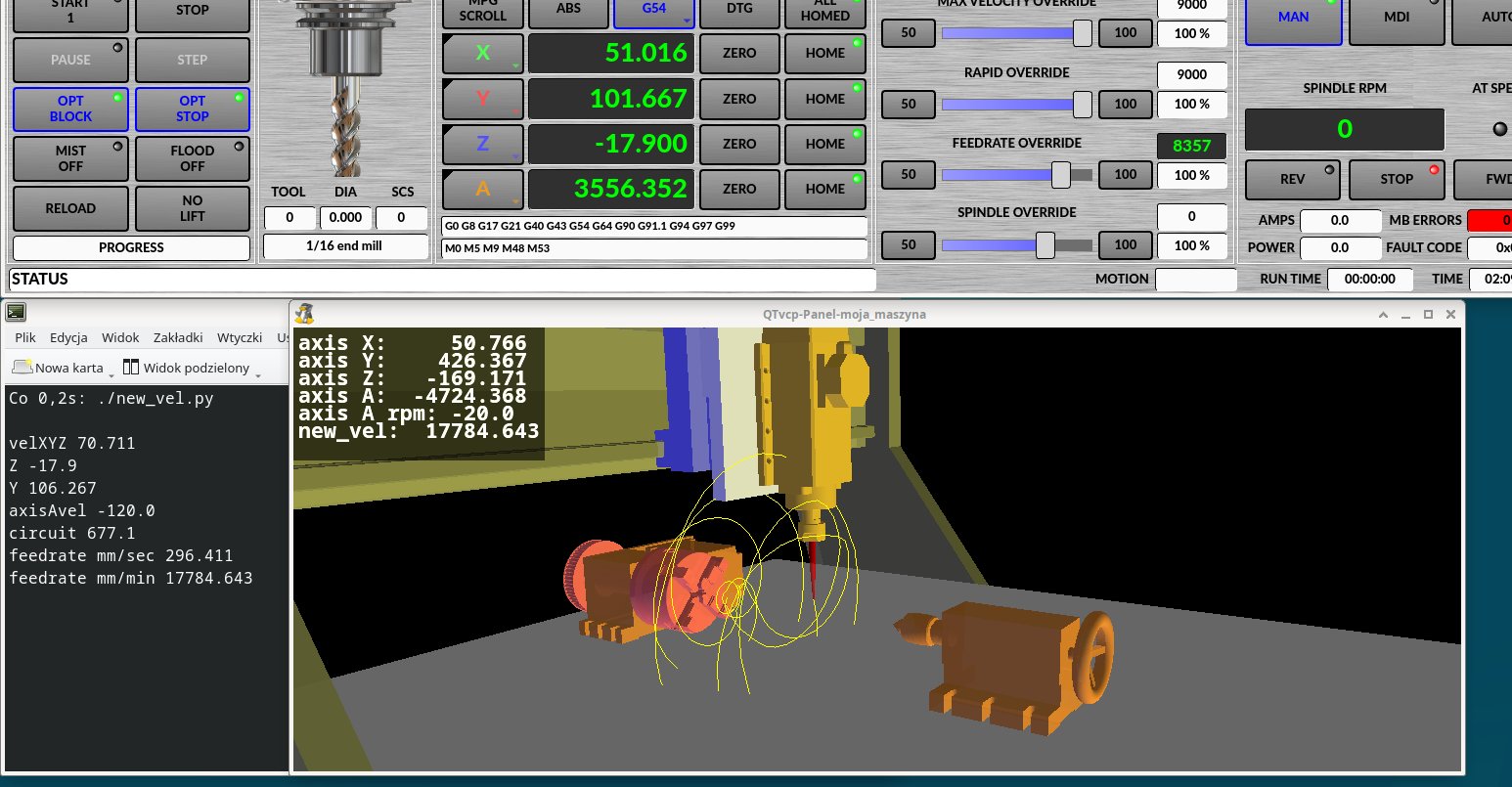
As for the feedrate, I made a test script in python that calculates the feedrate.
It adds the "vel XYZ" velocity to the linear velocity of the A axis, taking into account the distance of the cutter from the A axis rotation axis.
Currently, it adds the angular velocity to the "velXYZ" velocity, which completely falsifies the "feedrate override" value.
Maybe it would be worth adding a pin with the velXYZA value?
It adds the "vel XYZ" velocity to the linear velocity of the A axis, taking into account the distance of the cutter from the A axis rotation axis.
Currently, it adds the angular velocity to the "velXYZ" velocity, which completely falsifies the "feedrate override" value.
Maybe it would be worth adding a pin with the velXYZA value?
Please Log in or Create an account to join the conversation.
- cmorley
- Offline
- Moderator
-

Less
More
- Posts: 7368
- Thank you received: 2181
1 year 10 months ago #316074
by cmorley
Replied by cmorley on topic Error in tool_offsetview.py
fixed the logo problem. Can you show your calculation?
Please Log in or Create an account to join the conversation.
- MarkoPolo
- Offline
- Elite Member
-
Less
More
- Posts: 319
- Thank you received: 90
1 year 10 months ago #316131
by MarkoPolo
Replied by MarkoPolo on topic Error in tool_offsetview.py
The script calculates fairly correctly if g54 z0 is set to the A-axis rotation axis, and Y0 is above the A-axis center.
This is just a rough idea, to calculate the speed at the tool tip completely correctly, a few corrections would have to be made.
The script does not have a loop, so I run it like this: "watch -n0.2 ./new_vel.py"
This is just a rough idea, to calculate the speed at the tool tip completely correctly, a few corrections would have to be made.
The script does not have a loop, so I run it like this: "watch -n0.2 ./new_vel.py"
Please Log in or Create an account to join the conversation.
- MarkoPolo
- Offline
- Elite Member
-
Less
More
- Posts: 319
- Thank you received: 90
1 year 5 months ago #328476
by MarkoPolo
Replied by MarkoPolo on topic Error in tool_offsetview.py
Hi Cmorley
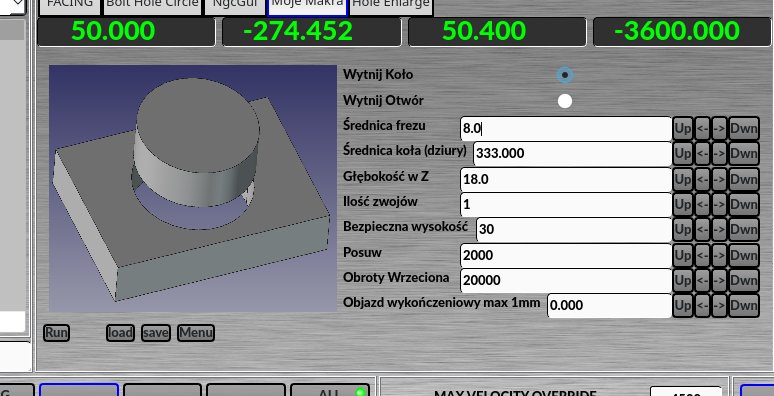
I like the MacroTab Widget, you can easily make your own simple macros, but I think it needs some fixes.
I can save the current parameters to a file, but there is a problem with restoring the settings from the file.
The "set_style" function also does not work. I tried to fix it, but so far without success.
Could you look at this problem?
I like the MacroTab Widget, you can easily make your own simple macros, but I think it needs some fixes.
I can save the current parameters to a file, but there is a problem with restoring the settings from the file.
The "set_style" function also does not work. I tried to fix it, but so far without success.
Could you look at this problem?
Please Log in or Create an account to join the conversation.
- cmorley
- Offline
- Moderator
-
Less
More
- Posts: 7368
- Thank you received: 2181
1 year 5 months ago - 1 year 5 months ago #328509
by cmorley
Replied by cmorley on topic Error in tool_offsetview.py
You bet. I will look at it as soon as I can.
Last edit: 1 year 5 months ago by cmorley.
Please Log in or Create an account to join the conversation.
- cmorley
- Offline
- Moderator
-
Less
More
- Posts: 7368
- Thank you received: 2181
1 year 5 months ago #328561
by cmorley
Replied by cmorley on topic Error in tool_offsetview.py
Can you give more detail of the load problem?
I'm guessing you want it to autoload at startup?
set_style is old code from a slightly different version.
IIRC if you use it then you can't override the style with the style editor.
Here are some of the things you can change from the style sheet editor:
I think it needs a way to change styles per macro as it's hard to get sizes to work with different macros.
If there is interest I can develop it more.
I'm guessing you want it to autoload at startup?
set_style is old code from a slightly different version.
IIRC if you use it then you can't override the style with the style editor.
Here are some of the things you can change from the style sheet editor:
Code:
MacroTab CustomButton{
width: 20px;
height: 40px;
}
MacroTab QPushButton {
width: 80px;
height: 40px;
}
MacroTab QLabel {
font: 24pt "Lato Heavy";
}
TouchSpinBox LineEdit {
font: 12pt "Lato Heavy";
}
TouchSpinBox QPushButton {
width: 60px;
height: 100px;
}
I think it needs a way to change styles per macro as it's hard to get sizes to work with different macros.
If there is interest I can develop it more.
Please Log in or Create an account to join the conversation.
Moderators: cmorley
Time to create page: 0.472 seconds