
- Posts: 7368
- Thank you received: 2181
Error in tool_offsetview.py
- cmorley
- Offline
- Moderator
-

Less
More
1 year 5 months ago #328720
by cmorley
Replied by cmorley on topic Error in tool_offsetview.py
Ok I tried fixing it again 
The following user(s) said Thank You: MarkoPolo
Please Log in or Create an account to join the conversation.
- MarkoPolo
- Offline
- Elite Member
-

Less
More
- Posts: 319
- Thank you received: 90
1 year 5 months ago #328994
by MarkoPolo
Replied by MarkoPolo on topic Error in tool_offsetview.py
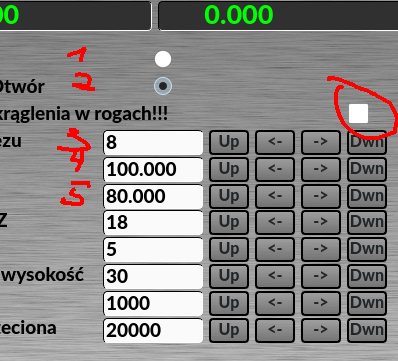
I found another problem with the MacroTab Widget related to the recent checkbox element improvement.
The checkbox element is not taken into account when numbering variables. All elements below the checkbox are shifted. #4 has value #5 etc. Two checkbox elements will shift everything below by 2, as in the screenshot.
The checkbox element is not taken into account when numbering variables. All elements below the checkbox are shifted. #4 has value #5 etc. Two checkbox elements will shift everything below by 2, as in the screenshot.
Please Log in or Create an account to join the conversation.
- cmorley
- Offline
- Moderator
-
Less
More
- Posts: 7368
- Thank you received: 2181
1 year 5 months ago #329026
by cmorley
Replied by cmorley on topic Error in tool_offsetview.py
Ok try the latest please.
The following user(s) said Thank You: MarkoPolo
Please Log in or Create an account to join the conversation.
- MarkoPolo
- Offline
- Elite Member
-
Less
More
- Posts: 319
- Thank you received: 90
1 year 5 months ago #329038
by MarkoPolo
Replied by MarkoPolo on topic Error in tool_offsetview.py
Now it works properly, thanks.
Please Log in or Create an account to join the conversation.
- MarkoPolo
- Offline
- Elite Member
-
Less
More
- Posts: 319
- Thank you received: 90
1 year 4 months ago #330174
by MarkoPolo
Replied by MarkoPolo on topic Error in tool_offsetview.py
Hi Chris
I found a few things to fix in qtdragon(hd)
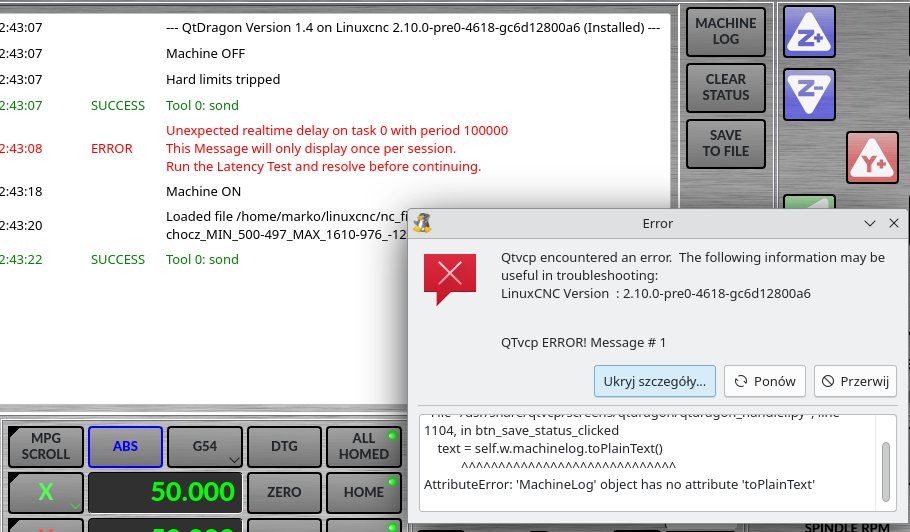
When saving the log to a file, an error is displayed, as in the screenshot.
The "clear status" button does not work.
In MacroTab Widget, the spacebar does not work.
In all others, "FACING", "hole enlarge", etc. pause works with the spacebar, but with MacroTab it does not.
There is such a topic forum.linuxcnc.org/38-general-linuxcnc-q...p-line-number#330090
Could you make it save the line number, e.g. in the log?
I found a few things to fix in qtdragon(hd)
When saving the log to a file, an error is displayed, as in the screenshot.
The "clear status" button does not work.
In MacroTab Widget, the spacebar does not work.
In all others, "FACING", "hole enlarge", etc. pause works with the spacebar, but with MacroTab it does not.
There is such a topic forum.linuxcnc.org/38-general-linuxcnc-q...p-line-number#330090
Could you make it save the line number, e.g. in the log?
Please Log in or Create an account to join the conversation.
- cmorley
- Offline
- Moderator
-
Less
More
- Posts: 7368
- Thank you received: 2181
1 year 4 months ago #330267
by cmorley
Replied by cmorley on topic Error in tool_offsetview.py
I'll look into these problems as soon as I can.
The following user(s) said Thank You: tommylight
Please Log in or Create an account to join the conversation.
Moderators: cmorley
Time to create page: 1.574 seconds