qtdragon - probing issues

More
3 years 5 months ago #271488 by rodw
Replied by rodw on topic qtdragon - probing issues
From your print statement, you have a diameter of 29.8995084 ( round to 3 decimals = 29.900
What did th eoriginal probing routine calculate? You need to look at X & Y after an initial probe to centre it

I wonder what would happen if you changed your probe diameter from say 2mm to 2.005
​​​​​
The following user(s) said Thank You: Roguish

Please Log in or Create an account to join the conversation.
More
3 years 5 months ago #271492 by cmorley
Replied by cmorley on topic qtdragon - probing issues

The inside corner probinfg is still worng. See video

photos.app.goo.gl/CtHjZJhMTHLYu8Zx8

Based on the initial move on start.  the probe should be situated near the corner but out a few mm from the corner towards the front eg x  -10, Y -10
I did run it from the outside of the left edge but it almost seemed like it as confusing the X direction with the Y direction.
 
A little hard to see  but it looks to me you started with the probe on the outside corner.
For inside probing you should set the probe at the inside corner.

First move will be -y by edge distance and at same time +x by xy clearance
looks like you had edge distance at 1mm? and clearance at 10mm?
If so then the move looked right.
again a little hard to see at the angle nut looked like it moved about 10mm to the right and a much smaller distance towards the camera. i think if you had set the probe starting point on the inside corner then it would not have failed.

Can you confirm this for me?

Please Log in or Create an account to join the conversation.

More
3 years 5 months ago #271493 by cmorley
Replied by cmorley on topic qtdragon - probing issues
Though 1mm edge distance is really small - what diameter probe do you use?

Please Log in or Create an account to join the conversation.

More
3 years 5 months ago #271496 by rodw
Replied by rodw on topic qtdragon - probing issues
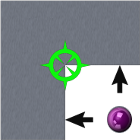
So last time you said to position  the start position  where the purple dot is on the image.
This was counterintuitive to me becasue I would have started on the inside of the corner and above the part.
So this time I started on the purple dot (say X-5, Y +5) but I was a lot closer in reality.

If it needs  to start on the inside corner, the images are wrong.

I'll test again in the inside position and report back when I get a chance.

What is the edge width? the context sensitive help was not helpful...
 

Please Log in or Create an account to join the conversation.

More
3 years 5 months ago #271497 by cmorley
Replied by cmorley on topic qtdragon - probing issues
I don't think I ever said purple dot - always the green marker.
I agree - I don't know what the purple dot was to represent and it should be removed.

edge width - is the distance to move _along_ the edge, away from the corner.
You don't want to probe the corner you want to probe edge width distance from the corner.
- y edge width away, then after probing that, +X edge distance away.

Contrast this to xy clearance, which is the distance _away_ from the wall to give room to clear and search for the wall.

The first move combines these two moves of course to speed things up.

Please Log in or Create an account to join the conversation.

More
3 years 5 months ago - 3 years 5 months ago #271498 by cmorley
Replied by cmorley on topic qtdragon - probing issues
 
May be this helps.

edge distance is from the green start point to (measured along the edge) one on the arrows.
XY clearance is the distance from the purple dot to the same arrow point.
Last edit: 3 years 5 months ago by cmorley. Reason: clarity

Please Log in or Create an account to join the conversation.

Moderators: cmorley
Time to create page: 0.376 seconds
Powered by Kunena Forum
