TCP 5-axis kinematics

More
5 years 2 months ago #218413 by jurod
Replied by jurod on topic TCP 5-axis kinematics
Hi, I have a problem setting up TCP kinematics.
Switching between kinematics works well   

but in reality the movement of the machine is chaotic  

Numerical coordinates indicate a slight change.
Machine is gantry Y on version LC 2.9.

in my ini :
Code:
[DISPLAY] GEOMETRY = xyzab [TRAJ] COORDINATES =  XYYZBC  [KINS] JOINTS =  6 KINEMATICS = xyzbc-trt-kins coordinates=XYYZBC sparm=identityfirst  

In my hal:
Code:
  # Kinematics setp xyzbc-trt-kins.x-offset 0 setp xyzbc-trt-kins.y-offset 0 setp xyzbc-trt-kins.z-offset 0 setp xyzbc-trt-kins.x-rot-point 160 setp xyzbc-trt-kins.y-rot-point 0 setp xyzbc-trt-kins.z-rot-point 0 net tool-offset motion.tooloffset.z xyzbc-trt-kins.tool-offset

In my M128 code:
Code:
  #!/bin/bash halcmd setp motion.switchkins-type 1 halcmd -f <<EOF setp ini.x.min_limit -50 setp ini.x.max_limit  4550 setp ini.y.min_limit -40 setp ini.y.max_limit  3140 setp ini.z.min_limit -740 setp ini.z.max_limit  0.1 setp ini.b.min_limit -135 setp ini.b.max_limit  315 setp ini.c.min_limit -270 setp ini.c.max_limit  270 EOF exit 0

In my M129 code:
Code:
  #!/bin/bash halcmd setp motion.switchkins-type 0 halcmd -f <<EOF setp ini.x.min_limit -50 setp ini.x.max_limit  4550 setp ini.y.min_limit -40 setp ini.y.max_limit  3140 setp ini.z.min_limit -740 setp ini.z.max_limit  0.1 setp ini.b.min_limit -135 setp ini.b.max_limit  315 setp ini.c.min_limit -270 setp ini.c.max_limit  270 EOF exit 0


How to set parameters in HAL file correctly?
On those videos I switch the kinematics using HB04B macros and generate the movements with the mpg wheel
Please help.


Please Log in or Create an account to join the conversation.
More
5 years 2 months ago - 5 years 2 months ago #218418 by Aciera
Replied by Aciera on topic TCP 5-axis kinematics
Note that the xyzbc-trt-kins are for a setup with a rotary table (c axis) on top of a tilting table (b axis). You seem to be using a machine where the b and c axis is in the head and that requires a different kinematic model.

You might want to have a look at 5axiskins:

github.com/LinuxCNC/linuxcnc/blob/master...nematics/5axiskins.c

forum.linuxcnc.org/10-advanced-configura...s-kinematics-modules
Last edit: 5 years 2 months ago by Aciera. Reason: Forgot about 5axiskins

Please Log in or Create an account to join the conversation.

More
5 years 2 months ago #218466 by jurod
Replied by jurod on topic TCP 5-axis kinematics
I've seen everything possible before, but without success.
Where do the following points lie in space?
setp xyzbc-trt-kins.x-offset 0
setp xyzbc-trt-kins.y-offset 0
setp xyzbc-trt-kins.z-offset 0
setp xyzbc-trt-kins.x-rot-point 160
setp xyzbc-trt-kins.y-rot-point 0
setp xyzbc-trt-kins.z-rot-point 0

Please Log in or Create an account to join the conversation.

More
5 years 2 months ago - 5 years 2 months ago #218468 by Aciera
Replied by Aciera on topic TCP 5-axis kinematics
This is from the description:

xyzbc-trt-kins (switchkins) 
Uses remapped user m codes for kins switch: 
M429: Identity Kinematics
M428: XYZBC (TCP)
M430: userk Kinematics A
hal net is required to connect the analog out pin N,
Example (for N=3): net :kinstype-select <= motion.analog-out-03net :kinstype-select => motion.switchkins-type 

Hal Input pins:xyzbc-trt-kins.x-offset, xyzbc-trt-kins.z-offset: 
X and Z offsets are the offsets from the center of rotation of the B axis relative to the center of rotation of the C axis. 
Hal Input pins:xyzac-trt-kins.x-rot-point, xyzac-trt-kins.y-rot-point, xyzac-trt-kins.z-rot-point:
 X, Y and Z rot-point pins represent the offsets of the center of rotation of the C axisrelative to the machine absolute zero


But I'll say it again if your machine has indeed a rotary/tilting spindle then the -trt kinematics will not work for you. The math in the  -trt kinematics is not going to work for an -srt machine.
Last edit: 5 years 2 months ago by Aciera.

Please Log in or Create an account to join the conversation.

More
5 years 2 months ago #218589 by jurod
Replied by jurod on topic TCP 5-axis kinematics
so i have to go to kinematics xyzbc-trt-kins?

Please Log in or Create an account to join the conversation.

More
5 years 2 months ago - 5 years 2 months ago #218691 by Aciera
Replied by Aciera on topic TCP 5-axis kinematics
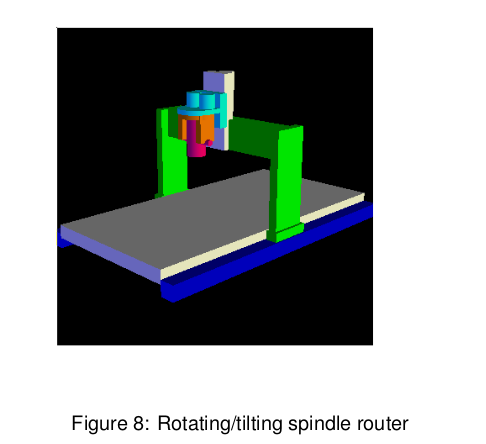
I have not really seen more than a quick glimpse of the spindle of your machine but if your machine has a rotary/tilting spindle like this:
linuxcnc.org/docs/2.8/html/motion/5-axis-figures/Figure-11.png
Then you should try '5axiskins'. Have a look at the simualtion at /configs/sim/axis/vismach/5axis/bridgemill

If you have a setup like one of these (ie a tilting/rotating mechanism on the machine table) then either 'xyzac-trt' or 'xyzbc-trt' will be useful to you:
linuxcnc.org/docs/2.8/html/motion/5-axis-figures/Figure-3.png

linuxcnc.org/docs/2.8/html/motion/5-axis-figures/Figure-7.png

There are also mixed types. If you are still unsure then please post a picture of your machine.


[edit]
There is also documentation on a XYZBC-SRT kinematic by the same author who contributed the xyzac-trt and xyzbc-trt kinematic: forum.linuxcnc.org/media/kunena/attachme...5-axis-machines2.pdf
 

[edit2]
I made a simulation from the documented xyz-srt kinematic mentioned above and, as far as I can tell, it does basically the same as  '5axiskins' does in the 'bridgemill' simulation config.
Since I don't really have any hands on experience with 5-axis machining I can't say more than that.  
Last edit: 5 years 2 months ago by Aciera.

Please Log in or Create an account to join the conversation.

Time to create page: 0.107 seconds
Powered by Kunena Forum
