
- Posts: 111
- Thank you received: 24
TCP 5-axis kinematics
- robh
- Offline
- Premium Member
-

Less
More
8 years 6 months ago #108678
by robh
Replied by robh on topic TCP 5-axis kinematics
nice work, will you be sharing some of the setup , as would be intresting to see how got this to work and any info on setting it up etc..
Please Log in or Create an account to join the conversation.
- jsskangas
- Offline
- Premium Member
-
Less
More
- Posts: 144
- Thank you received: 9
8 years 6 months ago - 8 years 6 months ago #108704
by jsskangas
Replied by jsskangas on topic TCP 5-axis kinematics
Hello
I included nc files and setup that hold kinematics source file as well.
Nc files has one example, but please be careful running it.
My post is not complete yet and at operation endings it does not lift Z home between operations.
So when it crosses over impeller it will hit a bolt that holds impeller down.
So if someone wants to run that nc file fix each operation ending so that it will lit tool higher.
It is only includes rough cut operations, no finishing paths.
Another limitation in Linuxcnc is that you can only change kinematics when rotary axes are at 0.00 position.
This limits things in some degree. You can not pre-index part with rotary axes, then move close and turn TCP on.
I made my own post so that it evades most of collisions.
It seems to work best this way:
G0 Xxx.xx Yyy.yy
G43 Hxx
M128 (TCP ON)
Ccc.cc
Zzz.zz Bbb.bb
.
.
.
.
.
.
G0 Zzz.zz B0.
G0 C0.
M129 (TCP OFF)
G91 G28 Z0.
Kinematic definitions are located in HAL file:
#############################################3
# Kinematics
setp XYZBCsmkins.X-offset 0.0
setp XYZBCsmkins.Z-offset 0.0
setp XYZBCsmkins.X-rotpoint 103.0820
setp XYZBCsmkins.Y-rotpoint -0.861
setp XYZBCsmkins.Z-rotpoint -455.1930
net tool-offset motion.tooloffset.z XYZBCsmkins.Tool_Z_Offset
X-offset and Z-offset are misalignment between rotaary axes, only need to set X.
I have not yet measured my own offset value.
X-rotpoint, Y-rotpoint, are center of C-axis rotation in regarding your machine zero.
Z-rotpoint is B axis coordinate from machine zero.
I included nc files and setup that hold kinematics source file as well.
Nc files has one example, but please be careful running it.
My post is not complete yet and at operation endings it does not lift Z home between operations.
So when it crosses over impeller it will hit a bolt that holds impeller down.
So if someone wants to run that nc file fix each operation ending so that it will lit tool higher.
It is only includes rough cut operations, no finishing paths.
Another limitation in Linuxcnc is that you can only change kinematics when rotary axes are at 0.00 position.
This limits things in some degree. You can not pre-index part with rotary axes, then move close and turn TCP on.
I made my own post so that it evades most of collisions.
It seems to work best this way:
G0 Xxx.xx Yyy.yy
G43 Hxx
M128 (TCP ON)
Ccc.cc
Zzz.zz Bbb.bb
.
.
.
.
.
.
G0 Zzz.zz B0.
G0 C0.
M129 (TCP OFF)
G91 G28 Z0.
Kinematic definitions are located in HAL file:
#############################################3
# Kinematics
setp XYZBCsmkins.X-offset 0.0
setp XYZBCsmkins.Z-offset 0.0
setp XYZBCsmkins.X-rotpoint 103.0820
setp XYZBCsmkins.Y-rotpoint -0.861
setp XYZBCsmkins.Z-rotpoint -455.1930
net tool-offset motion.tooloffset.z XYZBCsmkins.Tool_Z_Offset
X-offset and Z-offset are misalignment between rotaary axes, only need to set X.
I have not yet measured my own offset value.
X-rotpoint, Y-rotpoint, are center of C-axis rotation in regarding your machine zero.
Z-rotpoint is B axis coordinate from machine zero.
Last edit: 8 years 6 months ago by jsskangas.
The following user(s) said Thank You: Shu
Please Log in or Create an account to join the conversation.
- andypugh
- Offline
- Moderator
-

Less
More
- Posts: 19899
- Thank you received: 4655
8 years 6 months ago #108718
by andypugh
Replied by andypugh on topic TCP 5-axis kinematics
I am curious about why you need to switch kinematics. Is this simply to allow the use of both TCP and conventional rotary-axis toolpaths?
My approach would probably have been to have two configs in the same folder, one for conventional and one with TCP kins, sharing everything but kinematics.
My approach would probably have been to have two configs in the same folder, one for conventional and one with TCP kins, sharing everything but kinematics.
Please Log in or Create an account to join the conversation.
- jsskangas
- Offline
- Premium Member
-
Less
More
- Posts: 144
- Thank you received: 9
8 years 6 months ago - 8 years 6 months ago #108719
by jsskangas
Replied by jsskangas on topic TCP 5-axis kinematics
I need to run normal 3+2 indexing operations and full 5-axis operation mixed in one program.
Too much work to shutdown machine and restart it with another setup...
Im too lacy for that.
Too much work to shutdown machine and restart it with another setup...
Im too lacy for that.
Last edit: 8 years 6 months ago by jsskangas.
Please Log in or Create an account to join the conversation.
- robh
- Offline
- Premium Member
-
Less
More
- Posts: 111
- Thank you received: 24
8 years 6 months ago #108765
by robh
Replied by robh on topic TCP 5-axis kinematics
thanks for sharing all the info, i hope to soon have a play around with it when i get a quite day(s)
andy.like wise here also..
plus when you have run other controls and get used to a simple on off function like G43.5 or what ever your control may imploy you realy dont want to run any other way..
i find here alot of work is 3+2 normaly end up doing a little 5th work to get a finish or some hard to reach wall, as we all know what designers are like with parts now days..!
andy.like wise here also..
plus when you have run other controls and get used to a simple on off function like G43.5 or what ever your control may imploy you realy dont want to run any other way..
i find here alot of work is 3+2 normaly end up doing a little 5th work to get a finish or some hard to reach wall, as we all know what designers are like with parts now days..!
Please Log in or Create an account to join the conversation.
- jsskangas
- Offline
- Premium Member
-
Less
More
- Posts: 144
- Thank you received: 9
8 years 6 months ago #108998
by jsskangas
Replied by jsskangas on topic TCP 5-axis kinematics
Ok, I finished impeller today.
Now i can say more about 5-axis capabilities.
I got rid of most of jerk by limiting rotary axis acceleration.
Now linears don't need to do make too fast compensation movements, this did not affect too much on performance.
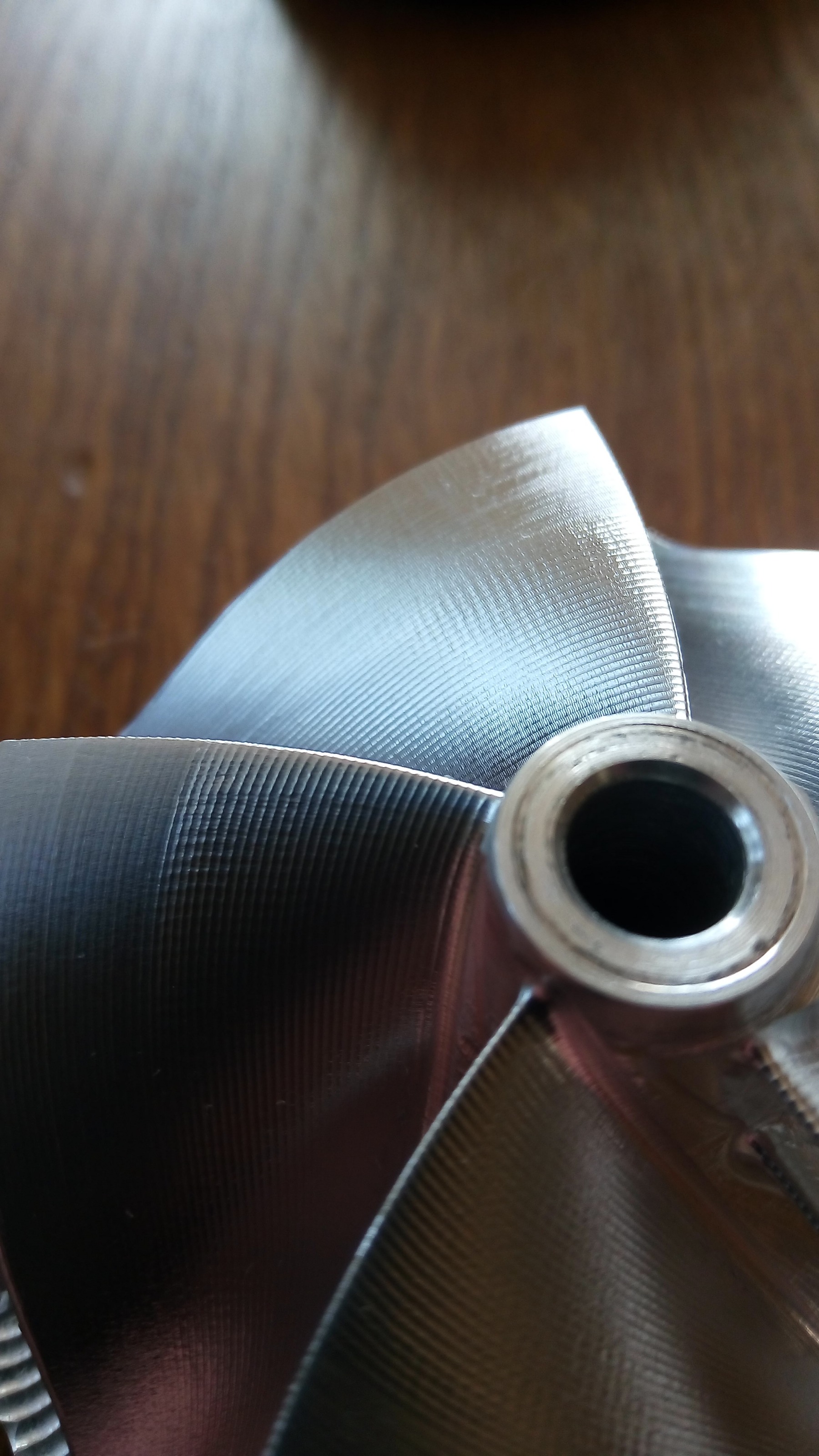
Surface quality was better than I expected.
Here is video of nc-code simulation:
Now i can say more about 5-axis capabilities.
I got rid of most of jerk by limiting rotary axis acceleration.
Now linears don't need to do make too fast compensation movements, this did not affect too much on performance.
Surface quality was better than I expected.
Here is video of nc-code simulation:
Please Log in or Create an account to join the conversation.
Time to create page: 0.167 seconds