
- Posts: 4819
- Thank you received: 2177
5Axis Kinetic from 2.8 on 2.7x
- Aciera
- Offline
- Administrator
-

Less
More
6 years 1 month ago #181987
by Aciera
To use those M codes you need a version of LinuxCNC that allows switching kinematics. This functionality has not been merged with the main branch of linuxcnc. So in order to install that you will need to do a RIP (Run in Place) install of dewey garretts switchkins branch. This will require you to compile and build linuxcnc from source.
Here is his guide: www.panix.com/~dgarrett/stuff/s_kins_guide.txt
Further information:
www.panix.com/~dgarrett/stuff/switchkins.html
Replied by Aciera on topic 5Axis Kinetic from 2.8 on 2.7x
For that you have to program "M" codes, like "M128" to activate "TCP" & "M129" to deactivate it.
To use those M codes you need a version of LinuxCNC that allows switching kinematics. This functionality has not been merged with the main branch of linuxcnc. So in order to install that you will need to do a RIP (Run in Place) install of dewey garretts switchkins branch. This will require you to compile and build linuxcnc from source.
Here is his guide: www.panix.com/~dgarrett/stuff/s_kins_guide.txt
Further information:
www.panix.com/~dgarrett/stuff/switchkins.html
Please Log in or Create an account to join the conversation.
- JackRay
- Offline
- Elite Member
-

Less
More
- Posts: 226
- Thank you received: 14
6 years 1 month ago #182001
by JackRay
Replied by JackRay on topic 5Axis Kinetic from 2.8 on 2.7x
Thank you for all those informations.
I do not have the necessary level to do this (compliation / branch ??).
however, I saw that I could use the M66 / M68 to change the type of kinematics and synchronization of the axes.
all this with the subroutine call.
subroutine call as I have already used for the automatic measurement of my tool length.
Is it correct ?
Thank you
I do not have the necessary level to do this (compliation / branch ??).
however, I saw that I could use the M66 / M68 to change the type of kinematics and synchronization of the axes.
all this with the subroutine call.
subroutine call as I have already used for the automatic measurement of my tool length.
Is it correct ?
Thank you
Please Log in or Create an account to join the conversation.
- Aciera
- Offline
- Administrator
-
Less
More
- Posts: 4819
- Thank you received: 2177
6 years 1 month ago #182007
by Aciera
Replied by Aciera on topic 5Axis Kinetic from 2.8 on 2.7x
M66 and M68 are indeed used in the M128/M129 commands to read/write values from inside the Gcode. However the actual changing of kinematics is only possible if you run the switchkins-branch.
This is, by the way, also why I got to learn how do a RIP install. It's really not all that difficult. One just has to sit down and try.
Really all that's needed is described in the link above:
2) To get the source code and build LinuxCNC, see:
linuxcnc.org/docs/master/html/code/building-linuxcnc.html
Learn how to build the default (master) branch first.
You must succeed with this before proceding.
3) To build a specific branch (like dgarr/s_kins):
$ cd ~/linuxcnc-dev/src
$ git checkout dgarr/s_kins # checkout branch
$ git branch | grep \* # show current branch
$ git log --oneline -1 # show the current commit
$ make && sudo make setuid # build current branch
$ source ../scripts/rip-environment # set environment
$
$ # go to sim directory:
$ cd ../configs/sim/axis/vismach/5axis/table-rotary-tilting
$ linuxcnc xyzac-trt-kins.ini # run a sim
$ # experiment with gui
You've got a nice machine, would be a shame.
This is, by the way, also why I got to learn how do a RIP install. It's really not all that difficult. One just has to sit down and try.
Really all that's needed is described in the link above:
Warning: Spoiler!
2) To get the source code and build LinuxCNC, see:
linuxcnc.org/docs/master/html/code/building-linuxcnc.html
Learn how to build the default (master) branch first.
You must succeed with this before proceding.
3) To build a specific branch (like dgarr/s_kins):
$ cd ~/linuxcnc-dev/src
$ git checkout dgarr/s_kins # checkout branch
$ git branch | grep \* # show current branch
$ git log --oneline -1 # show the current commit
$ make && sudo make setuid # build current branch
$ source ../scripts/rip-environment # set environment
$
$ # go to sim directory:
$ cd ../configs/sim/axis/vismach/5axis/table-rotary-tilting
$ linuxcnc xyzac-trt-kins.ini # run a sim
$ # experiment with gui
You've got a nice machine, would be a shame.
The following user(s) said Thank You: JackRay
Please Log in or Create an account to join the conversation.
- JackRay
- Offline
- Elite Member
-
Less
More
- Posts: 226
- Thank you received: 14
6 years 1 month ago #182009
by JackRay
Replied by JackRay on topic 5Axis Kinetic from 2.8 on 2.7x
Thanks, but I'm really not good on linux.
it starts well I do not have the files attached in my tree structure ...
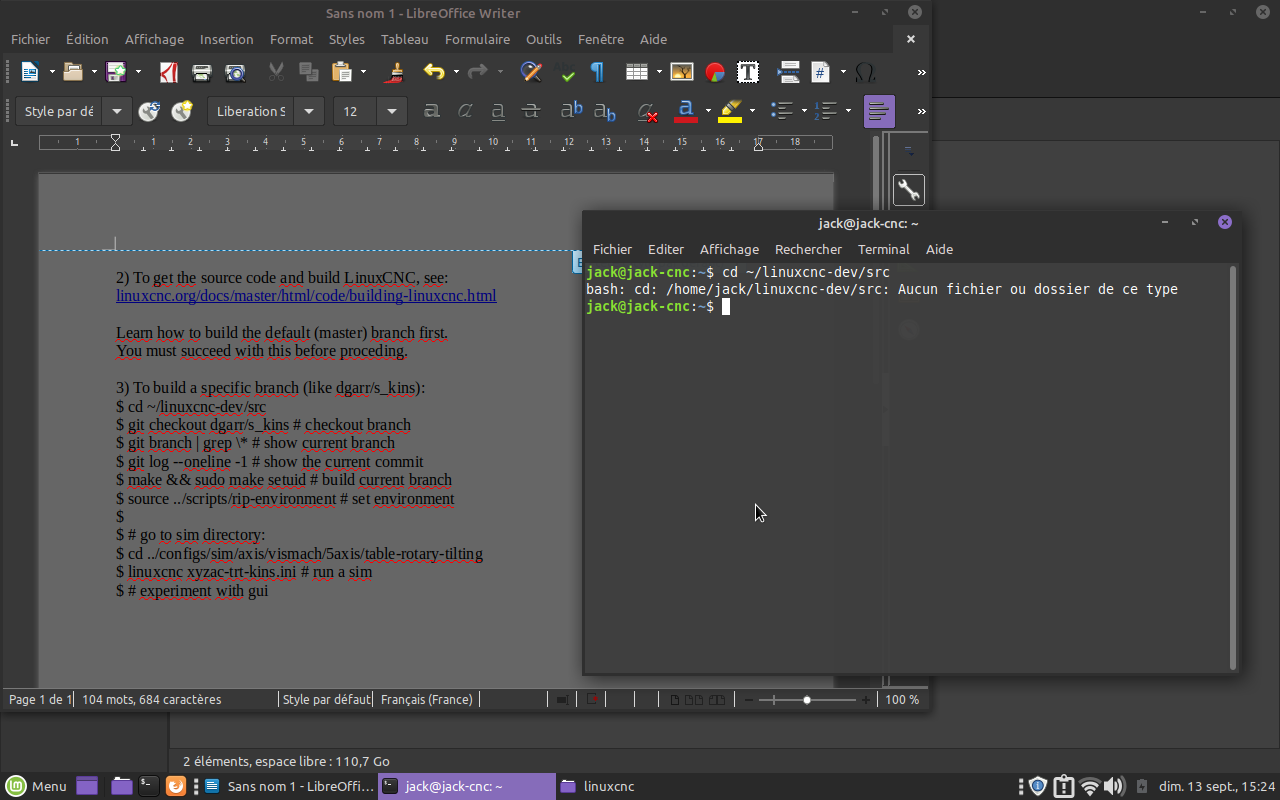
it starts well I do not have the files attached in my tree structure ...
Please Log in or Create an account to join the conversation.
- JackRay
- Offline
- Elite Member
-
Less
More
- Posts: 226
- Thank you received: 14
6 years 1 month ago #182010
by JackRay
Replied by JackRay on topic 5Axis Kinetic from 2.8 on 2.7x
I got to go until there.
but the error ??
thank you very much, but without you it's impossible to do it.
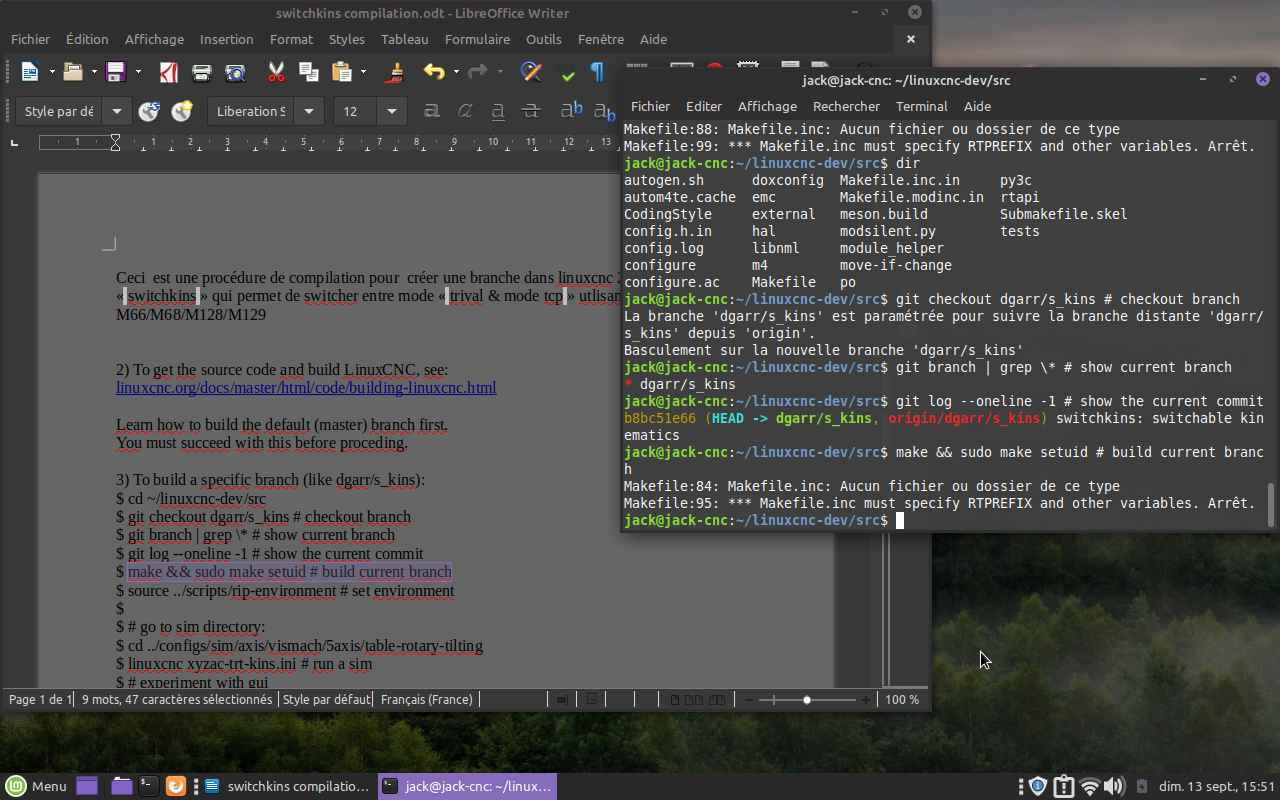
but the error ??
thank you very much, but without you it's impossible to do it.
Please Log in or Create an account to join the conversation.
- Aciera
- Offline
- Administrator
-
Less
More
- Posts: 4819
- Thank you received: 2177
6 years 1 month ago #182011
by Aciera
Replied by Aciera on topic 5Axis Kinetic from 2.8 on 2.7x
Have you completed step 2?
There you need to first try this:

It this fails, as it probably will, you will need to install the missing dependencies.
Maybe this helps: (I have not actually watched the whole thing)
2) To get the source code and build LinuxCNC, see:
linuxcnc.org/docs/master/html/code/building-linuxcnc.html
Learn how to build the default (master) branch first.
You must succeed with this before proceding.
There you need to first try this:
It this fails, as it probably will, you will need to install the missing dependencies.
Maybe this helps: (I have not actually watched the whole thing)
Please Log in or Create an account to join the conversation.
Time to create page: 0.136 seconds