Successfully configured with stepconf: but +Y-axis "stutters" running G-code

More
4 years 6 months ago #239214 by clunc
The following user(s) said Thank You: tommylight

Please Log in or Create an account to join the conversation.

More
4 years 6 months ago - 4 years 6 months ago #239217 by RGH
As Tommy said - ditch the odd DIMM and stay on two sticks.
Additionally ditch the discrete GPU and use the internal VGA.

Regarding bios settings have a look at the attached pdf. I highlighted settings I would recommend.

Kernel params that can help (see www.kernel.org/doc/html/v5.4/admin-guide/kernel-parameters.html for details):
isolcpus=1 irqaffinity=0 processor.max_cstate=0

After rebooting enter the terminal and run
watch -d -n1 cat /proc/interrupts
You should see the interrupt count mostly increase on CPU0. CPU1 should see only rescheduling and timer ints.

Generally core2 machines are pretty good but in this case I suspect a 'lemon'. Those huge latency glitches you have are most likely some weird Dell SMIs that you possibly won't be able to get rid off. But you might be lucky... 
Edit:
I totally misread the latency histogram and jumble the off-chart counts with time. ~30 microseconds isn't really that bad. Are we chasing the real issue for the stuttering axis?
Last edit: 4 years 6 months ago by RGH. Reason: Correction
The following user(s) said Thank You: tommylight

Please Log in or Create an account to join the conversation.

More
4 years 6 months ago #239219 by tommylight
Are you aware that you can use the PC with pretty bad latency by raising the base period till you do not get latency warnings?
Also are you aware that you can install RTAI kernel that has much better latency, but, the new RTAI might not work at all, so some experimenting with older RTAI might prove valuable.
I have some laptops with terrible latency for testing with 300000 base period. This does limit the step rate a lot, though.
If you are using the 2.8.2 official ISO, give RTAI a try, might surprise you:
linuxcnc.org/docs/2.8/html/getting-start...#cha:Installing-RTAI

Please Log in or Create an account to join the conversation.

More
4 years 6 months ago #239260 by clunc
Cut-to-the-chase: (2) 4GB sticks in complementary slots (-1 and -2); latency 123000 ns base. Somewhat better, but no blue ribbons.
I'm a little slow getting back to you because of an experiment.

I was concerned that the hwinfo report indicated the maximum memory for four slots was 8GB, and that the 4GB parts might be problematic so I tried the simplest configuration first: 2GB in DIMM-1.

Result: no boot.

Quick revert to: 4GB parts in DIMM-1 and DIMM-2 (that is, paired), and booted as before.

The latency-test seems to be maxed out at about 123000 ns with 4 glxgear, 4 glxhead, and firefox open with a dozen tabs and playing one youtube video.

That's an improvement, but I'm going to shutdown and go through the BIOS settings 1x1 using the guide Nebur provided.

I'll be back asap.

@tommylight, I suspected it, and hoped it might be possible, that the machine could be configured for "sub-optimal" performance by increasing the base period, but I hadn't ever seen it in writing.  For the kind of work I do (200 ipm tops, in hardwood), that might be workable for me.
The following user(s) said Thank You: tommylight

Please Log in or Create an account to join the conversation.
More
4 years 6 months ago #239263 by RGH
120us jitter is worse than what you posted initially.
Assuming you still have that wonky radeon gpu installed, remove it and go onboard graphics.

Otherwise any positive effect that bios settings or kernel params could provide, will be completely invisible in the 'latency test'. The only observable change would be the shape of the 'latency histogram' (not the max+/- deviations).

Regarding mem config, dual-channel / paired dimms is the only way to go. I wouldn't bother experimenting with that. The only thing that improves latency on core2 is switching memory straps but that's in the realm of 'honing' some microseconds and getting a 'pointy' histogram curve / reducing standard deviation.

Still - I don't see how the initial ~30us latency you had could lead to a stuttering axis. Assuming the base thread timing is adequate for the given latency that shouldn't happen. Also why only in auto mode and not while jogging and why only on one axis?

Please Log in or Create an account to join the conversation.

More
4 years 6 months ago - 4 years 6 months ago #239299 by clunc
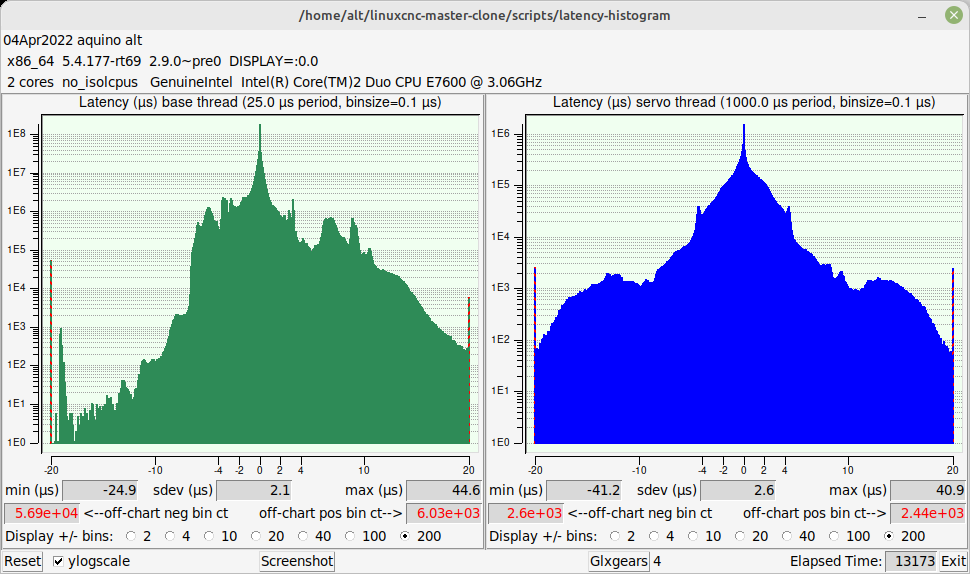
Update: latency-test is down to 33000 ns base. With (4) glxgears, (4) glxheads, youtube with 12 tabs and playing (4) youtube movies. 'latency-histogram --show' attached.  The histogram looks terrible again.

BIOS changes:
1. I went through the BIOS point-by-point again, following Nebur's checklist. I had had S.M.A.R.T. disk-monitoring and Fan-Control Override both Enabled. I disabled them now.
2. Aside: I noticed that several options on Nebur's list were missing from my BIOS; "USB for Flex bay" and "HDD Acoustic Mode" being examples. It may signal a BIOS update is available.

Video change:
1. Removed the PCI-e DVI-D video card, and reverted to motherboard VGA.

Memory changes:
1. Removed the 2 GB stick and put the 4 GB pair in DIMM-3 and DIMM-4 (the blacks: following @tommylight's instruction).

Parallel port:
1. I had early-on disabled the motherboard parport in the BIOS and begun using one of the two parport PCI cards. The tests were run with this configuration.

The off-chart bin counts on the latency-histogram are still bad.
Last edit: 4 years 6 months ago by clunc.

Please Log in or Create an account to join the conversation.

Time to create page: 0.067 seconds
Powered by Kunena Forum
