Successfully configured with stepconf: but +Y-axis "stutters" running G-code

More
4 years 6 months ago - 4 years 6 months ago #239406 by clunc

Did you test with reset time of 5000?
 
 
 My understanding is that the .ini and .hal files are accessed when LinuxCNC starts, which I haven't risked trying until I get the latency straightened out.

I'm misunderstanding something. 
Uppermost is what you mean by testing with the parport reset time of 5000.
Secondly, does the latency-test access the .ini or .hal file or both?
Is it possible to run LinuxCNC and to test various settings independently of latency-test? That is, can I just start up a custom G-code to send it around and around for hours and see if it still has its zero at the end?

I tried creating a new machine config from scratch with stepconf where I entered the desired step, dir, and jitter values, while copying pin, axis, and spindle values from one that had worked before. However I could not test run it because stepconf didn't or couldn't find the parallel port on the card and insisted on overwriting the address in the .hal to '0 out' every time I edited it to 'dce8 out' which works in other .hal files--and which files stepconf strangely does not overwrite.

When I use one of those other configs, and change the Steplen/Stepspace/Dirhold/Dirsetup/Jitter settings to 5000/5000/8000/5000/50000 ns, all 3 axes perform acceptably when tested in stepconf.  Stepconf reports using a base period of 65000 ns.

But they tested well in stepconf's Runs before the initial problem showed up too.
Last edit: 4 years 6 months ago by clunc. Reason: clarify

Please Log in or Create an account to join the conversation.

More
4 years 6 months ago #239434 by tommylight
StepConf is a great tool to get a working config and lay a foundation for a functional machine.
Latency tests (yes tests, there are 3 of them), are also tools to get a rough idea if the system is usable regarding latency, but not the definitive conclusion.
For comfortable use of LinuxCNC, editing config files is easy by using a text editor (never use windows, wordpad, openoffice, etc. Text editor only.), and latency can only be checked by running LinuxCNC and everything that goes with it. Latency tests do just that, test latency, so they do not load a lot of other threads/components/stuff that LinuxCNC uses.
-
-edit the hal file and set the reset time to 5000, test again
-do not use StepConf to test the machine, use it only to test if the config has set the pins correctly, save and open LinuxCNC for further testing and tuning. Most of the stuff can be changed/tested/set using the "calibration" from the "machine" menu in almost all included GUI's.
-

Please Log in or Create an account to join the conversation.

More
4 years 6 months ago #239438 by clunc
@tommylight

Okay, I get 'stepconf' now. The pins, axes and spindle settings passed.

I'm well-acquainted with using 'vi' and have edited .ini, and the .hal file less often in the past.

By "test", the only thing I know to do at this point is load up a G-code project and give it a try.

I am supposing that increasing the parport reset time from 1500 to 5000, and raising the jitter time to 50000 (which stepconf dutifully translated into 65000 dirhold and dirsetup times in the .hal) will 'slow' the controller's command stream down sufficiently so commands will be less likely to be missed.

I'm off to do that. Thank you.
The following user(s) said Thank You: tommylight

Please Log in or Create an account to join the conversation.

More
4 years 6 months ago #239443 by rodw

@tommylight

I'm well-acquainted with using 'vi' and have edited .ini, and the .hal file less often in the past.
 
I can't believe people still use vi.
please try
sudo apt install geany
and give geany a try. You will never go back.

Please Log in or Create an account to join the conversation.

More
More
4 years 6 months ago #239464 by clunc
Tried a model. Failed. Lost steps.

I managed the rough cut which was relatively simple, with a 1/2" endmill @80ipm.
However the back-and-forth passes of a 1mm roundnose @120ipm lost steps after perhaps 2 dozen passes. I'd left the room after assuring myself that it seemed stable.

However, the first passes were also relatively smooth. As the majority of the model is carved relief text, there is much more acceleration/deceleration required in those parts and it appears that it failed as it entered that area. I discovered it after I returned to check on it.

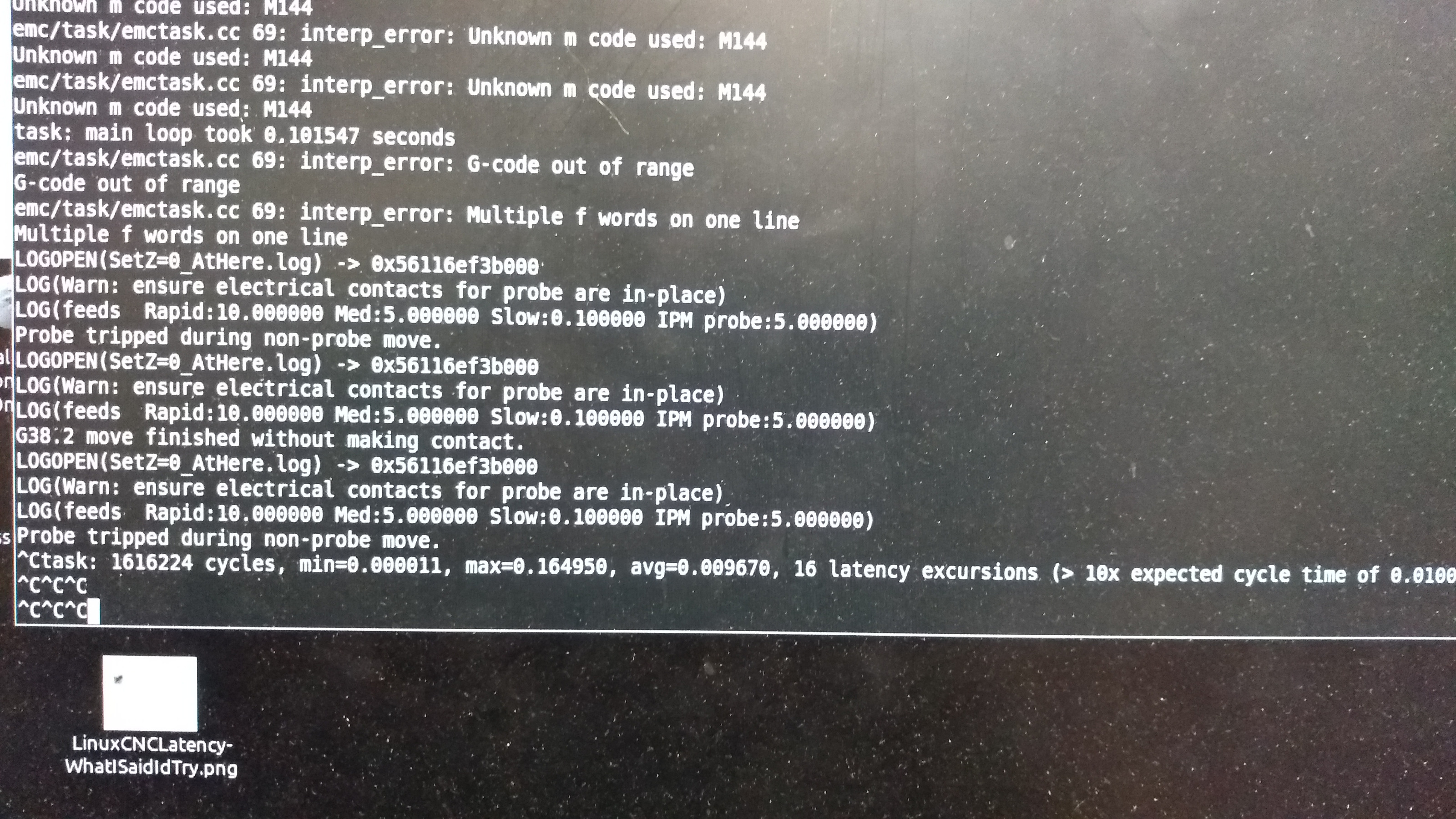
After I shut it down, I "posed" the model in the AXIS GUI and snapped a picture and was attempting to jog the head out of the way so I could take a comparative picture of the model when LinuxCNC locked up and became unresponsive to the mouse and keyboard, and Ctrl-Cs in the terminal failed to interrupt it.  I had to force the terminal window closed to kill it.  Even at that, it said LinuxCNC was still running when I restarted it.

I've attached pictures.  The second is a terminal message about 16 latency excursions (I'd have expected 100s if not 1000s). "16" may correlate with the number of passes in the more complicated area of the model before I shut it down.

The finish pass begins from the lower-left of the model and then cuts left-to-right (+X), then steps up (+Y) a fragment of the width of the 1mm cutter, then cuts right-to-left (-X), steps up (+Y), etc.

Axis accelerations and velocities are copied from the last setup, and the CNC itself is capable of executing them, and each axis performed acceptably with those accelerations in stepconf.

I'll attach .ini and .hal files for completeness sake.

The lockup makes it appear to more serious a problem than losing steps.
 

Please Log in or Create an account to join the conversation.
Time to create page: 0.155 seconds
Powered by Kunena Forum
