Successfully configured with stepconf: but +Y-axis "stutters" running G-code

More
4 years 7 months ago - 4 years 7 months ago #237855 by clunc
So far I've only experimented with isolcpus settings with no noticed difference.

I remembered another option I recalled seeing and have a pre-owned 2G Radeon card on-order as it was reported to be "recommended by Dell for the Optiplex series."  Right now I'm using motherboard VGA, but my monitor and the card are capable of DVI. I'm betting I'll see improvement with that change.

Edit: Update: Ordered a full-height video card through ebay. Received half-height...   Well, it might have shown a difference if it had arrived. ;^/ Now we do the ebay two-step.
Last edit: 4 years 7 months ago by clunc. Reason: update

Please Log in or Create an account to join the conversation.

More
4 years 7 months ago - 4 years 7 months ago #238409 by clunc
While I'm awaiting a new-used video card, two questions occurred to me:
1. Is there a way I could "dial back" performance settings in the configuration to something that, while not optimal, would execute programs reliably?

2. Alternatively, without changing anything in the current performance settings, would switching to a Mesa card result in reliable performance at the past relatively high level of performance? [1]

Thank you for your help.

[1] I am not averse to ponying up some hundreds to make my system more portable across PCs, but I also saw Andy's post
 about there being a Mesa option for some twenties.
[2] ...and I have now found Rod's explanation of how a Mesa card relaxes the latency requirements by relieving the CPU of
high-frequency step-generation. (That notion of the CPU just signaling a step frequency to the Mesa reminds me a little of the telegraph key "bug" used by Morse-code enthusiasts to relieve their fingers of having to tap multiple dots or dashes. For that matter it would not surprise me at all to find a host of amateur radio types in this group.)
Last edit: 4 years 7 months ago by clunc. Reason: update. clarify.

Please Log in or Create an account to join the conversation.
More
4 years 7 months ago #238414 by RGH
Did you optimize the bios settings?
In a nutshell: Deactivate every power management feature you can find and disable every feature and onboard device you don't need. Stuff like speedstep etc.

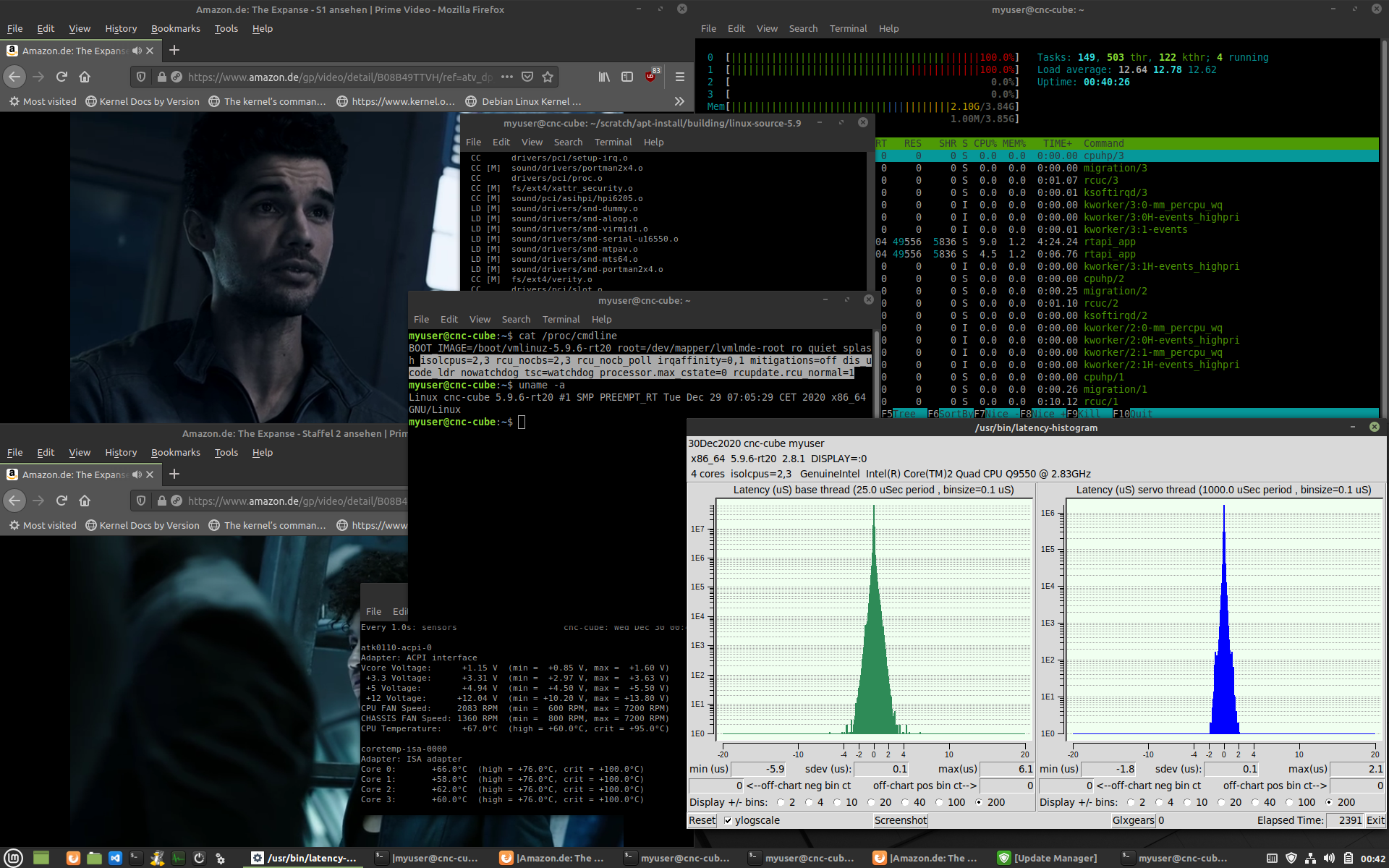
I spent some time months ago playing with preempt-rt, different machines, vga, core isolation, interrupt routing... yada yada to squeeze 'more rt' out of machines. There is quite a lot of stuff that can be done... see attachment for a nice result while torture testing.

But a 'clean' bios is a good initial step. If suitable bios options to get power / clock management under control aren't available, kernel params can be used to get things under control. The kernel documentation contains all the info required.

Isolcpus isn't worthless btw. It won't turn a lemon into something brilliant but depending on how intertwined the cores are (e.g. cache layout can require to sacrifice more than one core) it can be combined with a proper irq routing to keep a core 'clean' and reduce an 'acceptable' latency by an order of magnitude.

Also my experience on old intel machines has been that onboard vga produced the least noise in terms of latency artifacts.

What CPU and kernel version are you running exactly? I might have dealt with a similar machine and have more concrete tips or 'kernel spells' I could share :-)

Please Log in or Create an account to join the conversation.

More
4 years 7 months ago #238425 by tommylight
@Clunc,
I have not done amateur radio since i went to army. :(

@Nebur,
Those are some nice numbers. :)

Please Log in or Create an account to join the conversation.

More
4 years 6 months ago - 4 years 6 months ago #239206 by clunc
Update: standalone DVI-D Radeon card has arrived and been installed; if anything latency seems worse (+130k ns base jitter)

Answering the last question first:
Machine: Dell Optiplex 780, with 10 GB RAM[1] (hwinfo)
CPU: model name    : Intel(R) Core(TM)2 Duo CPU     E7600  @ 3.06GHz (hwinfo)
Kernel: Linux aquino 5.4.177-rt69 #2 SMP PREEMPT_RT Sun Feb 20 21:43:22 CST 2022 x86_64 x86_64 x86_64 GNU/Linux (uname)

[1] HWinfo did show up one curiosity that may be doing something; it says this about:
Physical Memory Array: #4096
    Location: 0x03 (Motherboard)
    Slots: 4
    Max. Size: 8 GB

However, there are actually (2) 4 GB and (1) 2 GB RAM modules installed, in a 4-2-4 (DIMM-1-DIMM-2-DIMM-3) configuration for a total of 10GB. I could try reducing that to 2 GB and placing the module in the DIMM-1 slot to see if there's a lot of overhead in the memory access.

Nebur,

Firstly, I'm terribly sorry for the drawn-out delay in replying.  I started to reply immediately, but then had to get up to go see about the hardware and kernel information you asked about when... Other Things started breaking--including a basement window which fell out in high winds because my teen-aged boys put it in five years ago and secured it with construction wedges.  Car troubles too, and unscheduled trips and and. It went from too-bad to ridiculous.
And secondly, I want to thank your for your offer to help.

Did you optimize the bios settings?
In a nutshell: Deactivate every power management feature you can find and disable every feature and onboard device you don't need. Stuff like speedstep etc.

I spent some time months ago playing with preempt-rt, different machines, vga, core isolation, interrupt routing... yada yada to squeeze 'more rt' out of machines. There is quite a lot of stuff that can be done... see attachment for a nice result while torture testing.

But a 'clean' bios is a good initial step. If suitable bios options to get power / clock management under control aren't available, kernel params can be used to get things under control. The kernel documentation contains all the info required.
 
I turned off everything I could see: effectively, telling the BIOS "No. Don't help."

Isolcpus isn't worthless btw. It won't turn a lemon into something brilliant but depending on how intertwined the cores are (e.g. cache layout can require to sacrifice more than one core) it can be combined with a proper irq routing to keep a core 'clean' and reduce an 'acceptable' latency by an order of magnitude.
And that's a question I have: Is the Dell Optiplex I've jumped to a lemon as far as a software-stepper for LinuxCNC is concerned?
As I recall leaving it, I have set isolcpus to first one then the other core and noticed no difference or improvement.

Also my experience on old intel machines has been that onboard vga produced the least noise in terms of latency artifacts.
...which suggests that I probably should be looking elsewhere than video for improvement.

What CPU and kernel version are you running exactly? I might have dealt with a similar machine and have more concrete tips or 'kernel spells' I could share :-)
(Info moved to top)


Last edit: 4 years 6 months ago by clunc. Reason: correct

Please Log in or Create an account to join the conversation.

More
4 years 6 months ago #239212 by tommylight
TL:DR
Get the 1Gb stick out, put the 2 remaining 4GB sticks into slots with BLACK ears/levers, not the white ones.
Test again.
Additional info:
DDR = dual channel Dynamic RAM = Random access memory
Meaning when 2 or 4 sticks with the same capacity and speed and latency and ... are used, the processor can access both channels at the same time. But whenever there is a "not the same" memory stick, it will ruin the memory performance.

Please Log in or Create an account to join the conversation.

Time to create page: 0.290 seconds
Powered by Kunena Forum
