
- Posts: 226
- Thank you received: 39
Work with probe
- LearningLinuxCNC
- Offline
- Elite Member
-

Less
More
10 years 6 months ago #74079
by LearningLinuxCNC
Looks good. I have used a similar technique on my router. I do as andy has suggested and use the tool as the probe. I can't change tools on that machine without possibly messing up my position so I have to use the tool. Kind of a PITA with some cutters (tapered,etc.)
The main drawback is if there is an issue with the probe circuit the damage could be really bad. Excellent suggestion to keep the velocity really low.
Replied by LearningLinuxCNC on topic Work with probe
thor44 wrote: I came up with a crazy idea for a probe so I made it and here is a video to show how it worked out.
Looks good. I have used a similar technique on my router. I do as andy has suggested and use the tool as the probe. I can't change tools on that machine without possibly messing up my position so I have to use the tool. Kind of a PITA with some cutters (tapered,etc.)
The main drawback is if there is an issue with the probe circuit the damage could be really bad. Excellent suggestion to keep the velocity really low.
Please Log in or Create an account to join the conversation.
- okiejim
- Offline
- Junior Member
-

Less
More
- Posts: 31
- Thank you received: 0
10 years 5 months ago #75247
by okiejim
Replied by okiejim on topic Work with probe
Well this ole man is really struggling on this new toy I built and software. I just don't have any sub-routines that I am aware of, and my directories locations are sorta not clear to me. I made a confguration for TB6560 controller and it is named tb6560. Is this the configuration ini file I should be adding to? Also I don;t have any sub-routines I have made so don't understand how to add the correct part to the statement.. Hope you guy can help me to understand what I am lost on. Thank you for your time.
Please Log in or Create an account to join the conversation.
- LearningLinuxCNC
- Offline
- Elite Member
-
Less
More
- Posts: 226
- Thank you received: 39
10 years 5 months ago #75292
by LearningLinuxCNC
Replied by LearningLinuxCNC on topic Work with probe
okiejim,
I can answer some of your questions. You will need to modify the ini file for your configuration so the tb6560.ini will need to be modified to add the probe screen to your setup. If you don't currently have any subroutines then you will need to add the subroutine folder to the same directory as holds the tb6560.ini file and add the path statement to the ini file so that LinuxCNC knows where to look for the subroutines.
For example I have a folder called "macros" under my config directory.
In my .ini file under the [RS274NGC] header I have the following line.
The probe screen readme file should have all of the instructions you need to get it going. Feel free to ask any other questions that you have.
Jim
I can answer some of your questions. You will need to modify the ini file for your configuration so the tb6560.ini will need to be modified to add the probe screen to your setup. If you don't currently have any subroutines then you will need to add the subroutine folder to the same directory as holds the tb6560.ini file and add the path statement to the ini file so that LinuxCNC knows where to look for the subroutines.
For example I have a folder called "macros" under my config directory.
In my .ini file under the [RS274NGC] header I have the following line.
Code:
SUBROUTINE_PATH = macros
The probe screen readme file should have all of the instructions you need to get it going. Feel free to ask any other questions that you have.
Jim
The following user(s) said Thank You: verser, okiejim
Please Log in or Create an account to join the conversation.
- okiejim
- Offline
- Junior Member
-
Less
More
- Posts: 31
- Thank you received: 0
10 years 5 months ago #75304
by okiejim
Replied by okiejim on topic Work with probe
This what I was looking for. I kinda thought so but never hurts to ask before I break something. Thank you so much, I have the screen now and I will start to learn how to use it. I have a part for my patio roof that I made outta wood, now I want to probe it because I need to make about 50 of them. The cnc will be able to do that while I am doing other honey doo's. Thank you again.
Please Log in or Create an account to join the conversation.
- Wirewrap
- Offline
- Senior Member
-

Less
More
- Posts: 60
- Thank you received: 1
10 years 4 months ago - 10 years 4 months ago #75309
by Wirewrap
Replied by Wirewrap on topic Work with probe
I installed this probe screen on Debian Wheezy with LinuxCNC 2.7.4. I have to the best of my ability followed the installation instructions in this thread.
My first use of the probe screen would be to locate hole centers for reworking.
The screen appears, it looks OK, values can be set and buttons can be clicked.
What happens is that the application seems to not use my parameter entries. When I click a function key the probe retracts about 10
mm, goes down about 10 mm, goes forward about 5 mm and stops with one of these errors regardless of parameter values
17:35:07 Error: G38.2 move finished without making contact.
or
17:34:01 Error: User probe error
I even tried to set all parameters to "0" to see if there was any different response. Always back 10, down 10 forward 5, stop.
The direction is the expected one, Search X+ and it backs up to the left.
How can I diagnose and debug this?
My first use of the probe screen would be to locate hole centers for reworking.
The screen appears, it looks OK, values can be set and buttons can be clicked.
What happens is that the application seems to not use my parameter entries. When I click a function key the probe retracts about 10
mm, goes down about 10 mm, goes forward about 5 mm and stops with one of these errors regardless of parameter values
17:35:07 Error: G38.2 move finished without making contact.
or
17:34:01 Error: User probe error
I even tried to set all parameters to "0" to see if there was any different response. Always back 10, down 10 forward 5, stop.
The direction is the expected one, Search X+ and it backs up to the left.
How can I diagnose and debug this?
Last edit: 10 years 4 months ago by Wirewrap.
Please Log in or Create an account to join the conversation.
- verser
- Offline
- Senior Member
-
Less
More
- Posts: 78
- Thank you received: 69
10 years 4 months ago - 10 years 4 months ago #75320
by verser
Replied by verser on topic Work with probe
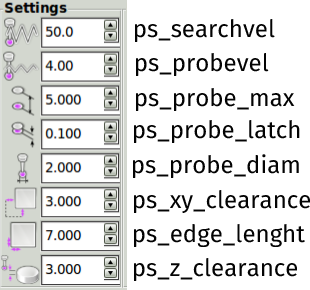
Here is a list of variables that can be found in the files macros/*.ngc and python/probe_screen.pyWirewrap wrote: How can I diagnose and debug this?
Last edit: 10 years 4 months ago by verser.
Please Log in or Create an account to join the conversation.
Time to create page: 0.435 seconds