
- Posts: 5
- Thank you received: 0
Work with probe
- unromeo21
- Offline
- New Member
-

Less
More
3 years 8 months ago - 3 years 8 months ago #265499
by unromeo21
Replied by unromeo21 on topic Work with probe
Hi there.
Newbie here, finishing my first CNC Mill.
I finally got my ProbeScreen v2 working inside gmoccapy after many tries with different versions, not even the ng was working properly during the tool change (hanging at the tool change script). All good except the jogging buttons inside the ProbeScreen tab are not working, hoping to fix this as well, mabye somebody has an ideea where I should look.
But, my main question is this: for Toll height measuring, why do we need to measure the Workpiece height as well ? why can't it just use the Z0 from G54, or any other work offset ? Is there any reasoning for this, or any advantage ?
For every job, i need to touch off Z AND Workpiece height one after another, it seems redundant.
Thanks.
Regards
Newbie here, finishing my first CNC Mill.
I finally got my ProbeScreen v2 working inside gmoccapy after many tries with different versions, not even the ng was working properly during the tool change (hanging at the tool change script). All good except the jogging buttons inside the ProbeScreen tab are not working, hoping to fix this as well, mabye somebody has an ideea where I should look.
But, my main question is this: for Toll height measuring, why do we need to measure the Workpiece height as well ? why can't it just use the Z0 from G54, or any other work offset ? Is there any reasoning for this, or any advantage ?
For every job, i need to touch off Z AND Workpiece height one after another, it seems redundant.
Thanks.
Regards
Last edit: 3 years 8 months ago by unromeo21.
Please Log in or Create an account to join the conversation.
- jcdammeyer
- Offline
- Senior Member
-

Less
More
- Posts: 73
- Thank you received: 8
3 years 8 months ago #265511
by jcdammeyer
Replied by jcdammeyer on topic Work with probe
I asked myself that same question. From what I can see in the code, and it's been a few months since I looked, there is no stored reference for the tool touch off to be linked to. So it uses the work but that only needs to happen once per work cycle.
Say you install your raw material on the bed. Then touch off to it to determine the height of it. It knows this because it knows how long your probe is. This value is saved.
Next you call for a tool change. The code asks you to install the tool and then moves to the tool setter and probes the length of the tool and uses the tool setter height along with the earlier part touch off to determine where the tool tip is.
Now you can move to Z0 and the tool tip will be on the surface of the part ready for Z-1 for a 1mm deep cut.
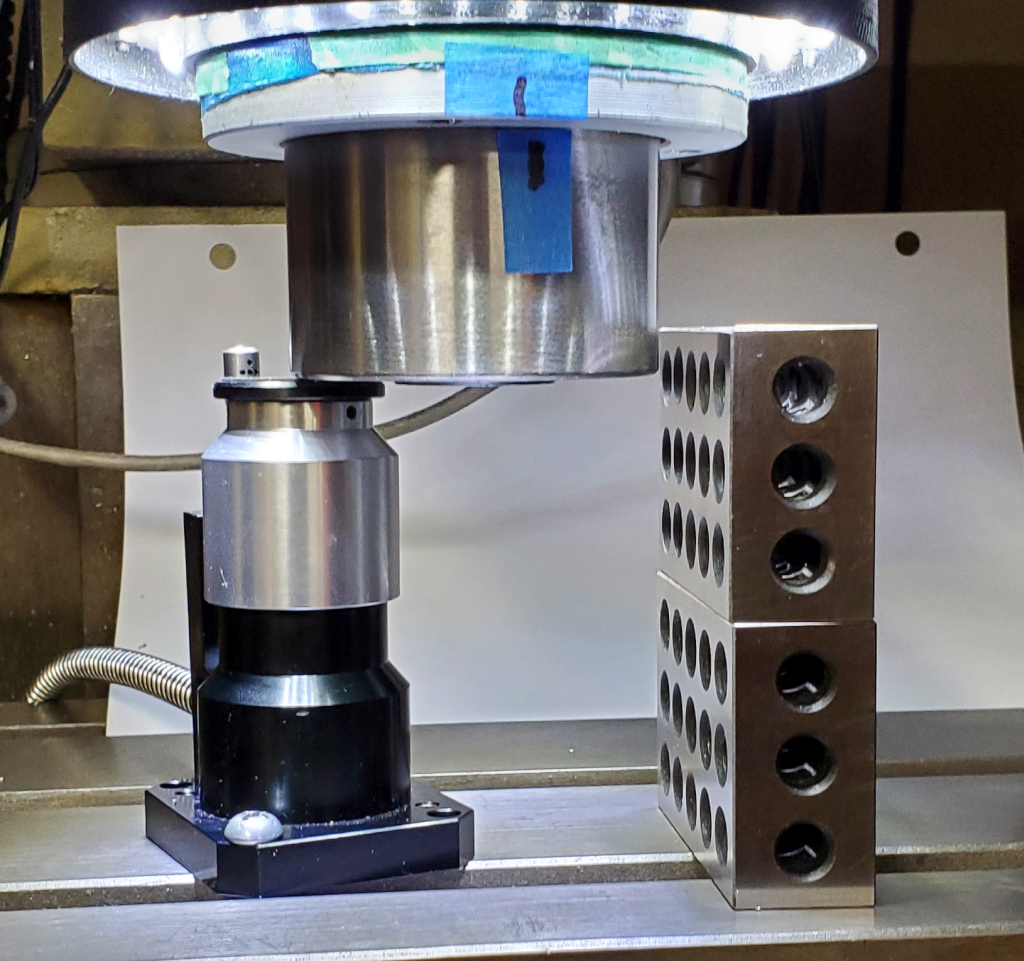
The alternative, which I did, is measure the height to the milling table of the base of the spindle. I use TTS holders for the most part so my tools in the tool table are all referenced to that. The attached photo shows how I do this. The 1-2-3 blocks are used to measure the spindle based until they just slide under. At that point Z is set to 0 in the G54 co-ordinate system. And I know my mill table is 4" lower than that so I record that value. The G53 Z0 was set earlier with the homing command.
Next the tool setter is measured by moving the spindle down until it depresses and the system is notified that the internal switch closed. The math using 4" (z0) and Tool Setter trip point now gives me my tool setter height.
Now I have the two important values. The height of the tool setter relative to the table. The distance of the spindle base to the table at the G53 Z0 homed position determined from the 1-2-3 block calculation. From that I can now determine the length of the touch probe as it touches the table. That's stored in the tool table. The distance to the table from the spindle base at Z home is part of the touch off code.
What I haven't done to the code yet is tested if there is a non zero value in the tool table. If there's a non-zero value then the tool has already been measured on the tool height setter and that operation won't be needed. If the value is 0 then it measures the tool (like a drill bit in a Jacobs chuck) on the tool height setter.
Now the part still needs to be probed at least once but the tool setter isn't used every time. Each tool change just uses the tool table as normal.
I've not finished the code yet. Haven't used the mill for anything since I started playing with that and it was a few months ago. Hopefully I documented enough of what I did in the MillMockup.pdf I've attached.
Say you install your raw material on the bed. Then touch off to it to determine the height of it. It knows this because it knows how long your probe is. This value is saved.
Next you call for a tool change. The code asks you to install the tool and then moves to the tool setter and probes the length of the tool and uses the tool setter height along with the earlier part touch off to determine where the tool tip is.
Now you can move to Z0 and the tool tip will be on the surface of the part ready for Z-1 for a 1mm deep cut.
The alternative, which I did, is measure the height to the milling table of the base of the spindle. I use TTS holders for the most part so my tools in the tool table are all referenced to that. The attached photo shows how I do this. The 1-2-3 blocks are used to measure the spindle based until they just slide under. At that point Z is set to 0 in the G54 co-ordinate system. And I know my mill table is 4" lower than that so I record that value. The G53 Z0 was set earlier with the homing command.
Next the tool setter is measured by moving the spindle down until it depresses and the system is notified that the internal switch closed. The math using 4" (z0) and Tool Setter trip point now gives me my tool setter height.
Now I have the two important values. The height of the tool setter relative to the table. The distance of the spindle base to the table at the G53 Z0 homed position determined from the 1-2-3 block calculation. From that I can now determine the length of the touch probe as it touches the table. That's stored in the tool table. The distance to the table from the spindle base at Z home is part of the touch off code.
What I haven't done to the code yet is tested if there is a non zero value in the tool table. If there's a non-zero value then the tool has already been measured on the tool height setter and that operation won't be needed. If the value is 0 then it measures the tool (like a drill bit in a Jacobs chuck) on the tool height setter.
Now the part still needs to be probed at least once but the tool setter isn't used every time. Each tool change just uses the tool table as normal.
I've not finished the code yet. Haven't used the mill for anything since I started playing with that and it was a few months ago. Hopefully I documented enough of what I did in the MillMockup.pdf I've attached.
Please Log in or Create an account to join the conversation.
- JohnnyCNC
- Offline
- Platinum Member
-

Less
More
- Posts: 572
- Thank you received: 115
3 years 7 months ago - 3 years 7 months ago #265685
by JohnnyCNC
Replied by JohnnyCNC on topic Work with probe
Attached are the files related to my M6 remap and and the use of a 3D probe, Toolsetter, and a mix of fixed length tools (Tormach TTS) and variable length tools. I am running QTDragon but may help or give you ideas.This whole project was a bit of a mind bender but it has been working great.Good Luck.
I found some typos and reposted this document
I found some typos and reposted this document
Last edit: 3 years 7 months ago by JohnnyCNC.
The following user(s) said Thank You: jcdammeyer
Please Log in or Create an account to join the conversation.
- perry1987
- Offline
- New Member
-
Less
More
- Posts: 1
- Thank you received: 0
3 years 4 months ago #273245
by perry1987
Replied by perry1987 on topic Work with probe
hey guys im trying to get working with Probe Screen-NG
github.com/linuxcnc-probe-screen/probe-screen-ng
I have a 3D Touch probe and a tool height setter or2 together and I can successfully probe workpieces now but if I MDI Tx M6 G43 a window pops up asking if I changed the tool and to click ok so I click OK and then nothing happens.. if I type Tx M6 G43 again it then goes over and touches the tool off on the tool height setter...
what could be happening?
I have a 3D Touch probe and a tool height setter or2 together and I can successfully probe workpieces now but if I MDI Tx M6 G43 a window pops up asking if I changed the tool and to click ok so I click OK and then nothing happens.. if I type Tx M6 G43 again it then goes over and touches the tool off on the tool height setter...
what could be happening?
Please Log in or Create an account to join the conversation.
- andypugh
- Offline
- Moderator
-

Less
More
- Posts: 19899
- Thank you received: 4655
3 years 4 months ago #273283
by andypugh
Replied by andypugh on topic Work with probe
This problem sounds like something is wring with the wiring of hal_manualtoolchange in the HAL file.
Do you want/need the dialog box popup?
Do you want/need the dialog box popup?
Please Log in or Create an account to join the conversation.
- jcdammeyer
- Offline
- Senior Member
-
Less
More
- Posts: 73
- Thank you received: 8
3 years 4 months ago - 3 years 4 months ago #274291
by jcdammeyer
Replied by jcdammeyer on topic Work with probe
I've not finished the code yet. Haven't used the mill for anything since I started playing with that and it was a few months ago. Hopefully I documented enough of what I did in the MillMockup.pdf I've attached.
Clearly more than a year later as I start to use this again my documentation was not sufficient. I've forgotten everything I've done and am once again confused. I should have had more information in that PDF. At the moment I'm not getting the tool length properly calculated and therefore changing a tool does not correctly change the parameters so the tip of the tool matches where the previous tip was.
I'm sure I'll figure it out and then write up a more detailed step by step. I'm using the rev 2 of the Probe screen since I don't like the rev 3 version layout. At the moment I can't even remember why there's the Remap M6 and Auto Zero check box.
I know if the Remap M6 Enable is checked that then a tool change causes the move to the tool-setter and causes the tool length to be measured and the value put into the tool table. The G43 should then also offset the Z position so the Z=0 point moves.
Not sure what the Auto Zero check box is for.
More when I figure it out again.
Last edit: 3 years 4 months ago by jcdammeyer. Reason: Make old message different from new.
Please Log in or Create an account to join the conversation.
Time to create page: 0.253 seconds