
- Posts: 78
- Thank you received: 69
Work with probe
- verser
- Offline
- Senior Member
-

Less
More
3 years 4 months ago - 3 years 4 months ago #274293
by verser
Replied by verser on topic Work with probe
Probe Screen v2.8 update - all commonly used probe macros on one stylish screen, intuitive look, minimal steps to set up.
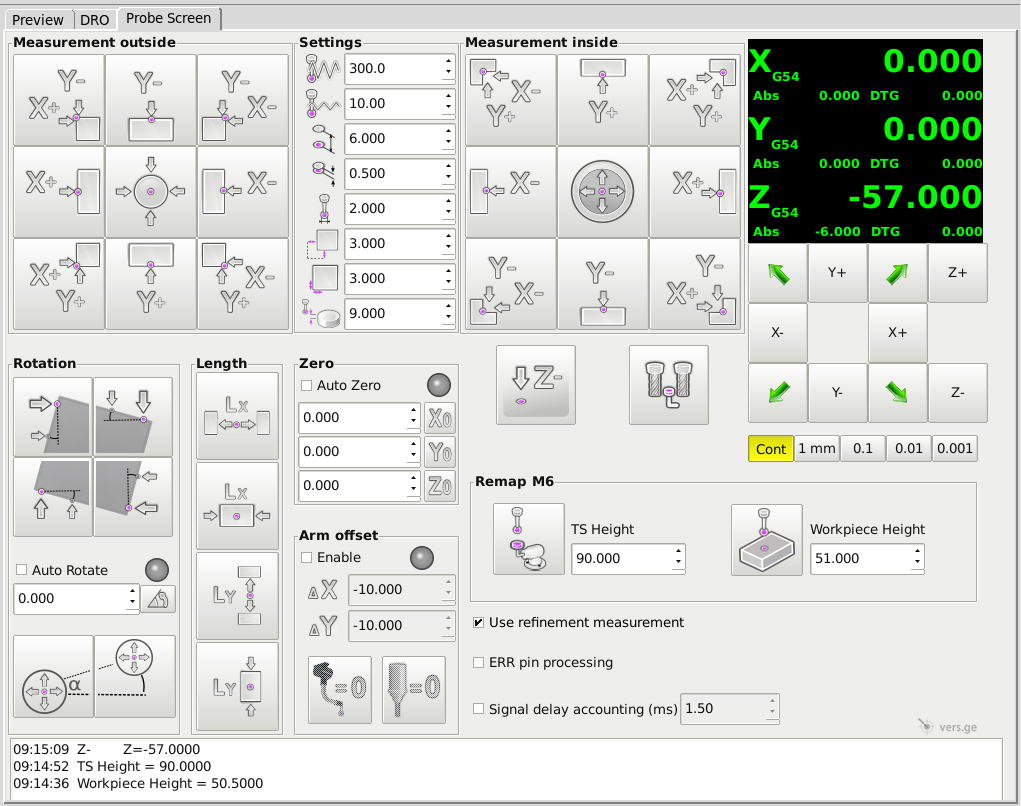
Сhanges:
►Designed for LinuxCNC v 2.8
►Included some additions from the PSNG development team
►First attempt to support metric and imperial
►Support for Axis and Gmoccapy interfaces, screens from 1280x1024
►Added diagonal movements
►Added rotation of coordinates by two holes
►Added probe arm support
►You can turn off the refinement measurement
►Accounting for signal delay from the probe
►Repeat measurement if an error signal is caught (for wireless)
►Tool diameter measuring with reverse rotation
Open source
Сhanges:
►Designed for LinuxCNC v 2.8
►Included some additions from the PSNG development team
►First attempt to support metric and imperial
►Support for Axis and Gmoccapy interfaces, screens from 1280x1024
►Added diagonal movements
►Added rotation of coordinates by two holes
►Added probe arm support
►You can turn off the refinement measurement
►Accounting for signal delay from the probe
►Repeat measurement if an error signal is caught (for wireless)
►Tool diameter measuring with reverse rotation
Open source
Last edit: 3 years 4 months ago by verser.
The following user(s) said Thank You: Roguish, GuiHue, jcdammeyer, itsme, Maik
Please Log in or Create an account to join the conversation.
- jcdammeyer
- Offline
- Senior Member
-
Less
More
- Posts: 73
- Thank you received: 8
3 years 4 months ago #274295
by jcdammeyer
Replied by jcdammeyer on topic Work with probe
Make sense to use this then. I'll install it and check it out tomorrow. I do want to change some things.
If the Z value in the tool table is 0 then measure it and replace it. If the value in the tool table is -1 then measure the tool and use it but don't change the tool table. If there is a positive value in the tool table just use it.
This takes care of a chuck with various drill bits, an R8 mounted tool but leaves alone pre-measured TTS tool holders.
If the Z value in the tool table is 0 then measure it and replace it. If the value in the tool table is -1 then measure the tool and use it but don't change the tool table. If there is a positive value in the tool table just use it.
This takes care of a chuck with various drill bits, an R8 mounted tool but leaves alone pre-measured TTS tool holders.
Please Log in or Create an account to join the conversation.
- itsme
- Offline
- Senior Member
-
Less
More
- Posts: 78
- Thank you received: 21
3 years 4 months ago #274300
by itsme
Replied by itsme on topic Work with probe
Yes, this would be a good add on!Make sense to use this then. I'll install it and check it out tomorrow. I do want to change some things.
If the Z value in the tool table is 0 then measure it and replace it. If the value in the tool table is -1 then measure the tool and use it but don't change the tool table. If there is a positive value in the tool table just use it.
This takes care of a chuck with various drill bits, an R8 mounted tool but leaves alone pre-measured TTS tool holders.
Please Log in or Create an account to join the conversation.
- andypugh
- Offline
- Moderator
-

Less
More
- Posts: 19899
- Thank you received: 4655
3 years 4 months ago #274305
by andypugh
github.com/andypugh/probe-screen-ng/comm...5cf18d2ae14cafb47766
Replied by andypugh on topic Work with probe
I don't now if you included this, but I made a patch to PSNG to switch to machine base units before probing.Probe Screen v2.8 update - all commonly used probe macros on one stylish screen, intuitive look, minimal steps to set up.
github.com/andypugh/probe-screen-ng/comm...5cf18d2ae14cafb47766
The following user(s) said Thank You: verser
Please Log in or Create an account to join the conversation.
- jcdammeyer
- Offline
- Senior Member
-
Less
More
- Posts: 73
- Thank you received: 8
3 years 4 months ago #274340
by jcdammeyer
Replied by jcdammeyer on topic Work with probe
I don't understand why the check box for M6 Enable has been removed. Once the tools installed in TTS holders have been measured and their lengths installed in the tool table there isn't a need to go over to the tool setter and measure them again.
If you are going to add a checkbox or method of changing between metric and imperial then the correct way, from a human factors engineering perspective, is to change all the values to the correct values. For example if you have metric checked and a box has 25.40 then when you uncheck metric or check imperial then the value in the box should change to 1.000
Similarly if metric is checked and you type in 1.000" and hit enter or leave the box the value should change automatically to 25.40. If however you type in 1.000 without the " then it redisplays as 1.00.
The system also doesn't appear to work with more than 3 decimal places and for imperial it should be 4.
If you are going to add a checkbox or method of changing between metric and imperial then the correct way, from a human factors engineering perspective, is to change all the values to the correct values. For example if you have metric checked and a box has 25.40 then when you uncheck metric or check imperial then the value in the box should change to 1.000
Similarly if metric is checked and you type in 1.000" and hit enter or leave the box the value should change automatically to 25.40. If however you type in 1.000 without the " then it redisplays as 1.00.
The system also doesn't appear to work with more than 3 decimal places and for imperial it should be 4.
Please Log in or Create an account to join the conversation.
- jcdammeyer
- Offline
- Senior Member
-
Less
More
- Posts: 73
- Thank you received: 8
3 years 4 months ago - 3 years 4 months ago #274342
by jcdammeyer
Replied by jcdammeyer on topic Work with probe
Andy,
He's modified the screen and removed the checkbox for enabling M6. He's also combined a number of the python files into one larger one.
So you changes aren't in his code below.
He's modified the screen and removed the checkbox for enabling M6. He's also combined a number of the python files into one larger one.
So you changes aren't in his code below.
Code:
# -------------------------- #
# Generic Probe Movement Methods #
# --------------------------
def z_clearance_down(self, data=None):
# move Z - z_clearance
s = """G91
G1 Z-%f
G90""" % (
self.halcomp["ps_z_clearance"]
)
if self.gcode(s) == -1:
return -1
return 0
Doesn't have your self.setunits feature.
And in addition, if a probe distance is 25.4mm and the machine is running metric a change to imperial would make it try to move 25.4" not 1"
Last edit: 3 years 4 months ago by jcdammeyer.
Please Log in or Create an account to join the conversation.
Time to create page: 0.259 seconds