Touch Plate Explanation please

More
5 years 11 months ago - 5 years 11 months ago #190458 by Aciera
Ok your path is different:
Go to ~/linuxcnc/configs/Router

type ls and you should see all the files just like in your screenshot.

then try
Code:
linuxcnc Router.ini

and that should start your machine config.

[edit]
As for what you're seeing:

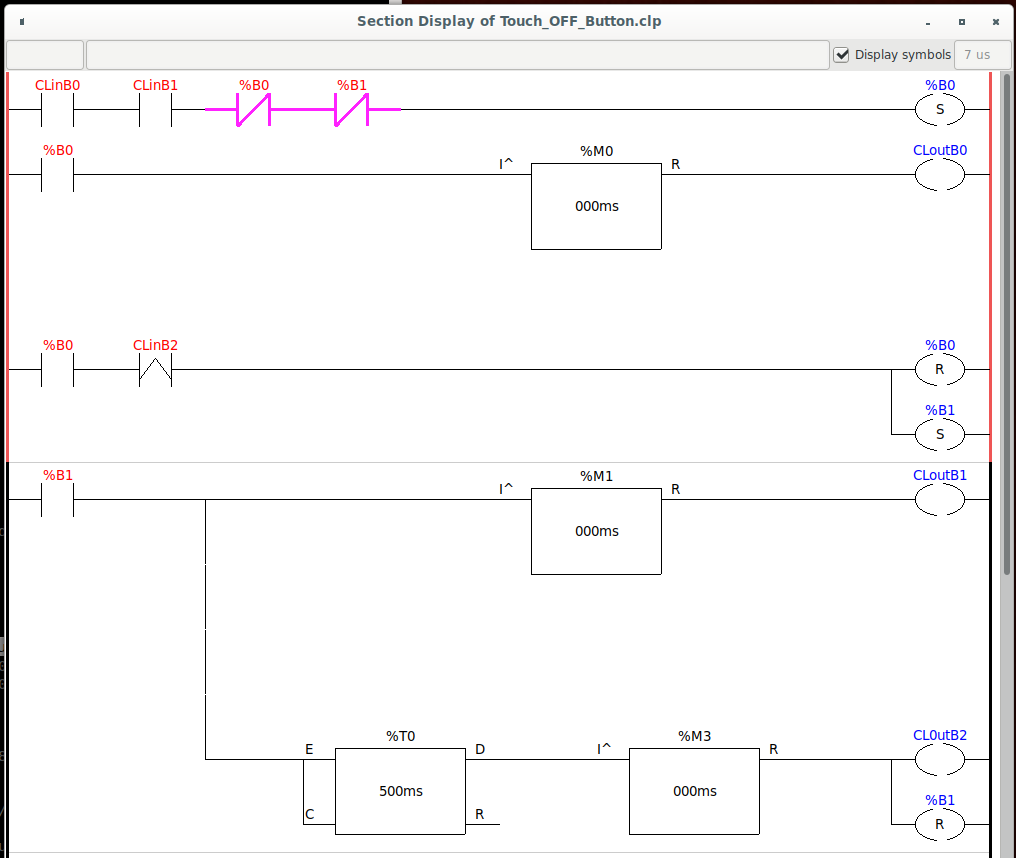
"CLinB0" is this in your custom_postgui.hal : net remote-z-axis-touchoff classicladder.0.in-00 <= pyvcp.z-axis-touchoff
"CLinB1" is: net mode halui.mode.is-mdi => classicladder.0.in-01
"CLinB2" is: #net in_pos motion.motion-inpos => classicladder.0.in-02 (so this will never turn to true because it's commented out!)
"CLoutB0" is: net z-touchoff classicladder.0.out-00 => halui.mdi-command-00
"CLoutB1" is: net z-zero classicladder.0.out-01 => halui.mdi-command-01
"CLoutB2" is: #net rapid-away classicladder.0.out-02 => halui.mdi-command-02 (which is also commented out for some reason)

The whole diagram is fairly easy to understand. Its just like an electric circuit:

-| |- is a normally open switch, so it needs to go TRUE to let the signal pass from left to right.
-|/|- is a normally closed switch, so it needs to be FALSE to let the signal pass from left to right.
-( ) is an output
-(S) means if the signal reaches it all the way from the left side of the window is sets the corresponding output to TRUE
-(R) means if the signal reaches it all the way from the left side of the window it set the corresponding output to FALSE
then you also have some timer blocks that create delays and such.

The nice thing is you can watch what happens as you press the buttons.
Have a look if those lines in your "custom_postgui.hal" should really be commented out (the leading #).
Last edit: 5 years 11 months ago by Aciera.

Please Log in or Create an account to join the conversation.

More
5 years 11 months ago #190466 by shortcircuit48
Well, nearly there.
I can start programme from terminal.
Went through the custom_postgui.hal and edited
I can get the touch-off button to work but I have to do a G92.2 manually first.
Although I saw changes in the ladder monitor I did not see the switches closing.
Will continue to attempt to resolve.
Thanks again

Please Log in or Create an account to join the conversation.

More
5 years 11 months ago #190473 by shortcircuit48
Hopefully I have worked this out and would be grateful for confirmation

MDI_COMMAND = G38.2 Z-2 f16
MDI_COMMAND = G92 Z0.25
MDI_COMMAND = G0 Z0.75
MDI_COMMAND = G92 x2 y-.5

The first command takes the probe down to the touch plate a maximum of 2mm at a rate of 16.
When the plate touches the second command memorises where it is and then adjust the position by 0.25mm which is the thickness of the touch plate being the workpiece zero.
The third command raises the probe 0.75mm

The fourth command has nothing to do with the probe but allows a new X and Y points to be set on the work surface at a new start point (I m not sure about this. I changed to X=0 and Y=0 and this set a new home zero)

Grateful for any comments to correct me if my assumptions are incorrect.

Please Log in or Create an account to join the conversation.

More
5 years 11 months ago #190493 by Aciera
Sounds correct to me.


I guess you have already found this:
linuxcnc.org/docs/html/gcode/g-code.html


Touch_OFF_Button.clp (I deleted the empty rungs so its nice and compact): If you are in MDI mode (CLinB1) and press the button on the screen (CLinB0) it automatically steps through the MDI commands 1,2 and 3 one after the other with short delays in between.


Just for general housekeeping: I would comment out loading that ladder at the bottom in Router.hal as I don't see it doing anything useful. But maybe you know why it is there?
Code:
# Load Classicladder without GUI (can reload LADDER GUI in AXIS GUI loadusr classicladder --nogui custom.clp

Please Log in or Create an account to join the conversation.

More
5 years 11 months ago - 5 years 11 months ago #190496 by shortcircuit48
Thanks again and yes I had that link but eventually took time to read and understand.

As I said previously, "I can get the touch-off button to work but I have to do a G92.2 manually first" Is this normal?
&.
"Although I saw changes in the ladder monitor I did not see the switches closing." I did observe that LinB1 does not close unless I operate as above?
Thanks again.

Edit How am I classed as an "Expert Boarder"?
Last edit: 5 years 11 months ago by shortcircuit48.

Please Log in or Create an account to join the conversation.

More
5 years 11 months ago #190497 by Aciera

I did observe that LinB1 does not close unless I operate as above?


You mean it does not close unless you do a manual G92.2 first? It should turn on as soon as you enter MDI mode.

Please Log in or Create an account to join the conversation.

Time to create page: 0.256 seconds
Powered by Kunena Forum