LinuxCNC on Linux Mint Debian Edition 6

More
2 years 6 months ago #298170 by rodw
What NIC are you using for ethercat? Is the MAC address set correctly in this file?
Check the MAC Address with ip a
Your file mentions enp3s0 but thats not what you are using based on dmesg
The following user(s) said Thank You: bkt

Please Log in or Create an account to join the conversation.

More
2 years 6 months ago #298273 by bkt

What NIC are you using for ethercat? Is the MAC address set correctly in this file?
Check the MAC Address with ip a
Your file mentions enp3s0 but thats not what you are using based on dmesg
 
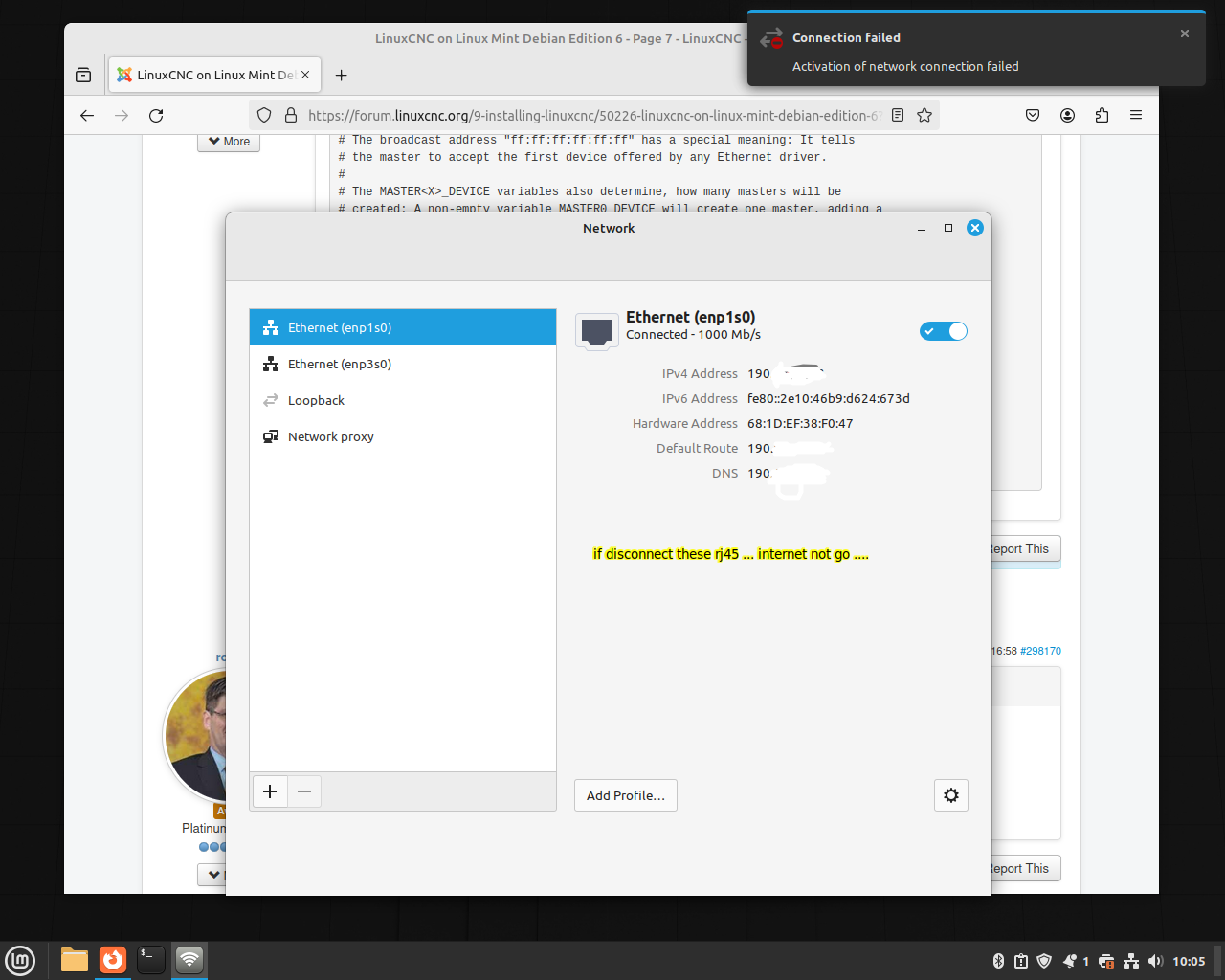
based on my dmesg I can see enp3s0 go down than go up .... and when go down master stop to work until unp3s0 link go up again .... not see I use enp1s0 at all really .... plus I add a new image about desktop warning about enp3s0 (and 2 image for show you mac adress is the same I write on config)

mac of internet port:
 

ethercat mac


problem with enp3s0 continuos disconnection:


Not find solution for now ....
 

Please Log in or Create an account to join the conversation.

More
2 years 6 months ago #298282 by tommylight
Why is your address starting with 190???
The only local address ranges are 192.168.n.n and 10.n.n.n (there are two more that i do not recal as i rarely used them), these are non routable address ranges for use in local networks as they do not get routed to the internet, others can not be used unless you own a registered public IP address. And even then only the actual router can and should have that public address, not the local PC's.

Please Log in or Create an account to join the conversation.

More
2 years 6 months ago #298303 by bkt

you own a registered public IP address.

 you caught me, I'm doing other experiment other these where try to use these little pc with realtek port, so i need it .... having said this, it has nothing to do with the fact that enp3s0 is not working properly.... in fact that is enp1s0.

Please Log in or Create an account to join the conversation.

More
2 years 6 months ago #298451 by bkt
acually running my drive is:
Code:
*-network        description: Ethernet interface        product: RTL8111/8168/8411 PCI Express Gigabit Ethernet Controller        vendor: Realtek Semiconductor Co., Ltd.        physical id: 0        bus info: pci@0000:03:00.0        logical name: enp3s0        version: 15        serial: 68:1d:ef:38:f0:48        size: 100Mbit/s        capacity: 1Gbit/s        width: 64 bits        clock: 33MHz        capabilities: pm msi pciexpress msix bus_master cap_list ethernet physical tp 10bt 10bt-fd 100bt 100bt-fd 1000bt-fd autonegotiation        configuration: autonegotiation=on broadcast=yes driver=r8168 driverversion=8.051.02-NAPI duplex=full latency=0 link=yes multicast=yes port=twisted pair speed=100Mbit/s        resources: irq:19 ioport:3000(size=256) memory:80404000-80404fff memory:80400000-80403fff

And the proble is teh same ... but after these command a couple of time:
Code:
sudo modprobe -r alx && sudo modprobe alx && systemctl restart NetworkManager

than again these modprobe command and restart ...
Code:
sudo modprobe -r r8169 && sudo modprobe r8169 && sudo systemctl restart

problem seems disappear and after clean my dmesg file .... it stay clean from 1 hour .... now try to reboot and make a latency trest again ....

Please Log in or Create an account to join the conversation.

More
2 years 6 months ago #298562 by bkt
So I try to upgrade LMDE6 to latest rt-preemp release .... so can see r8168 dmks problem at work ..... dmks log:
Code:
DKMS make.log for r8168-8.051.02 for kernel 6.6.13+bpo-amd64 (x86_64) Thu Apr 18 17:14:23 CEST 2024 make: Entering directory '/usr/src/linux-headers-6.6.13+bpo-amd64'   CC [M]  /var/lib/dkms/r8168/8.051.02/build/r8168_n.o   CC [M]  /var/lib/dkms/r8168/8.051.02/build/r8168_asf.o   CC [M]  /var/lib/dkms/r8168/8.051.02/build/rtl_eeprom.o   CC [M]  /var/lib/dkms/r8168/8.051.02/build/rtltool.o /var/lib/dkms/r8168/8.051.02/build/r8168_n.c: In function ‘r8168_csum_workaround’: /var/lib/dkms/r8168/8.051.02/build/r8168_n.c:29208:24: error: implicit declaration of function ‘skb_gso_segment’; did you mean ‘skb_gso_reset’? [-Werror=implicit-function-declaration] 29208 |                 segs = skb_gso_segment(skb, features);       |                        ^~~~~~~~~~~~~~~       |                        skb_gso_reset /var/lib/dkms/r8168/8.051.02/build/r8168_n.c:29208:22: warning: assignment to ‘struct sk_buff *’ from ‘int’ makes pointer from integer without a cast [-Wint-conversion] 29208 |                 segs = skb_gso_segment(skb, features);       |                      ^ cc1: some warnings being treated as errors make[2]: *** [/usr/src/linux-headers-6.6.13+bpo-common/scripts/Makefile.build:248: /var/lib/dkms/r8168/8.051.02/build/r8168_n.o] Error 1 make[1]: *** [/usr/src/linux-headers-6.6.13+bpo-common/Makefile:1938: /var/lib/dkms/r8168/8.051.02/build] Error 2 make: *** [/usr/src/linux-headers-6.6.13+bpo-common/Makefile:246: __sub-make] Error 2 make: Leaving directory '/usr/src/linux-headers-6.6.13+bpo-amd64'

realtek - tea - best

Please Log in or Create an account to join the conversation.

Time to create page: 0.077 seconds
Powered by Kunena Forum
