Ethercat random jitter fix

More
6 months 2 weeks ago #345438 by rodw
Replied by rodw on topic Ethercat random jitter fix
Thanks for ideas.

It gets worse and I've been pondering the next step.: "The machine is unusable; the axes shake and make a lot of noise. I tried rebooting and changing the refclock settings from -1 to values ​​of 1 or 1000, but to no avail. The PC has an Intel NIC, but, as I said, the hardware and software are identical to Debian 10. At this point, I don't know what to do. The problem is EtherCAT."
The customer would like to try Ethercat 1.52 from his Debian 10 days but I don't think it will run on later kernels 
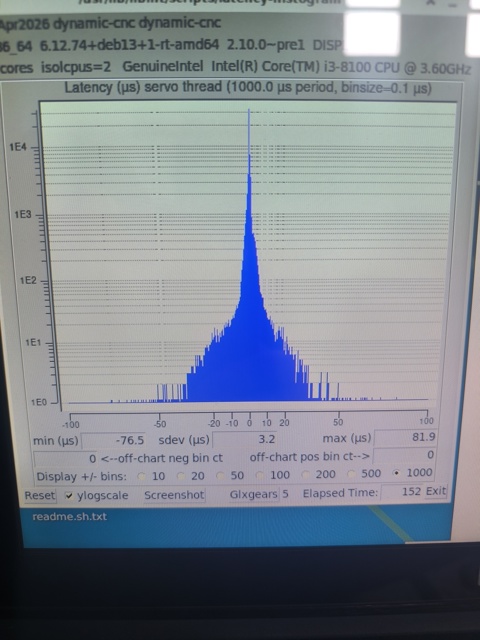
The current Debian 10 Ethercat version on their repos is 1.62, Debian 12 and Debian 13 is 1.69 with no other earlier versions published. Latency is OK but not great for a 4 core machine
 

The only thing I can think of is to roll back to Debian 12. Any other ideas? 


Please Log in or Create an account to join the conversation.

More
6 months 2 weeks ago - 6 months 2 weeks ago #345444 by papagno-source
Good morning everyone. We're running some tests with Rodw on a Debian Trixie system, kernel 6.12.74-rt, and ethercat 1.6.9.
Just to be fair, we're using the same configuration on real machines, so motors connected to lead screws, running Debian 10, kernel 4.19.0-27-rt, ethercat 1.5.2, and linuxcnc 2.9.0-pre1. So, with Debian 10, the machines work without problems. When I first start up, the drives and all ethercat I/O are immediately visible, meaning, for example, the positions of the absolute encoders for the motors appear instantly upon startup.
With Debian Trixie, we're having two problems. A less serious one, that is, at startup, the motor encoders' values ​​appear late, the first drive starting to appear after about a second (x axis), after another second Y appears and after that Z appears. But the most serious problem is that if you run the machine, the axes shake, then they stop shaking, then the vibration comes back and everything gets worse if I move windows on the desktop. Rodw has already attached the latency test on the matter, but I repeat, the PC is always the same and all the i/o and xml files are the same. Now I tried to copy from Debian 10 the bin/lcec_conf and rtlib/lcec.so files into the respective directories of Debian Trixie, without result, same problem. We tried to copy the same files from a version with the Grandixxximo patch, same problem, I also tried to vary the lcec.0.pll-drift pin, with values ​​from 10 to 1000 without solving. Honestly, I don't I know what to do. I'm attaching the XML files I use on Debian 10 and Trixie.

Last edit: 6 months 2 weeks ago by papagno-source.

Please Log in or Create an account to join the conversation.

More
6 months 2 weeks ago - 6 months 2 weeks ago #345445 by papagno-source
xml debian 10

Warning: Spoiler!
Last edit: 6 months 2 weeks ago by Aciera. Reason: use a spoiler

Please Log in or Create an account to join the conversation.

More
6 months 2 weeks ago - 6 months 2 weeks ago #345446 by papagno-source
xml on debian trixie
i have test refClockSyncCycles = -1 , but problem is the same
Warning: Spoiler!

 
Last edit: 6 months 2 weeks ago by Aciera. Reason: use a spoiler

Please Log in or Create an account to join the conversation.

More
6 months 2 weeks ago #345447 by papagno-source
Just to complete the information. The xml file contains drives that aren't actually present, so you can manage machines with different configurations. The real machine only has the x-y-z axes and an analog spindle.
So address 0 (I/O card), address 1 x-axis, address 2 y-axis, address 3 z-axis. The subsequent addresses aren't actually present, but this is done so as not to change much in the .hal file.
But I repeat, on Debian 10 the same xml files are used, the function syncToRefClock="true"

Please Log in or Create an account to join the conversation.

More
6 months 2 weeks ago - 6 months 2 weeks ago #345448 by grandixximo
sync0Shift should not be 0

sync0Shift needs to be at least a third of your cycle

Set to 500000 not 0

Also please post files as attachments, or link to paste bin or Google drive, don't paste the entire text in the forum.

Also run ethercat master command, share the output here, preferably in a text file.

I would suggest the first device to be DC enabled, which it is, and the xml devices should match what is actually connected to the machine.

Have different versions of the xml and Hal if you have different machines with different configurations.
Last edit: 6 months 2 weeks ago by grandixximo.

Please Log in or Create an account to join the conversation.

Time to create page: 0.507 seconds
Powered by Kunena Forum