
Advanced Search

Search Results (Searched for: )

  • B.Reilly01
  • B.Reilly01
27 Dec 2024 13:16

Adding 4th Axis to LinuxCNC with 7i92/7i77/7i76, Use absolute encoder or incr?

Category: Advanced Configuration

So I'm adding a Tsudokama RZ-160 rotary as a full 4th axis.   I'm replacing the existing TPC-JR with a standalone drive and wiring everything direct.  I have a good handle on most of this, however I'm left with the choice in the title.  The encoder is an absolute encoder wired directly to the drive.  The drive then either passes along the serial absolute position OR has outputs for a simulated incremental encoder.  I know how to wire the incremental, it's the same as my other 3 axes, and can get wired directly into "Axis 3" on the 7i77 board.  However, the RZ-160 of course does not have homing switches (that I'm aware of), so repeating the same location with the incremental encoder output through a power cycle may prove challenging.  At the very least, I'd have to break out an indicator and indicate in the 4th if I understand correctly.  With the Absolute encoder, in theory, I'll always know where the rotary table is at.  I don't know that that is accurate, and it may only remember location within 1 rotation of the motor, which is 1/60th a rotation of the table.  Is that accurate?  Can the PSO /PSO output be wired into the 7i77 SSerial port easily?  Is it worth it?How would you set up your 4th axis given this choice?  My drive is a Sigma II Yaskawa drive (SGDM-04ADA, same as what is in the TPC-JR), the servo is a Sigma II (SGMPH-04A1A-TF11).

Thank you
  • Aciera
  • Aciera's Avatar
27 Dec 2024 13:06 - 27 Dec 2024 13:11

Skew correction/perpendicularity correction (millkins or millkins_xyz)

Category: Basic Configuration

For an easier start on how to use jupyter notebook and ipython to derive the kinematic linked above you can directly load the notebook used to create it and the documentation to study/modify:
github.com/Sigma1912/LinuxCNC_Demo_Confi...0Kinematics%20.ipynb
This contains all the python code blocks that handle the math.
  • nicton
  • nicton
27 Dec 2024 13:02

Is the encoder feedback loop inside 7i92 (5ABOB_Enc)?

Category: Driver Boards

I want to make a machine with two 7i92 (configuration 7i92_5ABOB_Enc), at first I decided that one would stand on the machine and collect signals from the rulers and sensors, the second in the control cabinet and output step/dir, i.e. it turns out that feedback from the ruler goes through the computer, but then I came across information that mesa is not just an input/ conclusion, it almost recycles g-codes, i.e. hypothetically, the encoder feedback control loop can be closed inside mesa, and it is not advisable to break it, is this the case, or does the circuit in any case go through the core, and in mesa only the encoder counter and the step generator?
  • slowpoke
  • slowpoke
27 Dec 2024 12:46
Replied by slowpoke on topic 7i96S MPG input

7i96S MPG input

Category: Basic Configuration

Just a side question: Why do you need a separate Controller for the manual operation?

Isn*t everything possible to do in the LInux CNC. Slaving axis, Using MPG to move the axis manually?

 I think all of the functionality is available in LinuxCNC, however I developed a little touchscreen GUI for the existing ELS and I really like the ease of use when using the lathe in manual mode.
  • MaHa
  • MaHa
27 Dec 2024 12:28
Replied by MaHa on topic Tool setter setup

Tool setter setup

Category: Basic Configuration

The path for python is missing in the ini

linuxcnc.org/docs/stable/html/remap/rema...emap:embedded-python
[PYTHON]
# where to find the Python code:

# code specific for this configuration
PATH_PREPEND=./

# generic support code - make sure this actually points to Python-stdglue
PATH_APPEND=../../nc_files/remap_lib/python-stdglue/

# import the following Python module
TOPLEVEL=toplevel.py

# the higher the more verbose tracing of the Python plugin
LOG_LEVEL = 0
  • RNJFAB
  • RNJFAB
27 Dec 2024 11:55

Homemade CNC Plasma - hypertherm, Mesa, gear drives, nema 34.

Category: Show Your Stuff

Yeah, was a bit sick at the start of the year and had 6 months off work, not much happened at this time, just me thinking about this new build.

Very busy otherwise, I work full time, and I cut steel signs, and I run a small mowing business, and I work for my brother in his fabrication workshop, AND I'm still building my own house.

New build is coming along nicely.
Machine is built, most mechanical fitout complete, and started on the wiring tonight.
Pics to follow
  • macrimarco001
  • macrimarco001
27 Dec 2024 11:28

Newbie looking for a hardware configuration based on Raspberry Pi

Category: Computers and Hardware

Hello, it's been a while... i hope you had a merry Christmas. It sounds awesome to me. But i think it will take a while because i am preparing my last exams. Maybe there's a chance i may already know the UniCal professor you're talking about, if he's in my department (DIMES).

Hope to hear you soon. Sorry for the day in my reply, but I'm studying and working too.
Thank you so much :)
  • CaspianCmonster
  • CaspianCmonster
27 Dec 2024 11:24
Tool setter setup was created by CaspianCmonster

Tool setter setup

Category: Basic Configuration

Hi all, like many people out there I am trying to get a tool setter setup. 
I am working from the example files but I think I have issues with file/folder mapping among other problems. 

I get a startup error usr/share/axis/images/axis.ngc: pycall(remap.change_prolog) failed 

I found a similar issue in my searches but haven't been able to figure it out. 

many thanks

Luke 

 
  • abdulasis12
  • abdulasis12
27 Dec 2024 11:18 - 27 Dec 2024 11:21

Skew correction/perpendicularity correction (millkins or millkins_xyz)

Category: Basic Configuration
Hi
Thank you for fast reply.
Ok, I will try using the URLs you provided to study further. Maybe one day, I might be able to create it on my own.
Even though the chances are slim with my basic knowledge , I will give it a try.
The way you provided links for me to continue learning is really great I get to learn new things all the time.
Thank you so much for always helping me, from the first day I started using LinuxCNC until now (although I’ve stopped using Mint). It has been amazing!

forum.linuxcnc.org/9-installing-linuxcnc...ewbie?start=0#278679

Super Thanks  Tommylight, RodW, and you Aciera. 
second thanks : Online translator

Asis
  • Aciera
  • Aciera's Avatar
27 Dec 2024 10:47
Replied by Aciera on topic Double Z

Double Z

Category: General LinuxCNC Questions

I see two possibilities for this:

1. use a python filter script that parses your gcode file and replaces 'Z' for 'W' depending on the 'T' number
linuxcnc.org/docs/2.9/html/gui/filter-programs.html

2. use a custom kinematic that lets you switch between XYZ1 and XYZ2 and then use an m6 remap to handle the switching automatically for you.
For an example with 3 heads (custom m6 remap not implemented though)
forum.linuxcnc.org/10-advanced-configura...y-and-control#292847

Personally I would prefer the 2. because
a) there is no need to modify the gcode
b) It also works in MDI mode and Jogging
c) the planner does not fall back to one line lookahead (which happens whenever an axis word other than X,Y or Z is used in gcode)
d) with a filter script you would really want to check the output every time to make sure it actually got it right
  • Aciera
  • Aciera's Avatar
27 Dec 2024 10:30

Skew correction/perpendicularity correction (millkins or millkins_xyz)

Category: Basic Configuration
That is correct there is no skew correction in identity kinematics. Note though that my modifications are NOT what you need as the skew is in the work coordinate system (ie the correction rotates with the table) which is not correct, you want the skew correction to be applied to the machine coordinate system (ie it remains oriented to the machine joints regardless of table rotation).
To make a serious effort to get this working I would not bother with the built in trt kinematics but would use the more recently added userkins.comp template and build a new kinematic from scratch.
Re userkins.comp:
forum.linuxcnc.org/10-advanced-configura...mill?start=30#258311
For an example of how to derive a kinematic see:
forum.linuxcnc.org/10-advanced-configura...mill?start=80#263694
The finished kinematic see:
github.com/LinuxCNC/linuxcnc/blob/master.../xyzab_tdr_kins.comp

To derive the forward and inverse kinematic model I would recommend using jupyter notebook and ipython. However, you need to be, or be prepared to make yourself, comfortable using matrices.
  • AD_15
  • AD_15
27 Dec 2024 09:31 - 27 Dec 2024 09:49
Double Z was created by AD_15

Double Z

Category: General LinuxCNC Questions

Hello!!
I am Working on double Z, I have taken 4 axis as X,Y,Z,W. I am using W as my Z2 so W axis is working properly but In my case I want my double z should work like if 
N10T1M06
N14X0.000Y0.000
N20Z10.000
N22G00X-19.087Y264.170Z20.000
 so for this code if T1 M6 is there for every Z value my z axis should run but whenever T2M6 code executed in gcode then for every Z value my W axis should run. 
Please guide me How to implement this functionality I can't change my gcode file otherwise its working properly if I replace every Z with W for T2 M6.
  • abdulasis12
  • abdulasis12
27 Dec 2024 08:44 - 27 Dec 2024 08:44

Skew correction/perpendicularity correction (millkins or millkins_xyz)

Category: Basic Configuration

Hi Aciera,
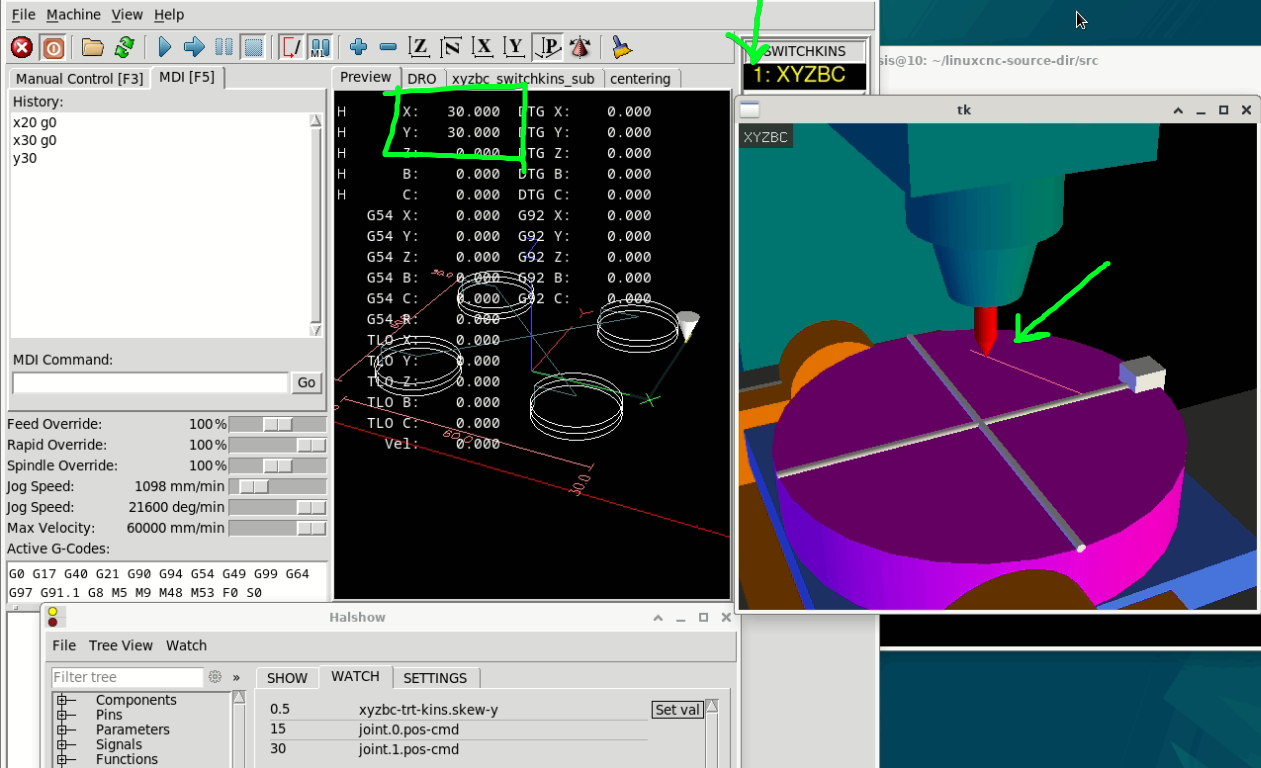
Now it's Work !!!

I miss  source scripts/rip-environment

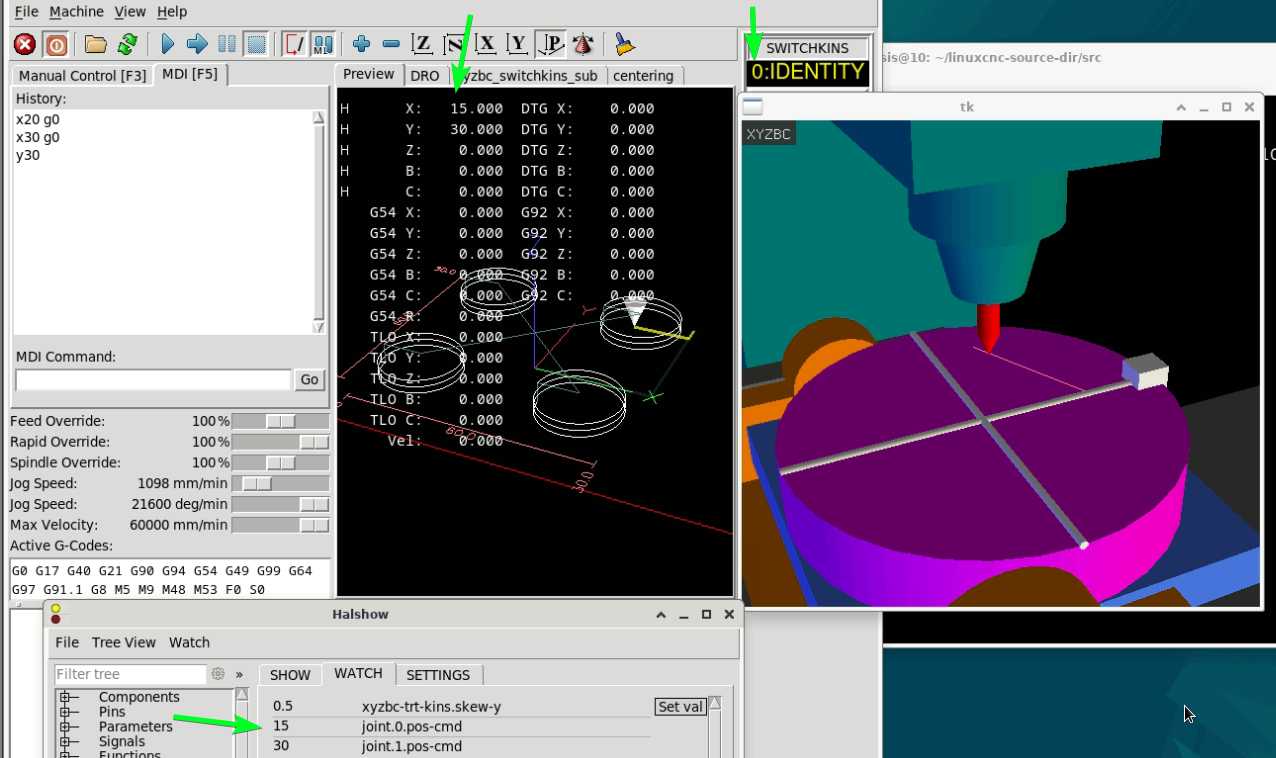
But....I think not correct output When in Mode : 0 Identify , because Identify not have skew

when change to mode to : 1 TCP  , Y move  and X skew correct
When I turn off TCP change to : 0 Identify Mode .   X will change to Y/0.5  off skew

In picture Mode 1 TCP   
X30
Y30

Then, I change mode from 1 (TCP) to 0 (Identify)  X and Y will change to
X15
Y30

In real I think in DRO will X30 Y30  (I think you understand me)

can you help me for check code again ?  ^^"  

Super thanks,
Asis


  • aikiaviator
  • aikiaviator
27 Dec 2024 07:43
Replied by aikiaviator on topic To Probe Basic from Gmoccapy

To Probe Basic from Gmoccapy

Category: QtPyVCP

Understand. However, I needed to adjust the Gcode to delete the Tool changing code. Is there a way of switching off the Tool changer from the Conversationals so it does not add the Gcode?
  • timo
  • timo
27 Dec 2024 04:34
Replied by timo on topic 7i96S MPG input

7i96S MPG input

Category: Basic Configuration

Just a side question: Why do you need a separate Controller for the manual operation?

Isn*t everything possible to do in the LInux CNC. Slaving axis, Using MPG to move the axis manually?
Displaying 21166 - 21180 out of 21867 results.
Time to create page: 0.598 seconds
Powered by Kunena Forum
