Advanced Search

Search Results (Searched for: )

  • PCW
  • PCW's Avatar
03 Aug 2025 22:27 - 03 Aug 2025 22:29
Replied by PCW on topic Encoder started misbehaving

Encoder started misbehaving

Category: Driver Boards

Basically as I said before, this points to an issue with ENCMUX. 

It may be a damaged 7I77 buffer chip for this signal
or in may be an on board 7I77 issue. The ENCMUX
signal is om DB25 pin 17. 

A 5i25 problem is still possible but less likely (damaged I/O pins
tend to be stuck low so can be detected with the simple mesaflash test)

I would definitely scope/trace the encmux signal.

As to what caused the damage, disconnecting/reconnecting the DB25 cable from the
7I77 if there is an (even small) ground potential difference between the PC and the machine
can damage interface components so should only be done with all power off.

Tomorrow, I can look at the schematics and see what parts on the 7I77 are in the ENCMUX
signal path (I think just one Hex inverter)
 
 
  • tsaG
  • tsaG
03 Aug 2025 22:22 - 03 Aug 2025 22:25
Probe Basic ATC Questions was created by tsaG

Probe Basic ATC Questions

Category: QtPyVCP

Hi,

I updated ProbyBasic to the newest dev version and I am facing two Issues. After the update, I deleted all my old folders (user tabs, subroutines, python etc...) with the new folders from the example config. I am currently trying out the ATC Rack tool Changer. 

Issue1:
For this, I am trying to modify my linuxcnc.var file, manually changing the following Parameter:

"3973    10.000000
3979    1.000000
3981    -76.000000
3982    0.000000
3983    1137.000000
3984    615.680000
3985    1137.000000
3986    565.680000
3987    1097.000000
3988    615.680000"

However, when opening Linuxcnc, all the values are still 0. When modifying some values in the GUI, for example X Position for P1 to 1337, I get the error "Error: No Conditions Met, Rack ID Not Set" BUT when hitting "update Rack ATC Parameters" the Value is saved in the linuxcnc file (but all the other values above are overwritten to 0.

So, I would be fine with including all these in the GUI but the only value I can not change is the "ATC Rack ID", which seems to be write protected and, I assume, creates the error above.

EDIT: Okay, I filled now all Parameters and it seems to have created a RACK ID -> 4. And it is working now.

Issue 2:

I set up everything and can now manually clamp and release the tools. The Tool touch off is also working (on both ATC and Tool Tab). However, when clicking "Store Tool in Rack", I get the Error "Unknown m code used: M10" but M10 is in the subroutines folder.
Similar to clicking "Ref Rack Data" (what does it actually do?) I get "Unknown m code used: M13".


  • tommylight
  • tommylight's Avatar
03 Aug 2025 22:18
Replied by tommylight on topic Interfaces & linear scale for LinuxCNC

Interfaces & linear scale for LinuxCNC

Category: General LinuxCNC Questions


Would a LPT port have enough inputs and outputs to read linear encoders for 3 axis?

Yes and no:
-Yes it can read 3 axis be it A/B or A/B/Z, so 6 or 9 inputs, but only in "IN" or "X" mode that most built in parallel ports can do but not all, and you might need more than one parallel port for everything to work.
-No as parallel port is really slow for reading encoders, especially high resolution ones.
You can use a parallel port or two to do some testing and maybe very slow work, but i would not think you can use it for a production machine.
As a reference, you can do 5000-20000 encoder pulse readings per second on a parallel port with a good latency PC, might even go to 50000 with a really good latency PC, but this is to far fetched.
And for reference Mesa can do up to 10000000 pulse readings per second. Yes, that is 10 million.
  • pommen
  • pommen's Avatar
03 Aug 2025 22:01
Replied by pommen on topic Encoder started misbehaving

Encoder started misbehaving

Category: Driver Boards

Thanks for your reply!
5i25 reported as you said 0001FFFF

I also tried with another cable without any change.

Encoder 00 and 01 show the same value, although nothing is attached to 01.
02 & 03 seems to be paired as well.
I got different reading on encoder 04 & 05, but they both changing from one encoder input.

Any further troubleshooting tips are highly appreciated! I am comfortible scopeing/soldering SMT if you think this is repairable.
/Peter
  • Cysign
  • Cysign
03 Aug 2025 21:51
Replied by Cysign on topic Interfaces & linear scale for LinuxCNC

Interfaces & linear scale for LinuxCNC

Category: General LinuxCNC Questions

Nice idea - but that won't work, since the LPT-port is connected to the motherboard ;)

Would a LPT port have enough inputs and outputs to read linear encoders for 3 axis?

Regarding linuxcnc.org/docs/html/hal/parallel-port.html that should work. So I coult start using the Intel Atom computer and once it's broken, I'll swap over using a Mesa card.

I guess I'll try to install a new version of LinuxCNC on the computer, connect it to the Toshiba driver board and the steppers and see if I can get it rotating.

Maybe I'll order one linear scale and test if it'll work with the LPT connection.
  • Benb
  • Benb's Avatar
03 Aug 2025 21:33
Replied by Benb on topic Switch relay in a defined x position

Switch relay in a defined x position

Category: Advanced Configuration

The following hal file is based on linuxcnc wcomp component.
linuxcnc.org/docs/2.8/html/man/man9/wcomp.9.html
The file was automatically generated by the eagle2hal script. 
 
​​​​​​​
#
# Load realtime Components and their counts
loadrt not          count= 1
loadrt or2          count= 1
loadrt wcomp    count= 1
#
# Add functions to threads
addf wcomp.0              servo-thread
addf not.0                    servo-thread 
addf or2.0                    servo-thread 
#
# Set parameters
setp wcomp.0.max  1600.0      
setp wcomp.0.min  900.0     
#
# Connect Pins using signals/wires
net axis.x.pos-cmd wcomp.0.in
net cyln.pos<max&&>min wcomp.0.out  not.0.in
net cyln.pos>max&&<min not.0.out  or2.0.in0 
net cyln.extended or2.0.in1  wcomp.0.under  
net trigger or2.0.out  hm2_7i76e.0.7i76.0.0.output-05 
 
  • --Matt--
  • --Matt--
03 Aug 2025 21:03 - 03 Aug 2025 22:15
Replied by --Matt-- on topic Surfacemap Z compensation with Probe Basic

Surfacemap Z compensation with Probe Basic

Category: QtPyVCP

Just discovered that the .var file was created with group and other permissions set to read only. Changing these to read and write seems to have made a difference. The probe feed speeds now seem to be updating based on values entered in the ui.

The ui entry boxes for probe feed settings in the surfacemap user tab still don't work properly. 
  • PCW
  • PCW's Avatar
03 Aug 2025 20:59 - 03 Aug 2025 21:15
Replied by PCW on topic Encoder started misbehaving

Encoder started misbehaving

Category: Driver Boards

If the input to encoder channel 0 affects the count on encoder channel 1,
that suggest a problem with the encoder multiplexing (basically that the encoder
mux-sel signal is not getting to the 7I77) 

This could be bad cable, or cables not inserted fully, bad or damaged
5I25, or bad or damaged 7I77.

You can check the 5I25 for damage by

1. Disconnecting the DB25 cable (with all power off)
2. Running: 
sudo mesaflash --device 5i25 --rp 0x1000

This should report all highs on the I/O pins = 0x001FFFF

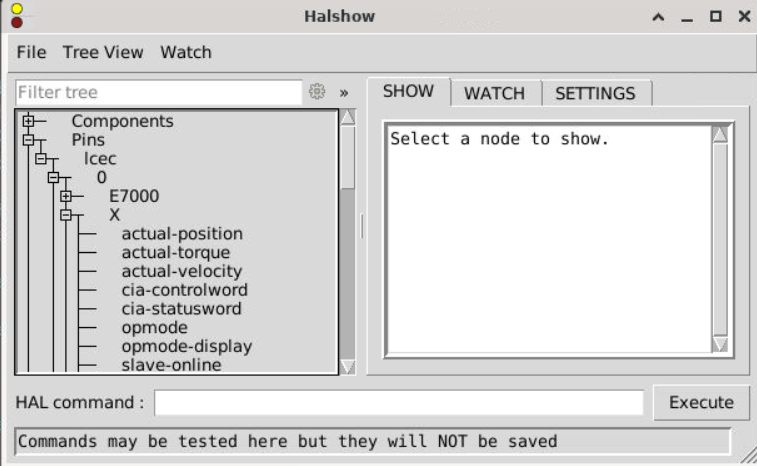
To diagnose the 7I77 encoder issue, I would setup halshow
to watch all 6 encoders and then try each encoder input and see:

1. If it works
2. If it affects any other channel
 
  • pommen
  • pommen's Avatar
03 Aug 2025 20:11
Encoder started misbehaving was created by pommen

Encoder started misbehaving

Category: Driver Boards

Today something strange happened to my setup. I was tidying some cables up in the control cabinet and must have fried something.
I have been running my machine for about a year now without any problems. 
Now my Y encoder readout follows my X axis. Even when I disconnect the encoder from the 7i77 it happens.
Changing from hm2_[MESA](BOARD).0.encoder.01.position
to hm2_[MESA](BOARD).0.encoder.04.position (and updating the other encoder lines from 01 to 04) and plugging it in encoder 04 position did not work.

X Z still works though. Spindle encoder reads nothing, although the actual encoder is functioning.

Have i fried my 7i77?

/Peter

File Attachment:

File Name: main.hal
File Size:8 KB

File Attachment:

File Name: dmu50.ini
File Size:6 KB
  • scotta
  • scotta's Avatar
03 Aug 2025 20:09

Remora - ethernet NVEM / EC300 / EC500 cnc board

Category: Computers and Hardware

Use the example configuration as a starting point and then add your hal configuration for end stop etc as you need.

github.com/scottalford75/Remora-RT1052-c.../remora-rt1052-basic
  • andypugh
  • andypugh's Avatar
03 Aug 2025 20:00
Replied by andypugh on topic Mesaflash is not able to find 5i25

Mesaflash is not able to find 5i25

Category: Driver Boards

does "sudo mesaflash" get any further?
  • andypugh
  • andypugh's Avatar
03 Aug 2025 19:56
Replied by andypugh on topic ECMO VMC100 Retrofit with Carousel/Toolchanger

ECMO VMC100 Retrofit with Carousel/Toolchanger

Category: Milling Machines

You need to "addf" carousel.0 too.
  • andypugh
  • andypugh's Avatar
03 Aug 2025 19:54

Auto mode, reaching first point of coord then "reading" state, no movement

Category: General LinuxCNC Questions

Though stuck on "reading" maybe hints at a file access problem.

Is there plenty of space on the SD card? Are the G-code files on the SD or maybe on a network drive?
  • andypugh
  • andypugh's Avatar
03 Aug 2025 19:52

Auto mode, reaching first point of coord then "reading" state, no movement

Category: General LinuxCNC Questions

I don't know if probing waits for spindle-at-speed. It might.

Have you checked the signal with halmeter?
  • andypugh
  • andypugh's Avatar
03 Aug 2025 19:50
Replied by andypugh on topic Controlling existing motors with resolvers

Controlling existing motors with resolvers

Category: Driver Boards

In that case things may get a little complicated. It comes down to how the controller gets its position information. Often the drive will excite the resolvers, use them for commutation, and then pass a quadrature signal out to the rest of the system.

The Mesa 7i49 and (I expect) the Granite devices drives expect to be providing the excitation signal, and will typically sample position at or around the peak in the excitation signal. If the controller is also sampling this signal for position feedback then it's going to get complicated.

Do you have any details of the drive to motor and drive to contoller wiring? Is there any motor-to-controller wiring?
Displaying 12256 - 12270 out of 16316 results.
Time to create page: 0.361 seconds
Powered by Kunena Forum