Advanced Search

Search Results (Searched for: )

  • Lcvette
  • Lcvette's Avatar
26 Sep 2025 16:08
Replied by Lcvette on topic QTPYVCP+VISMACH+LINUXCNC ROLLED INTO ONE?

QTPYVCP+VISMACH+LINUXCNC ROLLED INTO ONE?

Category: QtPyVCP

how is your project coming along?
  • Lcvette
  • Lcvette's Avatar
26 Sep 2025 16:07
Replied by Lcvette on topic Carousel don t stop when estop is pushed

Carousel don t stop when estop is pushed

Category: QtPyVCP

were you able to get this resolved?
  • Lcvette
  • Lcvette's Avatar
26 Sep 2025 16:07
Replied by Lcvette on topic Probe Basic ATC Setup Problems

Probe Basic ATC Setup Problems

Category: QtPyVCP

happy to help and glad you got it sorted out!
  • SvenRSA
  • SvenRSA
26 Sep 2025 16:03
Replied by SvenRSA on topic proudly presenting a Maho MH700 retrofit ..

proudly presenting a Maho MH700 retrofit ..

Category: CNC Machines

Hi there, So i have done the same conversion on my 700c, I replaced all the scales except the B axis seeing that it's a Heidenheime scale. Any change you perhaps still have the HAL file. the Software side has stumped me and I am not sure how to start or setup the scales etc.
Delos W series scales used
5i25T
7i77 for the scale inputs and the 3trm2 and B axis
7i84 for the 24V relays and inputs
  • andypugh
  • andypugh's Avatar
26 Sep 2025 15:17
Replied by andypugh on topic LinuxCNC RT blindspots (I2C and UART/Serial)

LinuxCNC RT blindspots (I2C and UART/Serial)

Category: Driver Boards

This isn't an answer to your question, but have you tried hal_gpio on the Odroid?

I was actually wondering the same thing about the serial port las month:

sourceforge.net/p/emc/mailman/emc-develo...arg.org/#msg59226340

Maybe a realtime modbus driver through the onboard serial port could work, for example.

If you can drive the serial port by sending bytes with outb() / inb() it might work, though you would end up having to re-invent the drivers as non-blocking code.
  • kb58
  • kb58
26 Sep 2025 15:03

(Solved) Initialization code for a rintelligent ECT60 fails when run on an ECR60

Category: Driver Boards

Thank you very much! Though I don't know Linux or XML, I'm familiar with other languages so feel assured that I can get myself in way over my head! First thing I'll do is save off a backup, then give your suggestion a go.
Thanks again.
  • PCW
  • PCW's Avatar
26 Sep 2025 14:58

Going from Devian 10 to 12 has created problems

Category: General LinuxCNC Questions

The issue with sudo and the command line is that the redirect (>) is done by the shell
and the shell is just running with your normal user permissions.

sudo -c bash 'echo 2 > /proc/irq/29/smp-affinity'

should work (as will a simplified 1 line script)
  • jcbryant
  • jcbryant
26 Sep 2025 14:00

Going from Devian 10 to 12 has created problems

Category: General LinuxCNC Questions

PCW - you were right.  Your script does in fact work nicely:

john@Taig:~/temp$ sudo ./pinirq_2025-09-25-2.txt enp1s0
Cores: 2
Old CPU Mask: 3
Set device enp1s0 IRQ 29 CPU mask to 2

I'm staggered and confused.  As I see it, the script simply does a bit of work to find the irq number for the specified device and then executes (in this case) "echo 2 > /proc/irq/29/smp_affinity".  How can this possibly work from a script when exactly the same command is rejected when entered directly?  Sudo must indeed be strange.  When I get a moment I'll try a one line script containing just the one command.  Presumably it will work.????  At least I now understand the irq folder.  I had failed to consider the possibility that it was present but hidden.

Pinning the interrupt dramatically changes the ping test results for the better:

--- 10.10.10.10 ping statistics ---
60000 packets transmitted, 60000 received, 0% packet loss, time 60084ms
rtt min/avg/max/mdev = 0.074/0.080/0.212/0.007 ms
john@Taig:~/temp$ sudo chrt 99 ping -i.001 -q -c 60000 10.10.10.10
PING 10.10.10.10 (10.10.10.10) 56(84) bytes of data.

--- 10.10.10.10 ping statistics ---
60000 packets transmitted, 60000 received, 0% packet loss, time 60101ms
rtt min/avg/max/mdev = 0.073/0.081/0.212/0.007 ms
john@Taig:~/temp$ sudo chrt 99 ping -i.001 -q -c 60000 10.10.10.10
PING 10.10.10.10 (10.10.10.10) 56(84) bytes of data.

--- 10.10.10.10 ping statistics ---
60000 packets transmitted, 60000 received, 0% packet loss, time 60084ms
rtt min/avg/max/mdev = 0.074/0.080/0.211/0.007 ms

With all round trips taking well under a millisecond, the fact that the total times for the tests are all > 60000ms is presumably due to delays in scheduling each ping.  In any case I now feel a LOT more confident that the erhernet communications are adequate for Linux CNC.

rodw:

I've looked into EEE, but unfortunately my ethtool appears to be an empty shell that doesn't actually support  any operations of interest:

john@Taig:~$ sudo ethtool --show-eee enp1s0
netlink error: Operation not supported
john@Taig:~$ sudo ethtool --set-eee enp1s0 eee off
netlink error: Operation not supported
john@Taig:~$ sudo ethtool --show-coalesce enp1s0 
netlink error: Operation not supported

Any ideas?  is there an alternate tool?  Can I somehow get a better version of ethtool?  Is it possible that my hardware is so ancient that the chips don't support EEE in any case?

Re compiling my own version of the kernel, both of you greatly overestimate my ability to handle such a task.  Basically I'm a newcomer to Linux and am still groping my way around.  Just getting from Buster to Bookworm was a monumental effort for me.  Given my limited abilities, I think that a better approach would be to simply install the Linux CNC 2.9.4 Bookworm ISO.  I presume that those maintaining Linux CNC know what they're doing, and that the kernel included in this release has been appropriately optimized.

 
  • tommylight
  • tommylight's Avatar
26 Sep 2025 12:42
  • tommylight
  • tommylight's Avatar
26 Sep 2025 12:42
Replied by tommylight on topic lcec and Operation not permitted

lcec and Operation not permitted

Category: General LinuxCNC Questions

# Создание thread с уникальным именем
loadrt threads name1=servo-thread period1=1000000 fp1=0

Seems like trying to load servo period twice, so try omitting the above line.
  • andypugh
  • andypugh's Avatar
26 Sep 2025 11:41
LinuxCNC v2.9.6 Released was created by andypugh

LinuxCNC v2.9.6 Released

Category: LinuxCNC Announcements

LinuxCNC 2.9.6 has been released.

This is a bug-fix release. Shortly after the release of 2.9.5 it was
noticed that a fix for a graphics bug in Gmoccapy had resulted in the
Axis touch-off dialog box no-longer working for non-zero entries.

This update is for all users, but especially users of the Axis GUI.

Packages for 2.9-uspace for amd64 (PC) for Debian Buster, Bullseye,
Bookworm and Trixie and for arm64 (Raspberry Pi 4/5) for Buster and
Bookworm have been added to the linuxcnc repository. If you installed
from one of our live images or Pi SD-card images then the update
should be available immediately.

If you installed into a normally-installed Debian from the Debian
repositories then hopefully the new version can be queued up for the
next point release. If you can’t wait then it is possible to add the
LinuxCNC repositories to the apt sources. One way to do this and
install the security keys is via the shell script here:
linuxcnc.org/docs/stable/html/getting-st...th_preempt_rt_kernel

At the moment the live-image installer and SD card images will install
2.9.4 but update should be trivial (and possibly automatic)

RTAI is still supported, but in the short term building from source is
likely to be the most expedient way to get 2.9.6 on that platform.

Changelog

qtvcp -Qt5_graphics: issue 2753; preview wrongly uses INI startup code
Merge pull request #3567 from Sigma1912/2_9-Correct_bad_fix_for_2753
Gremlin: Don’t use RS274NGC_STARTUP_CODE when updating the preview
Docs: Address G52 Circular Link #3565

Acknowledgements

As always, we couldn’t do this without the contributions from the
community, so many thanks to:

CMorley
Sigma1912

 
  • jpg
  • jpg
26 Sep 2025 11:22
Replied by jpg on topic G33.1 synchronized tapping problem

G33.1 synchronized tapping problem

Category: General LinuxCNC Questions

Hello Spumco, no worries, I just wanted to know where you were with the C axis.
  • Ri
  • Ri
26 Sep 2025 10:19 - 26 Sep 2025 10:23

lcec and Operation not permitted

Category: General LinuxCNC Questions

I launched linuxcnc, "ethercat slaves" are in OP state, everything seems correct in the XML configuration, what could be the problem?

0  0:0  OP  +  2DM880-EC
1  0:1  OP  +  2DM880-EC
2  0:2  OP  +  2DM880-EC
3  0:3  OP  +  2DM556-EC
4  0:4  OP  +  2DM556-EC
5  0:5  OP  +  DIEWU EtherCAT-IO (Digital 16-Input/16-Output)

When running the configuration, such errors occur:

Debug file information:
Note: Using POSIX realtime

HAL: ERROR: duplicate thread name servo-thread
THREADS: ERROR: could not create thread 'servo-thread'
threads: rtapi_app_main: Operation not permitted (-1)
./Sodick.hal:20: waitpid failed /usr/bin/rtapi_app threads
./Sodick.hal:20: /usr/bin/rtapi_app exited without becoming ready
./Sodick.hal:20: insmod for threads failed, returned -1
shutdown.hal:4: parameter or pin 'lcec.0.0.enable' not found
3184
Stopping realtime threads
Unloading hal componentsNote: Using POSIX realtime

I tried to fix the access error:

groups
sodick lp dialout cdrom sudo audio video plugdev users ethercat linuxcnc ecusers realtime

And all lcec files installed from linuxcnc:

/usr/bin/lcec_configgen
/usr/bin/lcec_conf
/usr/lib/linuxcnc/modules/lcec.so
/etc/linuxcnc/lcec.conf
/usr/lib/linuxcnc/modules/lcec.so


Hal file:

# Загрузка EtherCAT компонента
loadusr -W lcec_conf /home/sodick/linuxcnc/configs/Sodick/ethercat-conf.xml
loadrt lcec

# Загрузка дополнительных HAL компонентов
loadrt siggen
loadrt or2
loadrt and2
loadrt not

# Создание thread с уникальным именем
loadrt threads name1=servo-thread period1=1000000 fp1=0

# Добавление функций в поток (правильный порядок)
addf motion-command-handler servo-thread  
addf motion-controller servo-thread
addf lcec.0.read servo-thread
addf lcec.read-all servo-thread
addf lcec.write-all servo-thread
addf lcec.0.write servo-thread

  • souh-hil
  • souh-hil's Avatar
26 Sep 2025 09:57
Replied by souh-hil on topic Firmware Request for 7i92 – Plasma CNC Build

Firmware Request for 7i92 – Plasma CNC Build

Category: Driver Boards
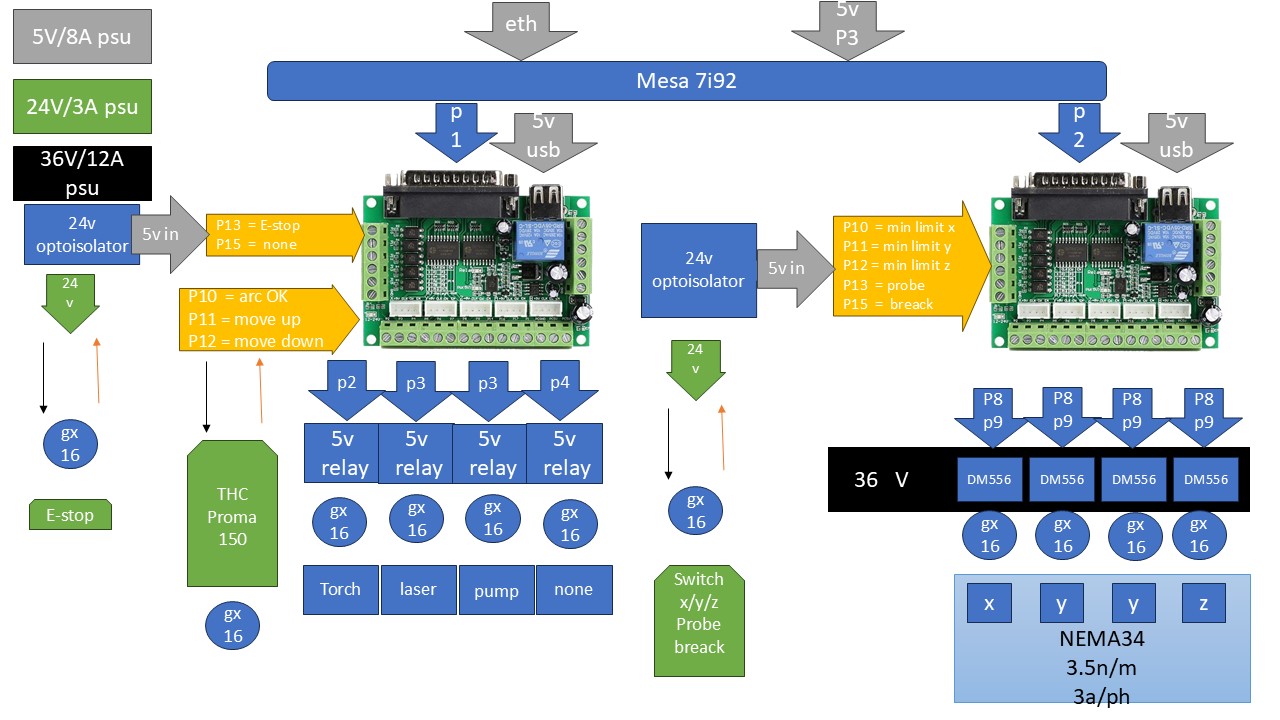
Hello again everyone,First, I apologize for the late reply — I’ve been working on revising my plan and wiring, and it took longer than expected.I’ve updated my wiring/architecture plan (see attached diagram), and here’s where I’m at:
  • Mesa 7i92 over Ethernet
  • Two 5-axis breakout boards (5ABOB ×2)
  • DM556 drivers for NEMA34 motors (3.5 Nm, 3 A/phase)
  • THC Proma 150 for torche height control (Arc OK, Up, Down signals)
  • Relays for torch, laser, pump, etc.
  • E-stop, limits, probe via optoisolators
  • Power supplies: 5 V/8 A, 24 V/3 A, 36 V/12 A
On one BOB (P1) I plan to handle signals like Arc OK, Up, Down, E-stop, relays; on the other BOB (P2) I plan to handle limits, probe, and driver step/dir lines.Questions
  1. With that setup (7i92 + 2 × 5ABOB), is the wiring architecture I’m proposing feasible?
  2. I was thinking of starting with the G540 HAL/INI config in pncconf as a base, then editing it . Is that a sensible approach, or is there a better workflow to generate a clean HAL/INI for this sort of layout?
Thanks again to PCW, tommylight,  Your help is very valuable. Any further feedback or corrections before I begin wiring would be hugely appreciated.
  • Korre
  • Korre
26 Sep 2025 09:03 - 26 Sep 2025 09:09

best practice Benutzervariablen anzeigen und speichern

Category: Deutsch
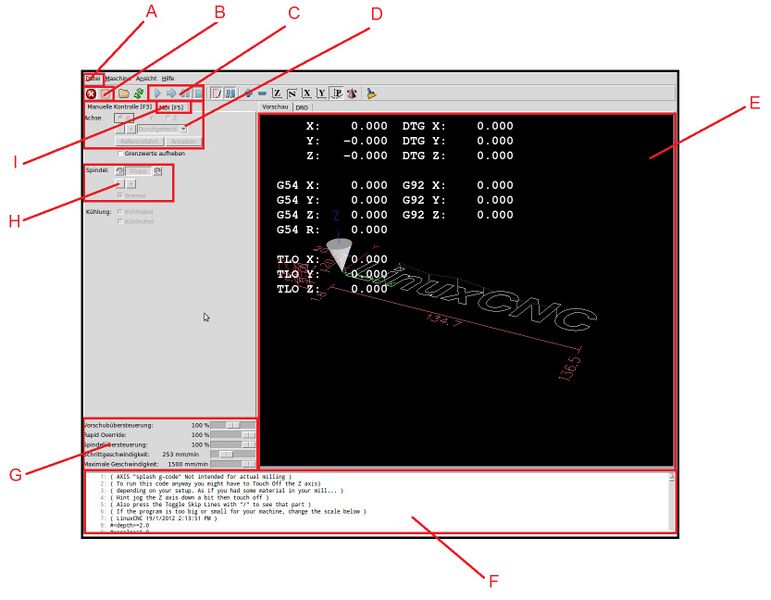
Vielen Dank für Eure Antworten, 

1. Parameterwert in einen Analog Hal pin schreiben (zB M68 E0 Q#31)

2. Parameterwert mit Gcode logging in eine Datei schreiben

1.) Parameterwert in Hal Pin werde ich testen. 
2.) Gcode logging: das praktiziere ich bereits, ist aber nicht so ganz "bequem" 

Über Debug kann man sich das im Fenster vorne ausgeben lassen. Z. B. #1234 = 12 + 32 ( debug, #1234 )
es gibt auch noch msg, und print, jenachdem ob es im terminal stehen soll oder vorne erscheinen soll

 
Der Befehl ist mit schon sehr wohl bekannt. Habe ich im Eröffnungsthread ja geschrieben.....
Nur wenn ich ein CNC Programm ablaufen lasse, Dann verschwindet das untere Fenster (F) und anstelle dem wird das CNC Programm angezeigt.
Wie bleibt dieses Ausgabefenster erhalten (für Statusreports und Fehlermeldungen) während das NC Programm ausgeführt wird?
(siehe Anhang!)


Displaying 9526 - 9540 out of 17020 results.
Time to create page: 0.367 seconds
Powered by Kunena Forum