
- Posts: 319
- Thank you received: 90
Error in tool_offsetview.py
- MarkoPolo
- Offline
- Elite Member
-

Less
More
3 years 5 months ago #270830
by MarkoPolo
Replied by MarkoPolo on topic Error in tool_offsetview.py
Proposed fix for colorizing the information bar.
If qtdragon is in "auto" mode and is executing code and you press "file", "offset", "tool: etc , the bar turns yellow and doesn't go back to normal until the job is finished.
I suggest that the colors automatically reset after a certain period of time, e.g. 15sec I made a timer in the handler file and it works as I would like. Or does anyone else have a better idea?
def endcolor(self):
self.timer = QtCore.QTimer()
self.timer.timeout.connect(self.set_style_default)
self.timer.start(15000)
# change Status bar text color
def set_style_default(self):
self.w.lineEdit_statusbar.setStyleSheet("background-color: rgb(252, 252, 252);color: rgb(0,0,0)") #default white
def set_style_warning(self):
self.w.lineEdit_statusbar.setStyleSheet("background-color: rgb(242, 246, 103);color: rgb(0,0,0)") #yelow
self.endcolor()
def set_style_critical(self):
self.w.lineEdit_statusbar.setStyleSheet("background-color: rgb(255, 144, 0);color: rgb(0,0,0)") #orange
self.endcolor()
Marek
If qtdragon is in "auto" mode and is executing code and you press "file", "offset", "tool: etc , the bar turns yellow and doesn't go back to normal until the job is finished.
I suggest that the colors automatically reset after a certain period of time, e.g. 15sec I made a timer in the handler file and it works as I would like. Or does anyone else have a better idea?
def endcolor(self):
self.timer = QtCore.QTimer()
self.timer.timeout.connect(self.set_style_default)
self.timer.start(15000)
# change Status bar text color
def set_style_default(self):
self.w.lineEdit_statusbar.setStyleSheet("background-color: rgb(252, 252, 252);color: rgb(0,0,0)") #default white
def set_style_warning(self):
self.w.lineEdit_statusbar.setStyleSheet("background-color: rgb(242, 246, 103);color: rgb(0,0,0)") #yelow
self.endcolor()
def set_style_critical(self):
self.w.lineEdit_statusbar.setStyleSheet("background-color: rgb(255, 144, 0);color: rgb(0,0,0)") #orange
self.endcolor()
Marek
Please Log in or Create an account to join the conversation.
- cmorley
- Offline
- Moderator
-

Less
More
- Posts: 7368
- Thank you received: 2181
3 years 5 months ago #270861
by cmorley
Replied by cmorley on topic Error in tool_offsetview.py
pushed. thanks
The following user(s) said Thank You: MarkoPolo
Please Log in or Create an account to join the conversation.
- MarkoPolo
- Offline
- Elite Member
-
Less
More
- Posts: 319
- Thank you received: 90
3 years 5 months ago - 3 years 5 months ago #270864
by MarkoPolo
Replied by MarkoPolo on topic Error in tool_offsetview.py
I still have some minor fixes in the matal_color theme and corrected too small spindle rotation font in the qtdragon theme.
edition.
I see that the brushed_metal_color file is already updated. Thanks
Only qtdragon.qss needs to be changed.
edition.
I see that the brushed_metal_color file is already updated. Thanks
Only qtdragon.qss needs to be changed.
Last edit: 3 years 5 months ago by MarkoPolo.
Please Log in or Create an account to join the conversation.
- MarkoPolo
- Offline
- Elite Member
-
Less
More
- Posts: 319
- Thank you received: 90
3 years 5 months ago #271343
by MarkoPolo
Replied by MarkoPolo on topic Error in tool_offsetview.py
Hi Chris
zooming in and out of the gcode window view is nice but it doesn't work very well because it doesn't enlarge the area with the line numbers and doesn't fit the numbering when zoomed in.

If I change the font size in gcode_editor.py then it works fine as in the attached picture.
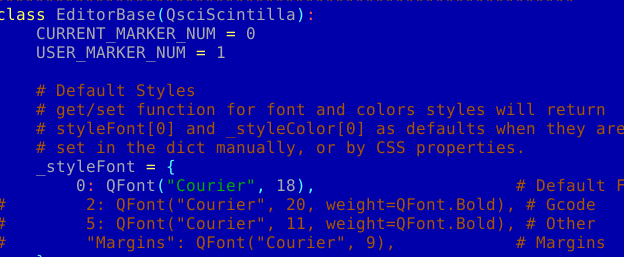
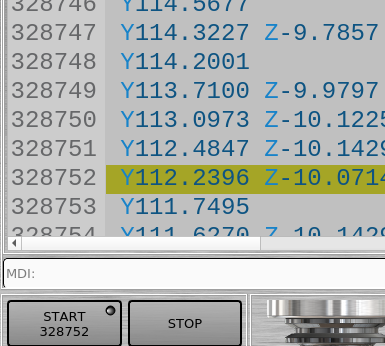
So the idea is to change the font size by changing
font size in gcode_editor.py.
I tried to do it with the + - buttons in qtdragon, but I can't get to the font size value in gcode_editor.py.
Maybe you could look at it?
zooming in and out of the gcode window view is nice but it doesn't work very well because it doesn't enlarge the area with the line numbers and doesn't fit the numbering when zoomed in.
If I change the font size in gcode_editor.py then it works fine as in the attached picture.
So the idea is to change the font size by changing
font size in gcode_editor.py.
I tried to do it with the + - buttons in qtdragon, but I can't get to the font size value in gcode_editor.py.
Maybe you could look at it?
Please Log in or Create an account to join the conversation.
- cmorley
- Offline
- Moderator
-
Less
More
- Posts: 7368
- Thank you received: 2181
3 years 5 months ago #271357
by cmorley
Replied by cmorley on topic Error in tool_offsetview.py
Zooming margins fixed.
added your style change to all qtdragon's stylesheets.
Did you notice the status bar will clear it's self after the timeout?
What do you think of that?
added your style change to all qtdragon's stylesheets.
Did you notice the status bar will clear it's self after the timeout?
What do you think of that?
Please Log in or Create an account to join the conversation.
- MarkoPolo
- Offline
- Elite Member
-
Less
More
- Posts: 319
- Thank you received: 90
3 years 5 months ago #271364
by MarkoPolo
Replied by MarkoPolo on topic Error in tool_offsetview.py
Great. I already had time to test, zooming
windows gcode works fine.
Yes, only now I see that the text disappears after the time in the status bar. This may be so, although some information may be useful, e.g. "Run timer stopped at 00:02:14" after stopping, or add some basic information in its place, e.g. about the current working mode.. ? (still to be considered)
What do you think about unlocking the functionality of the "settings" button
when the machine is in "auto" mode ? .
There would be runtime access to "status", "hal show" and the + - font buttons of the gcode window.
windows gcode works fine.
Yes, only now I see that the text disappears after the time in the status bar. This may be so, although some information may be useful, e.g. "Run timer stopped at 00:02:14" after stopping, or add some basic information in its place, e.g. about the current working mode.. ? (still to be considered)
What do you think about unlocking the functionality of the "settings" button
when the machine is in "auto" mode ? .
There would be runtime access to "status", "hal show" and the + - font buttons of the gcode window.
Please Log in or Create an account to join the conversation.
Moderators: cmorley
Time to create page: 0.149 seconds