Advanced Search

Search Results (Searched for: raspberry pi 3)

  • MeyerGreg007
  • MeyerGreg007
07 Aug 2026 09:47
Raspberry Pi5 Micro SD card wear and tear? was created by MeyerGreg007

Raspberry Pi5 Micro SD card wear and tear?

Category: General LinuxCNC Questions

Greetings,
This is my first post so I'm hoping I done break any protocols...

I have converted a 1959 vintage Centec AutoMill (3 axis horizontal milling machine) to CNC using LinuxCNC 2.9.10 Debian 13 Trixie PREEMPT-RT on a Raspberry Pi5 with 8 gig of ram, directly controlling three GeckoDrive 201x stepper drives via the Pi's GPIO pins. It is working very well as the Gecko 201x works with 3.3 volt logic and I very pleased with its performance. No need for a MESA board or any kind of logic level shifting.

I recently read that the Micro SD cards used in the Pi are not well suited to handle lots of read/write activity, and over time will fail.

Can anyone tell me if LinuxCNC does a lot of writing/reading of things like temporary files during the running of the machine?

TIA   Greg
  • djdelorie
  • djdelorie
04 Aug 2026 21:05

Best bet for a low cost HW assisted Linuxcnc engine....

Category: General LinuxCNC Questions

I would have thought that with "Raspberry PI with GPIO" you would have already had your cheap low-cost HW assisted engine.  If you must use a PC and don't want to find one with a parallel port, low-end Mesa cards are my suggestion (like the 7i92TH or 7i96S).  I think with Remora you'd "get what you paid for" and eventually a low-end Mesa card would be a better bargain, and much more turn-key and supported.
 
  • Mars
  • Mars
04 Aug 2026 20:36

Best bet for a low cost HW assisted Linuxcnc engine....

Category: General LinuxCNC Questions

Thanks for your response. I realize that an old PC with parallel port works. Counting on an old PC going forward is not something that appeals to me. I also understand that the Mesa card is solid but the price is less than desirable. Noting that I am not an expert, it seems that the Remora with RP2040 over ethernet should be up to the job and be far cheaper than the Mesa cards. Unfortunately,, I don't have the skills to write the SW so the question remains: Is/or will be Remora with RP2040 ready for prime time? Note: currently I have the Raspberry Pi 5 running Linuxcnc using its GPIO port (buffered with some simple buffer HW but not aux processor) and it will probably meet my needs. That said, a solution based on a cheap aux processor would be a big benefit.
  • Aciera
  • Aciera's Avatar
03 Aug 2026 14:37

Successful Raspberry Pi 4 Trixie LinuxCNC install.

Category: Installing LinuxCNC

There is little more than a single bug fix in 2.10 so unless that is going to affect you which it probably isn't, just get your Mesa card up and running with the working system you have.


The whole point of version 2.9.10 was that the 'single bug' could crash a users machine. So if the 'which it probably isn't,' turns out to be a wrong assumption then it might actually crash your machine if you happen to use existing probing routines.
  • Rykagon
  • Rykagon
03 Aug 2026 14:24 - 03 Aug 2026 15:06

Successful Raspberry Pi 4 Trixie LinuxCNC install.

Category: Installing LinuxCNC

Thanks very much for your knowledge and advice rodw!

I'm taking it to heart and will NOT update for now.

I'm going to continue posting progress and I hope you'll find it entertaining rather than laughable!
  • andreas0480
  • andreas0480
02 Aug 2026 08:01

7I96S isolated inputs (InM) stopped updating live — read fine at load, then froz

Category: Driver Boards

Thanks for the reply. I now also monitored the GPIOs.

Correction to my earlier post in this thread first: the InM is not frozen. That was a monitoring-timing mistake on my end — IN4 (E-stop) tracks perfectly in both inm.00.input-04 and gpio.004.in. Card, InM and Ethernet are all fine.

System: LinuxCNC 2.9.10 (uspace), Raspberry Pi CM5, Debian 12 PREEMPT_RT, 7I96S via hm2_eth.
config="num_encoders=1 num_pwmgens=1 num_stepgens=5 sserial_port_0=0xxxxxxx"

Bank is wired sourcing (common on 0 V) — confirmed by several known-good and working inputs:

E-stop: 24V+ → NC switch → IN4. Released (24 V on pin) → TRUE; pressed (open) → FALSE. Tracks perfectly.
Driver alarms: 24V+ → ALM → IN0–3, working.

Problem input: IN8 has an M8 NPN-NC inductive sensor (sinking). Bare, its target-present level only reached ~13 V, so it read active in both states; I added a ~470 Ω pull-up from the pin to +24 V. The pin now measures:

target absent: 0.1 V
target present: 23.85 V

The sensor's own LED and the card's IN8 input LED both follow the target correctly — but inm.00.input-08 and gpio.008.in read stuck TRUE regardless.
  • babinda01
  • babinda01
02 Aug 2026 05:55

LinuxCNC-RIO - RealtimeIO for LinuxCNC based on FPGA (ICE40 / ECP5)

Category: Computers and Hardware

Thanks, heaps, for the info. I have a working config for Ethercat on my raspberry pi 5, So I will play around with connecting a tang 9k to the spi on the pi and see how I go. I will post more info if/when i get it working.
Thanks again.
Andrew
  • rodw
  • rodw's Avatar
02 Aug 2026 00:16

Successful Raspberry Pi 4 Trixie LinuxCNC install.

Category: Installing LinuxCNC

There is little more than a single bug fix in 2.10 so unless that is going to affect you which it probably isn't, just get your Mesa card up and running with the working system you have.
  • andypugh
  • andypugh's Avatar
01 Aug 2026 11:37

Successful Raspberry Pi 4 Trixie LinuxCNC install.

Category: Installing LinuxCNC

You ought to be able to update straight to 2.9.10 now that you have a working install.

What interfaces / motors does the current setup use? Is it a stepper machine or servos?

If it's a simple stepper machine you could make a start using the hal_gpio module and Pi GPIO pins, but you will need some level-shifting protection as the existing logic is almost cetainly 5V (or 24V) rather than the 3.3V of the Pi GPIO pins.
  • NWE
  • NWE's Avatar
01 Aug 2026 03:46

using linuxcnc on a raspberry pi to prog and test steppers and servos

Category: General LinuxCNC Questions

I just noticed the hal tutorial is not obvious from the earlier link I shared. It is  here . Also explore the rest of the  manual .
  • NWE
  • NWE's Avatar
01 Aug 2026 03:40

using linuxcnc on a raspberry pi to prog and test steppers and servos

Category: General LinuxCNC Questions

Hi Group

I would like to potentially use linuxcnc on a Raspberry Pi to program and test steppers and servos
  • Are there any solutions that I can see samples of or potential uses that are using a Raspberry Pi or Arduino and LinuxCNC to control and test servo and stepping motors?
  • One plan is to have a test bench to play with ideas; this will have a controller board, some switches, sliders, connectors for motors, a variable power supply, etc..
    - Could LinuxCNC be used for this? i.e can i program it with Python or similar to run my code snippets or a full program?
    - When connecting motors that use pulse and direction, will I be able to connect any motor as long as the variable power supply is adjusted to give the right power to the motor?
    - Has anyone done this before like this?

  • Another plan is to create individual builds that will have one or more motors, sensors, switches, etc.. and will be all built into a case or item as a stand-alone solution. With a customised touch control screen. So when powered on, it boots up and is ready to use and be controlled from the touch control screen.
    can linuxCNC be used like this?
    if so is ther any links to videos or projects that do similer?

    Z

Sounds similar to some of my customizations. I get, you won't need to run G-code files?

Look at the  hal introduction , and the tutorial that follows. There are several methods of connecting your own custom gui to a stand-alone basic hal config. I tend to use glade. Yes you can then also have the app auto-start, that is configuration in the desktop environment, same as auto-starting any other app at boot.
  • tommylight
  • tommylight's Avatar
01 Aug 2026 03:39
  • tuxcnc
  • tuxcnc
01 Aug 2026 03:20

using linuxcnc on a raspberry pi to prog and test steppers and servos

Category: General LinuxCNC Questions

I would like to potentially use linuxcnc on a Raspberry Pi to program and test steppers and servos
  • Are there any solutions that I can see samples of or potential uses that are using a Raspberry Pi or Arduino and LinuxCNC to control and test servo and stepping motors?
  • One plan is to have a test bench to play with ideas; this will have a controller board, some switches, sliders, connectors for motors, a variable power supply, etc..
    - Could LinuxCNC be used for this? i.e can i program it with Python or similar to run my code snippets or a full program?
    - When connecting motors that use pulse and direction, will I be able to connect any motor as long as the variable power supply is adjusted to give the right power to the motor?
    - Has anyone done this before like this?
  • Another plan is to create individual builds that will have one or more motors, sensors, switches, etc.. and will be all built into a case or item as a stand-alone solution. With a customised touch control screen. So when powered on, it boots up and is ready to use and be controlled from the touch control screen.
    can linuxCNC be used like this?

You can build this, but it will be absolutely useless.
  • timo
  • timo
30 Jul 2026 15:05 - 30 Jul 2026 15:18
Replied by timo on topic DIY CNC

DIY CNC

Category: Milling Machines

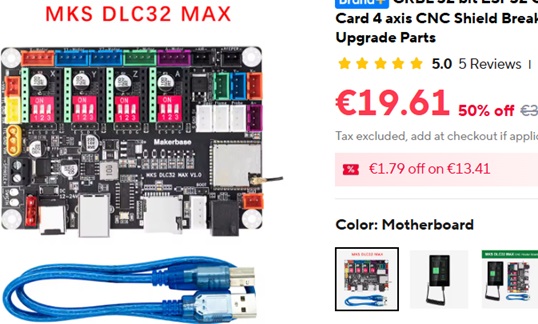
Exactly! The PC (raspberry Pi or similar), power supplies and stepper (or servo drivers) can be basically the same. What I think is that the mesa card is not worth it, when you stay with open loop stepper motors and the mechanical system is not made for high speeds. But once you start using the I/O and Encoder inputs it is a real help to have a system that is easy to use, supported and works (happy customer of Mesa Plug n go kit).
For the picoCNC I paid roughly (guessing) 130-140€. Some things come with minimum quantities, others are discounted. It ends up at approx. 30€ a piece +-. I would have just bought the successor of it for 50$, but shipping would have doubled the price. To me it was more about the assembly challenge than the actual need for it. But there are "ready to go" options. 


One aspect is that a 10 mm carbide endmill will cost roughly the same. 


So for metal working the tooling and material quickly gets in regions where a Mesa card is really my least problem :-) and I bought a 2nd Mesa card after the first one.

#no advertisement just random pictures. 
 
  • timo
  • timo
30 Jul 2026 12:26 - 30 Jul 2026 12:29
Replied by timo on topic DIY CNC

DIY CNC

Category: Milling Machines

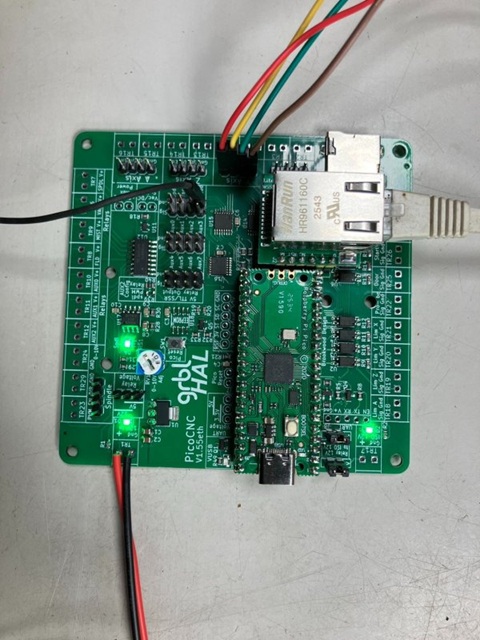
I am not sure if Linux CNC is really cheaper than GRBL. 
 

www.grbl.org/single-post/a-peek-at-the-picocnc This is an example based on the Raspberry Pi Pico, all documented and possible to recreate "in the flesh". I bought the Pico boards for like 3€ a piece. The base board was more expensive, but not too crazy. 
  • slow simple 3 axis machine without linear scales or rotary encoders probably works just fine with the GRBL
    • When I think of adding things "slaved axis", "linear scales", "automatic tool changer" I would go for LinuxCNC 
       
Displaying 16 - 30 out of 202 results.
Time to create page: 0.927 seconds
Powered by Kunena Forum