Advanced Search

Search Results (Searched for: )

  • RV3Dtech
  • RV3Dtech
14 Jan 2025 20:22
Replied by RV3Dtech on topic Handrad xhc-whb04b-6

Handrad xhc-whb04b-6

Category: Deutsch

So jetzt geht alles bis auf Spindel AUS bei mir auch. 
Hab mir bei ner Flasche Bier jeden einzelnen Fehler entweder in der Machine.hal oder Handrad.hal auskommentiert, so lange bis alle wichtigen Funktionen funktionieren. 
Für das Spindel AUS brauch ich wahrscheinlich nochmal Bier Nachschub. 
  • dg9mdr
  • dg9mdr
14 Jan 2025 20:05
Replied by dg9mdr on topic Maus funktioniert nicht bei Spindel Start

Maus funktioniert nicht bei Spindel Start

Category: Deutsch

Du kannst statt einem mechanischen Relais ein SSR-Relais einbauen.
  • DieLimo
  • DieLimo
14 Jan 2025 20:02 - 14 Jan 2025 20:12

Coordinate system in GUI does not match machine

Category: Basic Configuration

Hello everyone,
I probably have a very simple beginner's question that I just can't figure out how to solve.

I have a milling machine with x,y and Z travel and my home coordinate system is at the top right. I assume that you can do it this way or is this fundamentally wrong?

So that my coordinate system looks like this:
File Attachment:


But the coordinate system in the GUI shows the opposite.
File Attachment:

Video for better explanation: Link to video

I guess that my z-axis is the wrong way? Or the Y-Axis? And I also don't know which parameter I have to change in the ini-file (see attachment)?

Maybe someone can help me out with that.

Best regards


File Attachment:

File Name: Fraese2.ini
File Size:2 KB
  • Aciera
  • Aciera's Avatar
14 Jan 2025 19:40
Replied by Aciera on topic How to call a python script in gcode

How to call a python script in gcode

Category: General LinuxCNC Questions
There are different ways of doing this. I would do it with a python remap.
Here is a basic example that creates an 'M456' command that generates a random number and stores it in a gcode parameter named #<_random_value>.  You would need to add the other stuff with the file.

1. save this as 'toplevel.py' to a folder named 'python' in your configuration folder:
import remap

2. save this as 'remap.py' tot the folder named 'python' created above:
from interpreter import *

def m456(self):
    import random
    random_value = random.randint(0, 10000000000)
    self.execute("#<_random_value> = %f " % random_value, 1)
    yield INTERP_EXECUTE_FINISH

3. Add this line to the [RS274NGC] section of your ini file:
REMAP = M456  modalgroup=10   python=m456

4. make sure you have  this in your ini file:
[PYTHON]
PATH_PREPEND= python
# import the following Python module
TOPLEVEL= python/toplevel.py
# the higher the more verbose tracing of the Python plugin
LOG_LEVEL = 8

5. start your config and run MDI command:
M456

6. to check the result run MDI command:
(debug, #<_random_value>)

should return something like this:

 
  • programador
  • programador's Avatar
14 Jan 2025 19:29 - 14 Jan 2025 19:34
Replied by programador on topic How to call a python script in gcode

How to call a python script in gcode

Category: General LinuxCNC Questions

Hello, you can create a custom command it would be M100-M199 User Defined Commands link  linuxcnc.org/docs/html/gcode/m-code.html#mcode:m100-m199  Custom command
In the command file, place the python file to be executed, for example:
#! /usr/bin/python2.7 import sys print("Hello World")
This way, every time you execute the in the g-code script, it will execute the command desired python file.
  • PCW
  • PCW's Avatar
14 Jan 2025 19:11

How to use the velocity encoder signal as position feedback for the 7i77 board?

Category: HAL
As a start, I would set the encoder scale so the position is approximately correct.
You will likely need to add an offset component to zero the position as well.
  • HansU
  • HansU's Avatar
14 Jan 2025 19:07

Probe screen for WXGA monitor with 1366x768 dpi in linuxcnc 2.9

Category: Gmoccapy

Maybe you can modify the probe screen source to use CSS and then reduce the margins with CSS.
That's how I made Gmoccapy fit into the old sizes when migrating from Gtk 2 to Gtk 3...
  • programador
  • programador's Avatar
14 Jan 2025 19:01

How to use the velocity encoder signal as position feedback for the 7i77 board?

Category: HAL

Thank you, it solved the problem, the screen is showing the correct display.


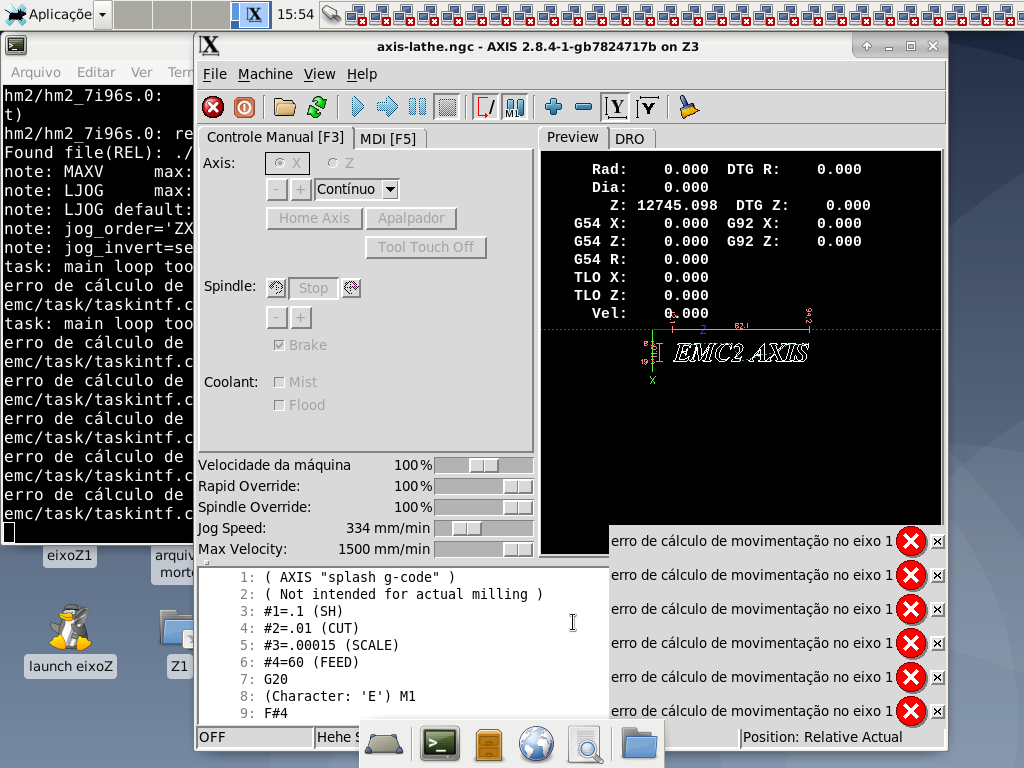
But when I try to start the machine, the message "error calculating movement on axis 1" appears. I tried to change the max_limit and min_limit values ​​in the INI file, but without success.

When this error message appears, is it possible to see in more detail which configuration is still wrong?

Do you have any tips or examples of how I should configure axis 1 so that the error does not appear?


Below are the HAL and INI files for your consideration.


File Attachment:

File Name: Z3_2025-01-14.hal
File Size:8 KB
 

File Attachment:

File Name: Z3_2025-01-14.ini
File Size:3 KB

 
  • PCW
  • PCW's Avatar
14 Jan 2025 18:30

Error problem hm2 7i96s 7i77 analogout scalemax not found ?

Category: HAL

You cannot run that command when LinuxCNC is running
or when it exited on a major error, because linuxCNC
blocks access to the Ethernet port it is using when it is running.

LinuxCNC restores access when it exits normally

 
  • programador
  • programador's Avatar
14 Jan 2025 18:13

Error problem hm2 7i96s 7i77 analogout scalemax not found ?

Category: HAL

Thanks for the suggestion of the command below:

mesaflash --device 7i96s --addr 10.10.10.10 --dbname3 7i77 --readhmid

It's a great option to debug any problems. But unfortunately in my case it wasn't allowed, the error below appeared:

lbp16_access.send_packet: Operation not permitted
Aborted

Do I have to assign a name or register it in the system so that readhmid works through the name? If so, do you have an example?
  • PCW
  • PCW's Avatar
14 Jan 2025 18:09

How to use the velocity encoder signal as position feedback for the 7i77 board?

Category: HAL

Try this:

# ---Encoder feedback signals/setup---

#setp hm2_7i96s.0.encoder.00.counter-mode 0 #Default PNCConf Wizard
setp hm2_7i96s.0.encoder.00.counter-mode 1 #change to accept signal from THCAD2 board as Z axis feedback
#setp hm2_7i96s.0.encoder.00.filter 1 #Default PNCConf Wizard
setp hm2_7i96s.0.encoder.00.filter 0
setp hm2_7i96s.0.encoder.00.index-invert 0
setp hm2_7i96s.0.encoder.00.index-mask 0
setp hm2_7i96s.0.encoder.00.index-mask-invert 0
setp hm2_7i96s.0.encoder.00.scale [JOINT_1]ENCODER_SCALE

net z-pos-fb <= hm2_7i96s.0.encoder.00.velocity

#net z-vel-fb <= hm2_7i96s.0.encoder.00.velocity
net z-pos-fb => joint.1.motor-pos-fb
net z-index-enable joint.1.index-enable <=> hm2_7i96s.0.encoder.00.index-enable
net z-pos-rawcounts <= hm2_7i96s.0.encoder.00.rawcounts
  • programador
  • programador's Avatar
14 Jan 2025 17:58

How to use the velocity encoder signal as position feedback for the 7i77 board?

Category: HAL

Good afternoon, dear friends.

Please, how should I make the connections in the HAL file so that the 7i77 electronic board accepts the frequency generated by the THCAD2 electronic board as feedback from the Z axis?

Below is the basic code generated by PNCConf from LinuxCNC:
# ---Encoder feedback signals/setup---

#setp hm2_7i96s.0.encoder.00.counter-mode 0 #Default PNCConf Wizard
setp hm2_7i96s.0.encoder.00.counter-mode 1 #change to accept signal from THCAD2 board as Z axis feedback
#setp hm2_7i96s.0.encoder.00.filter 1 #Default PNCConf Wizard
setp hm2_7i96s.0.encoder.00.filter 0
setp hm2_7i96s.0.encoder.00.index-invert 0
setp hm2_7i96s.0.encoder.00.index-mask 0
setp hm2_7i96s.0.encoder.00.index-mask-invert 0
setp hm2_7i96s.0.encoder.00.scale [JOINT_1]ENCODER_SCALE

net z-pos-fb <= hm2_7i96s.0.encoder.00.position

net z-vel-fb <= hm2_7i96s.0.encoder.00.velocity
net z-pos-fb => joint.1.motor-pos-fb
net z-index-enable joint.1.index-enable <=> hm2_7i96s.0.encoder.00.index-enable
net z-pos-rawcounts <= hm2_7i96s.0.encoder.00.rawcounts

Note:

The TCHAD2 electronic board receives the analog voltage from the Z-axis movement which is a magnetic sensor with repeatability accuracy of 10µm (MICRA, micron or micron), with a recordable speed of 10m/s (meters per second) and IP67 classification (dust protection and water and oil resistance).
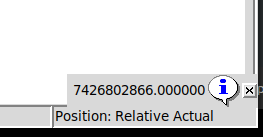
This sensor provides 0 volts at the output when the Z axis is lowered and 8 volts at the output when the Z axis is raised. The TCHAD2 electronic board converts this voltage into a frequency of 100kHz to 1Mhz (according to the chosen jumper). Then the 7i77 electronic board receives this frequency on encoder channel 0. It displays the position results counting to infinity, with only velocity being usable as position, with the low Z axis having a low frequency and the high Z axis having a high frequency.
Please, any basic example helps or suggestions. I appreciate your collaboration. Attached is a video showing how the values ​​from the TCHAD2 electronic board are being received by LinuxCNC.

*MICRA: The symbol (µm) and correspond to the microscopic unit of measurement, where 1 micron is the same as dividing 1 millimeter by 1000


  • TomAlborough
  • TomAlborough's Avatar
14 Jan 2025 17:56

RPi 5 with 6.12 PREEMPT_RT = Using POSIX non-realtime

Category: Installing LinuxCNC

Hello @cornholio:

I hear you. "AI" is a tool. One can try it out as is their desire, but that's getting harder to do given that it seems it's being forced down our throats sometimes. But, that's a problem not solved in this one post.

So, does the gyroscope created by the rotor in the router "cause issues" because the earth is rotating and orbiting about, and by the fact we have gravity or, am I mistaken? Either way I have never investigated gyroscopes beyond crashing some (model) helicopters. They seem to cause confusion (maybe just for me), but after a while that's not an excuse not to learn about them.

I also need to read and understand "background" material I may post, like the citation about "kinematics".

Many thanks,
Tom
  • Clive S
  • Clive S
14 Jan 2025 17:10
Replied by Clive S on topic Homing an axis moves away from home switch!

Homing an axis moves away from home switch!

Category: StepConf Wizard

Can you post the ini and hal files.
  • langdons
  • langdons's Avatar
14 Jan 2025 17:09
Replied by langdons on topic Homing an axis moves away from home switch!

Homing an axis moves away from home switch!

Category: StepConf Wizard

Here's the pinout of the input pins on my PMDX-122 breakout board.

Pin 10: E-Stop to PC (Internal, Works great)
Pin 11: Home X and X-axis minimum limit
Pin 12: Home Y and Y-axis minimum limit
Pin 13: Z-axis minimum limit
Pin 15: Maximum limit for all axes.

I know all switches work fine )

My machine is set up so "Home" means the tool is at the bottom-left corner of the table. (Y axis.)
Displaying 19846 - 19860 out of 21712 results.
Time to create page: 0.461 seconds
Powered by Kunena Forum