Advanced Search

Search Results (Searched for: )

  • gitin
  • gitin
17 Mar 2025 17:34
Replied by gitin on topic Linux_Mint_22.1_LinuxCNC_2.10.iso

Linux_Mint_22.1_LinuxCNC_2.10.iso

Category: Installing LinuxCNC

Yes, I launched the included Axis sims on a dell OptiPlex-7780-AIO Intel Core i7-10700.
This ssd has debian 12 and mx23, does this affect mint 22.1?

Error report created by /usr/lib/tcltk/linuxcnc/show_errors.tcl:

Print file information:
RUN_IN_PLACE=no
LINUXCNC_DIR=
LINUXCNC_BIN_DIR=/usr/bin
LINUXCNC_TCL_DIR=/usr/lib/tcltk/linuxcnc
LINUXCNC_SCRIPT_DIR=
LINUXCNC_RTLIB_DIR=/usr/lib/linuxcnc/modules
LINUXCNC_CONFIG_DIR=
LINUXCNC_LANG_DIR=/usr/lib/tcltk/linuxcnc/msgs
INIVAR=inivar
HALCMD=halcmd
LINUXCNC_EMCSH=/usr/bin/wish8.6
LINUXCNC - 2.10.0~pre0
Machine configuration directory is '/home/gitin/linuxcnc/configs/sim.axis-1'
Machine configuration file is 'axis_mm.ini'
INIFILE=/home/gitin/linuxcnc/configs/sim.axis-1/axis_mm.ini
VERSION=1.1
PARAMETER_FILE=sim_mm.var
TPMOD=
HOMEMOD=
TASK=milltask
HALUI=halui
DISPLAY=axis
COORDINATES=X Y Z
KINEMATICS=trivkins
Starting LinuxCNC...
Starting LinuxCNC server program: linuxcncsvr
linuxcncsvr (2832) emcsvr: machine 'LinuxCNC-HAL-SIM-AXIS' version '1.1'
Loading Real Time OS, RTAPI, and HAL_LIB modules
linuxcnc TPMOD=tpmod HOMEMOD=homemod EMCMOT=motmod
Starting TASK program: milltask
milltask (2845) task: machine 'LinuxCNC-HAL-SIM-AXIS' version '1.1'
Starting HAL User Interface program: halui
halui (2847) halui: machine 'LinuxCNC-HAL-SIM-AXIS' version '1.1'
Found file(lib): /usr/share/linuxcnc/hallib/core_sim.hal
Found file(lib): /usr/share/linuxcnc/hallib/sim_spindle_encoder.hal
Found file(lib): /usr/share/linuxcnc/hallib/axis_manualtoolchange.hal
Found file(lib): /usr/share/linuxcnc/hallib/simulated_home.hal
Found file(REL): ./cooling.hal
USRMOT: ERROR: command 30 timeout
emcMotionInit: emcTrajInit failed
Starting DISPLAY program: axis
Shutting down and cleaning up LinuxCNC...
task: 0 cycles, min=0.000002, max=0.001060, avg=-1.000000, 0 latency excursions (> 10x expected cycle time of 0.001000s)
Removing HAL_LIB, RTAPI, and Real Time OS modules
Removing NML shared memory segments

Debug file information:
Note: Using POSIX realtime
link (updating variable file): Нет такого файла или каталога
Traceback (most recent call last):
File "/usr/bin/axis", line 3007, in <module>
vars = nf.Variables(root_window,
^^^^^^^^^^^^^^^^^^^^^^^^^
File "/usr/lib/python3/dist-packages/nf.py", line 46, in __init__
setattr(self, name, makevar(master, name, klass))
^^^^^^^^^^^^^^^^^^^^^^^^^^^^
File "/usr/lib/python3/dist-packages/nf.py", line 70, in makevar
self.set(self._default)
File "/usr/lib/python3.12/tkinter/__init__.py", line 424, in set
return self._tk.globalsetvar(self._name, value)
^^^^^^^^^^^^^^^^^^^^^^^^^^^^^^^^^^^^^^^^
_tkinter.TclError: can't set "taskfile": can't read "::": no such variable
2835
2845
Stopping realtime threads
Unloading hal components
Note: Using POSIX realtime


Info report created by linuxcnc_info:
The file: /tmp/linuxcnc_info.txt
can be posted to a forum or a web site like:
pastebin.com
in order to provide information about the linuxcnc
system and configuration.

Date: Пн 17 мар 2025 19:59:24 MSK
UTC Date: Пн 17 мар 2025 16:59:24 UTC
this program: /usr/bin/linuxcnc_info
uptime: 19:59:24 up 4 min, 1 user, load average: 1,03, 0,92, 0,43
lsb_release -sa: Linuxmint Linux Mint 22.1 22.1 xia
linuxcnc: /usr/bin/linuxcnc
pwd: /home/gitin/linuxcnc/configs/sim.axis-1
USER: gitin
LOGNAME: gitin
HOME: /home/gitin
EDITOR:
VISUAL:
LANGUAGE: ru_RU
TERM: dumb
COLORTERM:
DISPLAY: :0
DESKTOP: mate
display size: 1920x1080 pixels (508x285 millimeters)
PATH: /usr/bin:/home/gitin/linuxcnc/configs/sim.axis-1/bin:/usr/bin:/usr/local/sbin:/usr/local/bin:/usr/sbin:/usr/bin:/sbin:/bin:/usr/games:/usr/local/games:/snap/bin

uname items:
nodename -n: gitin-OptiPlex-7780-AIO
kernel-name -s: Linux
kernel-vers -v: #1 SMP PREEMPT_RT Debian 6.10.12-1 (2024-10-01)
machine -m: x86_64
processor -p: x86_64
platform -i: x86_64
oper system -o: GNU/Linux

/proc items:
cmdline: BOOT_IMAGE=/boot/vmlinuz-6.10.12-rt-amd64 root=UUID=0ae8aa4a-3b74-4dae-9243-989492bb833f ro quiet splash
model name: Intel(R) Core(TM) i7-10700 CPU @ 2.90GHz
cores: 8
cpu MHz: 4558.254
parport:
serial: 0000-0000 : serial

Versions:
gcc: gcc (Ubuntu 13.3.0-6ubuntu2~24.04) 13.3.0
python: Python 3.12.3
git: not_in_PATH
git commit: NA
tcl: 8.6
tk: 8.6
glade: not_in_PATH

linuxcnc_var all:

LINUXCNCVERSION: 2.10.0~pre0
LINUXCNC_AUX_GLADEVCP: /usr/share/linuxcnc/aux_gladevcp
LINUXCNC_AUX_EXAMPLES: /usr/share/linuxcnc/aux_examples
REALTIME: /usr/lib/linuxcnc/realtime
RTS: uspace
HALLIB_DIR: /usr/share/linuxcnc/hallib
PYTHON: /usr/bin/python3

dpkg -l '*linuxcnc*':
Желаемый=неизвестно/установить/удалить[r]/вычистить[p]/зафиксировать[h]
| Состояние=не[n]/установлен/настроен[c]/распакован/частично настроен[F]/
частично установлен[H]/trig-aWait/Trig-pend
|/ Ошибка?=(нет)/требуется переустановка[R] (верхний регистр
в полях состояния и ошибки указывает на ненормальную ситуацию)
||/ Имя Версия Архитектура Описание
+++-===================-=============-============-==============================================
un linuxcnc <нет> <нет> (описание недоступно)
un linuxcnc-dev <нет> <нет> (описание недоступно)
un linuxcnc-doc <нет> <нет> (описание недоступно)
un linuxcnc-doc-en <нет> <нет> (описание недоступно)
un linuxcnc-doc-es <нет> <нет> (описание недоступно)
un linuxcnc-doc-fr <нет> <нет> (описание недоступно)
un linuxcnc-sim <нет> <нет> (описание недоступно)
un linuxcnc-sim-dev <нет> <нет> (описание недоступно)
ii linuxcnc-uspace 1:2.10.0~pre0 amd64 motion controller for CNC machines and robots
ii linuxcnc-uspace-dev 1:2.10.0~pre0 amd64 PC based motion controller for real-time Linux

  • directandrew
  • directandrew
17 Mar 2025 17:24 - 17 Mar 2025 17:26

New to linuxcnc, basic question for DRO modes with encoded handwheels

Category: General LinuxCNC Questions

Hi,I'm in the early stages of researching a conversion for my PM-25 mill to use stepper motors and encoders, with the goal of creating an easy-to-use system for both manual and CNC operation. Ideally, it will be a 50/50 split between DRO mode and running G-code from my CAM software.

I have experience with 2.5 and 3-axis Southwest/Prototrak systems and really enjoy using X/Y DRO mode for quick manual jobs—especially for things like reworking a part on the fly with handwheels.

Now, for my question: I came across Probe Basic, which looks like a good fit for my needs, but is it possible to have a DRO mode where external encoders on the X and Y axes feed into LinuxCNC, move the stepper motors, and display the position on the Probe Basic screen?

In short:
  • Enter DRO mode.
  • Turn a custom encoder on the X axis and Y axis (e.g., 100 steps maybe even a fine or course option? ).
  • The table moves accordingly, and LinuxCNC tracks the position.
  • If needed, I can zero out the position, similar to how old MX2 or K3 Prototraks work.


Would this kind of setup be possible? Im ok with EE and Software, can build a PCB but rather look for some options first. Thanks!
  • JT
  • JT's Avatar
17 Mar 2025 17:18
Replied by JT on topic Testing CSS

Testing CSS

Category: General LinuxCNC Questions

Is the X axis position getting smaller as it moves in?
linuxcnc.org/docs/stable/html/lathe/lath..._synchronized_motion

JT
  • masawee
  • masawee
17 Mar 2025 17:13 - 17 Mar 2025 17:14
Replied by masawee on topic duel y motor setup help please

duel y motor setup help please

Category: StepConf Wizard

how setting first time my dual Y axis at setup wizard, i has try add my parallerport pin 8 and 9 is A axis, and setting pins 8,9 to tandem Y step and dir, normal Y have pin 4 Y step and 5 is Y dir, but no working. what i need setting can use 2 motor Y axis. new version 2.9.4 old has 2.8.4.

how setup dual Y axis, just installed new version linuxcnc because i hear support dual Y axis motors, but now first time try setting wizard make tandem Y step ad dir add to pin 8 and 9 (A axis in card) no working.
  • masawee
  • masawee
17 Mar 2025 16:47

How to setup simultaneous tandem Y and tandem Z

Category: StepConf Wizard

i just installing ew version linuxcnc old has 2.8.4 ew is 2.9.4 and have dual Y axis problem, i try add parallerport card A axis to second motor to Yaxis but no working, how this setting, wizarrd i has make setting XYZA and pin setting 8 and 9 have Yaxis2 step and dir. all other pins have normal XYZ old setting but now try use tandem Y step and dir, to A axis. no working, how this setting ?
  • tommylight
  • tommylight's Avatar
17 Mar 2025 16:35
Replied by tommylight on topic Linux_Mint_22.1_LinuxCNC_2.10.iso

Linux_Mint_22.1_LinuxCNC_2.10.iso

Category: Installing LinuxCNC

Post the error report here.
Did you try running the included Axis sims?
Usually Axis issues are always related to OpenGL not working, so you can try adding or removing the graphic card.
-
FYI, i have installed this 7-8 times by now, it works as advertised, meaning installs in about 8-12 minutes on some Lenovo i7 6600U and 7600U.
Also axis works always.
  • Aciera
  • Aciera's Avatar
17 Mar 2025 16:27
Replied by Aciera on topic M19 and spindle-index-enable issues

M19 and spindle-index-enable issues

Category: Advanced Configuration

So, how did you get this to work:
pin in  s32   mode        "0: rotate - shortest move; 1: always rotate clockwise; 2: always rotate counterclockwise. Add 16 (0x10) to the mode to force homing to index before orienting";
I thought it meant to add 16 to the P word in the M19 command but that does not work as only values 0,1 or 2 are accepted by the interpreter.
  • Overspeed
  • Overspeed
17 Mar 2025 16:26
Replied by Overspeed on topic New update on STMBL

New update on STMBL

Category: Driver Boards

I hope that Kuka Robot will be enough to operate in my home.
Ac motor drive
but need installation guide and details
  • Overspeed
  • Overspeed
17 Mar 2025 16:24
Replied by Overspeed on topic New update on STMBL

New update on STMBL

Category: Driver Boards

My network supports max imput 220vac, I am not in an industrial environment.
This may be possible but 220v input drive electricity going to the motor can be up to out drive motor 380v but I don't think it is needed because 220v 15 20A would be enough
  • tommylight
  • tommylight's Avatar
17 Mar 2025 16:24
Replied by tommylight on topic Migration von 2.8.4 auf 2.9.4

Migration von 2.8.4 auf 2.9.4

Category: Deutsch

If it works, don't mess with it.

I absolutely agree.
  • tommylight
  • tommylight's Avatar
17 Mar 2025 16:22

PCIe - No parport registered at "0x " . This is not Always an error.Continuing.

Category: Advanced Configuration

Had the same issue yesterday, PCI-E Sunix card, works perfectly but the error shows up whenever LinuxCNC is started.
Did not bother with it, but i did notice LSPCI does not show loaded module for it at all, but it does show all the other info with addresses and stuff.
  • gitin
  • gitin
17 Mar 2025 16:22
Replied by gitin on topic Linux_Mint_22.1_LinuxCNC_2.10.iso

Linux_Mint_22.1_LinuxCNC_2.10.iso

Category: Installing LinuxCNC

Hi Tommy. I installed your build. It works well, loads quickly.
If in the ini file DISPLAY = axis, the screen does not load.
If this is replaced with DISPLAY = gmoccapy or with
DISPLAY = qtvcp qtdragon
PREFERENCE_FILE_PATH = WORKINGFOLDER/qtdragon.pref
it works fine. Maybe I don't understand something.
Translated in Google.
  • tommy
  • tommy
17 Mar 2025 16:20

STEPLEN STEPSPACE time for Bergerda AC servo driver

Category: General LinuxCNC Questions

Parameter 82 did the trick! It was set to 600 by default, now I set it to 1000, and works perfectly up to 170mm/s velocity.
  • bnet
  • bnet's Avatar
17 Mar 2025 15:12

Fanuc Serial Pulse Coders - Red cap servos, mesa 7i76e, how to?

Category: Driver Boards

That's what I'm starting to realize! Thanks for adding to my confidence on this route.

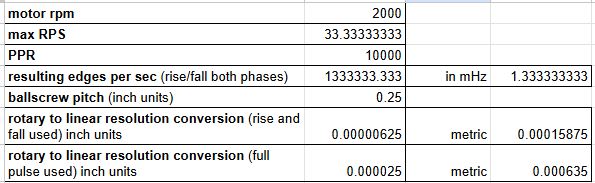
I have found some good encoders - I'm thinking of going with 10000 PPR for X and Z and 800 PPR for the turret and the live tooling motor as the latter won't need much in terms of resolution, while the Z and especially X will need as much as I can get/afford (maximum count rates of A-B Ultra3000 2.5 mHz).

 
  • scda
  • scda's Avatar
17 Mar 2025 14:53
Replied by scda on topic M19 and spindle-index-enable issues

M19 and spindle-index-enable issues

Category: Advanced Configuration

Hi all

Not sure if this is still relevant. I am using this "new" orient comp from Andy (recompiled it as orient2). And I have to say, this actually works great!

The only thing I changed is: uncomment "is_oriented = 0" (otherwise I was not able to run multiple M19 commands in a row).
This changes the behavior of the -is-oriented pin --> So i use the oneshot function to make the signal stay true longer and activate the spindle brake and some other stuff. Might add another input to the comp, so the i"s-oriented" pin can be reset with M5 or an other signal...)

Before I saw this, I had to use tallas83 idea to orient a spindle (which requires much more signals/pins  & connections).

This should be added to the main fork in my opinion (maybe this was already done)?

One improvement in my setup would probably be to run the indexing only once (and then change the mode to 0) and after that do a few orientation commands. That should make it a bit faster as a constant rehoming is not necessary after every orientation (espescially if the spindle is not running in velocity mode in between).
 
Displaying 17521 - 17535 out of 18506 results.
Time to create page: 0.360 seconds
Powered by Kunena Forum