Advanced Search

Search Results (Searched for: )

  • ckuecker
  • ckuecker
22 Sep 2025 00:39

New install on previously working system

Category: Installing LinuxCNC

Running 2.9.5 on a RPi 4. I had this system running well earlier, until I tried to update Easy Probe. Now, I can't communicate with the Mesa card on ETH0.

I had to replace my main PC, which wants to use the 192.168.1.x addresses. I changed the jumpers on my 7i96s to 10.10.10.10, and I can ping the card.

When I run LinuxCNC, I get the attached report.
Any suggestions?
  • Rockwood
  • Rockwood
21 Sep 2025 23:17 - 21 Sep 2025 23:44
Dynamic soft limits was created by Rockwood

Dynamic soft limits

Category: PathPilot

Hey All,
I'm not sure if this is the right place for this. But I'm working with a Tormach 1500MX that has a PathPilot control.
I built a complicated fixture for running the same part over and over. I wanted to have the soft limits prevent the tool from hitting the fixture. Which means having different X and Y limits when the Z axis is low enough to have the tool in the fixture. Also to prevent Z from lowering into the fixture unless X and Y are correctly positioned.

I ended up with this added to tormach's postgui hal file:

#rockwood edit , the below is for setting dynamic soft limits to protect from crashing into fixture when in "run" mode, "Setup" accessed with the built in tormach keyswitch, will have full travel. All units are inches.
#If Z < -3.187: X and Y limits switch to narrow windows (X:[14.349-15.175], Y:[5.674-6.559]); else use factory limits.
# Z min is -3.187 by default; becomes -11.494 when BOTH X and Y are within their narrow windows.


#load and name components I will need later,  and2 components have to be added in "tormach_mill_ethercat_csp.hal" 
loadrt mux2 names=mux.xMin,mux.xMax,mux.yMin,mux.yMax,mux.zMin,mux.zMinSetup
loadrt comp names=comp.zBelow,comp.x_ge_min,comp.x_le_max,comp.y_ge_min,comp.y_le_max

# add stuff to servo thread
addf comp.zBelow     servo-thread
addf comp.x_ge_min   servo-thread
addf comp.x_le_max   servo-thread
addf comp.y_ge_min   servo-thread
addf comp.y_le_max   servo-thread
addf mux.xMin        servo-thread
addf mux.xMax        servo-thread
addf mux.yMin        servo-thread
addf mux.yMax        servo-thread
addf mux.zMin        servo-thread
addf mux.zMinSetup   servo-thread     
addf not.setup-mode  servo-thread      
addf and.narrow      servo-thread      
addf and.znarrow     servo-thread      
addf and.xInWin      servo-thread
addf and.yInWin      servo-thread
addf and.xyInWin     servo-thread


setp comp.x_ge_min.in0  14.349                                          # comp.x_ge_min.in0 is set to X narrow MIN setting
setp comp.x_le_max.in1  15.175                                          # comp.x_le_max.in1 is set to X narrow MAX setting
net motor.00.feedback-position comp.x_ge_min.in1 comp.x_le_max.in0      # current X postion is sent to *min.in0 and *max.in1

setp comp.y_ge_min.in0  5.674                                           # comp.y_ge_min.in1 is set to Y narrow MIN setting
setp comp.y_le_max.in1  6.559                                           # comp.Y_le_max.in1 is set to Y narrow MAX setting
net motor.01.feedback-position comp.y_ge_min.in1 comp.y_le_max.in0      # current Y postion is sent to *min.in0 and *max.in1

setp comp.zBelow.in1   -3.187                           # set in1 to our fixture height threshhold:
net motor.02.feedback-position  => comp.zBelow.in0      # assign current Z position to comp.zBelow.in0
net z-below-thresh     comp.zBelow.out                  #create z-below-thresh this is true when Z is extended into the fixture 

net x-ge-min            comp.x_ge_min.out    => and.xInWin.in0          # is X > than MIN?
net x-le-max            comp.x_le_max.out    => and.xInWin.in1          # is X < than MAX?
net x-inrange           and.xInWin.out                                  # if both are true than so is x-inrange

net y-ge-min            comp.y_ge_min.out    => and.yInWin.in0          # is Y > than MIN?
net y-le-max            comp.y_le_max.out    => and.yInWin.in1          # is Y < than MAX?
net y-inrange           and.yInWin.out                                  # if both then y-inrange

net x-inrange           => and.xyInWin.in0
net y-inrange           => and.xyInWin.in1
net both-inrange        and.xyInWin.out                                 # if both X and Y are in range, then both-inrange

#these mux contain the limit values. 
setp mux.xMin.in0   -0.000001   #factory default
setp mux.xMax.in0    19.68500   #factory default

setp mux.yMin.in0   -0.000001   #factory default
setp mux.yMax.in0    13.77900   #factory default

setp mux.zMinSetup.in0    -14.0   #this is the factory default Min Z, IF we are in setup mode this should always be the value.
setp mux.zMinSetup.in1    -3.187  #this is a zMin just above the fixture. this is default when in run mode. it changes only when X and Y are in the narrow window.   

setp ini.2.max_limit 0.000001  #setting Z max to factory limit. this is a fixed value.

# Narrow windows: X and Y
setp mux.xMin.in1    14.349
setp mux.xMax.in1    15.175
setp mux.yMin.in1     5.674
setp mux.yMax.in1     6.559

setp mux.zMin.in1     -11.494  #this is 1mm below cutting height, to be allowed only when x and y are within window 

#modeswitchsig is from tormach, its TRUE when in setup mode. im flipping it and creating "not-setup" which just means run mode.
net modeswitchsig       => not.setup-mode.in
net not-setup       not.setup-mode.out

#if z-below-thresh and not setup, then we narrow x and Y windows
net z-below-thresh and.narrow.in0
net not-setup      and.narrow.in1
net narrow-enable  and.narrow.out
net narrow-enable  mux.xMin.sel
net narrow-enable  mux.xMax.sel
net narrow-enable  mux.yMin.sel
net narrow-enable  mux.yMax.sel

#mux.zmin setup just exists so we can go all the way down in setup mode
net not-setup mux.zMinSetup.sel 
net z-min-default mux.zMinSetup.out mux.zMin.in0    #This assigns a default Zmin -3.187 if in "run" mode, -14 if in "setup mode"

#If X and Y are in the window and not-setup then set the Zmin mux to true, changing our z min value
net both-inrange  and.znarrow.in0
net not-setup     and.znarrow.in1
net z-narrow      and.znarrow.out
net z-narrow      mux.zMin.sel

# set axis limits min/max from the muxes
net x-min-dyn  mux.xMin.out ini.0.min_limit
net x-max-dyn  mux.xMax.out ini.0.max_limit
net y-min-dyn  mux.yMin.out ini.1.min_limit
net y-max-dyn  mux.yMax.out ini.1.max_limit
net z-min-dyn  mux.zMin.out ini.2.min_limit
#Rockwood edit over


I've tested it, just jogging around and with MDI commands. It seems to be working. But this is my first time using linuxCNC. So I'd love a reality check from anyone more familiar. Does this make sense or is there a better way to do it? Am I adding too much to the servo thread? Is there something I should check to make sure I'm not slowing stuff down too much? 

In the future, I want to get rid of all the hard-coded numbers. I want to store them in another file or at least one clear location in the postgui file. Preferably, I could process the "narrow window" numbers from a work offset, so I can move the fixture in the future and change the offset. But I would want to then lock that or all offsets from being edited easily, maybe using the same setup mode keyswitch. I'm not sure how to handle that yet. If anyone has ideas, I'd love to hear them.

Thanks for your time!
 
  • RayJr
  • RayJr
21 Sep 2025 22:42
Replied by RayJr on topic Touch off, OK button greyed out

Touch off, OK button greyed out

Category: AXIS

What is the best way to move from 2.9.5 back to 2.9.4?
  • MaHa
  • MaHa
21 Sep 2025 21:25 - 21 Sep 2025 21:51
Replied by MaHa on topic FlexGui -Touch off

FlexGui -Touch off

Category: Flex GUI

I had time for some investigation. When touchof before running a gcode, (self.gui_path) in the file touchoff.py  leads to /usr/lib/libflexgui. but after running a gcode (self.gui_path) contains /home/miller/linuxcnc/configs.

Toolchange popup is affected also the same way.
  • scsmith1451
  • scsmith1451's Avatar
21 Sep 2025 20:55
Replied by scsmith1451 on topic Linear Move Exceeds Lower Limit

Linear Move Exceeds Lower Limit

Category: General LinuxCNC Questions

I have my machine configured for both and home on all axes.
  • scsmith1451
  • scsmith1451's Avatar
21 Sep 2025 20:52
Replied by scsmith1451 on topic Linear Move Exceeds Lower Limit

Linear Move Exceeds Lower Limit

Category: General LinuxCNC Questions

Your assumptions are correct for both the table and the block.
  • choppter
  • choppter
21 Sep 2025 18:02 - 21 Sep 2025 18:16

LinuxCNC-RIO - RealtimeIO for LinuxCNC based on FPGA (ICE40 / ECP5)

Category: Computers and Hardware

Hi meister,

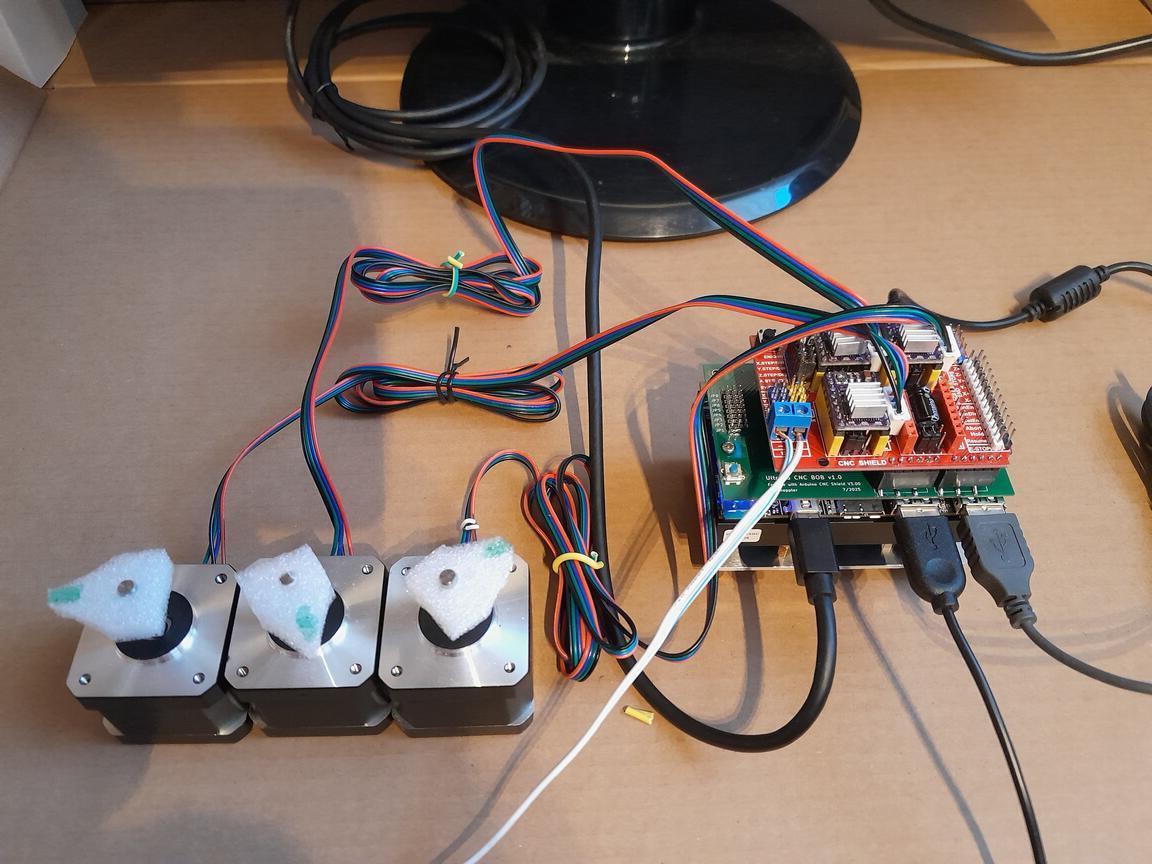
Really cool project! I was thinking about combining FPGA support and  LinuxCNC on an  Ultra96  board (Xilinx/AMD Ultrascale device, 4x ARM64 cores and FPGA on the same chip) for years, but had no clue how the HAL messaging works. But with your UDP example as a base it was really easy! Below is a pic of the demo system, which is the Ultra96 itself, a simple self made interface board and the CNC Shield v3.0 at the top. And of course a video . :-)When I was done I saw you had added and experimental "axi" plugin and it looks like you had the same idea like me, but it did not work for me. In case you are interested, I could send my versions of the verilog and and c-code portion and maybe you could add it in a later version of your code generation magic.

Thomas 

 
  • thanks for the help
  • thanks for the help
21 Sep 2025 17:12
Replied by thanks for the help on topic Linear Move Exceeds Lower Limit

Linear Move Exceeds Lower Limit

Category: General LinuxCNC Questions

oops....sorry.
  • unknown
  • unknown
21 Sep 2025 17:03
Replied by unknown on topic Linear Move Exceeds Lower Limit

Linear Move Exceeds Lower Limit

Category: General LinuxCNC Questions

Yeah, I have home and limit switches. They came with the machine, so I was able to wire them in the control board.


That's nice mate, but my reply was to the OP.
  • thanks for the help
  • thanks for the help
21 Sep 2025 16:21
Replied by thanks for the help on topic Linear Move Exceeds Lower Limit

Linear Move Exceeds Lower Limit

Category: General LinuxCNC Questions

Yeah, I have home and limit switches. They came with the machine, so I was able to wire them in the control board.
  • PCW
  • PCW's Avatar
21 Sep 2025 16:19
Replied by PCW on topic Update LinuxCNC 2.9.5 on debian 13

Update LinuxCNC 2.9.5 on debian 13

Category: Installing LinuxCNC

The SmartSerial is also a latency related issue

Pinning the Ethernet IRQ to the top processor in conjunction with isolcpus=LastCPU
can also help a lot (LastCPU =3 for a 4 core processor)

This script can do this temporarily:


File Attachment:

File Name: pinirq_2025-09-21.txt
File Size:1 KB
  • upplib
  • upplib
21 Sep 2025 16:17

Mesa hm2/hm2_7i96: error finishing read - Dell 3050 Realtek NIC r8168

Category: Installing LinuxCNC

Thanks to all, I reinstalled, then installed dkms-r8168 pkg. This fixed the issue.
Now the driver is r8168 instead of r8169.
  • phew
  • phew
21 Sep 2025 12:21

LCNC 2.9.5 - How to jog with a wireless xbox bt controller

Category: Basic Configuration

Hey,

I am trying to set up my xbox controller to jog a three axis machine (y-gantry). Using a bluetooth dongle I had to fiddle around a bit (and install xpadneo) to get the controller to connect to the system but I eventually got there and do see input when pressing buttons/moving the joysticks.

I was digging into LinuxCNC a few years ago but then life happened and I had to put the project on ice up until now. This is my first home-built CNC (wood router) and I am very new to all of this.

My goal is to be able to move the X, Y (gantry) and Z axis using the gaming controller when there is no gcode being executed.

Currently this is a parport setup and the stepper motors are not actually installed on ball screws so I do not mess up anything while testing. I am planning on switching to a mesa card in the near future.
phew@linuxcnc:~$ sudo lsusb
Bus 001 Device 002: ID 2357:0604 TP-Link TP-Link Bluetooth USB Adapter
phew@linuxcnc:~$ sudo dkms status
hid-xpadneo/v0.9-226-ga16acb0, 6.1.0-39-rt-amd64, x86_64: installed
phew@linuxcnc:~$ sudo dmesg | grep -i xbox
[   41.033957] input: Xbox Wireless Controller as /devices/virtual/misc/uhid/0005:045E:0B13.0007/input/input16
[   41.034076] hid-generic 0005:045E:0B13.0007: input,hidraw6: BLUETOOTH HID v5.23 Gamepad [Xbox Wireless Controller] on 98:03:8e:4f:32:fd
[   41.094172] input: Xbox Wireless Controller as /devices/virtual/misc/uhid/0005:045E:0B13.0007/input/input17
[   41.094277] xpadneo 0005:045E:0B13.0007: input,hidraw6: BLUETOOTH HID v11.30 Gamepad [Xbox Wireless Controller] on 98:03:8e:4f:32:fd
[   41.094307] input: Xbox Wireless Controller Consumer Control as /devices/virtual/misc/uhid/0005:045E:0B13.0007/input/input18
[   41.094367] input: Xbox Wireless Controller Keyboard as /devices/virtual/misc/uhid/0005:045E:0B13.0007/input/input19
[   42.076531] xpadneo 0005:045E:0B13.0007: Xbox Wireless Controller [14:cb:65:c7:03:1e] connected
[   42.206305] input: Xbox Wireless Controller as /devices/virtual/misc/uhid/0005:045E:0B13.0007/input/input20
[   42.206585] xpadneo 0005:045E:0B13.0007: input,hidraw6: BLUETOOTH HID v11.30 Gamepad [Xbox Wireless Controller] on 98:03:8e:4f:32:fd
[   42.206615] input: Xbox Wireless Controller Consumer Control as /devices/virtual/misc/uhid/0005:045E:0B13.0007/input/input21
[   42.206743] input: Xbox Wireless Controller Keyboard as /devices/virtual/misc/uhid/0005:045E:0B13.0007/input/input22
[   43.189177] xpadneo 0005:045E:0B13.0007: Xbox Wireless Controller [14:cb:65:c7:03:1e] connected

xyyz.ini (machine basic setup)
# Generated by stepconf 1.1 at Thu Sep 11 20:35:55 2025
# If you make changes to this file, they will be
# overwritten when you run stepconf again

[EMC]
MACHINE = xyyz
DEBUG = 0
VERSION = 1.1

[DISPLAY]
DISPLAY = axis
EDITOR = gedit
POSITION_OFFSET = RELATIVE
POSITION_FEEDBACK = ACTUAL
ARCDIVISION = 64
GRIDS = 10mm 20mm 50mm 100mm 1in 2in 5in 10in
MAX_FEED_OVERRIDE = 1.2
MIN_SPINDLE_OVERRIDE = 0.5
MAX_SPINDLE_OVERRIDE = 1.2
DEFAULT_LINEAR_VELOCITY = 10.0
MIN_LINEAR_VELOCITY = 0
MAX_LINEAR_VELOCITY = 50.0
CYCLE_TIME = 0.100
INTRO_GRAPHIC = linuxcnc.gif
INTRO_TIME = 5
PROGRAM_PREFIX = /home/phew/linuxcnc/nc_files
INCREMENTS = 20mm 10mm 5mm 1mm .5mm .1mm .05mm .01mm .005mm

[KINS]
JOINTS = 4
KINEMATICS = trivkins coordinates=XYYZ kinstype=both

[FILTER]
PROGRAM_EXTENSION = .png,.gif,.jpg Greyscale Depth Image
PROGRAM_EXTENSION = .py Python Script
PROGRAM_EXTENSION = .nc,.tap G-Code File
png = image-to-gcode
gif = image-to-gcode
jpg = image-to-gcode
py = python

[TASK]
TASK = milltask
CYCLE_TIME = 0.010

[RS274NGC]
PARAMETER_FILE = linuxcnc.var

[EMCMOT]
EMCMOT = motmod
COMM_TIMEOUT = 1.0
BASE_PERIOD = 50000
SERVO_PERIOD = 1000000

[HAL]
HALUI = halui
HALFILE = xyyz.hal
HALFILE = custom.hal
HALFILE = xbox.hal
POSTGUI_HALFILE = postgui_call_list.hal
MDI_COMMAND = G0 X0
MDI_COMMAND = G0 Y0
MDI_COMMAND = G0 Z0
JOINT_0 = X
JOINT_1 = Y
JOINT_2 = Y
JOINT_3 = Z

[TRAJ]
COORDINATES =  X Y Y Z
LINEAR_UNITS = mm
ANGULAR_UNITS = degree
DEFAULT_LINEAR_VELOCITY = 2.50
MAX_LINEAR_VELOCITY = 25.00

[EMCIO]
EMCIO = io
CYCLE_TIME = 0.100
TOOL_TABLE = tool.tbl

[AXIS_X]
MAX_VELOCITY = 50.0
MAX_ACCELERATION = 25.0
MIN_LIMIT = -0.001
MAX_LIMIT = 800.0

[JOINT_0]
TYPE = LINEAR
HOME = 0.0
MIN_LIMIT = -0.001
MAX_LIMIT = 800.0
MAX_VELOCITY = 50.0
MAX_ACCELERATION = 1875.0
STEPGEN_MAXACCEL = 1875
SCALE = 160
FERROR = 1
MIN_FERROR = .25
HOME_SEQUENCE = 0
HOME_SEARCH_VEL = -20.0
HOME_LATCH_VEL = 2.0
HOME_OFFSET = -1.0
HOME_USE_INDEX = NO
HOME_IGNORE_LIMITS = YES

[AXIS_Y]
MAX_VELOCITY = 50.0
MAX_ACCELERATION = 25.0
MIN_LIMIT = -0.001
MAX_LIMIT = 1000.0

[JOINT_1]
TYPE = LINEAR
HOME = 0.0
MIN_LIMIT = -0.001
MAX_LIMIT = 1000.0
MAX_VELOCITY = 50.0
MAX_ACCELERATION = 1875.0
STEPGEN_MAXACCEL = 1875
SCALE = 160
FERROR = 1
MIN_FERROR = .25
HOME_SEQUENCE = 1
HOME_SEARCH_VEL = -20.0
HOME_LATCH_VEL = 2.0
HOME_OFFSET = -1.0
HOME_USE_INDEX = NO
HOME_IGNORE_LIMITS = YES

[JOINT_2]
TYPE = LINEAR
HOME = 0.0
MIN_LIMIT = -0.001
MAX_LIMIT = 1000.0
MAX_VELOCITY = 50.0
MAX_ACCELERATION = 1875.0
STEPGEN_MAXACCEL = 1875
SCALE = 160
FERROR = 1
MIN_FERROR = .25
HOME_SEQUENCE = 1
HOME_SEARCH_VEL = -20.0
HOME_LATCH_VEL = 2.0
HOME_OFFSET = -1.0
HOME_USE_INDEX = NO
HOME_IGNORE_LIMITS = YES

[AXIS_Z]
MAX_VELOCITY = 25.0
MAX_ACCELERATION = 10.0
MIN_LIMIT = -150.0
MAX_LIMIT = 0.001

[JOINT_3]
TYPE = LINEAR
HOME = 0.0
MIN_LIMIT = -150.0
MAX_LIMIT = 0.001
MAX_VELOCITY = 25.0
MAX_ACCELERATION = 1000.0
STEPGEN_MAXACCEL = 1875
SCALE = 160
FERROR = 1
MIN_FERROR = .25
HOME_SEQUENCE = 2
HOME_SEARCH_VEL = 20.0
HOME_LATCH_VEL = -2.0
HOME_OFFSET = 1.0
HOME_USE_INDEX = NO
HOME_IGNORE_LIMITS = YES

xyyz.hal:
loadrt [KINS]KINEMATICS kinstype=both
loadrt [EMCMOT]EMCMOT base_period_nsec=[EMCMOT]BASE_PERIOD servo_period_nsec=[EMCMOT]SERVO_PERIOD num_joints=[KINS]JOINTS
loadrt hal_parport cfg="1 out+in"
setp parport.0.reset-time 5000
loadrt stepgen step_type=0,0,0,0
loadrt pwmgen output_type=1

addf parport.0.read base-thread
addf stepgen.make-pulses base-thread
addf pwmgen.make-pulses base-thread
addf parport.0.write base-thread
addf parport.0.reset base-thread

addf stepgen.capture-position servo-thread
addf motion-command-handler servo-thread
addf motion-controller servo-thread
addf stepgen.update-freq servo-thread
addf pwmgen.update servo-thread

net x-home-raw parport.0.pin-11-in
net x-home-raw => joint.0.home-sw-in
#net x-home-raw => joint.0.neg-lim-sw-in
# net x-home-raw => joint.0.pos-lim-sw-in  # optional

net y0-home-raw parport.0.pin-12-in
net y0-home-raw => joint.1.home-sw-in
#net y0-home-raw => joint.1.neg-lim-sw-in

net y1-home-raw parport.0.pin-13-in
net y1-home-raw => joint.2.home-sw-in
#net y1-home-raw => joint.2.neg-lim-sw-in

net z-home-raw parport.0.pin-15-in
net z-home-raw => joint.3.home-sw-in
#net z-home-raw => joint.3.neg-lim-sw-in

setp stepgen.0.position-scale [JOINT_0]SCALE
setp stepgen.0.steplen 1
setp stepgen.0.stepspace 0
setp stepgen.0.dirhold 40000
setp stepgen.0.dirsetup 40000
setp stepgen.0.maxaccel [JOINT_0]STEPGEN_MAXACCEL
net xpos-cmd  joint.0.motor-pos-cmd => stepgen.0.position-cmd
net xpos-fb   stepgen.0.position-fb => joint.0.motor-pos-fb
net xstep     stepgen.0.step => parport.0.pin-02-out
net xdir      stepgen.0.dir  => parport.0.pin-03-out
net xenable   joint.0.amp-enable-out => stepgen.0.enable

net y-enable joint.1.amp-enable-out
net y-enable => stepgen.1.enable
net y-enable => stepgen.2.enable

setp stepgen.1.position-scale [JOINT_1]SCALE
setp stepgen.1.steplen 1
setp stepgen.1.stepspace 0
setp stepgen.1.dirhold 40000
setp stepgen.1.dirsetup 40000
setp stepgen.1.maxaccel [JOINT_1]STEPGEN_MAXACCEL
net ypos-cmd  joint.1.motor-pos-cmd => stepgen.1.position-cmd
net ypos-fb   stepgen.1.position-fb => joint.1.motor-pos-fb
net y0step    stepgen.1.step => parport.0.pin-04-out
net y0dir     stepgen.1.dir  => parport.0.pin-05-out

setp stepgen.2.position-scale [JOINT_2]SCALE
setp stepgen.2.steplen 1
setp stepgen.2.stepspace 0
setp stepgen.2.dirhold 40000
setp stepgen.2.dirsetup 40000
setp stepgen.2.maxaccel [JOINT_2]STEPGEN_MAXACCEL
net y1pos-cmd joint.2.motor-pos-cmd => stepgen.2.position-cmd
net y1pos-fb  stepgen.2.position-fb => joint.2.motor-pos-fb
net y1step    stepgen.2.step => parport.0.pin-06-out
net y1dir     stepgen.2.dir  => parport.0.pin-07-out

setp stepgen.3.position-scale [JOINT_3]SCALE
setp stepgen.3.steplen 1
setp stepgen.3.stepspace 0
setp stepgen.3.dirhold 40000
setp stepgen.3.dirsetup 40000
setp stepgen.3.maxaccel [JOINT_3]STEPGEN_MAXACCEL
net zpos-cmd joint.3.motor-pos-cmd => stepgen.3.position-cmd
net zpos-fb  stepgen.3.position-fb => joint.3.motor-pos-fb
net zstep    stepgen.3.step => parport.0.pin-08-out
net zdir     stepgen.3.dir  => parport.0.pin-09-out
net zenable  joint.3.amp-enable-out => stepgen.3.enable

net estop-out <= iocontrol.0.user-enable-out
net estop-out => iocontrol.0.emc-enable-in


xbox.hal
loadusr -W hal_input -KRAL Xbox

loadrt scale count=3
addf scale.0 servo-thread
addf scale.1 servo-thread
addf scale.2 servo-thread

setp scale.0.gain 50.0   # X
setp scale.1.gain 50.0   # Y
setp scale.2.gain 50.0   # Z

loadrt mult2 count=3
addf mult2.0 servo-thread
addf mult2.1 servo-thread
addf mult2.2 servo-thread

loadrt conv_bit_float
addf conv-bit-float.0 servo-thread

net xbox-x-raw input.0.abs-x-position => scale.0.in
net xbox-y-raw input.0.abs-y-position => scale.1.in
net xbox-z-raw input.0.abs-ry-position => scale.2.in

net xbox-x-scaled scale.0.out => mult2.0.in0
net xbox-y-scaled scale.1.out => mult2.1.in0
net xbox-z-scaled scale.2.out => mult2.2.in0

net xbox-jog-bit input.0.btn-a => conv-bit-float.0.in
net xbox-jog-float conv-bit-float.0.out => mult2.0.in1
net xbox-jog-float => mult2.1.in1
net xbox-jog-float => mult2.2.in1

net xbox-x-vel mult2.0.out => joint.0.jog-scale   # X
net xbox-y-vel mult2.1.out => joint.1.jog-scale   # Y (Y0)
net xbox-y-vel => joint.2.jog-scale                      # Y (Y1)
net xbox-z-vel mult2.2.out => joint.3.jog-scale   # Z

# Press [A]-button to enable joints
net xbox-jog-bit => joint.0.jog-enable
net xbox-jog-bit => joint.1.jog-enable
net xbox-jog-bit => joint.2.jog-enable
net xbox-jog-bit => joint.3.jog-enable

setp joint.0.jog-vel-mode TRUE
setp joint.1.jog-vel-mode TRUE
setp joint.2.jog-vel-mode TRUE
setp joint.3.jog-vel-mode TRUE

net xbox-x-vel => halui.axis.x.analog
net xbox-y-vel => halui.axis.y.analog
net xbox-z-vel => halui.axis.z.analog

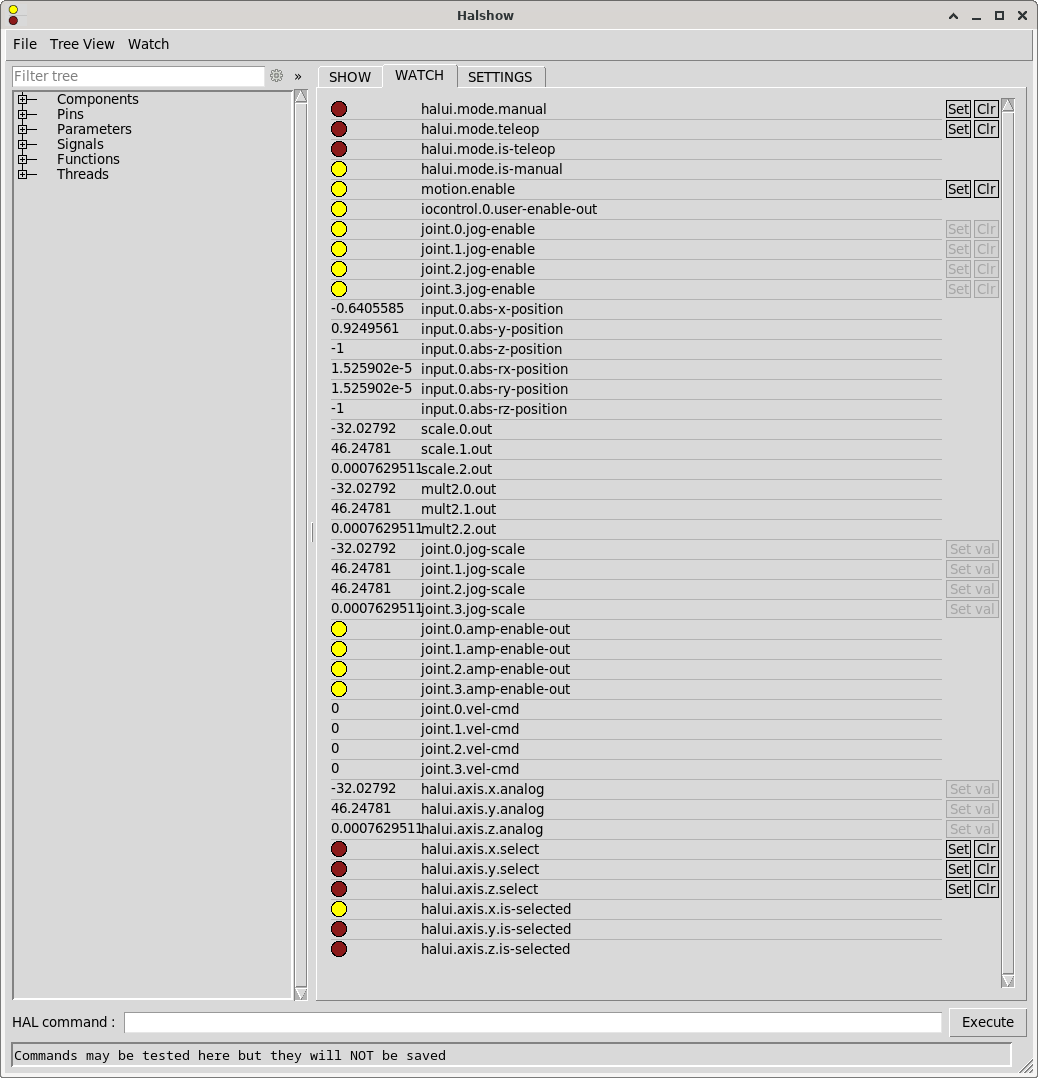
With this setup I can see input from the controller in halshow:


However, joint.*.vel-cmd always stays 0 and obviously the stepper motors are not spinning. Also I am not sure what mode I have to use, but I also tried setting halui.mode.manual and halui.mode.teleop using the [Set] button in halshow, but this did not change anything.

Setting it up like this will not allow the machine to start when the Xbox Controller is not connected as it expects the controller to be found. The controller will shut itself off if not being used for a certain period of time and this will also result in an error popping up in axis ui.

I think my current approach is way more complicated and clumsy than it actually needs to be, but the learning curve seems to be pretty steep for me and therefore I probably resorted to using way more AI generated code than I should have.

How do I
  1. set this up correctly so the Xbox Controller input can actually controll the X, Y and Z axis?
  2. set this up in a way so the controller does not need to be connected in order for the machine to start and won't result in an error when the controller disconnects for some reason
Any help is appreciated!

 
  • anli
  • anli's Avatar
21 Sep 2025 11:06
Replied by anli on topic Update LinuxCNC 2.9.5 on debian 13

Update LinuxCNC 2.9.5 on debian 13

Category: Installing LinuxCNC

sudo chrt 99 ping -i .001 -c 60000 -q [card_ip_address]


reports
anli@linuxcnc:~$ sudo chrt 99 ping -i .001 -c 60000 -q 192.168.1.121
[sudo] Passwort für anli: 
PING 192.168.1.121 (192.168.1.121) 56(84) bytes of data.

--- 192.168.1.121 ping statistics ---
60000 packets transmitted, 60000 received, 0% packet loss, time 59999ms
rtt min/avg/max/mdev = 0.045/0.054/0.750/0.013 ms
I managed to get it up and running. First I disabled
  • Secure boot
  • Intel SpeedStep
  • PCIe ASPM
  • TurboBoost 
in the bios. Than I could establish a connection and steer the axles. Afterwards I enabled one by one except PCIe ASPM again and I could steer the axles. I ran the above test in this state.
However, some errors remain:
2:52:38.591 WARNING Config: mousetweaks GSettings schema not found, mousetweaks integration disabled.
[GladeVCP.QTVCP.QT_ISTAT][WARNING]  INI Parsing Error, No DEFAULT_SPINDLE_0_SPEED Entry in DISPLAY, Using: 200 (qt_istat.py:532)
[GladeVCP.QTVCP.QT_ISTAT][WARNING]  INI Parsing Error, No MIN_SPINDLE_0_SPEED Entry in DISPLAY, Using: 100 (qt_istat.py:532)
[GladeVCP.QTVCP.QT_ISTAT][WARNING]  INI Parsing Error, No MAX_SPINDLE_0_SPEED Entry in DISPLAY, Using: 2500 (qt_istat.py:532)
[GladeVCP.QTVCP.QT_ISTAT][WARNING]  INI Parsing Error, No MAX_SPINDLE_0_OVERRIDE Entry in DISPLAY, Using: 1 (qt_istat.py:532)
[GladeVCP.QTVCP.QT_ISTAT][WARNING]  INI Parsing Error, No MIN_SPINDLE_0_OVERRIDE Entry in DISPLAY, Using: 0.5 (qt_istat.py:532)
[Gmoccapy.GMOCCAPY.GETINIINFO][WARNING]  Wrong entry [DISPLAY] CYCLE_TIME in INI File! Will use gmoccapy default 150 (getiniinfo.py:56)
58720259
hm2/hm2_7i76e.0: Smart Serial port 0: DoIt not cleared from previous servo thread. Servo thread rate probably too fast. This message will not be repeated, but the hm2_7i76e.0.sserial.0.fault-count pin will indicate if this is happening frequently.

hm2/hm2_7i76e.0: Smart Serial port 0: DoIt not cleared from previous servo thread. Servo thread rate probably too fast. This message will not be repeated, but the hm2_7i76e.0.sserial.0.fault-count pin will indicate if this is happening frequently.
Traceback (most recent call last):
  File "/usr/lib/python3/dist-packages/gladevcp/hal_widgets.py", line 361, in <lambda>
    lambda p: self.set_text(self.text_template % p.value))
                            ~~~~~~~~~~~~~~~~~~~^~~~~~~~~
I'll try to fix these - however if anybody has a quick idea what needs to be done to fix them your help is always appreciated :-)
Thank you so far for your quick help to get the machine up and running again!
  • rodw
  • rodw's Avatar
21 Sep 2025 10:59
Replied by rodw on topic VLANs or multiple ethernet cards?

VLANs or multiple ethernet cards?

Category: Computers and Hardware

I would put 2 NICS in the PC, daisy chain one NIC to your Ethernet slaves and use the either to connect your PC to your network, with or without a VLAN.

Ethercat is likened to a high speed train with packets getting on and off without the train stopping... so no benefit in more complex networking
Displaying 9706 - 9720 out of 17021 results.
Time to create page: 1.126 seconds
Powered by Kunena Forum