Advanced Search

Search Results (Searched for: )

  • seuchato
  • seuchato
12 Aug 2025 10:04

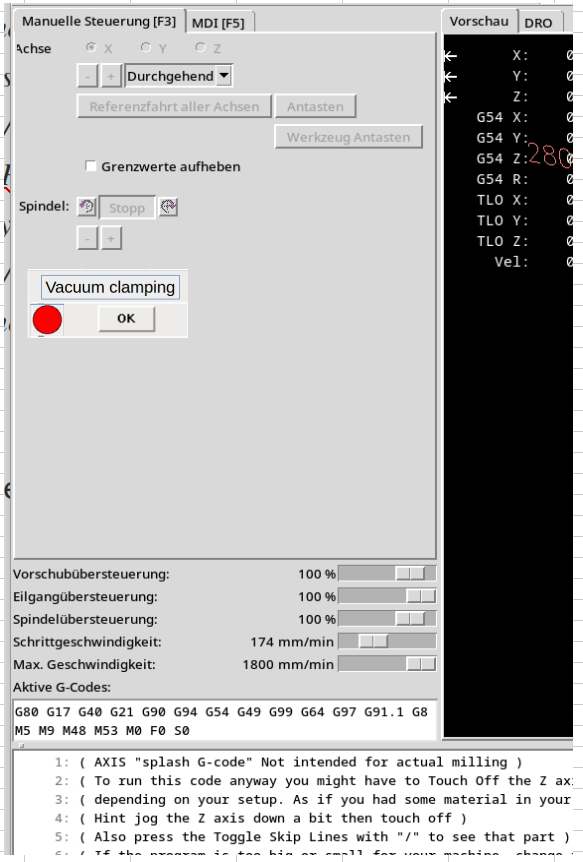
M1xx: Controlling Relays (solenoids) from within axis MDI

Category: Advanced Configuration

....
For more outputs/stuff, you would have to go with what you did, and there are probably many ways of doing it, and you can use PyVCP panel to show info about it at all times:
linuxcnc.org/docs/html/gui/pyvcp.html
I use PyVCP panels a lot with Axis GUI, a lot, even for showing all Mesa IO and everything else, on industrial machines. :)
forum.linuxcnc.org/30-cnc-machines/31792...ofit?start=100#88523
See the right side, all is added as PyVCP panels.
 

I see there is a "sim.pyvcp.demo" "pyvcp.embed.tab" Which fits my bill quite closely. What I'd really would love is something added on the "F3" panel of axis:


I have no idea how to do that.
But also, maybe that is another thread in axis and at the wrong place here. Pls let know and I'd open a new thread there, leaving a hint here. 
greez
chris
  • seuchato
  • seuchato
12 Aug 2025 08:15

M1xx: Controlling Relays (solenoids) from within axis MDI

Category: Advanced Configuration

... following up on this, instead of working :-)
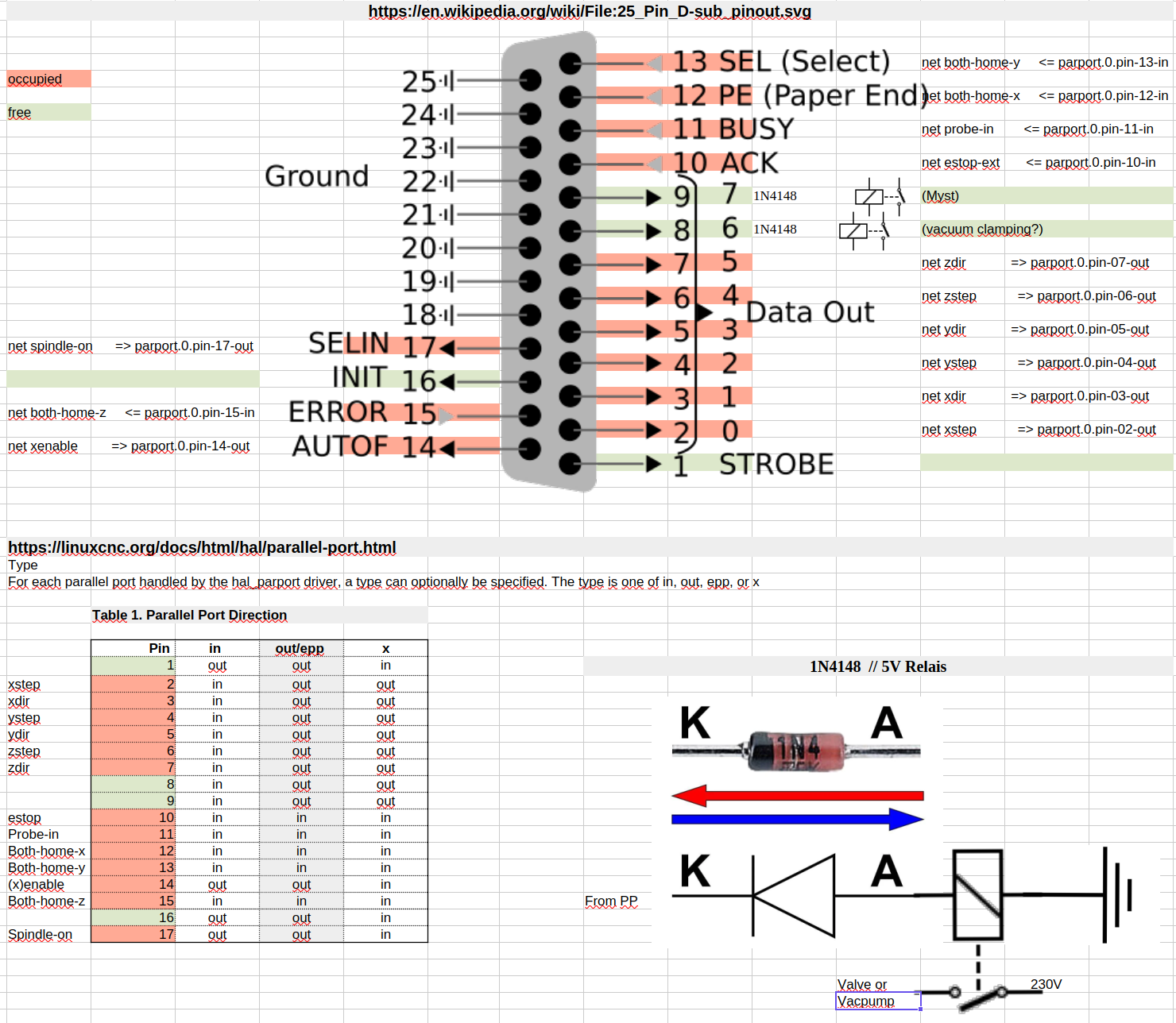
my parport pin usage:


So, it turns out langdons was right about some pins still being unused. I my case, pins 1, 8, 9 and 16 wait to be used. Hope I got the connection diagram of said 1N4148 diode and relays right, (I lack electronics knowledge). I am about to order this board:

www.conrad.com/en/p/tru-components-tc-99...-1-pc-s-2481804.html

I have a feeling, it has some sort of protection built in. The manual is not clear on this however. Anyway, some 1N4148 never seem to be unnecessary, so I order these:

www.conrad.com/en/p/tru-components-ultra...-150-ma-1581846.html

Are these OK?

greez
chris
 
  • juergen-home
  • juergen-home
12 Aug 2025 07:52
Replied by juergen-home on topic "pwm/dir" (Out1) switches for spindle CCW

"pwm/dir" (Out1) switches for spindle CCW

Category: Basic Configuration

Thanks Peter for coming by. I put your 3 lines in my .hal file but there is an error message:
...
Debug file information:
Note: Using POSIX realtime
./ttm_a.hal:298: parameter or pin 'hm2_6i25.0.gpio.007.is_output' not found
2077
Stopping realtime threads
...
Perhaps this is because  gpio.007 is "hm2/hm2_6i25.0:     IO Pin 007 (P3-17): PWMGen #0, pin Out1 (Dir or Down) (Output)"

Seems this gpio.007 is bound to "pwm/dir" (Out1) for signaling CCW, what I want to do is to use it as a signal to enable my VFD while CW rotation.
Because I'm low on outputs I want to use this gpio.007 with the relay.

Juergen


Error report created by /usr/lib/tcltk/linuxcnc/show_errors.tcl:

Print file information:
RUN_IN_PLACE=no
LINUXCNC_DIR=
LINUXCNC_BIN_DIR=/usr/bin
LINUXCNC_TCL_DIR=/usr/lib/tcltk/linuxcnc
LINUXCNC_SCRIPT_DIR=
LINUXCNC_RTLIB_DIR=/usr/lib/linuxcnc/modules
LINUXCNC_CONFIG_DIR=
LINUXCNC_LANG_DIR=/usr/lib/tcltk/linuxcnc/msgs
INIVAR=inivar
HALCMD=halcmd
LINUXCNC_EMCSH=/usr/bin/wish8.6
LINUXCNC - 2.8.4-1-gb7824717b
Machine configuration directory is '/home/cnc/linuxcnc/configs/ttm_a'
Machine configuration file is 'ttm_a.ini'
INIFILE=/home/cnc/linuxcnc/configs/ttm_a/ttm_a.ini
VERSION=1.1
PARAMETER_FILE=linuxcnc.var
TASK=milltask
HALUI=halui
DISPLAY=axis
COORDINATES=XYZ
KINEMATICS=trivkins coordinates=XYZ
Starting LinuxCNC...
Starting LinuxCNC server program: linuxcncsvr
Loading Real Time OS, RTAPI, and HAL_LIB modules
Starting LinuxCNC IO program: io
Starting HAL User Interface program: halui
Found file(REL): ./ttm_a.hal
Shutting down and cleaning up LinuxCNC...
Running HAL shutdown script
hm2: loading Mesa HostMot2 driver version 0.15
hm2_pci: loading Mesa AnyIO HostMot2 driver version 0.7
hm2_pci: discovered 6i25 at 0000:06:00.0
hm2/hm2_6i25.0: Low Level init 0.15
hm2/hm2_6i25.0: Smart Serial Firmware Version 43
hm2/hm2_6i25.0: 34 I/O Pins used:
hm2/hm2_6i25.0:     IO Pin 000 (P3-01): PWMGen #0, pin Out0 (PWM or Up) (Output)
hm2/hm2_6i25.0:     IO Pin 001 (P3-14): IOPort
hm2/hm2_6i25.0:     IO Pin 002 (P3-02): StepGen #0, pin Step (Output)
hm2/hm2_6i25.0:     IO Pin 003 (P3-15): IOPort
hm2/hm2_6i25.0:     IO Pin 004 (P3-03): StepGen #0, pin Direction (Output)
hm2/hm2_6i25.0:     IO Pin 005 (P3-16): IOPort
hm2/hm2_6i25.0:     IO Pin 006 (P3-04): StepGen #1, pin Step (Output)
hm2/hm2_6i25.0:     IO Pin 007 (P3-17): PWMGen #0, pin Out1 (Dir or Down) (Output)
hm2/hm2_6i25.0:     IO Pin 008 (P3-05): StepGen #1, pin Direction (Output)
hm2/hm2_6i25.0:     IO Pin 009 (P3-06): StepGen #2, pin Step (Output)
hm2/hm2_6i25.0:     IO Pin 010 (P3-07): StepGen #2, pin Direction (Output)
hm2/hm2_6i25.0:     IO Pin 011 (P3-08): StepGen #3, pin Step (Output)
hm2/hm2_6i25.0:     IO Pin 012 (P3-09): StepGen #3, pin Direction (Output)
hm2/hm2_6i25.0:     IO Pin 013 (P3-10): IOPort
hm2/hm2_6i25.0:     IO Pin 014 (P3-11): IOPort
hm2/hm2_6i25.0:     IO Pin 015 (P3-12): IOPort
hm2/hm2_6i25.0:     IO Pin 016 (P3-13): IOPort
hm2/hm2_6i25.0:     IO Pin 017 (P2-01): Encoder #0, pin A (Input)
hm2/hm2_6i25.0:     IO Pin 018 (P2-14): Encoder #4, pin B (Input)
hm2/hm2_6i25.0:     IO Pin 019 (P2-02): Encoder #0, pin B (Input)
hm2/hm2_6i25.0:     IO Pin 020 (P2-15): Encoder #4, pin Index (Input)
hm2/hm2_6i25.0:     IO Pin 021 (P2-03): Encoder #0, pin Index (Input)
hm2/hm2_6i25.0:     IO Pin 022 (P2-16): IOPort
hm2/hm2_6i25.0:     IO Pin 023 (P2-04): Encoder #1, pin A (Input)
hm2/hm2_6i25.0:     IO Pin 024 (P2-17): IOPort
hm2/hm2_6i25.0:     IO Pin 025 (P2-05): Encoder #1, pin B (Input)
hm2/hm2_6i25.0:     IO Pin 026 (P2-06): Encoder #1, pin Index (Input)
hm2/hm2_6i25.0:     IO Pin 027 (P2-07): Encoder #2, pin A (Input)
hm2/hm2_6i25.0:     IO Pin 028 (P2-08): Encoder #2, pin B (Input)
hm2/hm2_6i25.0:     IO Pin 029 (P2-09): Encoder #2, pin Index (Input)
hm2/hm2_6i25.0:     IO Pin 030 (P2-10): Encoder #3, pin A (Input)
hm2/hm2_6i25.0:     IO Pin 031 (P2-11): Encoder #3, pin B (Input)
hm2/hm2_6i25.0:     IO Pin 032 (P2-12): Encoder #3, pin Index (Input)
hm2/hm2_6i25.0:     IO Pin 033 (P2-13): Encoder #4, pin A (Input)
hm2/hm2_6i25.0: registered
hm2_6i25.0: initialized AnyIO board at 0000:06:00.0
hm2_6i25.0: dropping AnyIO board at 0000:06:00.0
hm2/hm2_6i25.0: unregistered
hm2_pci: driver unloaded
hm2: unloading
Removing HAL_LIB, RTAPI, and Real Time OS modules
Removing NML shared memory segments

Debug file information:
Note: Using POSIX realtime
./ttm_a.hal:298: parameter or pin 'hm2_6i25.0.gpio.007.is_output' not found
2077
Stopping realtime threads
Unloading hal components
RTAPI_PCI: Unmapped 65536 bytes at 0x7f0222141000
Note: Using POSIX realtime


-----------------------------------------------------------------------
Info report created by linuxcnc_info:
The file:    /tmp/linuxcnc_info.txt
can be posted to a forum or a web site like:
     http://pastebin.com
in order to provide information about the linuxcnc
system and configuration.

                Date: Di 12. Aug 09:22:22 CEST 2025
            UTC Date: Di 12. Aug 07:22:22 UTC 2025
        this program: /usr/bin/linuxcnc_info
              uptime: 09:22:22 up 10 min, 1 user, load average: 1,09, 0,87, 0,52
     lsb_release -sa: Debian Debian GNU/Linux 10 (buster) 10 buster
      which linuxcnc: /usr/bin/linuxcnc
                 pwd: /home/cnc/linuxcnc/configs/ttm_a
                USER: cnc
             LOGNAME: cnc
                HOME: /home/cnc
              EDITOR:
              VISUAL:
            LANGUAGE:
                TERM: dumb
           COLORTERM:
             DISPLAY: :0.0
             DESKTOP: lightdm-xsession
        display size: 1920x1080 pixels (508x285 millimeters)
                PATH: /usr/bin:/home/cnc/linuxcnc/configs/ttm_a/bin:/usr/bin:/usr/local/bin:/usr/bin:/bin:/usr/local/games:/usr/games

uname items:
         nodename -n: debian
      kernel-name -s: Linux
      kernel-vers -v: #1 SMP PREEMPT RT Debian 4.19.316-1 (2024-06-25)
          machine -m: x86_64
        processor -p: unknown
         platform -i: unknown
      oper system -o: GNU/Linux

/proc items:
             cmdline: BOOT_IMAGE=/boot/vmlinuz-4.19.0-27-rt-amd64 root=UUID=9c449597-d44a-4504-9fed-3d2541ad317f ro initrd=/install/initrd.gz quiet
          model name: Intel(R) Core(TM) i5-4440 CPU @ 3.10GHz
               cores: 4
             cpu MHz: 1935.655
             parport: 0000-0000 : parport0
              serial: 0000-0000 : serial

Versions:
                 gcc: gcc (Debian 8.3.0-6) 8.3.0
              python: Python 2.7.16
                 git: not_in_PATH
          git commit: NA
                 tcl: 8.6
                  tk: 8.6
               glade: not_in_PATH
          glade-gtk2: not_in_PATH

linuxcnc_var all:

     LINUXCNCVERSION: 2.8.4-1-gb7824717b
LINUXCNC_AUX_GLADEVCP: /usr/share/linuxcnc/aux_gladevcp
LINUXCNC_AUX_EXAMPLES: /usr/share/linuxcnc/aux_examples
            REALTIME: /etc/init.d/realtime
                 RTS: uspace
          HALLIB_DIR: /usr/share/linuxcnc/hallib

dpkg -l '*linuxcnc*':
Gewünscht=Unbekannt/Installieren/R=Entfernen/P=Vollständig Löschen/Halten
| Status=Nicht/Installiert/Config/U=Entpackt/halb konFiguriert/
         Halb installiert/Trigger erWartet/Trigger anhängig
|/ Fehler?=(kein)/R=Neuinstallation notwendig (Status, Fehler: GROSS=schlecht)
||/ Name                Version              Architektur  Beschreibung
+++-===================-====================-============-=====================================================================
un  linuxcnc            <keine>              <keine>      (keine Beschreibung vorhanden)
un  linuxcnc-dev        <keine>              <keine>      (keine Beschreibung vorhanden)
un  linuxcnc-doc        <keine>              <keine>      (keine Beschreibung vorhanden)
ii  linuxcnc-doc-en     1:2.8.4.1.gb7824717b all          motion controller for CNC machines and robots (English documentation)
ii  linuxcnc-doc-es     1:2.8.4.1.gb7824717b all          controlador de movimiento para máquinas CNC y robots (Español).
ii  linuxcnc-doc-fr     1:2.8.4.1.gb7824717b all          motion controller for CNC machines and robots (French documentation)
un  linuxcnc-sim        <keine>              <keine>      (keine Beschreibung vorhanden)
un  linuxcnc-sim-dev    <keine>              <keine>      (keine Beschreibung vorhanden)
ii  linuxcnc-uspace     1:2.8.4.1.gb7824717b amd64        motion controller for CNC machines and robots
ii  linuxcnc-uspace-dev 1:2.8.4.1.gb7824717b amd64        PC based motion controller for real-time Linux

  • jimmyrig
  • jimmyrig
12 Aug 2025 07:46 - 12 Aug 2025 07:47
Replied by jimmyrig on topic Mesa 7i76eu gpio pins not working

Mesa 7i76eu gpio pins not working

Category: General LinuxCNC Questions

Had the same issue, need to wire the "orange block" so that your inputs and outputs have power. You should see a yellow light only with only Ethernet or 5v power..... and a red or green light with field power.

I think it's just the bottom one on that orange block that needs 24v and the top one needs ground but that's from memory.... please check the manual
  • LeonDolnicar
  • LeonDolnicar
12 Aug 2025 07:41
Mesa 7i76eu gpio pins not working was created by LeonDolnicar

Mesa 7i76eu gpio pins not working

Category: General LinuxCNC Questions

Hello,

I am using Mesa 7i76eu card to operate my 3 axis CNC mill. I connected the stepper motors and they work, I can move them with linuxCNC. Now I tried to connect PNP proximity sensors to use as homing switches, but they are not working. At first I was also getting an error when starting linuxCNC, but i noticed that is because W1 jumper fell out while wiring. I set the W1 jumper back to its original left position but the pins are still not working. I also noticed that i have a CR11 LED light turned on indicating field i/o fault. Does anyone have an idea what could be the problem.
  • Hakan
  • Hakan
12 Aug 2025 07:18
Replied by Hakan on topic Debian Trixie upgrade/install to 2.9.4

Debian Trixie upgrade/install to 2.9.4

Category: Installing LinuxCNC

Ended up reinstalling ethercat_dkms and ethercat_master, before that I got errors
of not being able to read PDO at 0x0000 or something. After reinstall that's gone.

Yes, I'm trying to float over the certificate thing without really understanding.
I did some reading on the subject and the lines you have in the sticky file should make secure boot and ethercat modules work together. I'll point to that next time.
  • Hakan
  • Hakan
12 Aug 2025 06:59
Replied by Hakan on topic Amplifier Fault ECT60 Closed Loop

Amplifier Fault ECT60 Closed Loop

Category: EtherCAT

Sorry, I don't do consulting.
But I'm often here on the forum and, as I do for everyone, I try to help.

Ethercat has its fair share of startup issues and that's what many people need help with. But after the devices are configured and working, it's just regular LinuxCNC, with HAL files, INI files and all that. Now you know something about ethercat, Tommy and can jump in.
  • Aciera
  • Aciera's Avatar
12 Aug 2025 06:54

best practice Benutzervariablen anzeigen und speichern

Category: Deutsch

Mir ist kein Weg bekannt um ausserhalb des Interpreters direkt auf gcode
Parameter zuzugreifen. Ein Auslesen von Paramterwerten ist somit (meines Wissens) nur von innerhalb des GCode Programms möglich.

1. Parameterwert in einen Analog Hal pin schreiben (zB M68 E0 Q#31)

2. Parameterwert mit Gcode logging in eine Datei schreiben
(logopen,myparams.txt)
(log,#31, #32, #33)
#31 = 1.23
(log,#31, #32, #33)
#32 = 4.23
(log,#31, #32, #33)
(logclose)


linuxcnc.org/docs/html/gcode/overview.html#gcode:logging
  • meister
  • meister
12 Aug 2025 06:16

best practice Benutzervariablen anzeigen und speichern

Category: Deutsch

Hi Korre,
ich verfolge das mal hier, ich finde nämlich auch keine lösung für das problem,
weder in der al noch über die python api. bekomme ich die parameter ausgelesen.

Gruß,
Olli
  • ruediger123
  • ruediger123
12 Aug 2025 06:09
Replied by ruediger123 on topic scurve trajectory planner

scurve trajectory planner

Category: General LinuxCNC Questions

As far as I know, the Scurve Trajectory Planner plans the tool's trajectory using jerk, acceleration, and speed, which works very well, but doesn't take the constraints of the individual axes into account.
For example, the trajectory speed is constant in a 90° corner, while the axis speeds change without considering constraints.
This can be seen in my previous post.
I hope I explained the connections correctly.

gruss
Rüdiger
  • seuchato
  • seuchato
12 Aug 2025 06:09

M1xx: Controlling Relays (solenoids) from within axis MDI

Category: Advanced Configuration

I was looking for a way to control my vacuum table's vacuum pump from within axis.
To late, but:
Axis (and probably other GUI's) already have built in control for Mist and Flood so you could have just used those as that would also make it possible to use the M7/M8/M9 codes to control them directly, more info here
linuxcnc.org/docs/html/gcode/m-code.html#mcode:m7-m8-m9
For more outputs/stuff, you would have to go with what you did, and there are probably many ways of doing it, and you can use PyVCP panel to show info about it at all times:
linuxcnc.org/docs/html/gui/pyvcp.html
I use PyVCP panels a lot with Axis GUI, a lot, even for showing all Mesa IO and everything else, on industrial machines. :)
forum.linuxcnc.org/30-cnc-machines/31792...ofit?start=100#88523
See the right side, all is added as PyVCP panels.
P.S.
I was just searching for a retrofit i did to post the link here, bumped into my video from youtube posted by some russian company on rutube !!! And they wonder why the whole world hates them!
 

Tommy
you're never too late :-)
I'll check on the possibilities to use Mist and Flood and M7/M8/M9 codes. Looks handy to me. Thanks for pointing this out, was not aware of this stuff.
Counts for PyVCP panel too. I had a camalign tab in axis up. Still there, but defunct now, as the camera got brocken in a stupid action by myself. I'll check out the sims, I think I remember having seen Mist and Flood buttons just below the spindle control buttons.  That's really where I'd love to have them, eventually with a status led on the vacuum clamping, too. I would prefer a tab thought for stuff to set up before a running job, as that leaves more screen for real time animation. Not sure how to kinda move a panel into a tab. Tried that with the manual tool change panel and failed.

Greez
chris
 
  • seuchato
  • seuchato
12 Aug 2025 05:55

M1xx: Controlling Relays (solenoids) from within axis MDI

Category: Advanced Configuration

A parallel port has 12 output pins, that's a lot to work with.

But in case more than 12 outputs are needed, this method is great for non-latency-sensitive stuff.
 

I'll check on all available pins later today. Thx a ton for the hints. If I can do it over the parport, I 'd definetly be better off.
greez
chris
  • ChironFZ16
  • ChironFZ16's Avatar
12 Aug 2025 04:19
Replied by ChironFZ16 on topic Bitfile for 6i25+7i74+7i85

Bitfile for 6i25+7i74+7i85

Category: Driver Boards

Thanks for your efforts, my card 7i85 will arrive tomorrow and I will then try everything out at my leisure.During an update, I encountered another problem with special comp files that no longer work with the new software.
  • johnbump
  • johnbump
12 Aug 2025 00:32

view > mm vs inches, and tool size display, in AXIS

Category: General LinuxCNC Questions

I could totally do that (rounding errors on this machine are so far below its backlash) but then I have to go through all the axes and recalculate steps per unit distance and bleah.
  • PCW
  • PCW's Avatar
12 Aug 2025 00:00 - 12 Aug 2025 00:54
Replied by PCW on topic Bitfile for 6i25+7i74+7i85

Bitfile for 6i25+7i74+7i85

Category: Driver Boards

I tested the bitfile and it works for me on LinuxCNC 2.9.4 (all sserial ports on the 7I74 work)
(the 7I74 is on 6I25 P2 = HDR26)

Since it looks like you have and older installation, you may have been bitten by this bug:

github.com/LinuxCNC/linuxcnc/commit/24b9...d5ef156b4282f6191158

If so, you could update to something newer, or I could make firmware with no sserial on the 7I85
and on the 7I74 change the port to 0
 
Displaying 13861 - 13875 out of 14146 results.
Time to create page: 1.528 seconds
Powered by Kunena Forum