Advanced Search

Search Results (Searched for: )

  • RogEnk
  • RogEnk
04 Jan 2025 18:27

[SOLVED] ProbeBasic NameError: name 'tool' is not defined

Category: QtPyVCP

Nice and thank you!
Applied the fix -self. to tool_actor.py and confirmed now fixed for me.

Now to add my spindle encoder, looking forward to testing the conversational part
  • slowpoke
  • slowpoke
04 Jan 2025 18:06
Replied by slowpoke on topic 7i96S MPG input

7i96S MPG input

Category: Basic Configuration

The MPG encoders are part of the inm module, so in halshow,
select hm2_7i96s.0.inm.00.enc0-count

Note that these are just raw counts and would need
the scale component to scale to position.

It might be easier to have some normal encoders brought out on the
parallel expansion connector since standard encoders have scaling built in.


I did a little test using hm2_7i96s.0.inm.00.enc0-count driving a HAL scale and it works very well as long as I move the carriage at moderate speeds.If I turn the hand wheel as fast as possible I loose counts as expected.

So next up try the pins on the P1 expansion port (ESD carefully).

Three questions if you don't mind:
1) How would I use or map the expansion port pins to be used as 'A', 'B'  quadrature encoder inputs and where would I find them in HAL?
2) One of my scales has differential outputs 'A' ,'A-',  &  'B', 'B-'. all within the range of 0-5V so when 'A' is +5V, 'A-' is 0V etc. Can four expansion port pins be used to accommodate differential quadrature signalling or just single ended?

I order a fair number of PCB's and I get free PCB vouchers, so I will probably make a little daughter board either with fast opto's, or perhaps just a series resistor and TVS's (need to think about that) to be on the FPGA safe side. However I would like to do a proof of concept first.

3) Assuming I have created a HAL net with the DRO value and now I want to display that in Axis as a DRO value, what target parameter do i need to send the DRO value to?    And, assuming my commanded values will differ from the scale values because of backlash, which displayed value in axis represents the commanded value, and which one represents the actual (scale read value)?

Much appreciated.


  • Murphy
  • Murphy
04 Jan 2025 17:48

Remora - ethernet NVEM / EC300 / EC500 cnc board

Category: Computers and Hardware

Any idea why they PV and raw count stop counting after a certain RPM. When I am in hal show I can see it counting up. But if I increase the rpm(it's not much rpm maybe 500rpm) it stops counting up. 
Its a 600ppr, supposed to be 100khz encoder.  Encoder scaled to 2400 in the hal file.
  • shipmodeller
  • shipmodeller's Avatar
04 Jan 2025 17:42 - 04 Jan 2025 17:45
Replied by shipmodeller on topic 2.9.3 INI_VARS issue

2.9.3 INI_VARS issue

Category: General LinuxCNC Questions

1: After a lot of playing around, I think I found the flaws in my thinking.  First of all, the variables in the INI file MUST be capital.  So changing my file as below allowed me to use it as a READ ONLY variable.

[TOOLSETTER]
Z_TOOL = -1
Z_TOOL_HOME = -0.1
X_TOOL_HOME = 0
Y_TOOL_HOME = -10.25

2: You cannot CAN NOT use the ini variables as a regular read / write variable.  Is this brought out in the documentation?  I must have glossed over it .. see this:  Nowhere in here does it state capital or read only state.  I think that needs to be added to the manual.

3: So that begs another question...  is there any script that can be configured to run on initialization of LinuxCNC so we can create variables and set them to certain values? I don't remember reading anything like that in the manual.   It would be nice if the ini section had an entry for that.I can't really mark this solved, because of the remarks I made here. Yes, I have a better understanding now.. IF I am correct in my assumptions.  But it has led to some confusion, and days wasted troubleshooting this.  ( I have been programming since 1967, long retired now. )

[code][b][b][b][code][b][color=#3498db]Thanks for reading this.
 [/color][/b]
[/code][/code][/b][/b][/b]
  • erdem
  • erdem
04 Jan 2025 17:36
Replied by erdem on topic Cnclinux do not find harddisk

Cnclinux do not find harddisk

Category: Installing LinuxCNC

thanks for reply to me,
I am using 2.7.15 version of linuxcnc , I want to update from 2.7.15 to 2.9.3,but Debian terminal does not take code like sudo apt install .... or sudo apt update /upgradeI.Debian send to message me thar Terminal is locked to code
gooddays
  • poesel
  • poesel
04 Jan 2025 17:35
Replied by poesel on topic connecting to laser TTL

connecting to laser TTL

Category: Plasma & Laser

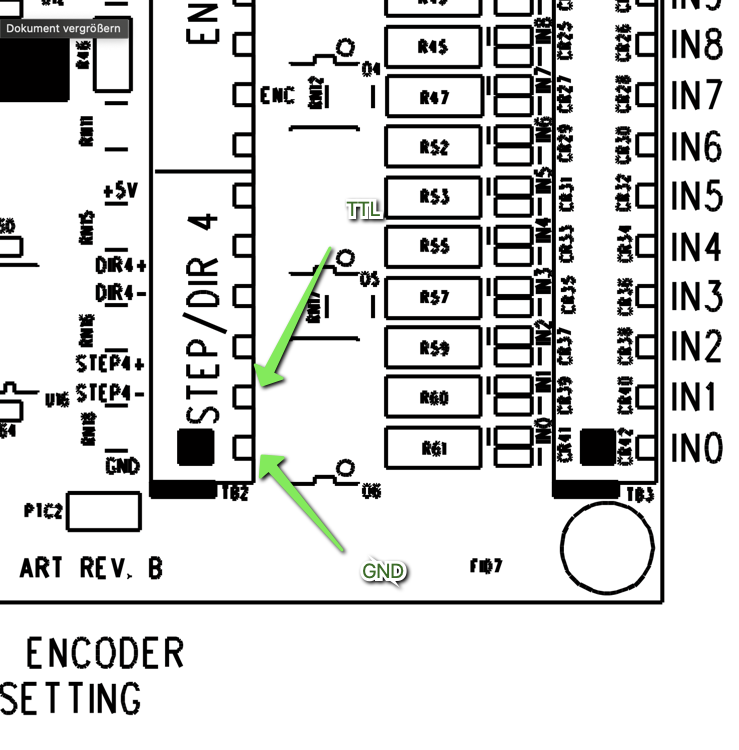
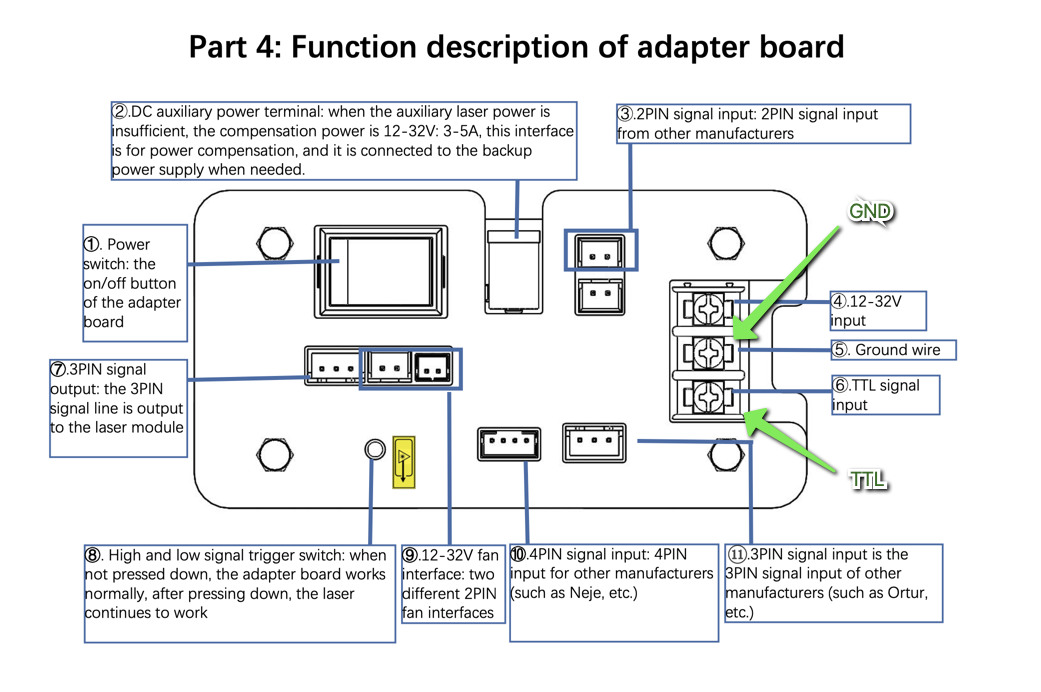
Ok, so I have flashed the card with 7i96s_2pwmd which changes STEP4 to a PWM output. Then connect the STEP4- output on the mesa card with TTL on the laser controller and the same with GND on both sides.
HAL config as per this discussion:
forum.linuxcnc.org/27-driver-boards/5480...and-wiring-for-laser


That correct? Thanks.
  • mariusl
  • mariusl's Avatar
04 Jan 2025 17:10
Replied by mariusl on topic Custom kinematics

Custom kinematics

Category: Advanced Configuration

Well I would never have guessed that it was for the sims only.

Thanks for clearing it up for me.
  • nick_namsep
  • nick_namsep
04 Jan 2025 16:57
First time configuring ethercat was created by nick_namsep

First time configuring ethercat

Category: EtherCAT

Hello everyone, 

I have been working the past couple days on getting ethercat working and installed for my first linuxcnc project. I got ethercat working and the slave is showing the master command etc works so that is amazing but now i am stuck with the configuration part. I have not used linuxcnc before and i can't seem to find any well quite basic tutorials on how to set up a single axis and just get it to show in linuxcnc i have tried to make a config using a old tutorial but i just can't seem to figure it out. I am currently using a raspberry pi with Leadshine EL8 driver and the ethercat between these works just dont understand the config part. 

So if there is someone that would be able to help get me started that would be amazing.
  • Aciera
  • Aciera's Avatar
04 Jan 2025 16:53 - 05 Jan 2025 10:25
Replied by Aciera on topic Mcode out of range, greater than 199 error

Mcode out of range, greater than 199 error

Category: G&M Codes

M100 .. M199 are User Defined Commands and can be any executable script. These need to be located in the path set in [RS274NGC]USER_M_PATH in the ini file. These do not need a remap.

M200...M999 are gcode or python files and need to be located in the [RS274NGC]SUBROUTINE_PATH and these DO need to be listed as remap. 

[edit]
The error message comes from here
github.com/LinuxCNC/linuxcnc/blob/master...interp_read.cc#L1122

If the mcode in the gcode is not found in the list of remapped mcodes and is above 199 then you get the error.
  • tommylight
  • tommylight's Avatar
04 Jan 2025 16:52
Replied by tommylight on topic Cnclinux do not find harddisk

Cnclinux do not find harddisk

Category: Installing LinuxCNC

What is the exact error?
  • Lcvette
  • Lcvette's Avatar
04 Jan 2025 16:22
Replied by Lcvette on topic To Probe Basic from Gmoccapy

To Probe Basic from Gmoccapy

Category: QtPyVCP

we made some changes that should resolve an issue found in the way tool edits/calls from the conversational works, they are up in the develop version and will be released soon in the new stable update in the next day or two. if you would like to change to the develop version you could give it a try!
  • PCW
  • PCW's Avatar
04 Jan 2025 16:21 - 04 Jan 2025 17:18

Mesa 7i95T spindle step/Direction setup using stepgen

Category: Driver Boards

Never mind, the PID stuff is all side stepped by:

net machine-is-on => hm2_[MESA](BOARD).0.stepgen.03.enable
net spindle-vel-cmd-rps => hm2_[MESA](BOARD).0.stepgen.03.velocity-cmd
net spindle-vel-fb-rps <= hm2_[MESA](BOARD).0.stepgen.03.velocity-fb

But it looks like machine-is-on is not connected, it probably should be something like:

net machine-is-on  <=motion.motion-enabled
 
  • Lcvette
  • Lcvette's Avatar
04 Jan 2025 16:19
Replied by Lcvette on topic Mcode out of range, greater than 199 error

Mcode out of range, greater than 199 error

Category: G&M Codes

its been a while since i tested this, and i currently have a large project pulled that i don't want to exist until finished as we are preparing a release for qtpyvcp and probe basic.

based on spumco's response above does this mean that a remap for 200+ mcodes is required? i think spumco is running probe basic also if memory serves so his experience should be the same as the pb sim.
  • PCW
  • PCW's Avatar
04 Jan 2025 16:16

Mesa 7i95T spindle step/Direction setup using stepgen

Category: Driver Boards

As a first step try this:

[SPINDLE_0]
MAX_VELOCITY = 100.0
MAX_ACCELERATION = 300.0
# The values below should be 25% larger than MAX_VELOCITY and MAX_ACCELERATION
# If using BACKLASH compensation STEPGEN_MAXACCEL should be 100% larger.
STEPGEN_MAX_VEL = 125.00
STEPGEN_MAX_ACC = 375.00
P = 0
I = 0
D = 0
FF0 = 1
FF1 = 0
FF2 = 0
BIAS = 0
DEADBAND = 0.001
MAX_OUTPUT = 2000
  • Lcvette
  • Lcvette's Avatar
04 Jan 2025 16:15
Replied by Lcvette on topic Mcode out of range, greater than 199 error

Mcode out of range, greater than 199 error

Category: G&M Codes

would it be better to use 100-199 for the switchkins to avoid the possible conflict?
Displaying 20731 - 20745 out of 21678 results.
Time to create page: 0.641 seconds
Powered by Kunena Forum