Work with probe

More
8 years 5 months ago #110511 by Mike_Eitel
Replied by Mike_Eitel on topic Work with probe
Hi

If I try to use probing ( on my testbench ) any of the icons axes move accordingly to symbol but when i signal a probe contact by hw-switch i get an error message with movements stop:

5:17:20 Error: Tastspitze bei inaktivem MDI-Befehl ausgelöst.
I'd translate to: probe signal when inactive MDI command...

Tried that with all modes: manual/auto/mdi

I'm on latest master / gmoccapy/ stretch
All working fine, also tool measurement in gmoccapy reacts correct on probe signal.

thx Mike

Please Log in or Create an account to join the conversation.
More
8 years 5 months ago - 8 years 5 months ago #111094 by javelin
Replied by javelin on topic Work with probe
I have 1 issue.

I get an error when the probe makes contact with the plate which states "probe tripped during non-probe MDI command" . I assume this is a debounce issue based upon what I have read. Have others here experienced this same issue?

Edited: Fixed the problem with probe moving the wrong direction on an axis. It was a lack of understanding on my part, as usual LOL! :laugh: Also after understanding how the probe moves, upon measuring a move it seems to move 1 = 1 inch . Looking at the code it appears that the version now from github pulls in the settings from the hal and ini files if I am not mistaken. So.....

My question now is IF I have a machine setup for inches, and nother for mm it will adjust accordingly based upon the hal and ini files automatically? Please say its true LOL!
Last edit: 8 years 5 months ago by javelin.

Please Log in or Create an account to join the conversation.

More
8 years 5 months ago #111096 by Grotius
Replied by Grotius on topic Work with probe
Hi javelin,

Most of time if you load g-code file, in the top section is also a g-code that say's if you are in mm or in inches. Look for that code.
With the linuxcnc stepconfig wizard it will set your machine in mm or in inches indeed !
The hal section has nothing with mm or inches. In ini section you have parameter mm or inches.
In glade you can choose mm or inches on several widgets, like dro's (numerical position values)

Please Log in or Create an account to join the conversation.

More
8 years 5 months ago #111130 by rodw
Replied by rodw on topic Work with probe
It does not really matter in gcode if you have used metric or imperial units in your config as you can swap between them with G20 and G21 at will.

Please Log in or Create an account to join the conversation.

More
8 years 4 months ago #112678 by BrendaEM
Replied by BrendaEM on topic Work with probe
Verser,

I haven't got to try it yet, but your probe screen looks like a fine addition to LinuxCNC. Thank you.

It should be included with the next disrobution of LinuxCNC.

~

I am designing a blender-style widescreen interface for LinuxCNC, and working some buttons emulating your design, but making some compromises for touchscreen and modularity.

forum.linuxcnc.org/41-guis/34572-a-wides...e-interface?start=90

(Some of the other previous interface mockups are on the page previous to the link.)
The following user(s) said Thank You: verser

Please Log in or Create an account to join the conversation.

More
8 years 6 hours ago #119765 by verser
Replied by verser on topic Work with probe
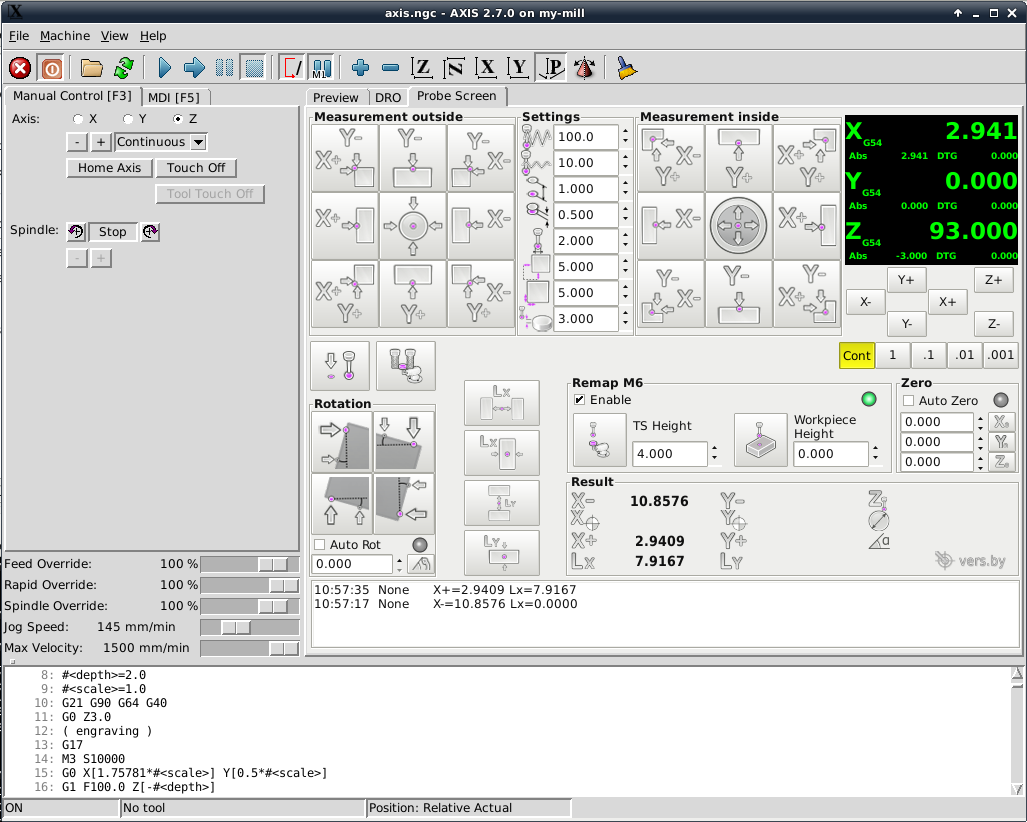
Update Probe Screen V2

Added:
- convenient control levers of movements without leaving the screen
- field with quick manual tool change settings (remap M6)
- measurement of tool diameter
- measurement of length-width inside-outside
- the mass of minor edits


Sources.
The following user(s) said Thank You: Roguish, pommen

Please Log in or Create an account to join the conversation.

Time to create page: 0.636 seconds
Powered by Kunena Forum
