New Project with Mesa 7I96 and THCAD-05

More
5 years 3 months ago #213620 by rodw
the Man page PCW says to view from the command line is also available here
linuxcnc.org/docs/devel/html/man/man9/hm2_eth.9.html

To set it up is described in the Configuring Ethernet section

You need to use sudo to edit that file.
Assuming you have previously installed Geany, you can edit that file with

sudo geany /etc/network/interfaces

Please Log in or Create an account to join the conversation.

More
5 years 3 months ago #213634 by acourtjester
Thanks for the replies from both of you, I will be looking into these on Monday. The wife has a day planned for the 4th, And looks like maybe another blower coming up for the south, forecasters no sure what it will do.image missing /media/kunena/emoticons/unsure.png
I do appreciate the help, not being fluid in Linuxcnc is a handy cap, but I will keep plugging at it.

Please Log in or Create an account to join the conversation.
More
5 years 3 months ago #213647 by Clive S

Thanks for the replies from both of you, I will be looking into these on Monday. The wife has a day planned for the 4th, And looks like maybe another blower coming up for the south, forecasters no sure what it will do.image missing /media/kunena/emoticons/unsure.png
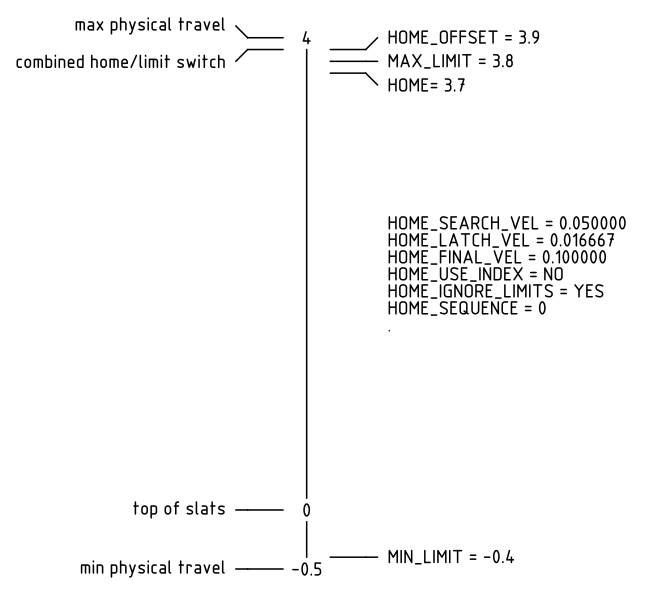
I have just noticed that in your ini file you have HOME_OFFSET = 0.20000 in the Z axis this will make it go off the switch in the wrong direction
this might be better if you made it go -ve ie. HOME_OFFSET = -0.20000

Please Log in or Create an account to join the conversation.

More
5 years 3 months ago - 5 years 3 months ago #213650 by phillc54
Assuming that you want to call the top of your slats Zero and your machine has a min/max travel of -0.5~4 and you want a combined home/limit switch then you need to end up with something similar to this:

Warning: Spoiler!
Last edit: 5 years 3 months ago by phillc54.

Please Log in or Create an account to join the conversation.

More
5 years 3 months ago #213663 by stivemaster13
And how simple everything could be:
To bring all the axes into the Home, you actually need one input. Why, because this is the most common belief among people who have been working with CNC machines for decades. The sequence of axes in the Home procedure is, of course, Z, X, Y, A and is processed elementary logically, even if the A axis is subordinate to X or Y. Simply, when moving in the Home direction, the end circuit of the end switches is monitored. When this happens - the portal stops and returns in the opposite direction, until the circuit is closed. .When they give way and restore the circuit, they become connected again.Home speed is usually 10% of the maximum speed of the machine .Home and Limit + and - sensors are placed on the moving parts of the machine on each axis .At both ends of the strokes humps are placed on each axis to actuate the sensors. When we have a Limit overwrite mode and set the axis to occur correctly, we can say that this is also a Limit - Then if the Soft limits are processed correctly, the software knows at all times exactly where the machine is and which axis is close to the limit. I describe all this because there are strange terms introduced in LinuxCNC, in some cases they are redundant, but in all cases they are confusing for most people. And this, as you can see, happens in July 2021 - the "problem" with Home in LinuxCNC is far from clear which is really unfortunate. Finally, whenever I allow myself to make a remark based on my experience (as advice) I recall the strangest advice I have received in this forum - because we do not care what others have done in this area before us, if you find it strange what we have done, do not use LinuxCNC!

Please Log in or Create an account to join the conversation.

More
5 years 3 months ago #213674 by acourtjester
Ok Clive when I had the - on that line it moved to home in the negative direction by removing it the Z than homed the the positive direction. When using the arrows on the screen I have the Z moving up with the + arrow. So to me that seems correct.
As the way it is now setup I hit the home button in the lower left, the Z will move up and hit the home switch back off (down) a very small distance then move slowly up. I hits the home switch again and back off (down) in a quicker movement.
Now there may be another setting that will have the Z act as you say. I know from my experience using Mach, there was a sequence of setting to getting the Z to home and travel in the correct manor. My lack of knowledge of Linuxcnc there may be another setting that is not correct.
From Phill's comment below I have the Home-Offset set with a negative and that may be the whole problem.

Please Log in or Create an account to join the conversation.

Time to create page: 0.234 seconds
Powered by Kunena Forum
