
- Posts: 292
- Thank you received: 29
New Project with Mesa 7I96 and THCAD-05
- acourtjester
- Offline
- Elite Member
-

Less
More
5 years 3 months ago #215421
by acourtjester
Replied by acourtjester on topic New Project with Mesa 7I96 and THCAD-05
thank you for the reply and the info, may I remind you I had zero experience with LinuxCNC but a very strong desire to learn and use it on my new table. In the instructions as to the copy and paste the file name was not custom.hal. I will now do that and in addition where do I fine loadrt and addf line and exactly where do I place them. I have come a distance with yours and others help and I am grateful for it.
Please Log in or Create an account to join the conversation.
- phillc54
- Offline
- Platinum Member
-

Less
More
- Posts: 5711
- Thank you received: 2100
5 years 3 months ago - 5 years 3 months ago #215447
by phillc54
Replied by phillc54 on topic New Project with Mesa 7I96 and THCAD-05
No worries, you will get there. I didn't read the instructions for ohmic so I didn't know.
Basically I was saying that it is best not to modify the machine hal file that PnCconf creates so that you can modify it later ith PnCconf. So keep all custom changes in the custom.hal file which doesn't get overwriten by PnCconf.
The two lines I referred to are the first two uncommented line in the zip file you posted, they should also go in the custom.hal file. So that entire zip file contents should be custom.hal.
the lines:
needs to be changed to:
The "debounce" refers to the old PlasmaC configs, and was changed quite some time go.
Basically I was saying that it is best not to modify the machine hal file that PnCconf creates so that you can modify it later ith PnCconf. So keep all custom changes in the custom.hal file which doesn't get overwriten by PnCconf.
The two lines I referred to are the first two uncommented line in the zip file you posted, they should also go in the custom.hal file. So that entire zip file contents should be custom.hal.
the lines:
Code:
unlinkp debounce.0.2.in
net ohmic-true ohmic-sense.ohmic-on => debounce.0.2.in
Code:
unlink db_ohmic.in
net ohmic-true ohmic-sense.ohmic-on => db_ohmic.in
Last edit: 5 years 3 months ago by phillc54. Reason: atrocious spelling
Please Log in or Create an account to join the conversation.
- rodw
- Offline
- Platinum Member
-
Less
More
- Posts: 12170
- Thank you received: 4153
5 years 3 months ago #215451
by rodw
Replied by rodw on topic New Project with Mesa 7I96 and THCAD-05
This post has a reasonably up to date process to install Ohmic3 which utilises a seperate hal file as Phill suggested.
forum.linuxcnc.org/38-general-linuxcnc-q...-05?start=220#210572
Don't forget to change the frequency settings!
I was hoping to finalise this once I get a working master branch config with QT plasmac operational but as Phill knows, thats been a bit problematic for me the last 24 hours.......
forum.linuxcnc.org/38-general-linuxcnc-q...-05?start=220#210572
Don't forget to change the frequency settings!
I was hoping to finalise this once I get a working master branch config with QT plasmac operational but as Phill knows, thats been a bit problematic for me the last 24 hours.......
Please Log in or Create an account to join the conversation.
- acourtjester
- Offline
- Elite Member
-
Less
More
- Posts: 292
- Thank you received: 29
5 years 3 months ago - 5 years 3 months ago #215496
by acourtjester
Replied by acourtjester on topic New Project with Mesa 7I96 and THCAD-05
Thanks again for the reply with updated info. Attached is a notepad file which shows the changes to the infor for the Hal custom file. Showing the change to encoder 1 and the setting from my THCAD freq values. And at the bottom shows what is currently in the Hal custom file. Do I add info to the file or remove the lower info and have just the added info??
Interesting note I use Notepad++ to look at the files on my house PC, well making changes with that do not carry onto the Linux PC, so now I make a notepad file with any changes move it to the Linux PC to copy and paste on the linux PC files.

Interesting note I use Notepad++ to look at the files on my house PC, well making changes with that do not carry onto the Linux PC, so now I make a notepad file with any changes move it to the Linux PC to copy and paste on the linux PC files.
Last edit: 5 years 3 months ago by acourtjester. Reason: adding info
Please Log in or Create an account to join the conversation.
- phillc54
- Offline
- Platinum Member
-
Less
More
- Posts: 5711
- Thank you received: 2100
5 years 3 months ago - 5 years 3 months ago #215531
by phillc54
Replied by phillc54 on topic New Project with Mesa 7I96 and THCAD-05
Yes, keep the existing and add all the ohmic stuff below that. There should also be other net commands there as well to connect the othe plasma signals, like float, torch on arc ok etc. Oops, that was for Plasmac...
I do see an odd character in there on this line:
I think you can set notepad++ to do unix style line endings. It is years since I used a Windows machine so I am not 100% sure...
I do see an odd character in there on this line:
Code:
# --- Replace Plasmac�s Ohmic sensing signal ---
I think you can set notepad++ to do unix style line endings. It is years since I used a Windows machine so I am not 100% sure...
Last edit: 5 years 3 months ago by phillc54.
Please Log in or Create an account to join the conversation.
- acourtjester
- Offline
- Elite Member
-
Less
More
- Posts: 292
- Thank you received: 29
5 years 3 months ago #215602
by acourtjester
Replied by acourtjester on topic New Project with Mesa 7I96 and THCAD-05
Here is what that line actually had in it, there may be a translation error for special characters from Notepad to Linux. That had be talked about on Plasma Spider about DXF file from on software package to another.
# --- Replace Plasmac’s Ohmic sensing signal ---
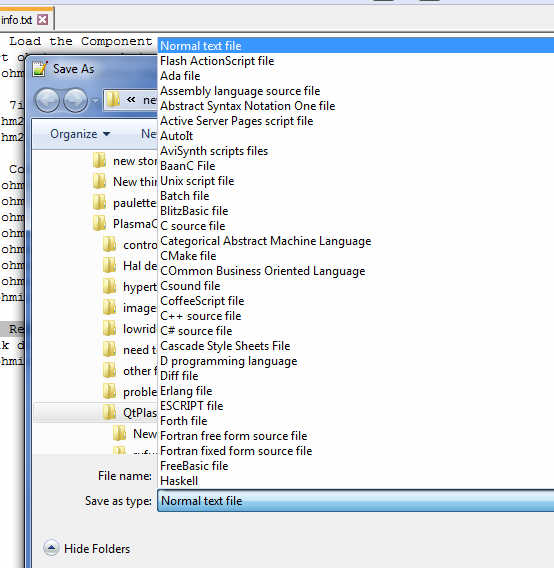
Also here is a list of the formats that Notepad++ will save files in.
# --- Replace Plasmac’s Ohmic sensing signal ---
Also here is a list of the formats that Notepad++ will save files in.
Please Log in or Create an account to join the conversation.
Time to create page: 1.058 seconds